
Are you ready to take your website live and share it with the world? Setting up web hosting is a crucial step, and GoDaddy is a popular choice for many looking to establish a strong online presence.
Whether you’re launching a personal blog, an online store, or a portfolio, understanding how to set up web hosting on GoDaddy can make a significant difference in your site’s performance and accessibility. In this guide, you’ll learn the straightforward steps to get your site up and running with GoDaddy, ensuring you feel confident and empowered throughout the process.
Don’t worry about technical jargon or complicated procedures; we’ve broken it down into simple, easy-to-follow instructions. By the end of this article, you’ll have all the tools you need to set up your web hosting with ease, opening the door to endless possibilities for your online venture. Let’s dive in and unlock the potential of your website today!
Choosing The Right Hosting Plan
Shared hosting is a budget-friendly choice. You share a server with others. This means you share resources like CPU and RAM. This option suits small websites or blogs. It’s easy to use and set up. Great for beginners. Keep costs low with shared hosting.
VPS stands for Virtual Private Server. You get a part of a server. But it acts like a private server. More control and flexibility than shared hosting. Ideal for growing sites. More power and better performance. Costs more than shared hosting. But worth it for bigger sites.
Dedicated hosting gives you a whole server. You don’t share with anyone. Best for large sites with lots of traffic. Offers high security and control. Most expensive option. Perfect for big businesses. You manage the server. Needs more technical skills.
Creating A Godaddy Account
Visit GoDaddy’s website. Click on Sign Up. Enter your details. Use your email for the username. Choose a strong password. Confirm the password. Click Create Account. Check your email.
Open the email from GoDaddy. Find the verification link. Click it. Your account is now ready. Keep your login details safe. Use them to access GoDaddy easily. Always check your email for updates.
Selecting A Domain Name
A good domain name is important for your website. It should be easy to spell. Check if your chosen name is available. Use Godaddy’s tool to search. Sometimes, your first choice is not available. Be ready with some alternatives. Choose a name that fits your business.
Once you find an available name, you can register it. Godaddy makes this easy. Follow their steps to complete registration. Keep your information secure and update it if needed. You will pay a small fee for the registration. Make sure to renew it before it expires.
Purchasing The Hosting Plan
Godaddy offers different hosting plans. Each plan has its own features. It’s important to compare price and storage. Some plans include extra security. Others have better support. Check the bandwidth offered. More bandwidth means faster loading. Look at the number of websites you can host. Choose a plan that fits your needs.
Once you pick a plan, add it to your cart. You will see the total price. Review your order details. Make sure everything is correct. Fill in your billing information. Double-check your payment method. Click on the purchase button. Wait for the confirmation email. You now have hosting on Godaddy!
Setting Up Your Hosting Account
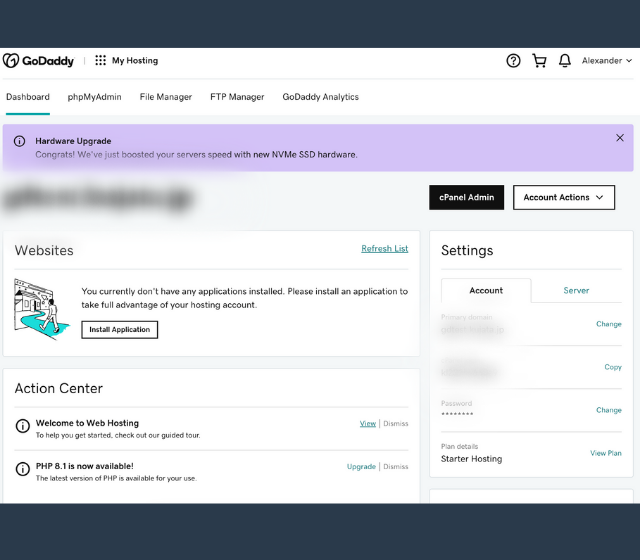
Log into your GoDaddy account. Find the “My Products” section. Click “Web Hosting”. This will show your hosting plan. Click “Manage” next to your plan. You will now see the control panel. The control panel is easy to use. It helps you manage your website.
Go to the “Settings” tab. Here you can change your account details. Update your email or password if needed. Make sure your contact details are correct. This ensures you get important updates. Choose your server location if available. This can affect website speed. Always save your changes after updating.
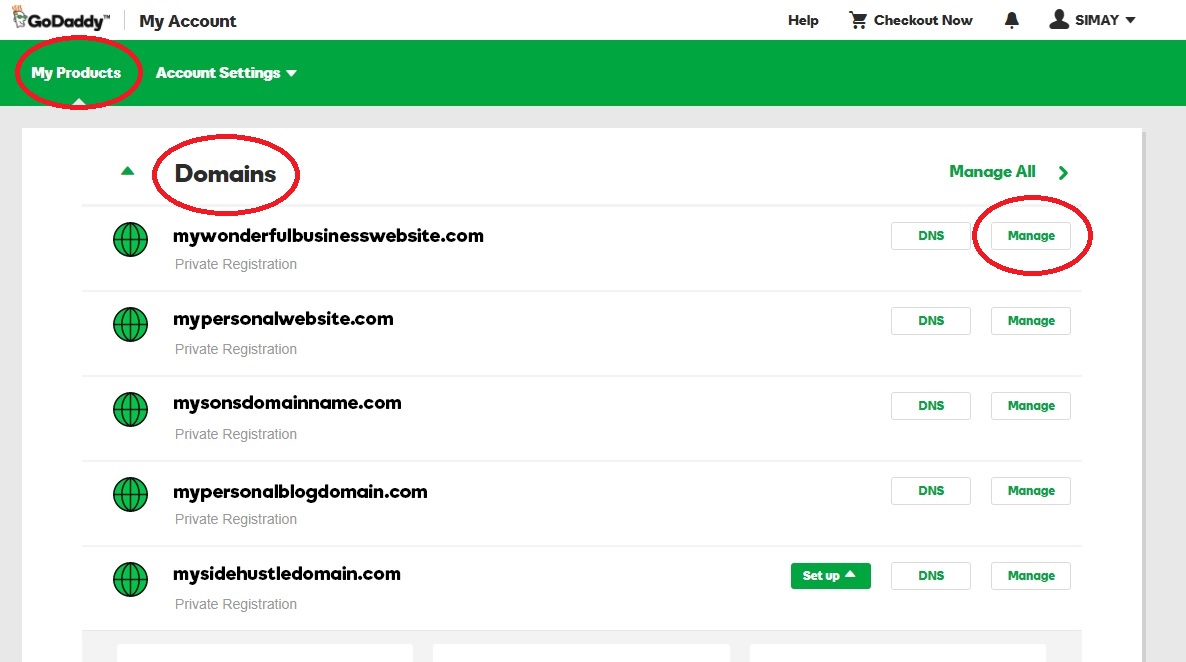
Credit: www.godaddy.com
Uploading Your Website Files
Using the File Manager in Godaddy is simple. Start by logging into your account. Find the hosting section. Click on the File Manager option. Here, you can see folders and files. To upload, click on the upload button. Select your website files. Wait for the upload to complete.
FTP Client Setup is another way to upload files. First, download an FTP client like FileZilla. Open FileZilla and enter your Godaddy details. These include your server address, username, and password. Connect to your server. You will see your files on the right side. Drag your website files from your computer to the server. The upload will start immediately.
Configuring Dns Settings
GoDaddy makes it easy to change name servers. First, log into your account. Find the domain you want to change. Click on the domain name. Look for the name servers section. Click on “Manage” to change them. You can enter custom name servers. Save your changes. Your domain will now use the new servers.
Updating DNS records is simple. Log in to GoDaddy. Open your domain settings. Find the DNS section. Click to edit records. You can add or change records here. Save your changes. Wait for a few hours. It takes time for changes to show.

Credit: www.godaddy.com
Installing Ssl Certificates
SSL certificates keep your website safe. They protect data. Godaddy offers both free and paid SSL options. Free SSL is good for small sites. Paid SSL offers more security features. It is best for bigger sites. Choose what suits your needs.
Free Vs Paid Ssl
Free SSL is easy to get. It renews automatically. But, support is limited. Paid SSL costs money. It has 24/7 support. It also gives a trust seal. This helps visitors feel safe. Both options encrypt data. Choose wisely.
Installation Steps
First, log in to Godaddy. Go to your account dashboard. Find your domain. Click on it. Next, select SSL certificates. Choose free or paid. Follow the steps to install. Wait for it to activate. Your site is now secure.
Setting Up Email Accounts
Start by logging into your GoDaddy account. Navigate to the Email & Office Dashboard. Click on “Create” to add a new email. Choose a name for your email address. Use your domain name to keep it professional. Set a strong password to protect your account. Click “Create” to finish. Your email is now ready to use.
Open your email client, like Outlook or Gmail. Go to the settings section. Choose “Add Account” to start. Enter your new email address. Then, type in the password you chose. Set the incoming and outgoing server settings. Usually, these are mail.yourdomain.com. Save the settings to complete. Now you can send and receive emails.
Credit: www.godaddy.com
Testing And Launching Your Website
Setting up web hosting on GoDaddy involves a few simple steps. First, choose a suitable hosting plan. Next, connect your domain to the hosting account. Finally, upload your website files using the provided tools.
Previewing Your Website
Previewing shows how your website will look. This step is crucial. It ensures everything works well. Look at each page. Check for broken links. Ensure all images load. Test forms to see if they work. See how it appears on mobile devices. Make sure text is easy to read. Adjust colors if needed. Pay attention to fonts. They should be clear. Use preview mode in your editor. It helps spot errors. Fix them before going live.
Troubleshooting Common Issues
Issues can arise when launching. Sometimes, pages load slowly. Check your internet connection. Refresh the page. If that doesn’t help, clear browser cache. This can solve many problems. Look for missing images. Ensure all files are uploaded. Double-check links. They should direct to the right place. Use error logs if available. They pinpoint issues. Ask for help if stuck. Forums and support can assist. Don’t panic. Every problem has a solution.
Frequently Asked Questions
How To Setup Web Hosting In Godaddy?
Log into your GoDaddy account, select “Web Hosting,” then click “Manage. ” Choose a plan, domain, and complete payment. Access cPanel to configure your website, upload files, and set email accounts. Use the domain manager for DNS settings. Ensure all settings are saved for your site to go live.
Is Godaddy Good For Website Hosting?
GoDaddy offers reliable website hosting with good uptime and customer support. It suits small to medium-sized businesses. Users appreciate its user-friendly interface. Pricing can be higher than some competitors, but its features justify the cost. Consider your specific needs before choosing GoDaddy for hosting.
Does My Godaddy Domain Come With Hosting?
A GoDaddy domain does not automatically include hosting. You need to purchase hosting separately. Explore GoDaddy’s hosting plans for various options.
Does Godaddy Host Websites For Free?
GoDaddy does not offer free website hosting. They provide paid hosting plans with varying features. Users can choose plans based on their needs, including shared, VPS, and dedicated hosting. Each plan comes with different resources and pricing options to support websites effectively.
Conclusion
Setting up web hosting on GoDaddy is simple and straightforward. Follow the steps, and your website will be live soon. Start by choosing the right plan for your needs. Then, register a domain and configure hosting settings. Don’t forget to upload your website files.
Check everything twice to ensure your site runs smoothly. GoDaddy offers great tools and support to assist you. With patience and attention, your site will be ready for visitors. Enjoy your new online presence. Happy hosting!


