
Ready to launch your website but unsure how to set up a server for web hosting? You’re not alone.
This crucial step can seem daunting, but with the right guidance, you can transform it from a challenging task into an empowering experience. Imagine having full control over your website’s performance, security, and scalability. You’ll feel confident knowing you’ve built a solid foundation for your online presence.
By the end of this article, you’ll understand not just the technical aspects, but also the strategic choices that can optimize your web hosting setup. Whether you’re a business owner, a developer, or someone who simply wants to share their passion online, this guide is designed with you in mind. You’re about to discover how straightforward, effective, and rewarding setting up your own server can be. Let’s dive in and unlock the potential of your web hosting journey!
Choosing The Right Server
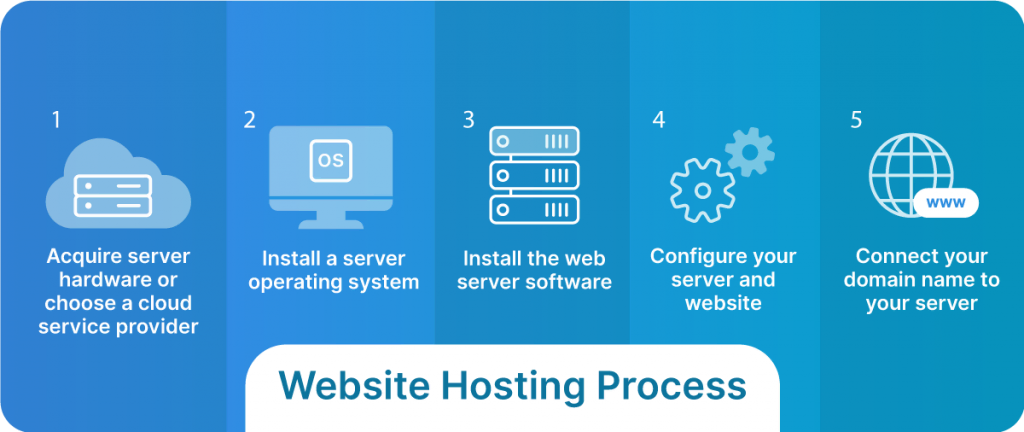
Servers come in different types. Dedicated servers are very powerful. They are best for big websites. Shared servers are less powerful. Many websites use the same server. VPS servers are in the middle. They give some power like dedicated ones but are shared.
Think about what your website needs. Small sites can use shared servers. Big sites need dedicated servers. If you plan to grow, choose VPS. Traffic is important. More visitors need more power. Security is also key. Choose a server with good protection.
Credit: www.liquidweb.com
Installing Server Software
Choosing the right operating system is important. Linux is a popular choice. It is known for its security. Windows is another option. It is easy to use. Each system has its own benefits. Linux is often free. Windows may need a license. Consider your needs before choosing.
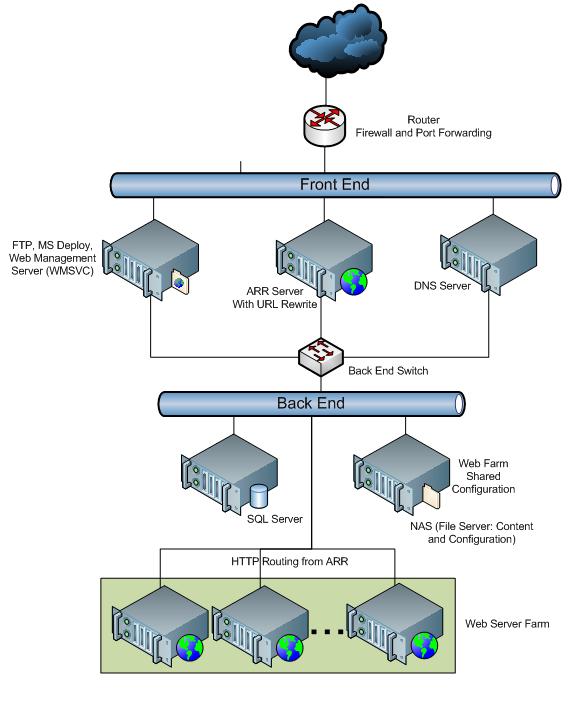
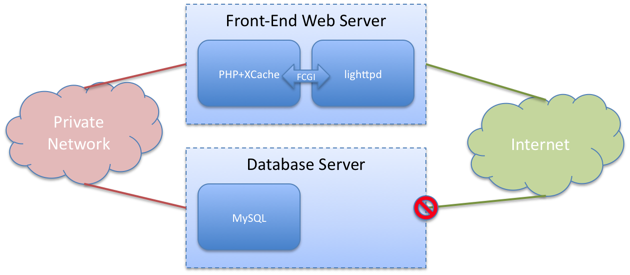
Web server software helps your site go online. Apache is a common choice. It works well with Linux. NGINX is another option. It is fast and uses less memory. Some people use Microsoft’s IIS. It works with Windows servers. Choose software that fits your server and skills.
Configuring Server Settings
Set up your server’s IP address first. Use a static IP address. This ensures your server is always reachable. Next, configure the subnet mask. It divides your network into smaller parts. This improves performance. Lastly, set up the gateway. It connects your server to the internet.
Protect your server with a firewall. It blocks unwanted traffic. Only allow necessary ports. Keep your server software up-to-date. Updates fix security flaws. Enable SSH for secure access. Use strong passwords. They are hard to guess.
Credit: learn.microsoft.com
Domain And Dns Setup
Start by choosing a unique domain name. This is your website’s address. It should be easy to remember. Check availability using a domain registrar. If your name is available, register it quickly. Domain registration costs money. Choose a plan that fits your budget. Most registrars offer yearly plans. Remember, your domain is your online identity. Protect it by registering it officially.
DNS stands for Domain Name System. It connects your domain to your server. You need to set up DNS records correctly. Important records include A Record and CNAME Record. A Record points to your server’s IP address. CNAME Record links to other domains. Check your registrar’s dashboard to configure them. Ensure each record is accurate. Mistakes can cause website errors.
Uploading Website Files
Setting up a server for web hosting involves uploading website files to the server’s directory. Ensure the server is configured correctly for seamless file transfer and access. Use FTP clients or control panel tools to manage and upload files efficiently.
Using Ftp
FTP helps you move files to your server. It’s simple to use. First, get an FTP client like FileZilla. Open it and type in your server details. These are your host, username, and password. Now, connect to your server. You’ll see your files on the left and server files on the right. Drag and drop your website files from your computer to the server side. Watch them upload. Remember to upload all files. Check the file names. Make sure they match the site structure. The main file is often named index.html.
File Management Tools
Some hosting services offer file managers. These are web-based tools. They can be used instead of FTP. Open your hosting account. Find the file manager option. Click on it to access your server files. Upload files directly using this tool. It’s usually a drag-and-drop process. Organize your files neatly. Keep track of file locations. Regularly check for any missing files. This ensures your website runs smoothly.
Database Integration
First, choose your database software. MySQL, PostgreSQL, and MongoDB are popular. Download and install the software. Follow the setup steps carefully. Each software has its own steps. Read the instructions on their website. Make sure your server meets the requirements. Check for updates regularly. Updates fix bugs and improve security.
Your website needs to connect to the database. Use a database connection string. This string tells your website how to find the database. It includes the database name, username, and password. Store the string safely. Do not share it publicly. Test the connection. Make sure the website can read and write data. Errors in connection cause problems for your site. Double-check everything.
Testing And Troubleshooting
Setting up a server can have some common issues. Sometimes, websites don’t load. This can happen if the server connection is slow. Another issue might be a misconfigured firewall. It can block important traffic. Check the DNS settings if the site doesn’t load. Incorrect settings can cause problems. Always ensure the server software is updated. Outdated software can cause bugs. If emails are not sending, check the SMTP settings. Wrong settings can stop emails. Always keep a backup. This can save data if something breaks.
A fast server makes users happy. Use a content delivery network (CDN). This helps load pages quickly. Compress files to reduce their size. Smaller files load faster. Use cache plugins to store web pages. This makes loading faster next time. Check server response time. It should be under 200 milliseconds. If not, upgrade the server hardware. Monitor the server’s resource usage. High usage can slow down performance. Always optimize the database. This keeps it running smoothly.
Regular Maintenance
Software updates keep your server safe. They fix bugs and improve features. Always use the latest version. Developers release updates regularly. Install them as soon as possible. This keeps your server healthy. It protects against attacks. Updating software is simple. Follow the instructions. Click on update buttons. Let the system do the work. Always check for updates weekly. Never skip them.
Monitoring tools are important. They watch server activity. They show how your server works. Many tools are free. Use them to check performance. They alert you when something is wrong. They help keep your server running. Tools are easy to use. Learn how they work. Set them up properly. Keep an eye on server health. Use tools daily.
Credit: blog.fosketts.net
Frequently Asked Questions
Do You Need A Server For Web Hosting?
Yes, a server is essential for web hosting. It stores website files and serves them to visitors online. You can choose dedicated servers, VPS, or shared hosting based on your needs. Reliable servers ensure fast loading times and secure data management, enhancing user experience and SEO ranking.
How Do I Set Up A Server Hosting Company?
Research the market and choose a niche. Secure funding and acquire necessary hardware. Set up infrastructure and hire skilled staff. Develop a user-friendly website and implement strong cybersecurity measures. Market your services effectively to attract customers.
How Do I Create My Own Server?
To create your own server, choose suitable hardware and install a server operating system. Configure network settings, set up necessary software, and ensure security measures. Regularly update and maintain the server for optimal performance.
Which Server Is Used For Web Hosting?
Web hosting commonly uses servers like Apache, Nginx, and LiteSpeed for efficient and secure service delivery. These servers manage HTTP requests, ensuring your website is accessible online. Hosting providers may also use specialized cloud servers, such as AWS or Google Cloud, for scalable and flexible hosting solutions.
Conclusion
Setting up a server for web hosting is crucial. With the right steps, it becomes manageable. Begin with choosing a reliable server provider. Follow up by installing necessary software. Ensure security measures are in place. Backup your data regularly. Test your setup to confirm everything works.
Keep updating software for better performance. Remember, patience is key to success. A well-configured server can support your website efficiently. Now, you’re ready to host your web content. Enjoy the world of web hosting and its possibilities.


