
Are you ready to take control of your online presence by setting up your very own web hosting server? Imagine the freedom of hosting your own website, customizing every detail, and saving money in the process.
You don’t need to be a tech guru to get started. With the right guidance, anyone can set up a web hosting server from scratch. This step-by-step guide is designed with you in mind, breaking down the process into simple, manageable tasks.
By the end of this article, you’ll not only understand how to set up a web hosting server, but you’ll also feel empowered to launch your digital domain confidently. Dive in to discover how you can harness the power of web hosting and take your online projects to the next level.
Choosing The Right Server
Servers come in different types. Dedicated servers are powerful. They handle heavy traffic well. Shared servers are cheaper. Many users share one server. Virtual Private Servers (VPS) offer a balance. They give good control and power. Cloud servers scale easily. They grow as your needs grow.
Check server CPU power. More power means faster processing. RAM is important. It helps with speed. Look at storage space. More space stores more data. Bandwidth matters for speed. It affects how fast data moves. Security features keep data safe. Choose servers with strong security.
Installing Operating System
Choosing between Linux and Windows is important. Linux is free and open-source. Many developers love it for its flexibility. Windows is user-friendly. It is popular for personal computers. Both have strengths. Pick the one that suits your needs.
Start with a clean computer. Insert the installation disk or USB drive. Follow the on-screen instructions. Choose the language and keyboard layout. Decide where to install the system. Wait while it installs. Restart the computer when done. Set up your user account and password. Keep it safe. Your operating system is ready!
Configuring Network Settings
Every server needs a unique IP address. This helps it connect to the internet. First, decide if the server uses a static or dynamic IP. A static IP stays the same. It is good for websites. A dynamic IP changes often. It is less stable. For business, choose a static IP. It ensures a stable connection. Write down the IP details to remember them.
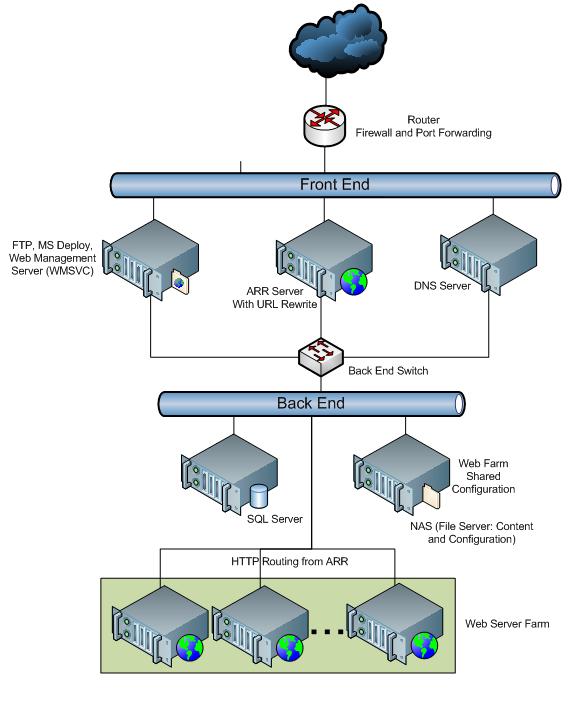
DNS links a domain name to an IP address. It works like a phonebook for the web. Start by finding the DNS settings in your server panel. Enter your domain name in the DNS section. Add the server’s IP address there. Save the changes to complete the setup. Now, visitors can reach your website using its domain name.
Credit: learn.microsoft.com
Setting Up Web Server Software
Apache is a popular web server software. First, you need to open the terminal. Type sudo apt update to refresh your system. Now, install Apache with sudo apt install apache2. Wait for the installation to finish. You can check if it works by typing localhost in your browser. If you see the Apache page, it works!
Nginx is another great web server. Start by updating your package list with sudo apt update. Then, install Nginx using sudo apt install nginx. After installation, test it. Open your browser and type localhost. If Nginx shows up, you did it right!
Securing Your Server
A firewall keeps your server safe. It blocks bad traffic. You must choose a strong firewall. Configuring it properly is essential. Open only necessary ports. Close all unused ports. This reduces risk. Regularly check your firewall settings. Update it to keep it strong. You can use software firewalls. Or hardware firewalls. Both work well.
SSL certificates protect your data. They encrypt information. This keeps it safe from hackers. Get a trusted SSL certificate. Install it on your server. Ensure it covers all domains. Always renew it before expiry. Check for any certificate errors. Fix them quickly. Customers trust sites with SSL. It shows their data is safe.
Creating User Accounts
Administrator Access is crucial for managing a web hosting server. Admins have full control. They can install software. They can update settings. Admins ensure server security. Choose a strong password. Change passwords regularly. Use two-factor authentication. This keeps accounts safe.
User Permissions define what users can do. Permissions protect important files. Users may have limited access. They might only view or edit files. Admins set permissions. Permissions prevent mistakes. They protect data from loss. Give users the right permissions. This keeps the server secure.
Deploying Websites
Use an FTP client to upload files. FileZilla is a popular choice. Connect it to your server using credentials. Drag and drop your website files into the server folder. Ensure all files are in the correct directory. Double-check file names for errors. This helps the website to run smoothly.
Set up the domain to point to your server. Access your domain registrar’s settings. Update the DNS records to your server’s IP address. Wait for the changes to take effect. This can take up to 48 hours. Test your domain to ensure it directs correctly. If issues arise, check DNS settings again.

Credit: www.youtube.com
Monitoring And Maintenance
Setting up a web hosting server requires regular monitoring and maintenance. This ensures optimal performance and minimizes downtime. Efficient server management helps in identifying potential issues early and enhances user experience.
Performance Monitoring
Keeping your server running well is key. Use tools to check CPU usage and memory performance. Watch for network traffic spikes. They can slow down your server. Set alerts for unusual activity. This way, you know when something’s wrong. Regular checks help keep your server healthy.
Regular Updates
Updating software is very important. It keeps your server secure. New updates fix bugs. They also add new features. Schedule updates during low traffic times. This avoids disruption. Always backup your data before updating. It protects you from data loss.

Credit: cyfuture.cloud
Frequently Asked Questions
Is A Web Hosting Server Free?
Web hosting servers are not typically free. Some companies offer free plans with limited features. For more robust services, you usually need to pay. Always choose a reliable provider to ensure website performance and security.
Can I Turn My Pc Into A Web Server?
Yes, you can turn your PC into a web server. Install server software like Apache or Nginx. Configure your network settings to allow external access. Ensure adequate security measures are in place. This setup lets you host websites from your PC, but requires careful management and monitoring.
Can I Host My Website On My Home Server?
Yes, you can host a website on your home server. Ensure reliable internet and hardware, proper configuration, and security measures. Consider the cost and potential technical challenges. Home hosting offers control but may lack the reliability of professional services.
Can You Setup Your Own Web Server?
Yes, you can set up your own web server. Choose suitable hardware, install server software, and configure settings. Ensure security measures and regular updates for optimal performance. Consider using guides or tutorials for detailed steps.
Conclusion
Setting up a web hosting server is simpler than it seems. You need basic tools, clear steps, and patience. Start with choosing reliable hardware. Next, install an operating system. Configure the server settings carefully. Don’t forget security measures. Regular backups protect your data.
Monitor server performance to ensure smooth operation. Troubleshoot common issues promptly. With these steps, your server will run efficiently. Always update software for better security. Practice makes perfect in server management. Soon, you’ll host websites like a pro. Enjoy the learning process and embrace challenges.
Success is within reach with persistence and dedication.


