
Are you ready to launch your website and share your ideas with the world? Setting up a server for web hosting is your first step.
You might feel overwhelmed with the technicalities, but don’t worry. This guide is here to help you navigate the process with ease. By the end of this article, you’ll have the confidence to set up your own server and get your website live.
Imagine the satisfaction of seeing your site running smoothly, attracting visitors, and growing your online presence. Let’s dive in and get started on turning your vision into reality!
Choosing The Right Server
Dedicated hosting gives you a whole server. It’s yours alone. No sharing. This means faster speeds and more control. But it costs more money.
Shared hosting is cheaper. Many people use the same server. It’s like sharing a pizza. Everyone gets a slice. But, if one site is busy, your site slows down.
Think about your website size. Is it big or small? Big sites need more power. They might need a dedicated server. Small sites can use shared hosting. Also, check your budget. How much can you spend? More money gives better options. Lastly, consider your tech skills. Some servers need more knowledge. Choose what fits you best.
Selecting The Operating System
Choosing the right operating system is crucial in setting up a server for web hosting. Consider compatibility with software, ease of use, and security features to ensure smooth operations. Popular options include Linux and Windows, each offering unique benefits for different hosting needs.
Linux Vs. Windows
Linux is free and open-source. It is great for web servers. Many developers love it. Windows is not free. It is user-friendly and supports many applications. Choose based on your needs.
Compatibility Considerations
Check software compatibility. Linux works with PHP, MySQL, and Apache. Windows supports ASP.NET and SQL Server. Ensure your server meets your software needs.
Installing Essential Software
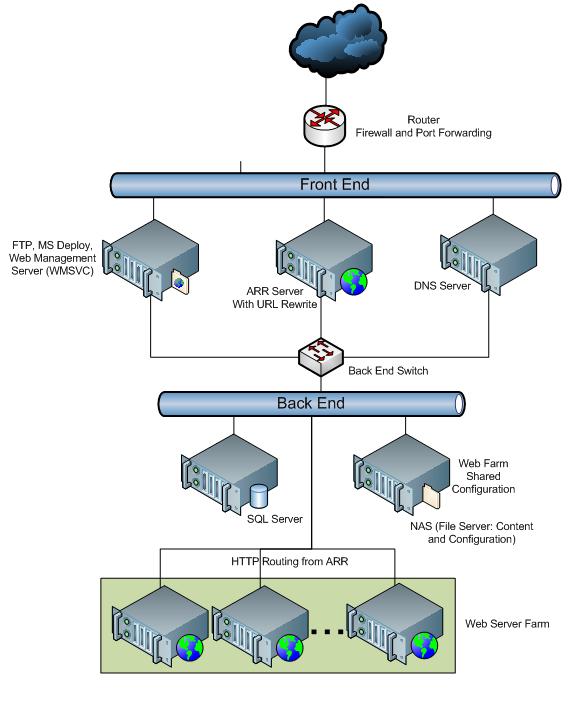
A web server is needed to host websites. Some popular options are Apache, Nginx, and LiteSpeed. Apache is very common and many people use it. Nginx is fast and good for high traffic. LiteSpeed is both fast and secure. Each server has its own features. Choose one that fits your needs. Check online for more details on each option.
Websites need a database to store information. MySQL and PostgreSQL are popular tools. MySQL is easy to use and has many users. PostgreSQL is very powerful and good for complex queries. Both tools work well with web servers. Use them to manage your data safely and efficiently.
Credit: learn.microsoft.com
Configuring Security Settings
Setting up a firewall is important. It protects the server from harm. First, install firewall software. Many options exist, like UFW for Linux. Next, allow only safe connections. Block others. Always check the rules you set. This keeps the server safe. Remember, a strong firewall is key.
SSL makes your site safe. It protects users’ data. Install an SSL certificate on your server. It keeps data private. First, get a certificate from a trusted source. Then, add it to the server. This helps create a secure connection. Users will see a padlock in their browser. This means the site is secure.
Setting Up Domain Name System (dns)
Choosing a domain is important. Pick a name that fits your website. Visit a domain registrar. Examples are GoDaddy or Namecheap. Search for your domain name. See if it’s available. Register the domain. Pay the fee. Some registrars offer privacy options. These protect your details.
DNS connects your domain to your server. First, access your registrar’s DNS settings. Find the section for DNS management. Add a new record. Use “A” type record. Enter your server’s IP address. Save the changes. Wait for DNS propagation. This may take hours. Your domain now points to your server.

Credit: www.youtube.com
Implementing Backup Solutions
Setting up automated backups is crucial for data safety. These backups save copies of your files regularly. Use software to schedule these backups. Choose a time with low server activity. This keeps server performance smooth. Store backups in a secure location. It could be cloud storage or an external drive. Also, ensure the backup process is reliable. Test it often to avoid issues later.
A disaster recovery plan helps in emergencies. This plan includes steps to restore data quickly. Start by identifying possible risks. Understand what could harm your data. Create a list of these risks. Then, decide how to handle each risk. Assign tasks to team members. Make sure everyone knows their role. Practice this plan regularly. This ensures everyone is ready. Being prepared reduces downtime and stress.
Monitoring And Maintenance
Servers need constant monitoring to check performance. Tools like New Relic and Datadog are useful. They help track CPU usage, memory, and disk space. Alerts are sent if something goes wrong. This helps fix problems quickly. Monitoring keeps servers running smoothly.
Software updates keep servers safe and fast. Regular updates fix security holes and bugs. Updates can add new features too. Set a schedule for updates. Nighttime is best so users are not disturbed. Always backup data before updating. Backups save important files.

Credit: en.wikipedia.org
Frequently Asked Questions
How To Create Your Own Server For Web Hosting?
Choose a reliable operating system like Linux. Install necessary software such as Apache, MySQL, and PHP. Configure your firewall for security. Register a domain name and point it to your server’s IP address. Test your server thoroughly to ensure everything runs smoothly.
Do You Need A Server For Web Hosting?
Yes, a server is essential for web hosting. Servers store website files and deliver them to users online. You can use shared, VPS, or dedicated servers based on your needs. Choose a reliable hosting provider to ensure fast loading times and excellent performance for your website.
How Much Does It Cost To Run A Server For A Website?
The cost of running a server varies. Shared hosting starts at $3/month, while dedicated servers can exceed $100/month. Prices depend on server type, features, and bandwidth requirements. Cloud hosting offers flexibility with pay-as-you-go models. Always consider your website’s needs to choose the most cost-effective option.
Can I Host My Website On My Home Server?
Yes, you can host a website on your home server. Ensure stable internet, proper hardware, and security measures. Consider dynamic DNS for changing IPs. Home hosting is cost-effective but may face bandwidth limitations. Professional hosting providers offer better reliability and support.
Conclusion
Setting up a server for web hosting is manageable. Follow the steps carefully. Choose reliable hardware and software. Ensure your server is secure and updated. Regular backups are crucial. Monitor performance regularly. Troubleshoot issues promptly. With practice, it becomes easier.
Hosting your own website is rewarding. You gain control and flexibility. Start small, learn, and grow. Enjoy the learning process. Stay curious and keep experimenting. You now have the basics. Go ahead and set up your server. Enjoy the journey into web hosting.


