
Have you ever wondered how websites become accessible on the internet? The secret lies in web hosting.
Setting up your own web hosting might sound like a daunting task, but it’s easier than you think. Imagine having complete control over your website, customizing every detail, and ensuring it’s always up and running. With the right guidance, you can transform this dream into reality.
This blog will walk you through each step, making it simple and straightforward. You’ll discover tools and tips that can save you time and money, while boosting your site’s performance. Get ready to dive into the world of web hosting and unlock the potential to elevate your online presence. Stay with us, and you’ll soon see how empowering it is to have your own web hosting setup.

Credit: www.youtube.com
Choosing A Hosting Type
Shared hosting lets many websites use one server. This option is cost-effective and easy to manage. Perfect for small websites and blogs. But, performance can drop if others use too much space. Security risks are higher because many sites share the same space.
VPS stands for Virtual Private Server. It offers more control than shared hosting. Your site is in a virtual space on a physical server. You get dedicated resources and better performance. Good for growing sites needing more power. Costs are higher than shared hosting.
Dedicated hosting provides a whole server for one site. Offers maximum control and security. Great for large websites with high traffic. Expensive, but worth it for big businesses. No sharing means optimal performance.
Cloud hosting uses multiple servers to host websites. It offers flexibility and scalability. Perfect for sites that grow fast. Pay only for what you use. Reliable because it uses many servers. Suitable for sites with changing traffic.
Registering A Domain Name
First, find a good domain registrar. This company sells domain names. Popular choices include GoDaddy and Namecheap. Check their prices and customer service. Make sure they have good reviews. Some offer free WHOIS privacy. This hides your personal details.
Your domain name is very important. It should be short and easy to remember. Avoid complex words or numbers. Use keywords that match your website. This helps people find you online. Make sure the name is not already taken. Check for trademarks too.
Think about privacy for your domain. WHOIS protection keeps your details safe. Without it, anyone can see your info. This includes your address and phone number. Most registrars offer this as an extra service. It is worth the cost to stay safe online.
Setting Up Your Hosting Account
First, visit the hosting provider’s website. Click on the sign-up button. Enter your email and password. Choose a plan that suits your needs. Fill in your billing details. Click submit to create your account.
After logging in, go to your account settings. Update your personal information if needed. Set up security questions for added safety. Choose your preferred language. Adjust your time zone settings. Save all changes before you exit.
The control panel is your dashboard. Here, you manage your website. You can create email accounts. Install apps like WordPress with a click. Backup your data regularly. Monitor your site’s performance using provided tools.

Credit: www.siteuptime.com
Uploading Your Website Files
FTP clients help move files to your web server. FileZilla is a popular choice. It’s free and easy to use. First, download and install the client. Next, enter your server details. These include the host, username, and password. Then, connect to the server. You will see files on your computer and server. To upload, drag files from your computer to the server side. Check if all files are uploaded.
Many hosting services offer a control panel. This is a web-based tool. Login to your hosting account. Find the File Manager option. It helps upload files directly. Click on the upload button. Choose the files from your computer. Wait for the upload to finish. Check if all files are in place. Easy and quick.
Keep files in the right folders. Use a clear structure. HTML files usually go in the root folder. Images go into an images folder. Stylesheets in a css folder. This keeps things tidy. It helps the website work properly. Keep names simple and lowercase. Avoid spaces in file names. Use dashes or underscores instead.
Configuring Domain Settings
DNS records are like a map for your website. They guide visitors to your site. To update them, access your domain registrar. Look for a section called DNS settings. You will see different types of records. The most important are A, CNAME, and MX. A record points to your server’s IP address. CNAME helps with aliases. MX deals with emails. Save changes after updating. It may take time to see effects.
Redirection sends users from one domain to another. You can choose 301 or 302 redirects. A 301 redirect is permanent. It tells browsers and search engines the move is forever. A 302 redirect is temporary. Useful for short-term changes. To set up, access your hosting control panel. Find the redirect section. Enter the old domain and new destination. Save changes. Test the redirect to ensure it works.
SSL certificates keep data safe. They add a padlock in the address bar. To install, purchase an SSL from a provider. Access your hosting control panel. Look for SSL management. Upload the certificate file. Follow instructions to complete installation. Check if your site is now HTTPS. This means it’s secure. Regular checks ensure the SSL stays valid.
Managing Email Accounts
First, log in to your web hosting dashboard. Find the email section and click on it. Look for an option to create a new email account. Enter the desired email name. Then, choose a password. Make sure it’s strong. Click “create” or “add.” Now, you have a new email account.
Go to the email settings. Find “forwarding” or “redirect.” Enter the email address you want to forward to. Save the changes. Now, all emails will go to the new address. This helps in managing multiple accounts easily.
Open your email client like Outlook or Thunderbird. Go to “add account.” Enter your email details. Use the settings from your host. These include incoming and outgoing server details. Save the settings. Now, you can send and receive emails using your email client.
Maintaining Server Security
Implementing Firewalls is very important for server security. They act like a shield. Firewalls block unwanted access. Only safe traffic gets through. This keeps your data safe. Always make sure your firewall is on.
Regular Software Updates help keep your server safe. New updates fix bugs. Bugs can let bad guys in. Update all software when new versions come out. This includes the operating system and apps.
Monitoring for Threats is a must. Watch your server closely. Use tools to find bad activities. Act fast if you see anything strange. This helps stop attacks before they cause harm.
Performance Optimization
Setting up your own web hosting boosts website performance. Choose reliable servers for speed. Regular updates improve security and efficiency. Manage resources wisely to prevent overload. Optimize settings for faster loading times. Keep user experience in mind for better engagement and satisfaction.
Caching Techniques
Caching helps speed up your website. It saves copies of pages for future use. This way, users get faster access. Use tools like browser caching. They store files locally. This reduces server load. Another method is server caching. It stores data on the server side. This makes data retrieval quick. Both methods help in improving speed.
Optimizing Images And Files
Large images can slow down websites. Resize images before uploading. Use formats like JPEG or PNG. These are smaller in size. Compress files to reduce their size. This saves bandwidth and improves loading times. Tools like TinyPNG can help. Always keep file sizes as small as possible.
Using Content Delivery Networks
A Content Delivery Network (CDN) helps distribute content. It uses servers around the world. This means data travels shorter distances. Users get content faster. Popular CDN services include Cloudflare and Akamai. They enhance website speed and reliability. CDNs are great for global reach.
Backing Up Your Data
Automated backups save time. They run on their own. Set up a schedule. Daily or weekly is best. Use tools like cPanel or Plesk. These tools make it easy. Always check if backups work. This ensures data safety.
Manual backups need more effort. You do them yourself. Download files using FTP. Save them on your computer. Use database export tools for databases. Keep backups in a safe place. This protects against data loss.
Restoring data brings it back. Use your backup files. Follow steps from your hosting provider. They often provide guides. Test restored data after finishing. Make sure everything works well. This ensures smooth operations.
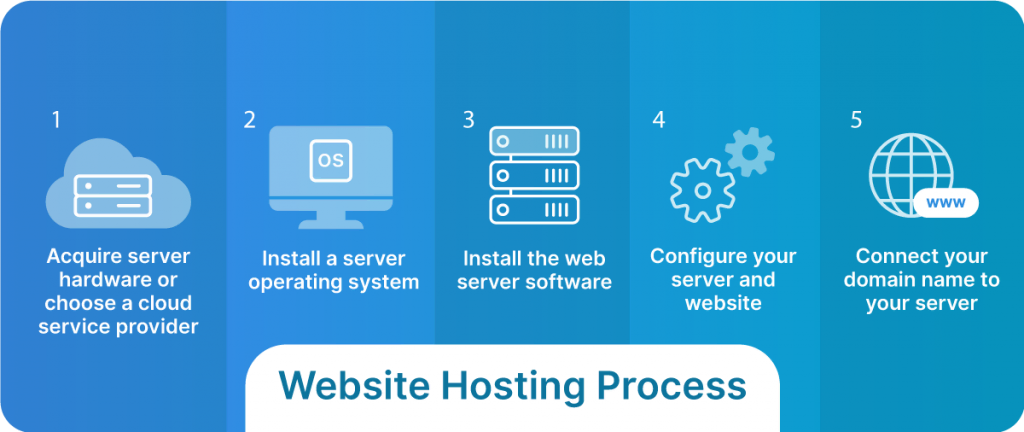
Credit: www.liquidweb.com
Frequently Asked Questions
Can I Host My Website Myself?
Yes, you can host your website yourself. You’ll need a computer with server software, a stable internet connection, and technical knowledge to manage security and maintenance. Consider the costs and time involved compared to professional hosting services.
How Do I Start My Own Web Hosting?
Choose a reliable server, install hosting software, and secure your domain. Market your services effectively. Ensure 24/7 support.
How Much Does It Cost To Host Your Own Website?
Hosting a website can cost between $3 to $50 per month. Shared hosting is cheaper, while VPS or dedicated servers are pricier. Domain registration is an additional fee, usually $10 to $15 annually. Costs vary based on hosting provider, features, and service level.
Is It A Good Idea To Host Your Own Website?
Hosting your own website offers control and customization. It can be cost-effective long-term but requires technical skills. Ensure reliable server management and security measures to prevent downtime. Consider the time and resources needed for maintenance. Evaluate your expertise and needs before deciding.
Conclusion
Setting up your own web hosting can seem daunting. But it’s doable. Start by choosing a reliable hosting provider. Then, select the right hosting plan for your needs. Follow the provider’s setup instructions carefully. Don’t rush the process. Secure your website with strong passwords and regular backups.
Test everything to ensure smooth operation. Over time, you’ll gain confidence and skills. Hosting your own site offers control and learning opportunities. Enjoy the journey of managing your online presence. It’s a valuable skill in today’s digital world. Keep exploring and improving.
Your website will thrive with your efforts.


