
Imagine having complete control over your website’s performance and security. Setting up your own web hosting server can make that a reality.
You might think it’s a daunting task, reserved for tech experts. But, what if you could do it yourself, saving money and customizing it to fit your needs perfectly? This guide will show you how to set up your own web hosting server without getting lost in technical jargon.
Whether you’re a small business owner, a tech enthusiast, or someone looking to learn something new, this step-by-step approach is designed just for you. Dive in, and discover how empowering it can be to manage your own server. You’ll gain insights, skills, and the confidence to take your website’s fate into your own hands. Ready to explore the possibilities? Let’s get started!
Choosing The Right Hardware
Picking the right server is important. A server needs a strong processor. It should be fast and reliable. RAM is the next thing to consider. More RAM means better performance. Aim for at least 8GB of RAM.
The CPU is the brain of the server. A multi-core CPU works best. It can handle many tasks at once. RAM helps the server work quickly. Choose RAM based on your needs. More users need more RAM.
Storage is like a big box. It holds all your data. SSD drives are faster than HDDs. They help the server run smoothly. Always have enough space for your files.
A fast internet is a must. It helps data move quickly. Use a reliable network card. This card connects the server to the internet. A good connection keeps your server online.
Selecting An Operating System
Linux and Windows are popular choices for servers. Linux is free and open-source. It offers strong security and stability. Windows, on the other hand, is user-friendly. It supports many commercial applications. Choosing between them depends on your needs. Linux is great for developers. Windows is ideal for those who prefer easy interfaces.
Different software runs better on different systems. Linux works well with open-source software. Windows supports Microsoft applications and games. Check your software requirements before choosing. Ensure your system supports all your tools. Compatibility is key to a smooth setup.
Installing Linux is often simple. Use a USB drive or CD. Follow the on-screen instructions. Windows installation might need a license key. It usually comes with a guide. Both need a restart to finish. Make sure your hardware meets the requirements.
Installing Web Server Software
Apache is very popular. It is good for small sites. Nginx is faster with many users. It uses less memory. Both are free and open-source. Choose what suits your needs.
First, install the server software. Then, set up your domain name. Create a configuration file. This file tells the server what to do. Make sure the server starts on boot. Check for errors in the log files. Make changes if needed.
Security is very important. Use a firewall to block bad traffic. Update your server often. Strong passwords are a must. Enable SSL for secure connections. Backup your data regularly. Keep your server safe from attacks.

Credit: www.wikihow.com
Setting Up Domain Name System (dns)
Setting up a Domain Name System (DNS) is vital for web hosting. Begin by selecting a reliable DNS provider. Configure DNS settings to link your domain with your server’s IP address.
Registering A Domain
Choose a domain name for your website. Visit a domain registrar online. Search for your chosen domain. Make sure it’s available. Register the domain if it’s free. Pay the registration fee. Enter your contact details. Confirm your email. Your domain is now registered.
Dns Configuration
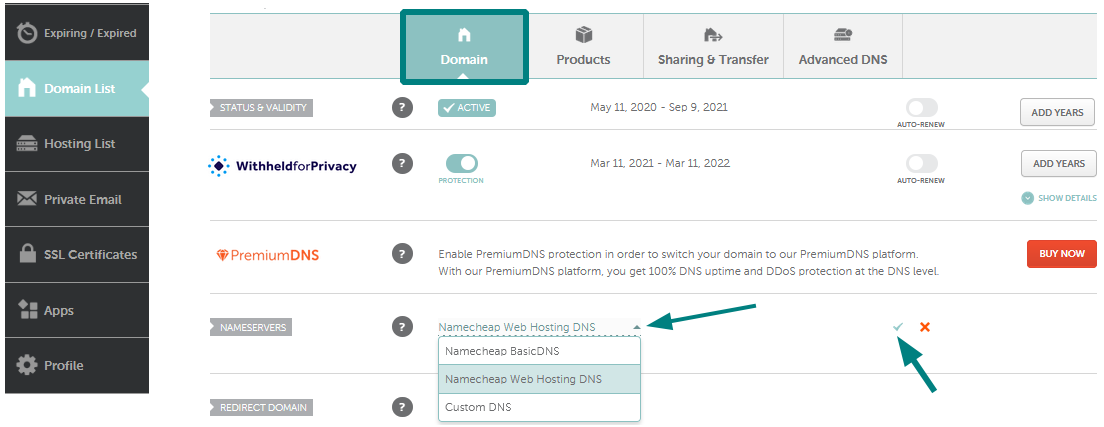
Access your domain registrar’s website. Find the DNS settings section. Add DNS records for your domain. Use the correct IP address. Set up A records for domain pointing. Configure MX records for email. Update CNAME records for subdomains. Save all changes after setup. Check the DNS settings for errors.
Testing Dns Setup
Open a command prompt on your computer. Type “nslookup” followed by your domain name. Check if the IP matches your server. Look for any error messages. Test email delivery using MX records. Access your website through a browser. Make sure the site loads correctly. Confirm all DNS settings work. Verify subdomain access too.
Configuring Security Protocols
Setting up a firewall is crucial for your server. It blocks unwanted traffic. Keep your data safe. Use tools like UFW or iptables. These tools help control access. They offer easy ways to manage rules. Make sure to update them regularly. This ensures new threats are blocked.
SSL certificates encrypt data. They protect information between server and user. Use Let’s Encrypt for free certificates. It’s simple to install. Renewal is automatic. This ensures constant protection. Users trust sites with SSL. Browsers show a padlock icon. This builds confidence in your site.
Perform security audits regularly. They identify vulnerabilities. Use tools like Nessus or OpenVAS. These tools scan your server. They check for weak spots. Fix issues quickly. Regular audits keep your server safe. They prevent data breaches. Security audits protect your reputation.
Credit: www.namecheap.com
Managing Server Resources
Using monitoring tools helps track your server’s health. They show important data like CPU usage and memory levels. Tools like Nagios and Zabbix are popular choices. They send alerts if anything goes wrong. This way, you can act fast to fix problems.
Keeping your server fast is crucial. Use caching to speed up your site. It helps store data temporarily. Also, update your software regularly. New versions often fix bugs and improve speed. Load balancing is another trick. It spreads traffic across servers. This keeps things running smoothly.
Problems can happen anytime. Check logs to find issues. They give details about errors. Restarting your server can solve many problems. Also, check your connections. Sometimes cables or networks fail. Use backup systems. They help restore data if something breaks.
Implementing Backup Solutions
Backup Frequency is crucial for data safety. Daily backups ensure data is safe. Weekly backups can also be effective. Choose a frequency that suits your needs.
Storage Solutions should be reliable. Use external hard drives or cloud storage. These options keep data safe. They also offer easy access.
Restoration Processes must be simple. Ensure backups are easy to restore. Test them regularly to check if they work. This helps avoid data loss.
Credit: www.socketlabs.com
Understanding Legal And Compliance Issues
Privacy regulations are very important. They protect user information. Each country has different rules. It’s crucial to know these rules. Breaking them can cause big problems.
Content policies guide what you can share. They help keep things safe. Follow these rules to avoid trouble. Always read policy updates. Stay informed.
User data protection keeps data safe. It builds trust with users. Always encrypt sensitive data. Use strong passwords for security. Regular checks help keep data safe.
Exploring Scalability Options
Vertical scaling means making a server stronger. Add more RAM or CPU. It is like giving your computer more power. This is simple but costly. One server can only grow so much.
Horizontal scaling is adding more servers. Like adding more friends to help. It is cheaper and helps handle more work. But you need a way to share the work among them.
Load balancing helps spread work evenly. Think of it like sharing toys with friends. Each server gets a fair amount of work. This keeps the server fast and happy. Balancers are like traffic police for servers.
Cloud integration means using cloud servers. They are like magic servers online. Easy to grow and shrink. Pay only for what you use. Cloud helps in saving money and space.
Frequently Asked Questions
How Do I Create My Own Hosting Server?
Set up a dedicated machine with Linux or Windows OS. Install server software like Apache or Nginx. Configure DNS and security settings. Connect to a reliable internet provider. Regularly update and backup data for maintenance.
Can I Host My Website By Myself?
Yes, you can host your website by yourself. You need a computer, reliable internet, and server software. Ensure you have technical knowledge for setup and maintenance. Self-hosting offers control but requires time and resources. Consider security and backup solutions for protection.
Can You Host A Server Yourself?
Yes, you can host a server yourself. Ensure you have the necessary hardware, software, and a stable internet connection. Proper security measures are crucial to protect your data. Hosting your own server can offer flexibility and control but requires technical expertise.
Can You Do Web Hosting Yourself?
Yes, you can host your website yourself. You’ll need a dedicated server, technical skills, and reliable internet connection. Self-hosting offers control and flexibility but requires maintenance and security management. Consider costs, hardware, and software requirements before choosing this option.
Conclusion
Setting up your own web hosting server can be simple. Follow the steps carefully. Choose the right hardware first. Install the necessary software next. Configure your settings properly. Test your server to ensure it works. Troubleshoot any issues quickly. This process helps you control your website.
It also saves hosting costs. You learn valuable skills along the way. Remember, patience and practice are key. Don’t rush through the setup. Enjoy the benefits of hosting your own server. It’s rewarding and educational. Keep your server updated regularly.
Protect your data with security measures. Happy hosting!


