
Do you feel stuck trying to move your domain to a new web host? You’re not alone.
Many people find this process confusing and frustrating. But don’t worry; we’ve got you covered. Imagine the relief of having your website running smoothly on a new host. With a few straightforward steps, you can make it happen. This guide will walk you through everything you need to know about setting up your domain with another web host.
Get ready to unlock the power of a seamless transition, and boost your website’s performance. Keep reading to discover the secrets to a hassle-free domain setup, and take control of your online presence today.
Choosing The Right Domain Registrar
Picking the best domain registrar is very important. Prices vary a lot. Some registrars have hidden fees. Check for renewal costs. Customer support matters too. You want help when things go wrong. Look for easy-to-use tools. Security features protect your site. Privacy options can hide your info. Transfer policies should be simple. Some registrars offer bundles with hosting. Read reviews online to see what others say. This helps you choose wisely.
| Registrar | Features |
|---|---|
| GoDaddy | Affordable, many tools, good support |
| Namecheap | Low prices, privacy protection, easy transfers |
| Bluehost | Great for beginners, bundles with hosting |
| Google Domains | Simple interface, strong security, trusted brand |
Transferring Your Domain
Make sure your domain is unlocked. Find this setting in your domain control panel. Check your contact details. They must be up-to-date. This includes your email. You will get important emails during the transfer. Obtain the EPP code. This is also known as the transfer key. Your current registrar provides this. Keep it safe. You will need it later. The domain privacy settings should be disabled. This makes your contact information visible. It is necessary for the transfer. Finally, check the domain’s expiry date. It should not be close. Otherwise, you might face issues during the transfer.
Choose a new web host. Start the transfer process from their website. Enter the EPP code when asked. This code proves you own the domain. Approve the transfer. Check your email for a confirmation link. Click it to approve. The process can take a few days. Be patient. Once complete, check your new host. Make sure everything works. Your domain is now with your new host.
Updating Dns Settings
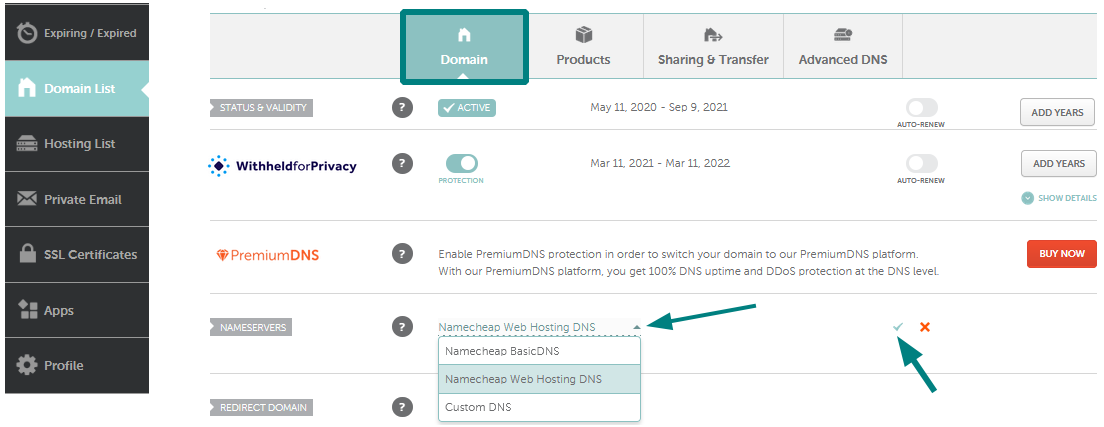
First, log in to your domain registrar account. Look for the section labeled DNS Management. This is where you can change settings. Find the option to update or modify DNS. This might be in settings or a menu.
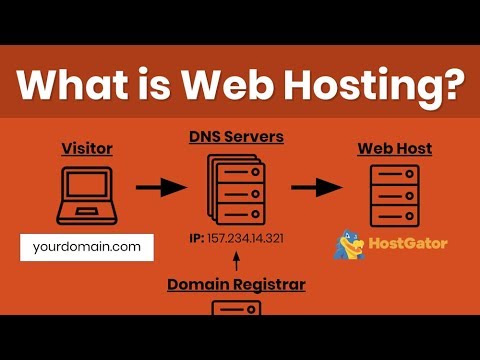
Nameservers are like the address of your web host. You need to update these to point to the new host. Enter the nameservers provided by your new host. There will usually be two or more. Save your changes and wait for them to update. This can take some time, sometimes up to 48 hours.
Configuring Domain Settings
Domain forwarding sends users to another site. Log in to your domain account. Find the domain settings section. Look for the forwarding option. Enter the new web host URL. Save the changes. This action redirects visitors to the new site. It’s a simple way to update your domain path. Check if the forwarding works. Visit your domain to test.
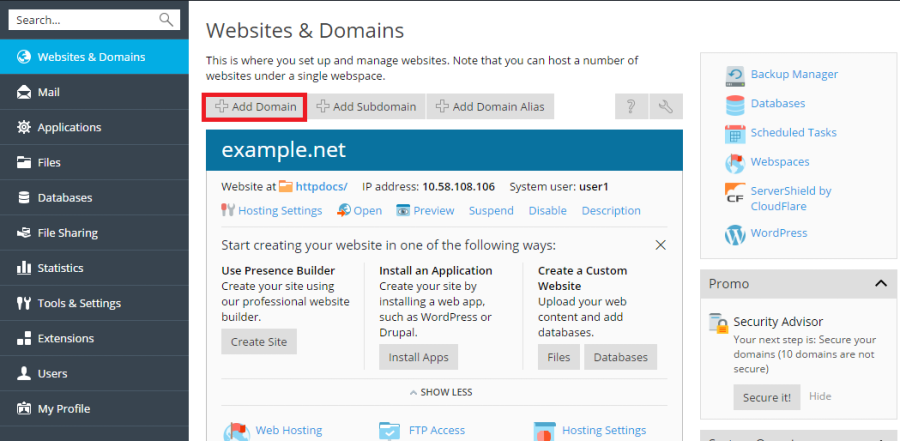
DNS records point your domain to a new host. Access your domain’s DNS settings. Update the A record to the new host’s IP address. Change the CNAME record for subdomains. Save each change carefully. This connects your domain to the correct server. Verify by checking domain propagation. It might take some time. Be patient for full updates.
Testing Domain Configuration
Domain propagation can take up to 48 hours. DNS changes may not show immediately. Use online tools to check DNS status. Tools like WhatsMyDNS.net are useful. They show DNS records worldwide. Propagation varies by location. Patience is key during this time.
Sometimes, domains face issues. Common ones include DNS errors or incorrect settings. Ensure DNS records point to the right server. Double-check settings on your web host. Contact support if issues persist. Clear browser cache can solve display problems. Restart your router for network-related issues.
Credit: www.youtube.com
Enhancing Domain Security
Enabling Domain Lock is very important. It stops others from changing your domain. This means no one can move your domain without your say. To do this, go to your domain settings. Find the option for domain lock. Turn it on. This keeps your domain safe.
Utilizing WHOIS Privacy helps protect your personal data. It hides your name and email from public view. You can turn this on in your domain settings. This way, strangers cannot see your details. It keeps your information private.
Maintaining Domain Health
Domains need regular checks to stay healthy. Watch for issues often. Keep an eye on DNS settings and resolve errors quickly. This prevents downtime. Regular scans can catch problems early. Security checks protect your domain. Alerts help spot threats. Use tools to track your domain’s health.
Domains should never expire. Always renew on time. Set reminders to avoid forgetting. A domain that expires can cause website issues. Losing a domain can be bad. Keep track of renewal dates. Use auto-renewal for peace of mind. This ensures your domain stays active.
Credit: www.namecheap.com
Credit: docs.plesk.com
Frequently Asked Questions
How Do I Point A Domain To Another Hosting?
Update your domain’s DNS settings by changing the nameservers to those provided by your new hosting provider. This ensures the domain points to the new server. Log into your domain registrar account to make these changes. Allow up to 48 hours for the DNS propagation to complete.
Can I Use My Domain With A Different Host?
Yes, you can use your domain with a different host. Update your domain’s DNS settings to point to the new hosting provider. This change usually involves modifying the nameservers or A records, which your new host will provide. This process is straightforward and ensures seamless website functionality.
Can I Register My Domain With One Company And Host With Another?
Yes, you can register your domain with one company and host it with another. This flexibility allows you to choose the best services for each task. Ensure both companies support DNS settings adjustments for smooth integration.
Can I Have Domain And Hosting From Different Providers?
Yes, you can have domain and hosting from different providers. Connect your domain to your hosting account by updating DNS settings. This setup offers flexibility and potential cost savings. Ensure compatibility between the services for smooth integration and optimal website performance.
Conclusion
Switching domains to a new host can seem tricky. Follow these steps carefully. Prepare your new host settings first. Update your domain’s DNS records. Wait for changes to take effect. Test the website’s functionality thoroughly. Don’t rush this process. Double-check each setting.
Ensure everything works seamlessly. Reach out to support if issues arise. Familiarize yourself with new host tools. Practice patience during the transition. Enjoy the benefits of a new host. Your site will run smoothly. Keep learning about web hosting. It enhances your skills.
Happy hosting!


