
Imagine having complete control over your website, from the data it holds to the way it operates. Setting up your own web hosting server gives you that power.
You’re not just another user on a shared server; you’re the captain of your own digital ship. But how do you navigate these waters? The process might sound daunting, but with the right guidance, it’s entirely achievable. Picture the satisfaction of knowing you’re in charge of your website’s speed, performance, and security.
This guide is designed to take you step-by-step through the process, breaking down the technical jargon into easy-to-follow instructions. By the end, you’ll have the confidence and know-how to set up your very own web hosting server. Ready to unlock the potential of your digital presence? Let’s dive in and transform your web hosting capabilities.
Choosing The Right Server
Dedicated hosting means you have one server all for you. No sharing with others. It gives more control and security. But it costs more money. Shared hosting is like living with roommates. You share one server with many users. It is cheaper but less control. Many websites are on one server. It can be slow if the server is busy.
Cloud servers are like magic. They use many computers together. It is fast and reliable. You pay only for what you use. VPS means Virtual Private Server. It is a mix of dedicated and shared. You get your own space but on a shared server. It gives more control than shared hosting. It is also cheaper than dedicated hosting.
Hardware Requirements
A good server needs a fast processor. Choose a multi-core processor for best results. At least four cores are ideal. This helps handle many tasks at once. RAM is also very important. More RAM means smoother performance. Aim for a minimum of 8GB RAM. This ensures your server can handle traffic.
Storage is where all data lives. Two types are common: HDD and SSD. HDDs are cheaper. But they are slower. SSDs are faster and more reliable. For better speed, choose an SSD. At least 256GB is a good start. More storage may be needed for big sites.
A strong network is key for a server. A fast internet connection is crucial. Check the upload and download speeds. A dedicated line is preferred. This ensures stability and speed. Consider having a backup connection. This helps during network issues.
Operating System Selection
Linux and Windows are popular choices for servers. Linux is known for its stability and security. It is often free and open-source. This makes it a cost-effective option. Linux supports many programming languages. It is suitable for developers.
Windows offers a user-friendly interface. It integrates well with other Microsoft products. Windows is great for businesses using Microsoft tools. It requires a license. This might increase costs.
Popular Distributions
| Linux Distributions | Features |
|---|---|
| Ubuntu | Easy to use, regular updates |
| CentOS | Stable, enterprise-level support |
| Debian | Reliable, long-term support |
Installing Server Software
Choose a reliable web server like Apache or Nginx. These are popular and easy to use. They help to manage website requests. Install them on your server. Follow the guide provided for setup. Configure the web server settings. Use default settings if unsure. This ensures your website runs smoothly.
MySQL and PostgreSQL are good choices for databases. They store your website’s data. Install one on your server. Follow the installation steps carefully. Set a strong password for security. Connect your web server to the database. Check if the connection works.
Security is important. Use tools like Firewalls and SSL Certificates. Firewalls protect your server from attacks. Install a firewall software on your server. SSL Certificates encrypt data. They keep user information safe. Set up SSL for secure connections. Regularly update security tools.
Configuring Server Settings
Pick a good domain name for your website. It should be short and easy. Register your domain with a domain registrar. This is a company that sells domain names. Connect your domain to your server. This tells the internet where your site lives.
DNS stands for Domain Name System. It helps people find websites. Set up DNS records with your registrar. Point them to your server’s IP address. This links your domain to your server.
An SSL certificate keeps data safe. It encrypts information between the server and users. Buy an SSL from a trusted provider. Install it on your server. This gives your site a secure connection. Users will see a padlock symbol in their browser.
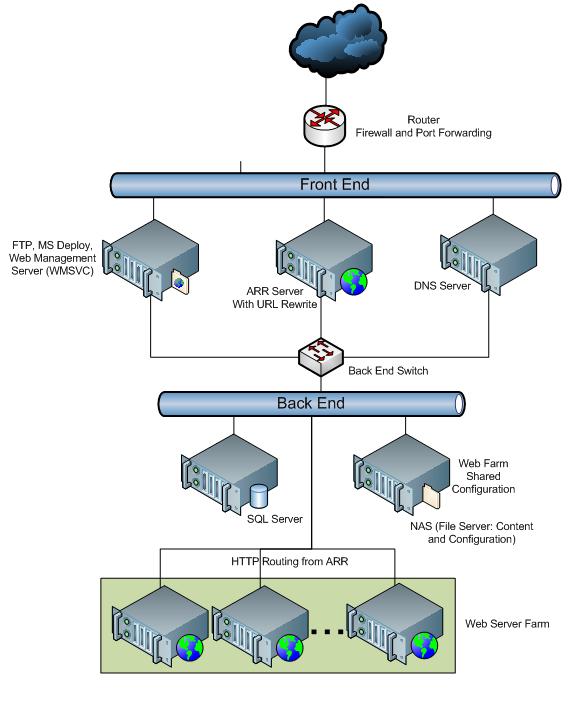
Credit: learn.microsoft.com
Testing And Monitoring
Performance Testing is very important for a web hosting server. It checks how fast the server works. Slow servers make users unhappy. Use tools like Apache JMeter or LoadRunner. These tools simulate many users at once. They help find speed problems. Fixing these problems makes the server better.
Security Audits keep the server safe from hackers. Regular checks find weak spots. Use tools like Nessus or OpenVAS. They scan for security holes. Fixing these holes protects user data. A safe server is a happy server.
Monitoring Tools help watch the server all the time. They alert you if something breaks. Use tools like Nagios or Zabbix. They show server health. CPU, memory, and disk space are important. Knowing these helps fix problems fast.
Maintenance And Updates
Regular backups are very important. They keep your data safe. Data loss can happen anytime. A backup is your safety net. Use tools to automate this. Set a schedule for backups. Check them to ensure they work. Keep your backup in a safe place. A secure location is best. This might be in the cloud or offline.
Software updates keep your server secure and efficient. They often fix bugs. Updates can add new features too. Always check for updates. Set reminders if needed. Install them as soon as possible. This prevents hackers from exploiting weaknesses. Make sure to update all software, not just the main ones. This includes plugins and extensions.
Problems can arise anytime. Learn how to fix common issues. Check your server logs first. They can show errors. Search online for solutions. Many people face the same issues. Use forums and help sites. Sometimes, a simple restart solves the problem. If not, contact your web host for help. They can guide you through the process.

Credit: www.siteuptime.com

Credit: www.youtube.com
Frequently Asked Questions
Is Google Hosting Free?
Google does not offer free hosting. Google Cloud and Firebase provide paid hosting services. Some basic features may be free, but they are limited. Always check the specific terms and pricing on their official website for accurate details.
Can I Turn My Pc Into A Web Server?
Yes, you can turn your PC into a web server. Install software like Apache, Nginx, or IIS. Ensure your PC has a stable internet connection and proper security measures. This setup allows hosting websites, applications, or files, making them accessible online.
Proper configuration is crucial for optimal performance and security.
How Much Does A Hosting Server Cost?
Hosting server costs range from $3 to over $500 per month. Prices vary based on server type, storage, bandwidth, and additional features. Shared hosting is cheaper, while dedicated servers and VPS are more expensive. Choose based on your website’s needs and budget for optimal performance.
Can I Host My Website On My Home Server?
Yes, hosting a website on your home server is possible. Ensure stable internet, security measures, and adequate hardware. This method may require technical expertise and might not support high traffic effectively. Consider professional hosting services for better reliability and support.
Conclusion
Setting up a web hosting server can be straightforward. Follow the steps carefully. Choose the right hardware first. Install your software next. Configure settings properly for security. Ensure regular updates for stability. Monitor server performance often. Troubleshoot issues promptly when they arise.
Keep backups to prevent data loss. Practice good security habits. Protect your server from threats. With patience and attention, success is achievable. A reliable server boosts online presence. Your site stays accessible to visitors. Enjoy the benefits of a well-maintained server.
Building your web hosting server is a rewarding journey. Start today with confidence.


