
If you’re using GoDaddy Web Hosting, you might be wondering how to find your email address. Whether you’re setting up a new account or trying to access an existing one, locating your email address is essential.
Imagine the convenience of effortlessly managing your communications, ensuring you never miss an important message. This guide will walk you through the simple steps to see your email address on GoDaddy Web Hosting, allowing you to streamline your online presence.
Ready to unlock the full potential of your web hosting experience? Keep reading, and discover just how easy it can be to take control of your emails.
Credit: www.itegritygroup.com
Accessing Your Godaddy Account
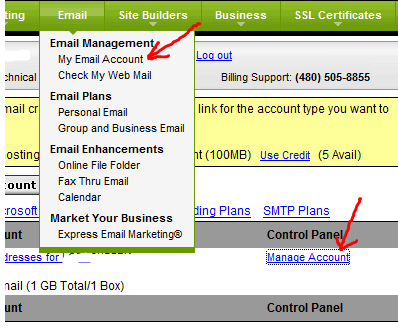
First, go to the GoDaddy website. Find the login button at the top. Click it. Enter your username and password. Press the login button again. This will take you to your dashboard.
In the dashboard, look for the control panel option. Click on it. You will see many options. Find the one for email settings. Click it to access your email information. This is where you manage your email addresses.
Credit: www.godaddy.com
Locating Email Services
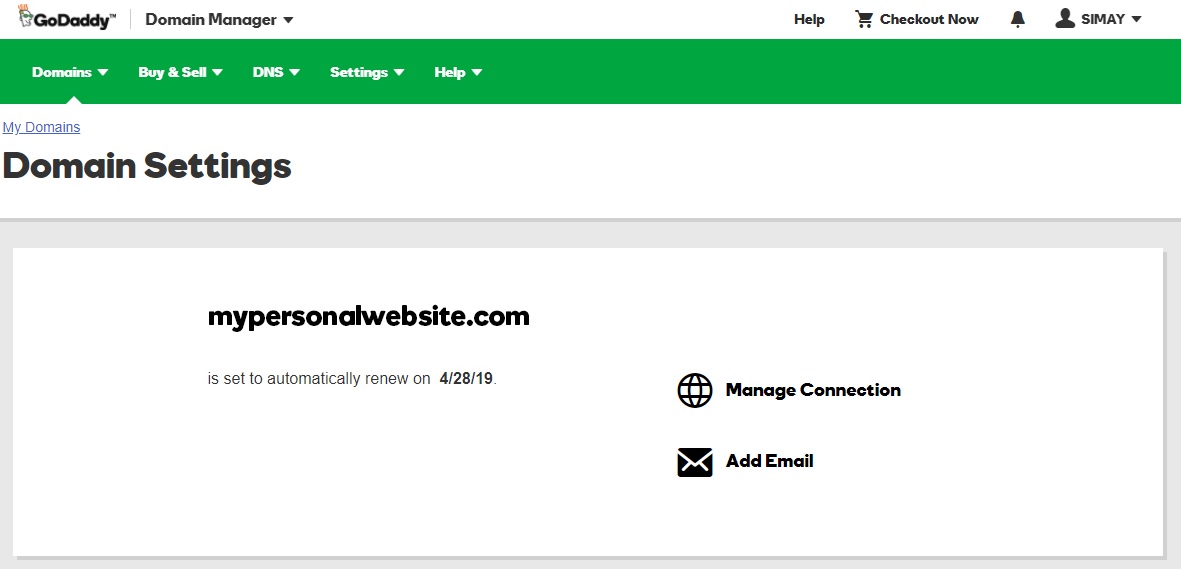
Start by logging into your GoDaddy account. Look for the Email & Office section in your dashboard. This area has all email tools. It’s important to identify the correct menu. Sometimes it may be called Workspace Email or Professional Email. Choose the option that matches your needs. Find the Manage button next to your email plan. Click on it to see more settings. This is where you can edit or view your email addresses.
After opening the management section, check the Setup options. Here, you can create new addresses. You can also view existing ones. The interface is user-friendly. Find the tab labeled Email Addresses. This will show a list of all emails linked to your hosting plan. It’s a simple way to handle email settings. Make sure to save any changes you make.
Viewing Email Addresses
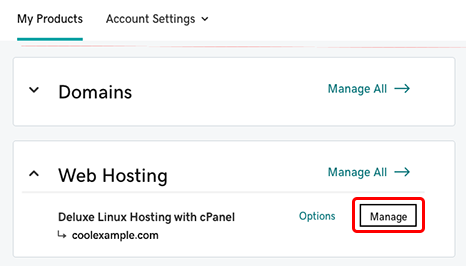
First, log in to your GoDaddy account. Go to the Web Hosting section. Click on “Manage” next to your hosting plan. This opens the control panel. Look for the Email Accounts option. Click on it. Now, you can see all your email accounts. Each account is listed here. It’s easy to find the right one. Just scroll and look.
Click on an email account to see details. You will see the full email address. Check the settings and storage details. You can also see the account’s usage. Look for important options like forwarding and auto-reply. You can adjust these settings if needed. Always keep your information updated. This ensures smooth email operations.
Troubleshooting Common Issues
Accessing your email address in GoDaddy Web Hosting is simple. Log into your GoDaddy account dashboard. Navigate to the Email & Office section to view your email settings.
Resolving Access Problems
Access issues can happen for many reasons. Check your internet connection first. Sometimes, a simple restart can fix the problem. Clear your browser cache too. This helps in loading the page correctly. If the problem remains, try a different browser.
Verifying Account Configuration
Ensure your account settings are correct. Double-check your username and password. Update your password if needed. Sometimes, server settings need adjustments. Verify the server name and port number. These should match GoDaddy’s settings. Contact their support if unsure. They can guide you.
Additional Features
Explore how to see email addresses in GoDaddy Web Hosting through its intuitive dashboard. Access settings easily to manage email accounts. Get a seamless experience with GoDaddy’s user-friendly interface.
Understanding Email Forwarding
Email forwarding helps send emails to another address. It is useful for managing multiple accounts. Users can forward emails from one account to another. This keeps messages organized in one place. Avoid missing important emails with forwarding. Godaddy provides easy steps for setting up. Follow the guide to use this feature.
Utilizing Email Storage Solutions
Saving space in your inbox is vital. Godaddy offers storage solutions for this. Users can store emails safely on the cloud. This keeps inboxes clean and tidy. Access stored emails anytime, anywhere. No need to worry about running out of space. Efficient storage helps keep things organized.
Credit: www.godaddy.com
Frequently Asked Questions
How To View Email Addresses In Godaddy?
Log in to your GoDaddy account. Navigate to the “Email & Office” section. Select “Manage” next to your email plan. View your email addresses under the “User Accounts” tab.
What Is My Godaddy Email Server Address?
Your GoDaddy email server address varies by plan. For IMAP, use “imap. secureserver. net” and for SMTP, use “smtpout. secureserver. net”. Check your specific plan for details.
How Do I Get An Email Address From Godaddy?
Sign up for GoDaddy email hosting. Choose a plan, then register or connect your domain. Follow instructions to create your email address. Access your email via GoDaddy’s webmail or set it up on email clients like Outlook. For support, contact GoDaddy’s customer service.
Does The Godaddy Domain Come With Email Addresses?
GoDaddy domains do not automatically include email addresses. You need to purchase email hosting separately. Explore GoDaddy’s email plans for options like professional email services. These plans offer branded email addresses that align with your domain. Enhance your brand’s credibility by choosing an email plan that suits your needs.
Conclusion
Seeing email addresses in GoDaddy hosting is straightforward. Follow the steps provided. Navigate your account with ease. Locate the email tab. Check settings for email addresses. No technical skills needed. Just a few clicks. Managing emails becomes simple. Stay organized with your GoDaddy hosting.
Regular check is key. Keep your email information updated. Troubleshooting is easy with the right tools. Ensure smooth communication. Your hosting setup supports this process. Efficient email management saves time. Practice these steps often. Benefit from a streamlined experience. Enjoy hassle-free email visibility.
Keep your hosting productive and effective.


