
Are you concerned about the security of your website hosted on an Apache web server? You’re not alone.
Cyber threats are more sophisticated than ever, and protecting your digital space is crucial. Imagine waking up one day to find your website compromised, data stolen, or even worse—completely inaccessible. It’s a nightmare scenario, but one you can prevent with the right strategies.
This guide is tailored just for you, offering simple, actionable steps to secure your Apache-hosted website. You’ll discover how to safeguard your server, protect your data, and ensure your site remains a safe haven for your visitors. Read on to empower yourself with the knowledge to enhance your website’s security, giving you peace of mind and keeping your online presence robust against any threat.

Credit: its.uri.edu
Apache Security Basics
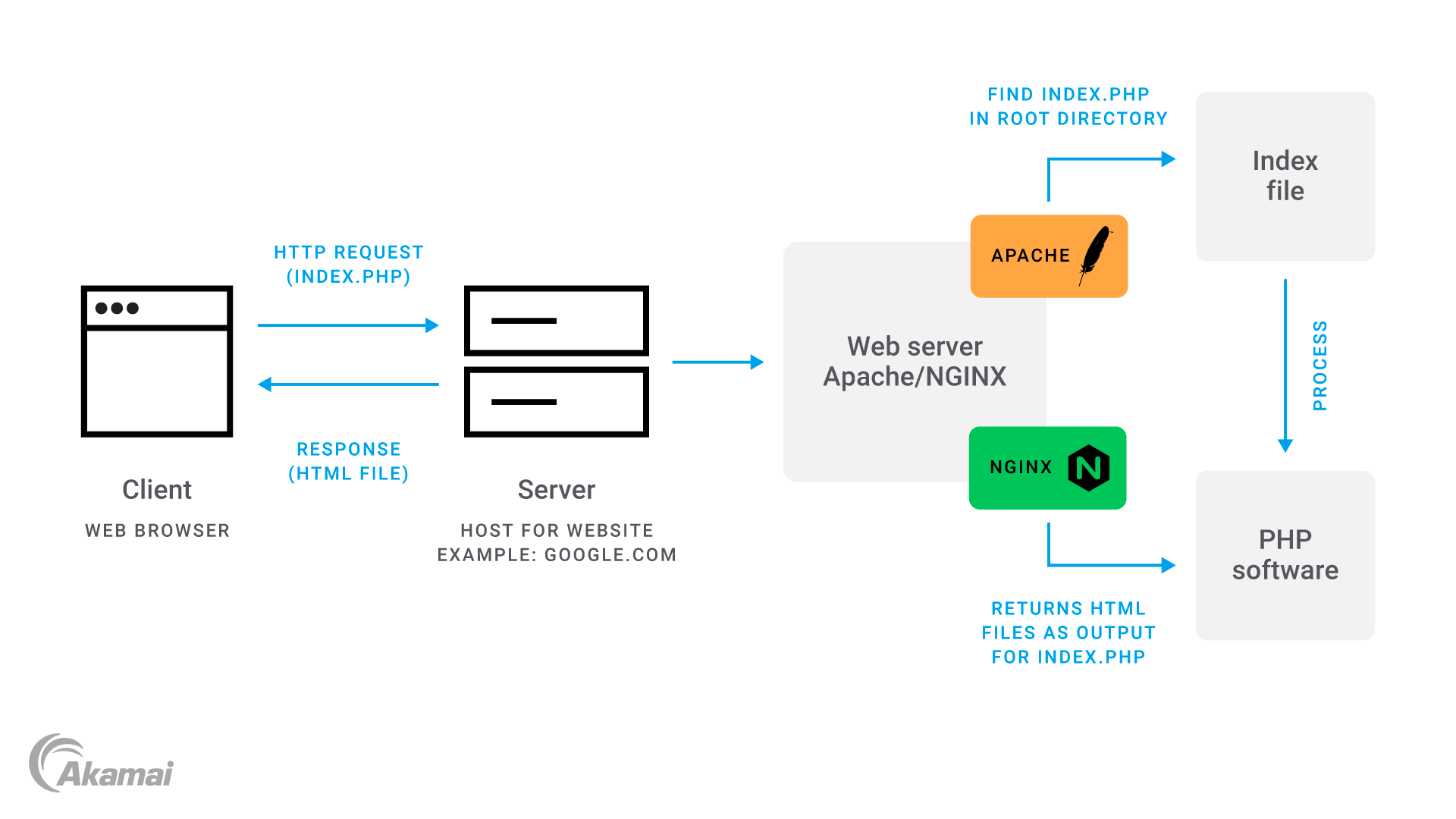
Understanding Apache Architecture is crucial for website security. Apache is a web server that handles requests from users. It serves files and web pages. The server works with modules. These modules give different features and functions. Apache uses a configuration file. This file controls how the server behaves. Knowing this helps in managing security.
Common Security Threats include attacks like SQL injections and cross-site scripting. These attacks aim to harm websites. Hackers try to steal data or disrupt services. Apache servers can also face denial-of-service attacks. These attacks overload the server. Keeping software updated is important. Updates help protect against new threats. Strong passwords and access controls are vital. They help in safeguarding your website.
Configuration Best Practices
Apache configuration files hold key settings. These files should stay secure. Always set the correct permissions. Only the owner should write to them. Others should only read. This reduces risks. Avoid leaving backup files on the server. Hackers might use them. Use SSL/TLS to encrypt data. This protects information between server and user. A secure website builds trust. It also meets basic security standards.
Apache has many modules. But, not all are safe. Only use the ones you need. Unused modules can be risky. Remove or disable them. This limits potential threats. Keep all used modules updated. Updates fix security holes. Be cautious with third-party modules. Check their security reputation first. Always test changes in a safe environment. This prevents errors on the live site.
Ssl/tls Implementation
SSL certificates are vital for website security. They encrypt data sent between user and server. Begin by purchasing an SSL certificate from a trusted provider. Next, access your Apache server. Use the terminal to install the certificate. Find the Apache configuration file. Edit it to include certificate details. Ensure paths to certificate files are correct. Restart Apache to apply changes. Check your site to see if SSL works.
HTTPS makes web connections secure. It’s important to enforce it. Modify the Apache configuration file. Redirect all HTTP requests to HTTPS. Use the mod_rewrite module to achieve this. Add specific rules in the .htaccess file. Test to ensure all traffic uses HTTPS. Users will see a padlock icon. It shows the site is secure.

Credit: kodekloud.com
Access Control Measures
Limiting access to directories is key. Use an .htaccess file. This file helps block unwanted visits. Only allow trusted users. Set permissions carefully. Keep important files safe. Use 403 Forbidden to block access. This makes directories secure.
Authentication checks who enters. Set up a username and password. Only trusted users can enter. Use Basic Authentication in the .htaccess file. This keeps data private. Choose strong passwords. Change them often. This step is vital for security.
Security Modules
ModSecurity helps in keeping bad things away from your website. It’s like a shield. This tool protects your site from attacks. It checks every visitor and every action. If something seems wrong, it stops it. You can make rules for ModSecurity. These rules tell it what is allowed and what is not. This helps in keeping your website safe.
ModEvasive is another safety guard. It keeps away too many requests. Some bad people send many requests to slow down your site. ModEvasive helps block them. It watches for too many requests from one place. If it sees this, it stops them. This keeps your website fast and secure. You can set limits on requests. This helps your site stay strong.
Monitoring And Logging
Logs help keep track of website activities. They record every action. Apache logs are very important. They show every visit and error. Setting up logs is easy. First, locate the Apache configuration file. Then, enable logging in this file. Choose the right log format for your needs. Common formats include Common Log Format (CLF) and Combined Log Format.
Logs can reveal possible threats to your website. Look at log entries carefully. Check for unusual patterns. Frequent requests from a single IP may signal trouble. Large amounts of failed login attempts are suspicious. Use tools to help analyze logs. They can filter and sort data quickly. Always check logs regularly. They are a window to your site’s security.
Regular Updates And Patching
Keeping software updated is very important. Old software can have security holes. Hackers use these holes to enter systems. Updates fix these holes. They make your system safer. Always check for new updates. Do this for all your software. Not just Apache. Even small updates matter. They protect your data from threats.
Automation makes patching easy. It saves time and effort. Set up tools that update software automatically. This way, you won’t forget updates. Tools like these work quietly. They keep your software current. Less manual work means fewer mistakes. Your website stays protected. Always choose trusted tools for this job.
Backup Strategies
Protecting a website on an Apache web server involves regular backups. Use automated tools to schedule frequent backups. Store copies in multiple locations to prevent data loss.
Creating Regular Backups
Regular backups keep your website data safe. Always save a copy of your files. Use tools like cron jobs to automate this. Store backups in a secure location. Cloud storage is a good option. You can also use an external hard drive. Keep at least three copies. This helps prevent data loss.
Restoration Procedures
Know how to restore your website from a backup. Test the process often. This ensures everything works. Have a step-by-step guide ready. It helps in emergencies. Make sure your team knows this guide too. Always check if the backup is complete before restoring. This prevents errors.
Credit: www.akamai.com
Frequently Asked Questions
How To Secure A Website Hosted On An Apache Web Server?
Secure your Apache server by updating software regularly. Use strong passwords and disable unnecessary modules. Implement SSL for encryption. Configure firewall and monitor logs for suspicious activity. Regularly back up your data to prevent loss.
How Secure Is The Apache Web Server?
Apache web server is secure with regular updates and a strong community. It supports SSL/TLS for encrypted connections. Security modules and best practices enhance its protection against threats. Regular monitoring and configuration audits are essential for maintaining security.
How To Make An Apache Web Server With Ssl?
Install Apache and OpenSSL. Generate a private key and certificate signing request (CSR). Obtain a SSL certificate from a Certificate Authority (CA). Configure Apache to use SSL by editing the configuration file. Restart Apache to apply changes. Test the server to ensure SSL is working correctly.
How To Restrict Ip Address In Apache?
To restrict an IP address in Apache, modify the. htaccess file. Use “Deny from [IP Address]” to block specific IPs. Add “Allow from [IP Address]” for permitted addresses. Ensure Apache is configured to allow. htaccess overrides. This method efficiently controls access to your server.
Conclusion
Securing your Apache web server is essential for peace of mind. Regular updates ensure protection against vulnerabilities. Configure firewalls to block unwanted traffic. Use SSL certificates for encrypted connections. Strong passwords deter unauthorized access. Backup data frequently to prevent loss.
Monitoring tools help detect threats early. Limit access rights to essential personnel only. These steps boost your website’s security. Stay proactive and safeguard your online presence. A secure server means trust for users. Prioritize these measures for a safe digital environment.


