
Imagine having the power to manage your very own website directly from your home computer. Sounds exciting, right?
Running a web host from your computer is not just a dream for tech enthusiasts; it’s a possibility within your reach. You don’t need a degree in computer science or a high-tech setup. You just need the right guidance, and that’s exactly what this article offers.
We’ll explore simple, step-by-step instructions to help you transform your computer into a web hosting powerhouse. Think of the control you’ll have, the money you could save, and the satisfaction of knowing you built something from scratch. So, whether you’re looking to host a personal blog, showcase your portfolio, or start a small online business, this guide will help you harness the technology you already own. Ready to unlock the potential of your computer? Let’s dive in!
Setting Up Your Computer
Begin with a strong processor. This helps your computer run smoothly. Ensure you have at least 8GB of RAM. This is important for handling tasks. A large hard drive is needed too. It stores all your files safely. A reliable internet connection is crucial. It keeps your web host running. Don’t forget a good cooling system. It prevents overheating.
Choose an OS that supports web hosting software. Linux is popular among web hosts. It is stable and secure. Windows is also an option. It is user-friendly. MacOS can host too. It requires specific tools. Ensure your OS gets regular updates. This keeps your system secure. Compatibility is key for smooth operation.
Choosing Web Hosting Software
Many people use Apache. It is free and very popular. Nginx is another choice. It is fast and uses less memory. LiteSpeed can handle many users at once. Caddy is easy to set up and secure. Each has its own strengths. Choose based on what you need.
First, download the software. Find it on the official site. Next, open the file. Follow the steps shown. Choose a folder on your computer. Install it there. Once done, open the program. Set up your website. You are now ready to host from home.
Configuring Web Server
Set up your computer to act as a server. First, install web server software like Apache or Nginx. These help your computer serve web pages. Next, check your computer’s IP address. This address helps others find your server. Set a static IP so it doesn’t change. Now, create a folder for your website files. Put your HTML, CSS, and other files here. Make sure your server software points to this folder. Finally, test your server by typing your IP address in a browser. If your page loads, you did it right!
Keep your server safe with these steps. Install a firewall to block unwanted access. Firewalls protect your computer like a gatekeeper. Next, update your server software often. Updates fix security holes. Use strong passwords for all accounts. Never use easy passwords like “12345”. Enable SSL/TLS for secure connections. This encrypts data between your server and users. Lastly, back up your data regularly. Backups keep your data safe if something goes wrong. Always be cautious and protect your server.

Credit: www.facebook.com
Domain Management
Choosing a domain name is the first step. Make it easy to remember. Use a domain registrar to check if it’s available. Register the domain once you find a good one. A good name can help people find your site.
DNS makes your domain easy to find on the internet. Set up the DNS records with your registrar. This tells computers where your site is. Common records include A, CNAME, and MX. Each record has a special job. Correct setup is important for your site to work.
Testing Your Web Host
Start by installing a local server software like XAMPP or MAMP. These tools help you test websites on your computer. Open the software and start the server. Place your website files in the htdocs folder. Open your browser and type localhost in the address bar. You should see your website load. Test all links and features. Check if images load correctly. Make sure all buttons work. Look for errors in the browser’s console. Fix any issues you find.
Sometimes, websites don’t load as expected. Check if the server is running. Make sure all files are in the correct folder. Look for typos in file names. Clear your browser’s cache to see changes. Update your server software if needed. Check error messages for clues. Search online for solutions to specific errors. Remember, practice makes perfect. Keep testing until everything works well.
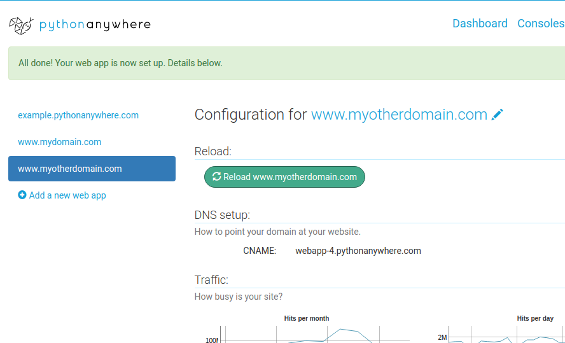
Credit: www.pythonanywhere.com
Launching Your Website
Start by putting your website files on your computer. Use a tool called FTP to move files to your web host. Make sure all files are in the right place. Check for any missing or extra files. This helps your site work well. Keep files organized. This makes changes easier later.
It’s important to watch how your website is doing. Use tools that show if your site is slow. They help find problems quickly. Make sure the site is always online. Check if pages load fast. Fast sites keep visitors happy. Fix any issues you find. This keeps your website running smoothly.
Maintaining Your Web Host
Regular backups protect your data from loss. Schedule backups daily. Use a reliable backup tool. Store backups on external drives. Make sure backups are secure. Test backups often. Ensure they restore properly. Keep multiple copies of important files. Update your backup strategy regularly. It’s important to have a plan.
Software updates keep your system safe. Check for updates weekly. Install them as soon as possible. Updates fix bugs. They improve security. Automatic updates can help. Enable them if possible. Always read update notes. They tell what’s new. Keep your software current. Outdated software can be risky. A stable system runs better.

Credit: www.godaddy.com
Frequently Asked Questions
How Do I Host A Website From My Own Computer?
Install a web server software like Apache on your computer. Configure it to host your website files. Use a dynamic DNS service to manage your domain name. Ensure your router forwards port 80 to your computer. Keep your computer running to maintain website availability.
Can I Host A Website Off My Computer?
Yes, you can host a website on your computer using software like Apache. Ensure your computer has a static IP address and stays online. Consider security risks and ensure regular backups. For better performance and reliability, opt for professional hosting services.
How Do I Run A Local Host Website?
To run a local host website, install web server software like XAMPP or WAMP. Configure settings and place your site files in the server’s directory. Start the server, then access your website via “localhost” in a web browser. Ensure all files are correctly linked and functioning.
Can I Turn My Pc Into A Web Server?
Yes, you can turn your PC into a web server. Install server software like Apache or Nginx. Configure your firewall settings. Ensure your PC has a stable internet connection. Regularly update security patches to protect your server. Monitor performance for optimal results.
Conclusion
Running a web host from your computer is doable. With the right tools and steps, you can manage it effectively. Start by choosing suitable software. Ensure your computer meets all requirements. Remember to regularly update your system. Keep security features active and strong.
Backup data often to prevent loss. Troubleshooting will be part of the process, so stay patient. Practice makes it easier over time. Your computer can support small websites well. Experiment, learn, and grow your hosting skills. Soon, you will have a reliable setup.


