
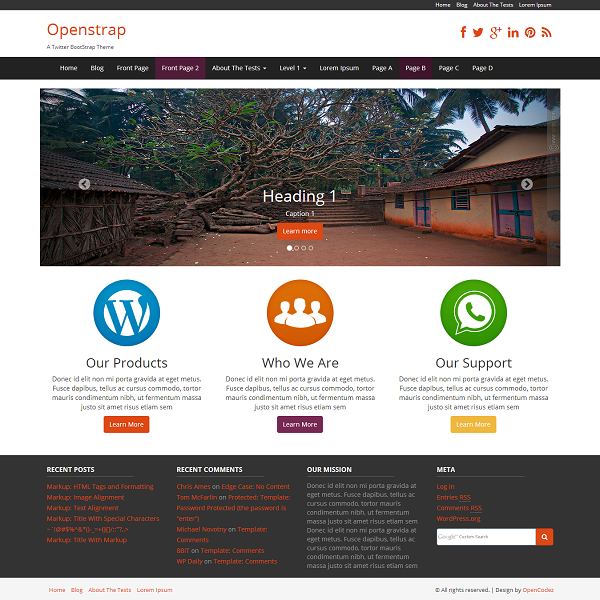
Are you using the Aadya WordPress theme but find the “Design by Opencodez” credit line a bit distracting? You’re not alone.
Many website owners prefer to have a clean and personalized footer without external credits. This guide is tailored just for you. We’ll walk you through the simple steps to remove the “Design by Opencodez” tag, so you can have a footer that truly reflects your brand.
With our easy-to-follow instructions, you’ll gain control over your website’s appearance and ensure it aligns perfectly with your vision. Ready to make your site shine and keep your visitors engaged? Let’s dive in!
Credit: www.opencodez.com
Understanding The Aadya Theme
The Aadya Theme is for WordPress users. It is simple and elegant. Many like its clean design. It suits blogs, businesses, and portfolios. The theme is mobile-friendly. This means it looks good on phones. It is also SEO-friendly. This helps in search engine ranking. Users find it easy to customize. You can change colors and fonts. It has widgets for extra features. These features make Aadya popular.
Branding is about identity. It shows who you are. In themes, branding is key. It makes your site unique. Your site stands out. Good branding builds trust. People remember your site. A branded site looks professional. This can bring more visitors. It helps in business growth. Strong branding can make your site special. This is why many focus on branding.
Locating The Design Credit
Removing the “Design by Opencodez” credit from the Aadya WordPress theme is straightforward. Access the theme editor in the WordPress dashboard. Locate the footer. php file and delete or modify the credit line.
Finding The Footer Section
The footer is at the bottom of the page. It often holds the design credit. Scroll down to see it. This section is different on each theme. Check carefully where it is placed. You might find it in the theme settings. Go to your WordPress dashboard. Click on “Appearance,” then “Editor.” Select “footer.php” to view the code.
Identifying The Credit Text
Look for the words “Design by Opencodez.” They are usually in the footer file. You can use the “Ctrl + F” function. It helps you find the exact words fast. Once found, you can edit or remove them. Make sure to save your changes. Check your site to see if the text is gone. Always backup your site before making changes.
Editing Theme Files
Editing theme files in WordPress allows removal of unwanted credits like “Design by Opencodez” in the Aadya theme. Locate the footer. php file, then find and delete the specific credit line. Always back up your files before making changes to avoid any mishaps.
Accessing Theme Editor
Open your WordPress dashboard. Click on Appearance. Then click on Theme Editor. A warning may show. Ignore it. You are ready to edit theme files. Find footer.php in the list. This is where you will make changes. Be careful here. Mistakes can break your site.
Modifying Footer.php File
Locate the footer.php file in the theme editor. Search for the line with “Design by Opencodez”. Delete this line to remove the credit. Save changes to update the footer. Refresh your site to see changes. Check if everything looks good.
Using Custom Css
To remove “Design by Opencodez” from the Aadya WordPress theme, use custom CSS. Access the theme editor and insert specific CSS code to hide the unwanted text. This tweak enhances your site’s appearance without altering the theme’s core files.
Adding Css To Hide Credit
Open your WordPress dashboard. Click on Appearance, then Customize. Now, look for the Additional CSS option. Click on it to open a new window. In the box, type the following code: .site-info { display: none; }. This code will hide the credit text. Click on the Publish button to save your changes.
Verifying Changes
Visit your site to check if the credit is gone. Refresh the page to see changes. If the credit text is hidden, you did it right. No more “Design by Opencodez” at the bottom. If the text is still there, double-check your CSS code. Make sure you typed it correctly. It’s important to save changes after editing CSS. Now, enjoy your clean footer.
Utilizing Child Themes
A child theme is a copy of the main theme. It keeps changes safe during updates. First, make a new folder in your themes directory. Name it like “aadya-child”. Next, create a style.css file inside. Add basic theme information. Now, make a functions.php file. Use it to load parent theme styles. Importantly, never change main theme files.
Editing the footer in a child theme is simple. Open the functions.php file. Add code to override parent footer. Use WordPress hooks for this. Target the footer section. Replace “Design by Opencodez” text with your own. Changes will stay safe during theme updates.
Credit: www.opencodez.com
Plugins For Credit Removal
Several plugins can help you change the footer. These plugins make it easy. Remove Footer Credit is one popular choice. Footer Putter is another useful plugin. These tools let you edit the footer text. You do not need coding skills. Many users find them very helpful.
First, go to the WordPress dashboard. Find the “Plugins” section. Click on “Add New”. Search for your chosen plugin. Click “Install Now”. After that, activate the plugin. You can then go to the plugin settings. Make the changes you need.
Legal Considerations
Many WordPress themes come with special licenses. These licenses tell what you can and can’t do. Always read the license agreement first. It is important to know your rights. Some licenses allow changes. Others do not. Check if you can remove developer credits. If unsure, ask for help. You can contact the theme creator. They can give clear answers. This keeps you safe from legal trouble.
Developers work hard to make themes. Their credits show their effort. Removing credits can be unfair. Always think before removing them. Respect their hard work. If you want to remove credits, seek permission. This shows respect to the developer. Some developers offer a way to remove credits legally. Always use legal methods. Avoid shortcuts. Respect is key in the tech world.
Credit: www.opencodez.com
Frequently Asked Questions
How Can I Remove “design By Opencodez” In Aadya Theme?
To remove “Design by Opencodez,” access the theme editor in WordPress. Locate the footer. php file. Search for the line containing the credit text. Delete or modify the text as needed. Save changes and check your site to ensure the credit is removed.
Is It Legal To Remove Theme Credits?
Yes, removing theme credits is generally legal if you own the theme. However, check the theme’s licensing agreement. Some themes might require credit retention. Always respect licensing terms to avoid legal issues. Consider contacting the theme developer for clarification if needed.
Will Removing Credits Affect Theme Functionality?
Removing theme credits typically doesn’t affect functionality. Credits are often just text in the footer. However, ensure you only edit the relevant section. Avoid accidentally altering other code. It’s wise to back up your site before making changes to prevent any mishaps.
Do I Need Coding Skills To Remove Credits?
Basic coding knowledge is helpful but not necessary. Many WordPress themes allow customization through the admin panel. Use WordPress theme editor or a plugin to manage credits. Follow a step-by-step guide online if you’re unfamiliar with code.
Conclusion
Removing “Design by Opencodez” from the Aadya theme is simple. Follow the steps carefully. First, access your WordPress dashboard. Navigate to the theme editor. Locate the footer. php file. Edit the code by removing the specific text. Save your changes.
Refresh your website to see the results. This process ensures a clean, professional look. Your site now reflects your brand. Enjoy the enhanced aesthetic. Always remember to back up your files before making changes. This prevents data loss. Keep customizing your WordPress site to suit your needs.
Happy blogging!


