
Are you facing challenges with your website’s SSL certificate on Namecheap? It might be time for a reissue.
This can seem daunting, but it’s crucial for maintaining your site’s security and trustworthiness. Imagine the peace of mind you’ll feel knowing your visitors are safe and your site is running smoothly. In this guide, we’ll walk you through the simple steps to reissue your SSL certificate on Namecheap.
You’ll discover how straightforward the process can be, ensuring your site stays secure without the headaches. Ready to make your website safer and more reliable? Let’s dive into the details.

Credit: www.youtube.com
Understanding Ssl Certificates
Understanding SSL certificates is crucial for website security. SSL stands for Secure Sockets Layer. It encrypts data between the server and the user’s browser. This encryption protects sensitive information from hackers. SSL certificates are essential for businesses and personal websites alike. They assure users that their data is safe.
Importance Of Ssl Certificates
SSL certificates build trust with your website visitors. They assure users that their data is safe. Google ranks sites higher with SSL certificates. Websites with SSL certificates have a padlock icon next to their URL. This icon signals security to users. No SSL? Users might leave due to security concerns.
Types Of Ssl Certificates
There are several types of SSL certificates. Domain Validated (DV) certificates are the most basic. They verify the domain name only. Organization Validated (OV) certificates require more scrutiny. They validate the organization behind the website. Extended Validation (EV) certificates offer the highest trust level. They show the organization’s name in the browser. Wildcard SSL certificates secure multiple subdomains. Multi-Domain SSL certificates cover multiple domain names.
Reasons To Reissue Ssl Certificates
Reissuing SSL certificates with Namecheap is important for maintaining security. It helps replace compromised keys or update domain information. This ensures your website remains trusted and secure for users.
Reissuing SSL certificates is crucial for website security. Sometimes, you need to update or fix certificate details. This process ensures your website stays protected and trustworthy. Understanding why and when to reissue can save time and prevent issues.Common Scenarios For Reissuance
Several scenarios necessitate SSL certificate reissuance. Firstly, if your private key is compromised, reissuing is vital. A compromised key can lead to security breaches. Second, changes to your domain name require a new certificate. This ensures the certificate matches the domain exactly. Third, updating organization details in the certificate requires reissuance. Accurate information is essential for trust and security.Benefits Of Reissuing
Reissuing SSL certificates offers many benefits. It keeps your website secure from threats. Security is paramount for user trust and business reputation. A correct certificate also improves website performance. Browsers load pages faster when certificates are up-to-date. Reissuing ensures your site maintains compliance with industry standards. Compliance is crucial for avoiding penalties and fines.Preparation Before Reissuing
Getting ready to reissue an SSL certificate with Namecheap involves gathering essential information. Ensure you have your domain details and account credentials handy. Follow Namecheap’s step-by-step guide to make the process smooth and stress-free.
Reissuing an SSL certificate on Namecheap might seem daunting, but with the right preparation, it becomes a manageable task. Before you dive into the process, it’s crucial to lay the groundwork. Consider this the calm before the storm, where getting organized can save you a lot of trouble later on. ###Gather Necessary Information
Begin by collecting all the details related to your current SSL certificate. You’ll need the CSR (Certificate Signing Request) and private key that you used when you first set up your certificate. If you’ve misplaced them, check your email history or contact Namecheap support. Make sure you also have your account login details handy. This might seem trivial, but you’ll need swift access to your Namecheap dashboard. Have you ever tried to reset a forgotten password in a hurry? It’s not fun. ###Backup Current Certificate
Create a backup of your current SSL certificate files. This includes the certificate itself, private key, and any intermediates. Store them securely on your server or a trusted cloud service. This step is like having a safety net—you hope you won’t need it, but it’s there just in case. Backing up ensures you can revert to the original settings if something goes awry during reissuance. Imagine the peace of mind knowing you have a fallback plan. This simple precaution could save you from potential downtime and security issues. By taking these preparatory steps, you set a solid foundation for a smooth SSL certificate reissuance process with Namecheap. Are you ready to move forward with confidence?Accessing Namecheap Account
Reissuing an SSL certificate with Namecheap starts by accessing your account. Follow the straightforward steps to navigate to SSL certificates. The user-friendly interface guides you through reissuing with ease.
Accessing your Namecheap account is the first step in reissuing your SSL certificate. This process ensures you have the control needed over your website’s security. Let’s break down the steps to make it seamless and straightforward.Logging Into Namecheap
Begin by visiting the Namecheap website. Click on the “Sign In” button located at the top right corner. Enter your username and password. If you’ve forgotten your password, use the “Forgot Password?” link to reset it. Keep your login details secure to protect your account.Navigating To Ssl Certificates Section
Once logged in, you’ll see the dashboard. Look for the “Products” tab in the left menu. Click on it to expand the options. Find and click on “SSL Certificates” from the dropdown list. This section lists all your purchased SSL certificates. Locate the one you wish to reissue. Select it by clicking on the corresponding option. Each step moves you closer to securing your website.Initiating The Reissue Process
Reissuing an SSL certificate on Namecheap might seem daunting, but it’s straightforward. Whether your certificate has expired or you need to update details, following simple steps will guide you. Initiating the reissue process ensures your website remains secure and trustworthy.
Selecting The Certificate
Start by logging into your Namecheap account. Navigate to the “SSL Certificates” section. Browse through your list of certificates. Identify the certificate you wish to reissue. Click on it to proceed.
Choosing Reissue Option
After selecting your certificate, locate the “Reissue” button. This option is typically found in the certificate management dashboard. Click to begin the reissue process. Follow the on-screen instructions carefully. Ensure all required fields are filled accurately.
Providing Required Information
Reissuing an SSL certificate with Namecheap requires specific information. Access your Namecheap account and locate the SSL section. Follow prompts to provide the necessary details for reissuance.
Reissuing an SSL certificate on Namecheap can seem daunting, but it becomes manageable when you know what information to provide. The process ensures your website remains secure and trustworthy for your visitors. Providing the right details is crucial for a smooth reissue. ###Updating Domain Details
Before diving into the reissue process, make sure your domain details are current. Outdated domain information can delay the SSL certificate reissue. Log into your Namecheap account and navigate to your domain settings. Check if your domain name is still registered under your name and if the contact information is correct. Consider whether your domain name has changed since the last SSL issue. If it has, update this information to avoid mismatches during the reissue process. ###Confirming Contact Information
Verify your contact information to ensure you receive important notifications. Accurate details help in the validation process, which is a key step in reissuing your SSL certificate. Double-check your email address. This is where Namecheap will send you instructions and updates about your SSL reissue. Imagine missing an important update because of an outdated email. It could delay your reissue by days, affecting your site’s security. Have you ever faced issues due to incorrect contact details? Share your thoughts on how keeping this information accurate has saved you time. By maintaining up-to-date domain and contact information, you pave the way for a hassle-free SSL certificate reissue on Namecheap. Are you ready to secure your site seamlessly?Completing Validation
Completing the validation process for reissuing an SSL certificate on Namecheap is crucial. This step ensures your website’s security and builds trust with your visitors. Choose the right validation method to keep the process smooth and efficient.
Email Validation
Email validation is a straightforward option. Namecheap will send a confirmation email to the domain’s registered address. Click the link in the email to verify your request. Ensure your domain’s WHOIS information is up to date. This helps you receive the validation email without issues.
Dns And Http Validation
DNS validation involves adding a specific record to your domain’s DNS settings. Namecheap provides the necessary details for this. Access your DNS settings and input the given record accurately. This method is great if you cannot access the domain’s email.
HTTP validation requires uploading a file to your server. Namecheap supplies the file and instructions. Place the file in the specified directory on your website. Once verified, the SSL certificate reissue will proceed.

Credit: www.youtube.com
Installing The Reissued Certificate
Reissuing an SSL certificate with Namecheap involves a few key steps. After you’ve completed the reissue, the next phase is installing the reissued certificate on your web server. This process ensures your website remains secure and trusted by users and browsers alike. Let’s delve into how to download and install your reissued SSL certificate.
Downloading The Certificate
Once your SSL certificate is reissued, download it from your Namecheap account. Log in to your Namecheap dashboard. Navigate to the “SSL Certificates” section. Locate the reissued certificate. Click on the “Download” button. This saves the certificate files to your computer. Usually, the files are in a ZIP folder. Extract the contents to access the certificate files.
Installing On Web Server
With the certificate files ready, proceed to install them on your web server. The installation process varies depending on the server type. For Apache servers, locate the Apache configuration file. Open it in a text editor. Insert the path to your SSL certificate file. Save the changes and restart the server. For Windows IIS, open the IIS Manager. Select your server’s name. Click on “Server Certificates.” Choose “Complete Certificate Request.” Follow the prompts to install the certificate.
Ensure you configure your server to use the new certificate. This might involve updating paths or settings in the server configuration. Always test the installation. Use online tools to verify the certificate is installed correctly. This step helps catch potential issues before they affect users. Proper installation ensures the security and credibility of your website.
Troubleshooting Common Issues
SSL certificates are crucial for website security. Yet, reissuing them can sometimes lead to challenges. Understanding common issues helps ease the process. Let’s delve into troubleshooting steps for a smooth experience.
Addressing Validation Errors
Validation errors occur during the reissue process. They can stem from incorrect domain information. Double-check the domain details you provide. Ensure they match the records in your Namecheap account. If discrepancies exist, update the information promptly.
Another cause is email validation issues. Ensure access to the email address linked with the domain. Check spam or junk folders for missed emails. Resend the validation email if needed. This ensures you receive and respond to the request.
Resolving Installation Problems
Installation problems can arise after reissuing your SSL certificate. Ensure the certificate files are correctly downloaded. Upload them to your server using the correct path. Follow your server’s specific installation guidelines closely.
Server configuration can also pose challenges. Verify your server is correctly configured for the new certificate. Restart your server after installation to apply changes. This simple step often resolves many installation issues.
Contact your hosting provider if problems persist. They can provide insights specific to your server environment. This assistance is crucial for resolving complex issues.
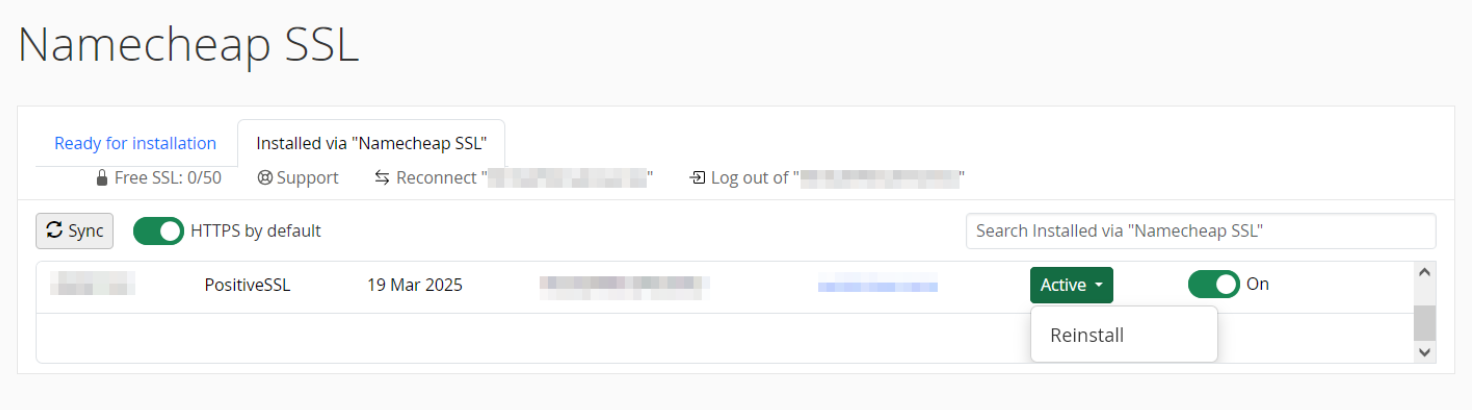
Credit: www.namecheap.com
Maintaining Ssl Certificate
Reissuing an SSL certificate with Namecheap involves accessing your account and navigating to the SSL management page. Follow the provided steps to initiate the reissue process. Ensure that your domain is correctly validated to maintain security. This process helps keep your website secure and trustworthy.
Maintaining an SSL certificate is crucial for website security. It ensures data protection and builds visitor trust. A valid SSL certificate signifies your website is secure. This helps in enhancing user experience and search engine ranking. Proper maintenance is essential to keep your SSL certificate effective.Regular Renewals
Renew your SSL certificate regularly to avoid security risks. An expired certificate can lead to browser warnings. This affects user trust and site traffic. Ensure you keep track of your certificate’s expiration date. Plan renewals in advance to maintain security. Namecheap provides reminders to help with this process.Monitoring Certificate Health
Regularly check your SSL certificate’s health for potential issues. Use online tools to monitor and verify certificate status. This helps in identifying vulnerabilities early. Resolve any issues promptly to ensure website security. Stay informed about updates from your certificate provider. This keeps your certificate current and effective. Maintaining an SSL certificate involves consistent effort and monitoring. Regular renewals and health checks are essential. They help in safeguarding your website and user data.Frequently Asked Questions
How To Reissue Ssl In Namecheap?
Log into your Namecheap account. Navigate to the “SSL Certificates” section. Select the certificate you wish to reissue. Click on the “Reissue” button. Follow the on-screen instructions to complete the process. Ensure you provide a new CSR if required.
How To Reissue An Ssl Certificate?
Log in to your SSL provider account. Locate the certificate you need to reissue. Generate a new CSR (Certificate Signing Request). Submit the CSR to your provider. Verify domain ownership if required. Download and install the reissued SSL certificate on your server.
How Do I Renew My Ssl Certificate On Namecheap?
Log into your Namecheap account. Go to the “SSL Certificates” section. Select the certificate you want to renew. Click on “Renew Now” and follow the instructions. Complete the payment process to finalize your SSL certificate renewal.
How Do I Replace An Ssl Certificate?
To replace an SSL certificate, generate a new CSR. Purchase the certificate from a trusted provider. Install it on your server. Update your website configurations. Test to ensure the certificate is working correctly.
Conclusion
Reissuing your SSL certificate with Namecheap is straightforward. Follow the steps carefully. Ensure your domain information is correct. Double-check the details before submission. Use the Namecheap dashboard for easy navigation. Contact support if issues arise. They offer helpful guidance. Keeping your website secure is essential.
Regularly update your SSL certificates. This protects user data and builds trust. A secure site encourages more visitors. Take action promptly to maintain security. Stay informed about SSL updates. Your efforts enhance online safety. Always prioritize website protection.


