

Are you ready to get your website online but don’t know where to start? Registering a domain and setting up hosting might sound tricky, but it’s easier than you think.
In this guide, you’ll learn exactly how to choose the perfect domain name and get reliable hosting without hassle. By the end, you’ll have a clear step-by-step plan to make your website live and ready for visitors. Let’s dive in and make your online presence happen!
Choosing The Right Domain Name
Choosing the right domain name is a key step in creating your website. It helps people find you easily online. Your domain name reflects your brand and sets the first impression. A good domain name is simple, clear, and memorable. It should match your website’s purpose well. Take time to pick a name that fits your goals and audience.
Tips For Selecting A Domain
Keep your domain name short and easy to spell. Avoid numbers and hyphens as they confuse visitors. Use keywords that relate to your business or content. This helps with search engines and user understanding. Check if your chosen name is unique and not too similar to others. This prevents legal issues and confusion. Think about future growth and choose a name that can expand with you.
Domain Extensions And Their Impact
Domain extensions like .com, .net, or .org affect how people see your site. The .com extension is the most trusted and recognized worldwide. Other extensions can show your website’s focus, like .edu for education or .shop for online stores. Local extensions like .uk or .ca signal a country-specific site. Choose an extension that fits your audience and business type. Avoid unusual extensions that might seem unprofessional or hard to remember.
Credit: www.wix.com
Checking Domain Availability
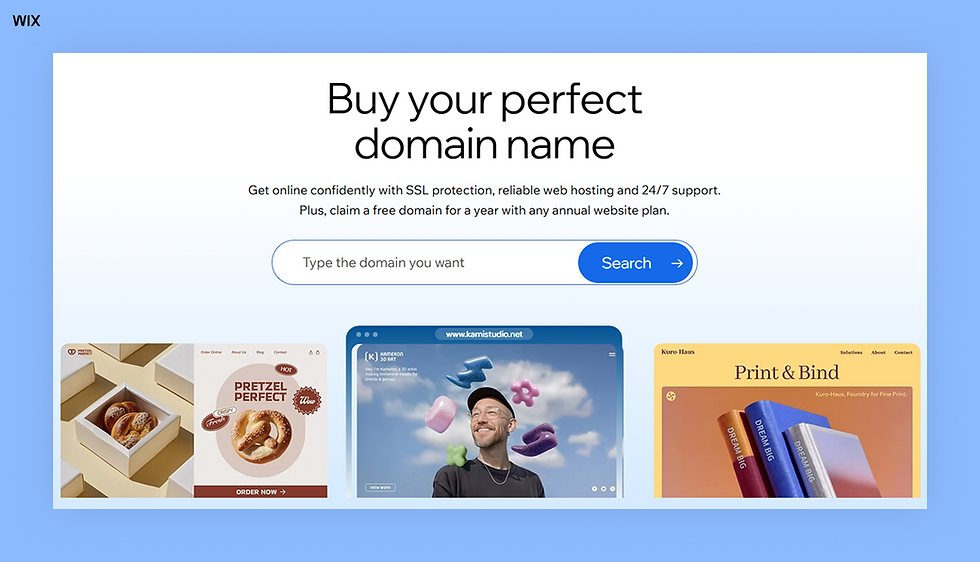
Checking if a domain name is available is the first step to starting your website. It helps you find out if the name you want is free to use. This step saves time and avoids problems later. You can check availability quickly using online tools.
Using Domain Lookup Tools
Domain lookup tools show if a domain name is taken or free. You type the name you want in the search box. The tool then checks many domain registrars at once. It shows results fast and clearly. Some popular tools include GoDaddy, Namecheap, and Whois.net. These tools also suggest similar available names. They help you find the best option easily.
Alternatives When Domain Is Taken
If the domain name you want is taken, do not stop. Try different endings like .net, .org, or .co. Add a simple word before or after your main name. Use short words or your location to make it unique. Avoid long or hard to spell names. These changes can help you find a good and available domain. Always choose a name easy to remember and type.
Registering Your Domain
Registering your domain is the first step to building your online presence. It gives your website a unique address on the internet. Choosing the right domain name is important for your brand and visibility. The process is simple and fast.
You can register domains through many companies called domain registrars. These companies offer various extensions like .com, .net, or .org. Prices and features may vary. It is best to pick a trusted registrar with good support.
Popular Domain Registrars
Some well-known domain registrars include GoDaddy, Namecheap, and Google Domains. They offer user-friendly interfaces and competitive prices. Many provide extra services like email hosting and domain privacy. These options protect your personal information online.
Other reliable registrars are Bluehost, HostGator, and DreamHost. They often bundle domain registration with web hosting. This makes managing your website easier. Choose a registrar that fits your needs and budget.
Step-by-step Registration Process
Start by searching for your desired domain name on the registrar’s website. Check its availability and look for similar options if taken. Add the domain to your cart once you find a free one.
Next, create an account with the registrar. Provide your contact details for domain registration records. This information is required by internet authorities.
Choose the registration period, usually one year or more. Consider adding domain privacy protection to hide your personal data. Review your order carefully before payment.
Complete the purchase using your preferred payment method. After payment, you will get a confirmation email. Your domain is now registered and ready for use.
Selecting A Hosting Provider
Selecting a hosting provider is a key step in building your website. It affects your site’s speed, security, and uptime. Choosing the right host ensures your site works smoothly. A good provider offers reliable service and support. Understanding your options helps you pick the best fit for your needs.
Types Of Hosting Services
Shared hosting is the most affordable option. Multiple websites share one server’s resources. It is best for small sites or blogs.
VPS hosting gives more power and control. It uses virtual servers on one physical machine. Suitable for growing websites needing more resources.
Dedicated hosting means your site has its own server. It offers the highest performance and security. Best for large websites with heavy traffic.
Cloud hosting uses many servers to host your site. It provides flexibility and can handle traffic spikes. Good for websites that may grow quickly.
Factors To Consider When Choosing
Check the hosting provider’s uptime guarantee. Look for at least 99.9% uptime to keep your site live. Fast loading speed is essential. It improves user experience and SEO ranking.
Customer support should be available 24/7. Responsive help can fix issues quickly. Look at storage space and bandwidth limits. Ensure they meet your website’s needs.
Security features like SSL certificates and backups protect your site. Easy-to-use control panels make managing your hosting simpler. Compare prices, but focus on value over cost.
Setting Up Your Hosting Account
Setting up your hosting account is the next step after registering your domain. This process connects your website to the internet. It makes your site live and accessible to visitors.
Setting up hosting might seem complex. It is simple if you follow clear steps. This section guides you through creating your account and adjusting settings.
Creating Your Hosting Account
Start by choosing a hosting provider that fits your needs. Visit their website and find the sign-up page. Enter your personal details like name and email.
Pick a hosting plan based on your website size and traffic. Plans often vary by storage, speed, and price. Next, create a username and a strong password. Save these details safely.
Complete the registration by confirming your email address. This verifies your identity and activates your account. Once done, you can log in to your hosting control panel.
Configuring Hosting Settings
Access your hosting dashboard after logging in. Here, you control how your website works. Start by linking your registered domain to your hosting account.
Find the domain settings section and enter your domain name. This connects your domain to the hosting server. Set up email accounts if needed. Many hosts include free email with your plan.
Adjust security settings like SSL certificates to protect your site. Enable backups to save your website data regularly. Check the server location and select the nearest one for faster loading.
Review all settings before publishing your site. Proper configuration ensures smooth website performance and better user experience.

Credit: www.youtube.com
Connecting Domain To Hosting
Connecting your domain to your hosting is a key step in making your website live. This process links your domain name to the server where your website files are stored. Without this connection, visitors cannot reach your website by typing your domain name.
The connection happens through DNS settings. These settings tell the internet where to find your website. You will need to update your domain’s DNS records to point to your hosting provider’s servers. This task is simple but important for your website to work correctly.
Updating Dns Records
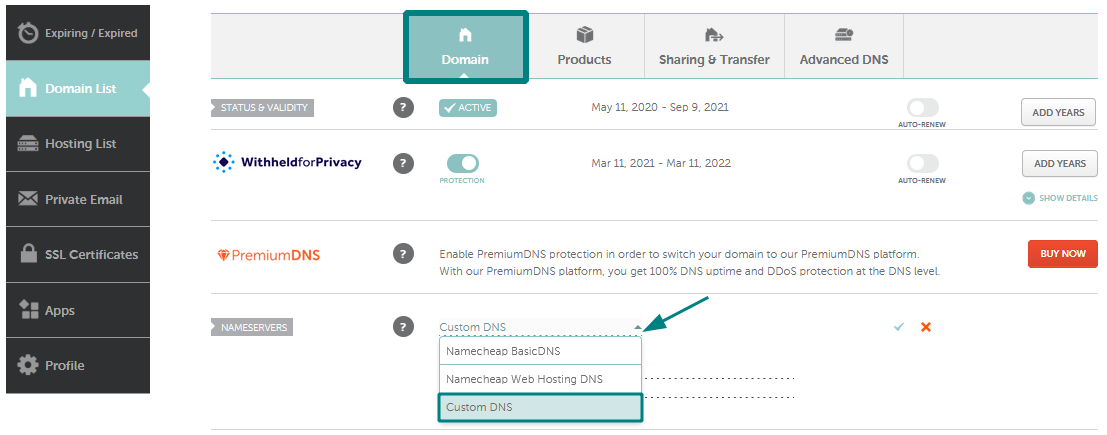
Start by logging into your domain registrar’s control panel. Find the section for DNS settings or Name Servers. Your hosting provider will give you the DNS records or name server details. Replace the current records with these new ones. Save your changes carefully. This update links your domain to your hosting server.
Waiting For Dns Propagation
After updating DNS records, changes take time to spread worldwide. This process is called DNS propagation. It can take from a few minutes to 48 hours. During this time, your website may not be visible to everyone. Be patient and check your website periodically. Once propagation finishes, your domain will load your hosted site correctly.
Installing A Website Platform
Installing a website platform is the next step after registering your domain and setting up hosting. This step lets you build and manage your website easily. Choosing the right platform helps you create a site that fits your needs. It also makes updating content simple and fast.
You can use a Content Management System (CMS) or a website builder. Both have tools to add pages, images, and other content. The right choice depends on your skills and site goals. After choosing, the installation process usually takes just a few minutes.
Choosing A Cms Or Website Builder
A CMS like WordPress, Joomla, or Drupal offers flexibility and control. It suits blogs, business sites, and online stores. These platforms need some technical knowledge but have many themes and plugins.
A website builder like Wix or Squarespace is easier for beginners. It has drag-and-drop tools and ready-made templates. No coding skills are needed. Builders are good for simple sites and quick setup.
Step-by-step Installation Guide
Most hosting providers offer one-click installation for popular platforms. Log in to your hosting control panel first. Find the app installer or software section.
Select your chosen platform and click install. Enter your site name, admin username, and password. Choose your domain from the list. Click confirm or install to begin.
Wait a few minutes for the system to set up files and database. After installation, access your website dashboard using the admin login. Start customizing your website and adding content.
Securing Your Website
Securing your website is a key step after registering a domain and setting up hosting. It protects your site from hackers and builds trust with visitors. Without good security, your website can be vulnerable to attacks that may cause data loss or damage your reputation.
Simple security actions can greatly improve your site’s safety. These steps keep your data safe and help your website run smoothly. Below are important security measures to take.
Enabling Ssl Certificates
SSL certificates encrypt the data between your website and visitors. This protects sensitive information like passwords and credit card numbers. Most hosting providers offer free SSL certificates. Activate SSL to show a secure padlock icon in browsers. This icon tells visitors your site is safe to use. Search engines also prefer websites with SSL, which can help your ranking.
Basic Security Measures
Start with strong passwords for your hosting account and website login. Change passwords regularly. Keep your website software and plugins updated. Updates fix security problems and improve performance. Limit access to your website’s backend. Only trusted people should have admin rights. Use security plugins to scan for malware and block suspicious activity. Backup your website data often to avoid losing it in an attack.
Testing And Launching
Testing and launching are the final steps in setting up your website. These steps ensure your site works well and looks right before visitors see it. Careful testing helps catch errors early. Launching makes your site live for everyone.
Checking Website Functionality
Test all links to make sure they lead to the right pages. Check forms, buttons, and navigation menus. Make sure images load quickly and display correctly. Review your site on different devices like phones and tablets. Test loading speed to keep visitors happy. Fix any bugs or broken features found during testing.
Launching Your Site Live
Choose a good time to launch when traffic is low. Double-check your domain points to your hosting correctly. Backup your website files before going live. Announce your launch with a simple message or email. Monitor your site closely after launch for issues. Keep your site updated and secure to maintain performance.
Credit: www.namecheap.com
Maintaining Domain And Hosting
Maintaining your domain and hosting is essential for keeping your website online and secure. Regular care prevents downtime and loss of data. It also helps your site run smoothly over time.
Renewing Domain And Hosting Services
Domains and hosting plans come with expiration dates. Renew them before they expire to avoid service interruptions. Set reminders for renewal dates. Many providers offer auto-renewal options to make this easy. If you miss renewal, your website may go offline. You could also lose your domain name to someone else.
Regular Backups And Updates
Back up your website files and databases regularly. This protects your content from accidental loss or hacks. Store backups in a safe place outside your hosting server. Keep your website software and plugins updated. Updates fix bugs and security issues. Outdated software can make your site vulnerable to attacks.
Frequently Asked Questions
What Steps Are Needed To Register A Domain Name?
To register a domain, choose a unique name, check availability, and select a registrar. Provide your details, pay the fee, and confirm your ownership. This process secures your website’s address online efficiently.
How Do I Choose The Best Hosting Service?
Evaluate hosting based on speed, uptime, customer support, and pricing. Consider your website needs like storage and bandwidth. Reliable hosting ensures your site runs smoothly without interruptions.
Can I Register A Domain And Hosting Together?
Yes, many providers offer domain registration and hosting packages. This simplifies setup and management. Bundling often saves money and ensures seamless integration between your domain and hosting.
How Long Does Domain Registration Take?
Domain registration usually takes minutes to a few hours. Sometimes, it may take up to 48 hours for DNS propagation. You can start setting up hosting immediately after registration.
Conclusion
Registering a domain and setting up hosting is simple with clear steps. Choose a domain name that fits your website’s purpose. Pick a reliable hosting service to keep your site online. Follow the registration process carefully to avoid mistakes. After setup, test your website to ensure it works well.
Keep your login details safe for future access. With patience and attention, anyone can create a website. Start today and watch your online presence grow steadily.


