
You’ve got an amazing idea for a website, and now it’s time to bring it to life. But before you can showcase your creativity or business online, you need a domain name.
Think of it as your website’s street address, making it easy for visitors to find you in the vast digital landscape. Registering a domain name is a crucial step, and doing it on Namecheap is a simple yet powerful choice.
Why Namecheap? It’s renowned for its user-friendly interface, competitive pricing, and excellent customer support. Imagine having a domain name that perfectly represents your brand or project, creating an instant connection with your audience. With Namecheap, you can achieve this effortlessly. In this guide, we’ll walk you through each step, ensuring you feel confident and capable as you navigate the process. By the end of this article, you’ll have not just a domain name but the excitement of seeing your website ready to make its mark online. Ready to get started? Let’s dive into the details that will empower you to register your domain name with ease and clarity.
Choosing The Right Domain Name
Registering a domain name on Namecheap is simple. Visit their website and search for your desired domain. Follow the steps to complete your registration easily.
Choosing the right domain name is a critical step in establishing your online presence. It’s more than just a web address; it’s your brand’s identity in the digital world. Selecting a domain name can significantly impact how your audience perceives you and your business. So, how do you go about choosing the perfect domain name? Let’s dive into some essential aspects that you should consider.Importance Of A Memorable Name
A memorable domain name sticks in people’s minds. Think about how effortlessly you recall names like Google or Amazon. A good name is easy to remember and pronounce. It can be the difference between someone finding your site and losing them to a competitor. Having a memorable name also helps with word-of-mouth marketing. Imagine a friend recommending your website; you want them to recall your domain name instantly, not struggle to remember it. Consider your domain name as a reflection of your brand’s personality. Does it convey the right message? Does it resonate with your target audience? These questions are vital in ensuring your domain name is not just memorable, but also meaningful.Tips For Selecting A Domain
When choosing a domain name, keep it short and sweet. A concise name is easier to type and share. Avoid using complex words or unusual spelling, as these can confuse potential visitors. Use keywords wisely. If you run a bakery, including ‘bakery’ in your domain can help with search engine optimization (SEO). But don’t overdo it; simplicity is key. Think about your target audience. If you cater to a local market, consider including your location. For example, ‘SeattleBakery.com’ instantly tells users where you are based. Check domain availability. You may have the perfect name in mind, but it’s crucial to ensure it’s not already taken. Namecheap makes this process easy with its search tool. Consider future growth. Will your name still be relevant if your business expands or changes focus? Choosing a versatile name can prevent future headaches. Finally, ask yourself: Does this name resonate with my audience? Would I be proud to share it? These questions can guide you toward a domain name that truly represents your brand. Choosing the right domain name involves more than just creativity; it requires strategic thinking. Are you ready to make your mark online with a domain that stands out?Checking Domain Availability
Before setting up your online presence, securing the perfect domain name is crucial. But how do you know if your desired domain is available? Checking domain availability is your first step toward establishing your brand online. With Namecheap, you have a reliable partner to help you navigate this process. Imagine the excitement of finding that your ideal domain name is available—it’s like discovering a hidden treasure. Let’s explore how you can efficiently check domain availability using Namecheap’s tools.
Using Namecheap’s Search Tool
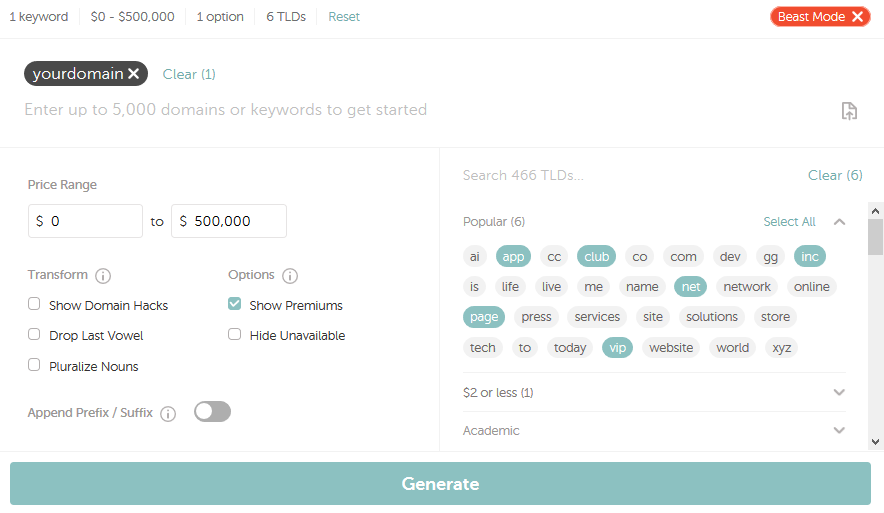
Namecheap offers a user-friendly search tool that simplifies the process of checking domain availability. Just enter your desired name into their search bar, and you’ll instantly know if it’s available. The tool provides suggestions and alternative domains, expanding your possibilities.
As you type, you’ll receive real-time feedback on the availability status. This feature ensures that you don’t waste time on names that are already taken. It’s like having a personal assistant guiding you through the maze of domain options.
What happens if your first choice is unavailable? Namecheap’s search tool suggests variations and alternatives. This way, you can find a domain that fits your needs without straying too far from your original idea.
Alternative Domain Extensions
Sometimes, your preferred domain with a ‘.com’ extension might be taken. Don’t let this discourage you. Namecheap offers a variety of alternative extensions like ‘.net’, ‘.org’, ‘.io’, and many others.
Choosing a different extension can be a strategic move. It allows you to maintain your brand identity while also standing out. For example, if you’re launching a tech startup, a ‘.io’ extension might resonate more with your audience.
Think about what your domain extension says about your brand. Would a ‘.co’ or ‘.biz’ better suit your business? Exploring these alternatives might reveal a better fit for your brand’s personality.
Have you ever found a domain name that felt like a perfect match, only to realize it’s unavailable? How did you overcome this challenge? Exploring alternative extensions might just be the solution you need.
Creating A Namecheap Account
Sign up for a Namecheap account to begin your domain registration. This process is simple and quick. After creating your account, select your desired domain name. Follow the on-screen instructions to complete your purchase.
Creating an account on Namecheap is the first step to registering a domain. It is a simple process designed to be user-friendly. Anyone, even beginners, can do it with ease. Follow these steps to set up your account and secure your domain name.Account Setup Process
To start, visit Namecheap’s website. Click on the “Sign Up” button at the top. Enter your email address. Choose a username. Create a strong password. Ensure it is unique and secure. Confirm your details and click “Create Account.” You will receive a confirmation email. Check your inbox and click the link. This verifies your account. Now, you’re ready to buy your domain.Security Features
Namecheap offers robust security features. Your account is protected with two-factor authentication. This adds an extra layer of security. You can enable it in your account settings. Use a secure password, combining letters, numbers, and symbols. Namecheap also provides free WhoisGuard. It protects your identity from public view. This service is included with many domain purchases. Rest easy knowing your information is safe.
Credit: www.youtube.com
Registering Your Domain
Registering a domain with Namecheap is simple and user-friendly. Start by searching for your desired domain name. Add it to your cart and proceed to checkout. Complete the purchase and own your domain.
Registering a domain name is your first step into the digital world. It’s like buying a piece of online real estate. If you’re considering Namecheap, you’re in good hands. They offer a user-friendly interface and competitive prices. But how do you actually register a domain there? Let’s dive in. ###Filling Out Registration Details
Once you’ve selected your domain, it’s time to fill in the registration details. This is where you’ll provide information like your name, address, and email. It’s crucial to enter accurate details. Why? Because incorrect information might lead to losing control of your domain. Namecheap makes this process straightforward. They guide you through each step with prompts. If you’ve ever filled out a form online, you’ll find this part simple. And if you’re stuck, Namecheap’s support is just a click away. ###Choosing Registration Duration
How long do you want to own this domain? With Namecheap, you can choose from one year up to ten years. Shorter durations may seem cheaper, but think about the hassle of renewing annually. Longer durations provide peace of mind and might even save you money in the long run. Imagine forgetting to renew your domain and losing it to someone else. To avoid such a nightmare, consider opting for auto-renewal. It’s a small step that ensures your domain remains yours. Namecheap offers this feature, making it easier for you to manage your domain. Have you ever registered a domain before? Or maybe you’re considering it for the first time. Either way, these tips can make your experience smoother and more enjoyable. Remember, your domain is your brand’s identity online. Make it count!Managing Domain Settings
Managing domain settings is an essential part of owning a domain. Namecheap offers a user-friendly platform to customize your domain settings. This ensures your domain works smoothly and securely. Let’s explore how to manage these settings effectively.
Dns Configuration
DNS settings allow your domain to connect with web services. Namecheap provides an easy way to configure DNS. You can manage DNS records like A, CNAME, and MX. These records direct traffic to your website or email services. Navigate to the DNS settings in your Namecheap dashboard. Here, you can add, edit, or delete DNS records. This flexibility helps in maintaining your website’s functionality.
Privacy Protection Options
Privacy protection keeps your personal information safe. Namecheap offers WHOIS protection to hide your details. This service prevents spammers from accessing your data. It also reduces unwanted marketing calls and emails. You can enable privacy protection in your domain settings. Check the privacy options in your dashboard. This ensures your contact details remain confidential.
Troubleshooting Common Issues
Registering a domain name on Namecheap can be an exciting step towards establishing your online presence. However, sometimes things don’t go as smoothly as expected. Have you ever faced issues during the registration process? If you have, you’re not alone. This section will guide you through troubleshooting some common problems you might encounter when registering or transferring a domain on Namecheap.
Failed Registration
Imagine eagerly trying to register your perfect domain, only to see a “failed registration” message pop up. This can be frustrating, but there are steps you can take to resolve it. First, check if the domain is still available. Sometimes, a domain can appear available due to caching issues. Refreshing the page or trying again after a few minutes might solve the problem.
If the issue persists, it could be due to incorrect information entered during registration. Double-check your details, including your email address and payment information. Typos or expired credit cards can halt the process.
Another culprit might be technical issues with Namecheap’s servers. It’s rare, but it happens. When this occurs, patience is key. Wait for a bit and try again later. You can also contact Namecheap support for further assistance. They are usually quick to respond and can help you navigate through any technical hurdles.
Domain Transfer Problems
Transferring a domain to Namecheap should be straightforward, but there can be hiccups along the way. Have you ever tried transferring a domain only to hit a snag? One common issue is incorrect transfer codes. Ensure you have the right EPP code from your current registrar. This code is crucial for a successful transfer.
Make sure your domain isn’t locked with your current registrar. A locked domain cannot be transferred. Check the status and unlock it if necessary. Also, verify that your domain isn’t within the 60-day lock period after registration or a previous transfer, as ICANN policies prevent transfers during this time.
Sometimes, the transfer process may stall due to email verification issues. Double-check your email associated with the domain and ensure you respond to any verification emails promptly. Missed emails can delay or even cancel the transfer.
Encountering these issues can be nerve-wracking, but remember, solutions are within reach. Have you faced any unexpected domain registration or transfer problems? Share your experiences below and help others learn from your journey. By tackling these challenges head-on, you ensure your domain registration or transfer process is smooth and successful.
Renewing Your Domain
Registering a domain on Namecheap is simple. Start by searching for your desired domain name. Follow the steps to complete the purchase and secure your online presence.
Renewing your domain is crucial for maintaining your online presence. A domain name is your digital address, and letting it expire can lead to losing your website. Staying informed about renewal policies helps in avoiding disruptions.Understanding Renewal Policies
Every domain registrar has specific renewal policies. Namecheap’s policies are straightforward. Domains need renewal before the expiration date. Failing to renew on time can lead to losing access. Domains might enter a grace period after expiration. During this time, you can renew at a regular cost. If the grace period lapses, domains enter redemption. Redemption costs more. Understanding these stages prevents unexpected surprises.Automatic Renewal Settings
Automatic renewal is a convenient feature on Namecheap. It ensures your domain stays active without manual intervention. Activating auto-renewal means charges occur automatically on due dates. This option is beneficial for busy individuals. It reduces the risk of missing deadlines. To enable auto-renewal, log into your Namecheap account. Navigate to the domains section. Choose the domain you want to update. Select auto-renewal settings. Confirm the changes. Always ensure payment methods are up-to-date. This avoids failed transactions during renewals.
Credit: www.youtube.com
Credit: www.namecheap.com
Frequently Asked Questions
How To Register Domain Name Namecheap?
Visit Namecheap’s website. Search for your desired domain name. Select the available domain. Create a Namecheap account. Complete the checkout process to register your domain.
How Do I Register My Own Domain Name?
To register your domain name, choose a registrar like GoDaddy or Namecheap. Search for your desired domain. Check availability. Follow the registration process by entering your details. Pay the registration fee to secure your domain. Confirm registration through email. Your domain is now ready to use.
How Do I Add A New Domain In Namecheap?
Log into your Namecheap account. Navigate to “Domain List” under “Account. ” Click “Add Domain” and enter the new domain name. Follow the prompts to complete the setup process. Ensure your domain is available before proceeding.
How Do I Activate A New Domain?
Log into your domain registrar account. Locate the domain settings. Enable domain activation by following on-screen instructions. Save changes to confirm activation. Ensure DNS settings are correctly configured.
Conclusion
Registering a domain on Namecheap is straightforward. The process offers simplicity and convenience. With a few clicks, you secure your online space. Namecheap provides user-friendly tools for domain management. You get affordable pricing and reliable service. Your website gains a professional identity quickly.
No complicated steps involved. Namecheap’s support ensures smooth registration. Perfect for beginners and experts alike. Finding the right domain is easy. Start your online journey with confidence. Choosing Namecheap means choosing quality and efficiency. Your domain is ready to represent you online.
Enjoy your new digital presence.


