

Have you ever bought a domain name but didn’t want to pay for hosting right away? Or maybe you want your domain to send visitors somewhere else without setting up a full website.
Redirecting your domain without hosting might sound tricky, but it’s simpler than you think. You’ll discover easy steps to make your domain point exactly where you want—quickly and without extra costs. Keep reading, and you’ll learn how to take control of your domain and make it work for you right now.
Credit: oddly.digital
Why Redirect A Domain Without Hosting
Redirecting a domain without hosting saves money and effort. You do not need to pay for web hosting services. This makes it ideal for simple domain forwarding.
Sometimes, you own multiple domains. Redirecting them to one main site keeps visitors on the right page. It also protects your brand by guiding users correctly.
Redirecting without hosting helps manage domains during website changes. It avoids broken links and keeps traffic flowing smoothly.
Protecting Brand Identity
Redirecting domains stops others from using your name. It keeps your brand consistent online. Visitors always reach your official site.
Saving Costs On Hosting
No need to buy hosting for every domain. Redirecting is a low-cost way to use multiple domains. It saves money for other business needs.
Managing Domains Easily
Redirects simplify domain management. You control where users go from one place. This reduces the risk of errors and confusion.
Keeping Seo Benefits
Redirects help keep search engine rankings. They transfer traffic and authority to your main site. This supports your online visibility and growth.
Choose The Right Domain Registrar
Choosing the right domain registrar is key to redirecting your domain name without hosting. The registrar controls your domain settings. It lets you change where your domain points. Not all registrars offer easy domain redirection features. Picking the right one saves time and effort.
Domain registrars differ in pricing and services. Some provide free domain forwarding. Others charge extra or limit forwarding options. A good registrar makes redirection simple and reliable. It ensures your domain directs visitors correctly.
Check Domain Forwarding Options
Look for registrars with clear domain forwarding tools. They should offer easy setup for URL redirects. Both 301 (permanent) and 302 (temporary) redirects matter. Some registrars provide masked forwarding to hide the target URL. Choose the one that fits your needs.
Compare Pricing And Renewal Fees
Review the initial cost and renewal fees. Some registrars offer low prices but high renewal rates. Extra fees may apply for domain forwarding or privacy protection. A reasonable price with good features is best for long-term use.
Evaluate User Interface And Support
A simple control panel helps manage your domain easily. Good customer support assists if problems arise. Check if support is available via chat, phone, or email. Fast help makes domain redirection less stressful.
Look For Reputation And Reviews
Search online for user reviews and feedback. A trusted registrar has positive ratings for reliability. Avoid registrars with frequent complaints about downtime or poor service. Your domain must stay accessible to visitors at all times.
Access Domain Control Panel
Accessing your domain control panel is the first step to redirect a domain name without hosting. This control panel holds the key settings for your domain. You can change where your domain points without needing a web host.
The domain control panel is provided by your domain registrar. This is the company where you bought your domain name. Each registrar has a slightly different interface, but the main options are similar.
Locate Your Domain Registrar
Find out which company manages your domain. Check your email for the purchase receipt. The registrar’s name usually appears there. You can also use online tools to look up your domain’s registrar.
Log In To Your Account
Go to the registrar’s website. Enter your username and password. If you forgot your password, use the reset option. Access to your account is essential for managing your domain.
Find The Domain Management Section
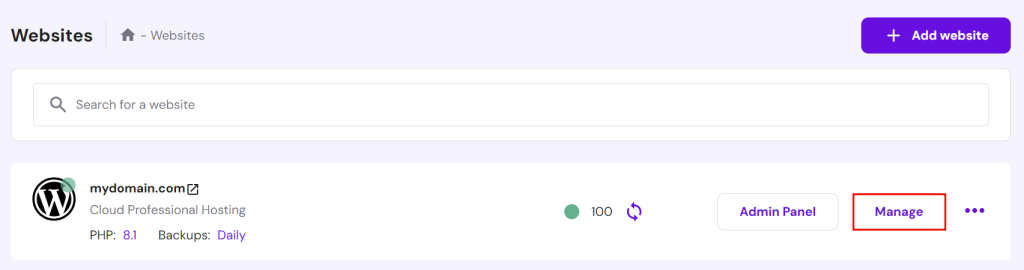
Once logged in, look for sections like “Domains,” “My Domains,” or “Domain Settings.” This area lists all domains registered under your account. Select the domain you want to redirect.
Access Dns Or Url Forwarding Settings
Within the domain settings, find options named “DNS Management,” “Name Servers,” or “URL Forwarding.” These settings control how your domain behaves. To redirect, you will adjust these options next.
Credit: www.hostinger.com
Set Up Url Forwarding
Setting up URL forwarding is a simple way to redirect your domain without hosting. It sends visitors from your domain to another web address. This method is easy and does not need a web server. Many domain registrars offer URL forwarding as a free service. It helps keep your online presence active even without hosting.
Types Of Redirects
There are two main types of redirects for URL forwarding. The first is a 301 redirect. It tells browsers the page has moved permanently. Search engines update their indexes to the new address. The second type is a 302 redirect. It means the move is temporary. Search engines do not change their indexes. Choosing the right type depends on your needs.
Configuring Forwarding Settings
Start by logging into your domain registrar account. Find the URL forwarding or redirect section. Enter the web address where you want visitors to go. Choose the redirect type: 301 or 302. Save your settings. The changes can take a few minutes to work. Test your domain by entering it in a browser. It should take you to the new site. Adjust settings if the redirect does not work correctly.
Use Dns Settings For Redirection
Redirecting a domain name without hosting is possible by using DNS settings. This method lets you point your domain to another website without needing a web server. It is a simple and cost-effective way to manage your domain. DNS settings control how your domain behaves and where it directs visitors. Adjusting these settings can guide users to the correct location.
Modify A And Cname Records
DNS uses different record types to manage domain traffic. The A record links your domain to an IP address. Changing the A record directs your domain to a new server’s IP.
The CNAME record points your domain to another domain name. It is useful for redirecting subdomains like www. You can set the CNAME to the target website’s domain.
Both A and CNAME records are easy to change in your domain registrar’s control panel. Save the changes and wait for them to update across the internet. This process is called propagation and can take a few hours.
Limitations Of Dns Redirects
DNS redirects have some limits. They cannot perform full URL redirects, like sending users from one page to another page. DNS only works at the domain or subdomain level.
It does not support HTTPS redirects by itself. You may need additional tools or hosting for secure redirection. Also, DNS changes affect all visitors, so test carefully before making changes live.
For complex redirects or tracking, using a web hosting service or redirect service is better. DNS redirection suits simple cases and saves hosting costs.
Test Your Domain Redirection
Testing your domain redirection is important. It confirms the redirect works correctly. This step helps avoid broken links and user confusion. Check if visitors land on the correct website without errors.
Testing is simple and quick. It ensures your domain points exactly where you want. This process also helps fix mistakes early. Testing saves time and improves user experience.
How To Check Domain Redirection
Open a web browser and enter your domain name. Press enter and watch where it leads. The website should load the target page instantly. If it does not, review your redirection setup.
Use Online Redirect Checker Tools
There are free tools online that test domain redirects. These tools show the type of redirect used. They also report errors or loops in the redirect. Use them to confirm your domain redirects properly.
Test Redirection On Different Devices
Try your domain on phones, tablets, and computers. Different devices may show different results. Testing across devices ensures consistency for all visitors. This step avoids device-specific issues.
Common Issues And Fixes
Redirecting a domain name without hosting can cause some common problems. These issues might stop your redirect from working correctly. Knowing the problems and how to fix them saves time and frustration. Here are two frequent problems and their simple solutions.
Redirect Loops
A redirect loop happens when your domain keeps sending visitors back and forth. This causes the browser to never reach the final page. It often happens if the redirect points to itself or creates a circle with other redirects.
Fix this by checking your redirect rules carefully. Make sure the source and destination URLs are not the same. Avoid multiple redirects that lead back to the original domain. Use online tools to test your redirects for loops.
Propagation Delays
Propagation delay means changes to your domain settings take time to appear on the internet. This delay happens because DNS servers worldwide update slowly. Your redirect may not work right after you set it up.
Wait for a few hours or up to 48 hours for DNS changes to spread. Avoid changing settings multiple times during this period. Use DNS checker tools to see if your new redirect settings are live.
Credit: oddly.digital
Alternative Methods Without Hosting
Redirecting a domain without hosting is possible. It saves you from buying expensive hosting plans. Several tools and services help you point your domain to another site. These methods work well for simple redirects.
These options are perfect for users who do not want to manage a server. They offer easy setup and quick changes. Understanding these alternatives can help you manage your domains better.
Using Third-party Redirect Services
Third-party redirect services offer simple domain forwarding. You only need to set your domain’s DNS records to their servers. These services handle the redirect process for you.
They often provide options for permanent (301) or temporary (302) redirects. Some services also offer URL masking to hide the destination URL. Most are free or low-cost, making them budget-friendly.
Choose a service that supports your redirect needs and is easy to configure. This method does not require hosting or technical skills.
Leveraging Cloudflare Page Rules
Cloudflare provides a free plan with page rules for redirects. You must point your domain’s DNS to Cloudflare’s servers first. Then, create a page rule to forward your domain to another URL.
This method supports 301 and 302 redirects. You can redirect the entire domain or specific pages. Cloudflare also offers security and speed benefits alongside redirects.
This option suits users wanting control without hosting. It requires a free Cloudflare account and simple settings changes.
Frequently Asked Questions
What Is Domain Redirection Without Hosting?
Domain redirection without hosting means pointing your domain to another URL. You do this using DNS settings or domain registrar tools, without needing a web hosting service.
How Can I Redirect A Domain Using Dns?
You can redirect a domain by setting up URL forwarding or using CNAME records in your DNS. This directs visitors to the target website without hosting.
Are Domain Redirects Free Without Hosting Services?
Most registrars offer free basic domain forwarding. Advanced options may require a small fee, but simple redirects usually cost nothing without hosting.
Can I Use Domain Registrar Tools For Redirection?
Yes, many domain registrars provide URL forwarding options. You can configure domain redirects easily through their control panel without hosting.
Conclusion
Redirecting a domain without hosting is simple and cost-effective. You only need access to your domain registrar’s settings. Changing the DNS or using URL forwarding works well. This method saves money and avoids unnecessary hosting fees. It keeps your web presence active and directs visitors where you want.
Stay patient and follow each step carefully for best results. This approach suits small projects and personal sites perfectly. Try it out and keep control of your domain easily.


