
Are you ready to launch your website but feel overwhelmed by the process of choosing a web host? You’re not alone.
Deciding where to host your website is a crucial step, and with so many options available, it can be hard to know where to start. That’s where GoDaddy comes in. Known for its user-friendly interface and reliable service, GoDaddy offers a seamless hosting experience perfect for beginners and seasoned webmasters alike.
In this guide, we’ll walk you through the simple steps to purchase web hosting from GoDaddy. By the end, you’ll feel confident in your ability to get your site up and running smoothly. Keep reading to discover just how easy it can be to make your online presence a reality with GoDaddy!

Credit: www.godaddy.com
Choosing The Right Hosting Plan
GoDaddy offers several hosting options. Shared hosting is affordable and good for small sites. VPS hosting is more powerful and flexible. Dedicated hosting is for large sites with high traffic. There’s also WordPress hosting, ideal for bloggers. Each type serves different needs. Choose based on your site size and traffic expectations.
Understand your website’s purpose. Is it a blog, business site, or e-commerce? Small blogs need less power, while large businesses need more resources. Think about growth too. Will your site expand soon? Consider storage, bandwidth, and email accounts. Your needs shape the best hosting choice.
Compare features in each plan. Look at storage space, bandwidth, and support. Price matters but isn’t everything. Some plans offer free domain and SSL certificates. Check renewal rates; they may be higher. Read user reviews for honest feedback. Choose wisely to fit both current and future needs.

Credit: www.godaddy.com
Setting Up A Godaddy Account
Visit the Godaddy website. Look for the “Sign Up” button. Click on it. Enter your email address. Create a strong password. Choose a username. Fill in your personal details. Click “Create Account”. You now have a Godaddy account. Remember your username and password. You’ll need them later.
Protect your account with two-factor authentication. Go to account settings. Find security options. Choose two-factor authentication. Enter your phone number. Godaddy will send you a code. Enter the code to verify. This keeps your account safe. Never share your password with anyone. Always log out after use.
Navigating The Godaddy Website
Start by visiting the Godaddy homepage. The website is colorful and busy. Look for the word “Hosting” at the top. It’s in the main menu. Click on it.
This takes you to the hosting services page. Here you see many options. Shared hosting, WordPress hosting, and more. Choose the one you need. Read about each type. Make sure it fits your needs.
Find the search bar at the top. It helps you quickly. Type “web hosting” into the bar. Press enter. A list of hosting plans appears. This is another way to find your hosting service.
Using the search is fast. It saves time. You see all the hosting options at once. Compare the plans easily this way. Pick the plan that suits you best. Always check the details carefully.
Credit: www.godaddy.com
Selecting Your Hosting Plan
Godaddy offers many hosting plans. Each plan has different features. Storage space is important. More storage means more files. Bandwidth is also crucial. It affects how fast your website loads. Security features keep your site safe. Look for SSL certificates and backups. These features protect your data.
Hosting costs vary. Some plans are cheap, others are more expensive. Monthly plans are usually pricier. Annual plans often save money. Consider your budget. Choose a plan that fits your wallet. Look for plans with free trials. Try before you buy.
Discounts help save money. Many times, Godaddy offers special deals. Keep an eye on their website. Sign up for their newsletter. They send discount codes. Use these to get a better price. Always check for coupons before buying.
Configuring Your Hosting Package
Pick a domain name that is easy to remember. Avoid complex words or long phrases. Keep it simple and relevant to your site. Use a name that reflects your business or personal brand. Check for availability to ensure uniqueness.
Choose a location close to your audience. This helps in speed and reliability. Godaddy offers options in multiple regions. Pick a data center that offers the best performance for your needs. Consider the impact on loading times.
Consider extra features like SSL certificates for security. Add backup services for data safety. Look for site-building tools if needed. These features can enhance your website. Choose ones that fit your needs and budget.
Completing The Purchase
Check your cart for all chosen items. Make sure the web hosting plan is correct. Look for any discounts or promo codes. Double-check the price and features. You want everything to match your needs.
Click on the payment section. Enter your credit card or PayPal details. Ensure that your billing address is accurate. This helps in processing your order smoothly. Always keep your payment information secure.
Review all details once more. Click the submit button to complete. Wait for the confirmation email. This email will have all the purchase details. Save it for your records. Now, you have your web hosting from Godaddy.
Setting Up Your Hosting
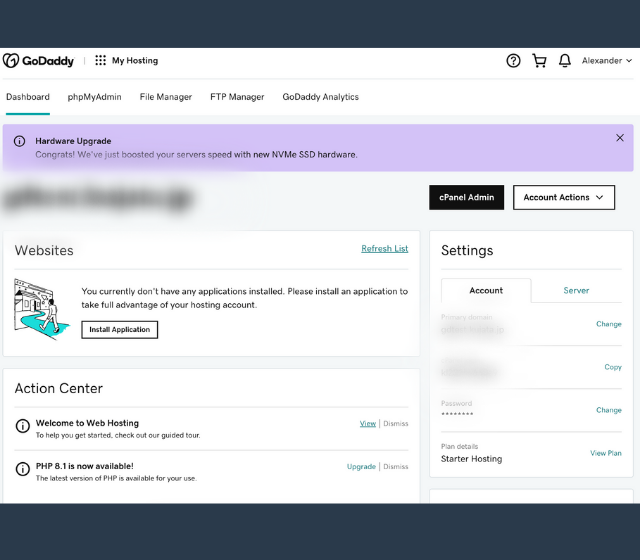
First, log into your Godaddy account. Find the hosting section. Click to access your control panel. Here, you can manage your website. You will see many options. Explore these options carefully. Each option helps you make changes. Changes can make your site better.
Choose a content management system (CMS). Popular choices include WordPress and Joomla. Click to install your chosen CMS. Follow the instructions step by step. Each step is important. This will help you manage your website. You can add new pages and posts. You can change the design too. A CMS makes things easy.
Go to the email section in your control panel. Click to create a new email account. Enter a name for your email. Choose a password you can remember. Save the settings. Now, you can send emails from your domain. This looks professional. Check emails regularly. Keep your inbox organized.
Managing Your Hosting Account
Purchasing web hosting from GoDaddy is simple. Visit their website, select a hosting plan, and complete the registration. Ensure you have a domain name ready, or choose one during the process. Payment is straightforward, and customer support is available if needed.
Monitoring Usage
Keep track of your hosting usage. Check how much space you use. Monitor your bandwidth regularly. This helps avoid unexpected fees. Godaddy provides tools to help. These tools are easy to use. They show your usage clearly. Understanding these can save money.
Upgrading Or Downgrading Plans
Sometimes you need more resources. Other times, you need less. Godaddy makes it easy to change plans. Visit your account settings. Choose to upgrade or downgrade your plan. This flexibility helps you manage costs. Always pick a plan that fits your needs.
Renewing Your Hosting
Renewing your hosting is important. It keeps your website online. Godaddy sends reminders for renewals. Check your email for these. Log into your account to renew. Make sure payment details are correct. This ensures a smooth renewal process. Keeping track of renewal dates is key.
Frequently Asked Questions
How To Set Up Godaddy Web Hosting?
Log in to your GoDaddy account. Select “Web Hosting” and choose your plan. Complete payment, then access cPanel. Use cPanel to install applications, upload files, and manage your website. Configure DNS settings and publish your site. Ensure all settings are correct for smooth operation.
Is Godaddy Good For Web Hosting?
GoDaddy offers reliable web hosting with various plans suitable for different needs. It provides good uptime and customer support. Its user-friendly interface appeals to beginners. Some users mention slow loading times. Consider your specific requirements before choosing GoDaddy as your web host.
Does My Godaddy Domain Come With Hosting?
GoDaddy domains do not automatically include hosting services. You need to purchase hosting separately. Consider GoDaddy’s hosting plans for website needs. Always check your account for specific services and packages included.
Why Is Godaddy Web Hosting So Expensive?
GoDaddy’s web hosting costs more due to their robust infrastructure, 24/7 customer support, and additional features. They invest in security, performance, and marketing, contributing to higher prices. Users benefit from reliable uptime, user-friendly interfaces, and comprehensive services, justifying the expense.
Conclusion
Choosing Godaddy for web hosting is a smart move. Their plans suit various needs. Beginners find the process straightforward. The platform offers helpful tools and support. This makes managing websites easier. Godaddy provides reliable service for small or large sites.
Start with basic hosting plans. Upgrade as your site grows. Their pricing is competitive. Features are user-friendly. A good choice for many website owners. Don’t hesitate. Begin your online journey today. Explore the options available. Find what works best for you.
A well-hosted site is key to success. Godaddy makes it simple.


