
Are you ready to take your Web API from development to live deployment? Publishing and hosting your Web API can seem daunting, but with the right guidance, you’ll navigate this process smoothly.
Imagine your API reaching users globally, performing seamlessly, and driving your project to new heights. This is not just a technical task—it’s the key to unlocking your application’s full potential. By the end of this article, you’ll have the insights and steps needed to effectively publish and host your Web API.
Let’s dive into the essentials that will empower you to make your API accessible to the world.
Choosing The Right Web Hosting Platform
Cloud hosting is like renting a powerful computer. It can grow or shrink based on needs. This is called scalability. Great for big websites. Shared hosting is like sharing a computer with friends. It is cheaper but slower. Best for small websites.
Think about how many visitors your site will have. More visitors need more power. Cloud hosting can handle this. It offers better performance. Shared hosting might slow down with many visitors. Choose wisely for your site’s needs.
Preparing Your Web Api For Deployment
Make sure your code is clean and efficient. Remove any unnecessary parts. This helps your API run faster. Use caching where needed. This saves time when fetching data. Always keep your code simple and easy to read. Developers can understand it better.
Check for repeated code. Move it to functions or methods. This makes your code shorter and neater. Use tools to find parts of your code that are slow. Work on improving those parts.
Keep your API secure. Use strong passwords for all accounts. Always encrypt data that travels over the internet. This protects it from hackers.
Limit access to your API. Only give access to those who need it. Keep your software updated. New updates often fix security holes. This makes your API safer.
Setting Up Your Hosting Environment
Start by choosing a reliable server. This is where your Web API will live. Many options exist like cloud servers or dedicated servers. Next, install the necessary software. This includes web servers like Apache or Nginx. Make sure the server is secure. Use firewalls and strong passwords. It keeps your data safe. Finally, test everything. Ensure the server is running smoothly. This step is important.
Select a database that fits your needs. Options include MySQL or PostgreSQL. Install it on your server. Create tables for storing data. Each table holds different information. Use SQL queries to interact with the database. This helps you add, remove, or edit data. Backup your data regularly. This prevents loss during failures. Keep your database up-to-date. Updates fix bugs and improve security.
Deploying Your Web Api
Publishing and hosting your web API involves choosing a reliable server environment. Consider security and scalability for a smooth deployment. Utilize cloud services or local servers to ensure your API is accessible and efficient.
Using Deployment Tools
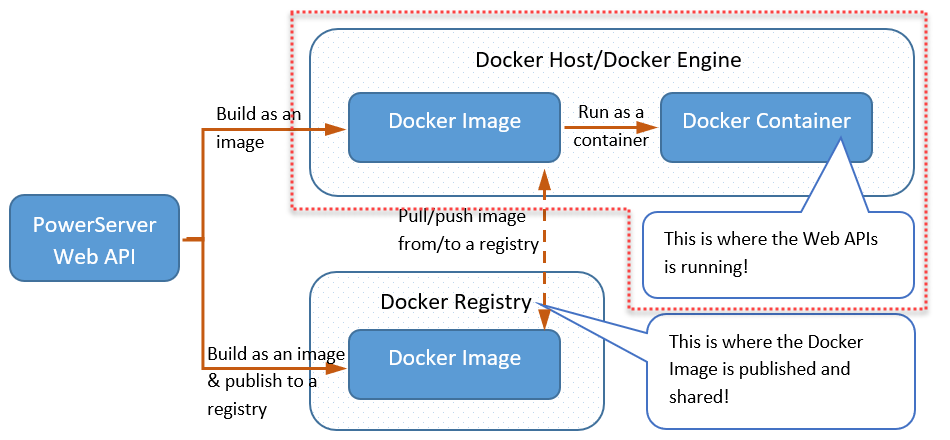
Deployment tools help launch your web API. Popular tools include Docker and Jenkins. Docker packs and ships your application. It works across platforms. Jenkins automates the process. It saves time and reduces errors. Both tools simplify deployment. They offer user-friendly interfaces. Choose the right tool for your needs. Ensure your tool supports your API. Check compatibility before use.
Automating Deployment Processes
Automation makes deployment fast and easy. Use scripts to automate tasks. Scripts reduce manual work. They minimize human errors. Automation tools like Ansible are helpful. These tools manage configurations. They handle updates efficiently. Automate to keep your API running smoothly. Consistency is key in automation. Regular checks improve performance. Automation saves time and effort. Ensure your system supports automation.
Monitoring And Maintenance
Monitoring and maintenance are essential for publishing and hosting a Web API. Regular checks ensure the API runs smoothly, identifying and fixing issues quickly. Maintaining a stable environment improves performance and keeps users happy.
Performance Tracking
Track how fast your Web API runs. Speed matters. Slow API annoys users. Use tools to measure speed. Monitor traffic too. High traffic means your API is popular. Popular APIs need more care. Watch for spikes. Sudden spikes can cause trouble. Alerts help you stay informed. Set alerts for unusual activity. This keeps your API healthy. Regular checks are crucial.
Handling Errors And Downtime
Errors happen. Fix them fast. Use error logs to find problems. Logs show you what’s wrong. Downtime affects users. Keep downtime low. Use backup systems. Backups keep your API running. Check them regularly. Have a plan for big errors. Big errors need quick action. Train your team. Trained teams fix issues fast. Keep users happy with fast fixes.
Credit: docs.appeon.com
Scaling Your Web Api
Scaling is important for web APIs. Vertical scaling means upgrading the server. It adds more power to one machine. Horizontal scaling means adding more servers. It distributes the load. Vertical is simple but limited. Horizontal is flexible and powerful. Choose based on needs and budget.
Load balancing helps manage traffic. Round-robin sends requests in order. It is easy and fair. Least connections sends to the least busy server. It helps when traffic is uneven. IP Hash sends requests based on IP address. It keeps users on the same server. Choose a strategy that fits your API.
Security And Compliance
Protecting data is very important. Use encryption to keep data safe. Secure data both during transit and storage. Implement access controls to limit who can see data. Regularly update your security measures to guard against new threats. Backup data often. Test your protocols to ensure they work well.
Follow the laws for data handling. Know the rules of your region. Adhere to GDPR if you work in Europe. Follow HIPAA for health data. Make sure your users know what data you collect. Get their consent before using it. Keep records of your compliance activities. Regular audits help ensure you meet legal needs.
Credit: learn.microsoft.com
Credit: www.c-sharpcorner.com
Frequently Asked Questions
How Do I Host My Web Api?
Host your Web API by choosing a reliable server provider, setting up the environment, and deploying using tools like Docker or Git. Ensure security protocols are in place and monitor performance regularly.
How To Publish Web Api?
To publish a Web API, deploy it on a server or cloud platform. Ensure proper configuration and security settings. Use tools like Docker or Kubernetes for containerization. Verify accessibility via endpoints. Documentation is crucial for users. Optimize for performance and scalability.
How Do I Publish A .net Core Web Api To A Folder?
To publish a .NET Core Web API to a folder, use the command line. Run `dotnet publish -c Release -o `. Replace “ with your desired directory. This command compiles and copies files to the specified folder, ready for deployment.
How To Host A .net Core Web Api?
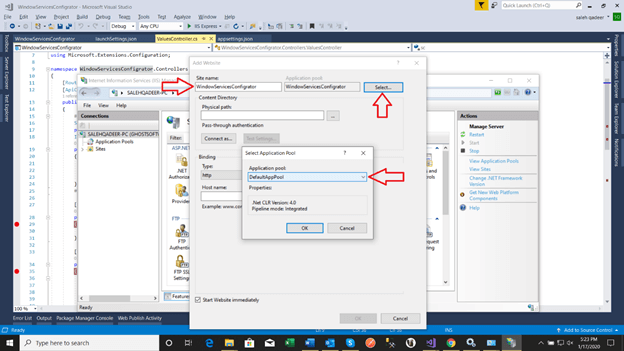
Host a. NET Core Web API by deploying on IIS, Azure, or Docker. Install. NET Core runtime, configure hosting environment, and publish your API. Ensure proper firewall settings and SSL for security. Optimize performance by caching and scaling resources. Monitor using tools like Application Insights.
Conclusion
Publishing and hosting a Web API is straightforward. Start by choosing the right platform. Follow the setup process carefully. Test your API thoroughly before going live. Ensure security measures are in place. Regular updates keep your API running smoothly. Monitor performance to spot any issues early.
Keep documentation clear for users. Good communication helps resolve problems fast. Remember, a well-hosted API enhances user experience. Focus on simplicity and reliability. These steps guide you towards successful API deployment. Keep learning, adapting, and improving your skills over time.
Your Web API journey has just begun.


