
Have you ever felt the frustration of trying to access your website, only to be met with an error message? Properly setting up web host pointers can save you from such headaches.
These pointers are crucial for directing traffic to the right place, ensuring your site runs smoothly. Just like a GPS guides you to your destination, web host pointers guide visitors to your website. Imagine the ease of a seamless connection, where every click leads visitors exactly where they need to go.
It’s not just about avoiding errors; it’s about creating a flawless experience for your users. When you get it right, your website becomes a welcoming place, inviting visitors to explore without interruptions. You’ll discover the simple steps to set up web host pointers effectively. You’ll learn how to avoid common pitfalls and ensure your site is always accessible. Let’s turn confusion into clarity and make sure your website is always open for business. Ready to dive in? Let’s get started!
Choosing A Domain Registrar
Pick a trusted domain registrar for your website. This is important. Check reviews before deciding. Look for good customer support. It helps if problems arise. Compare prices. Some registrars have hidden fees. Choose one with transparent pricing. Many offer extra features like domain privacy. This keeps your info safe. Ensure the registrar supports your domain extension. Not all do. Popular ones are .com, .net, and .org. Make sure they offer easy management tools. These tools simplify your work. A user-friendly interface is key. This makes navigation simple. Avoid registrars with bad reputations. They can cause trouble later. Picking wisely saves time and stress.
Credit: lowendbox.com
Understanding Dns Basics
DNS records help direct traffic on the internet. Each record has a specific job. A Records map domain names to IP addresses. CNAME Records are used for domain aliases. MX Records tell where emails should go. TXT Records hold text information. They might have security details. NS Records tell which servers handle DNS queries. This is important for website stability.
DNS propagation is when changes spread across the internet. This can take time. Sometimes up to 48 hours. Different servers update at their own pace. During this time, some see the old site. Others see the new one. Patience is key. It’s like waiting for a new address to be known by everyone.
Configuring Domain Name Servers
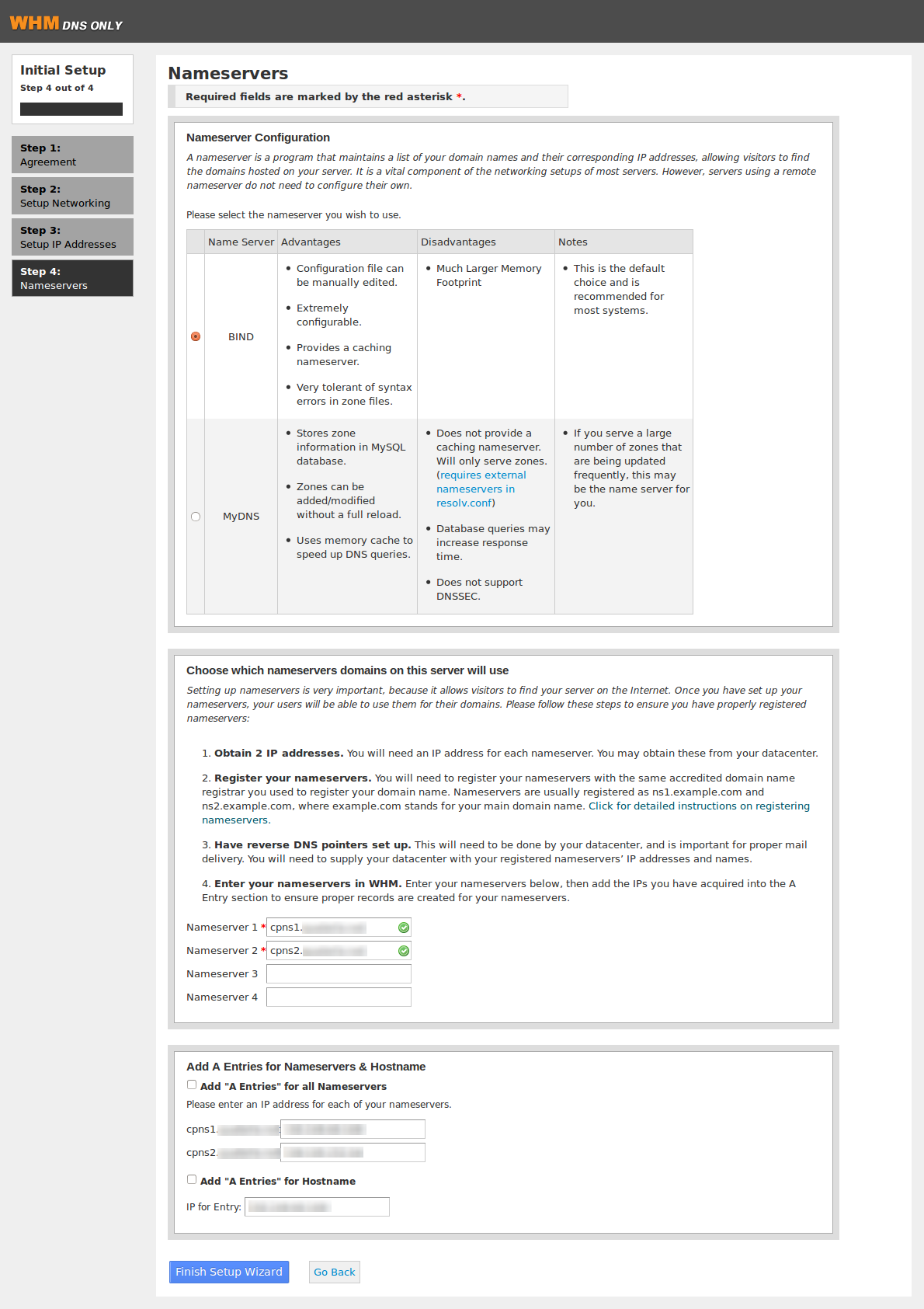
Setting up domain name servers is easy. First, you need a primary server. This server manages all domain requests. It is like the leader. Then, there is a secondary server. It is the backup. If the primary server fails, the secondary helps. These servers work together. They ensure your website is always available. Always keep your server details safe. Use strong passwords and keep them secret.
Some websites use custom name servers. These servers have unique names. You can create them with your domain provider. Custom servers give you more control. They can make your website faster. But, setting them up needs care. Incorrect settings can break your site. Always follow the steps provided by your host. If unsure, ask for help. It’s important to get it right.
Setting Up A Records
A Records help link domain names to IP addresses. You need the correct IP address for your server. Check with your web host for this. Log into your DNS provider’s control panel. Find the option for A Records. Enter your domain name and the IP address. Save the changes. This process may take some time to update.
TTL stands for Time to Live. It tells how long the DNS information stays in cache. A lower TTL means more frequent updates. Set TTL to a reasonable time, like 3600 seconds. This is equal to one hour. It balances between fast updates and server load. Remember, changes may take a while to reflect.
Configuring Cname Records
CNAME stands for Canonical Name. It points one domain to another. The alias is the name you see. The canonical name is the real name. Both are important in domain settings.
An alias can be used for easier access. It helps users find websites quickly. The canonical name is used by systems. It ensures correct routing of web traffic. Understanding both helps in proper web setup.
Subdomains
Setting up CNAME for subdomains is simple. It involves adding records in the DNS settings. Make sure the subdomain points to the right server. This ensures users reach the correct web page.
“`
Credit: www.ionos.com
Mx Records For Email
Choosing the right email hosting option is crucial. There are many choices out there. Some offer free plans. Others have paid options with more features. Always check the storage space. Look at the security features too. Many people like Google Workspace or Microsoft 365. They are popular for a reason. They are both reliable and user-friendly. But other hosts might suit you better. Compare prices and features. Ask yourself what you need most. Is it more storage or better security?
MX Records tell emails where to go. They have a priority number. Lower numbers mean higher priority. Setting this correctly is important. It ensures emails don’t get lost. Always check the priority settings. Make sure they are right for your needs. Test them after setting up. It’s good to know your emails will arrive safely.
Testing And Verifying Setup
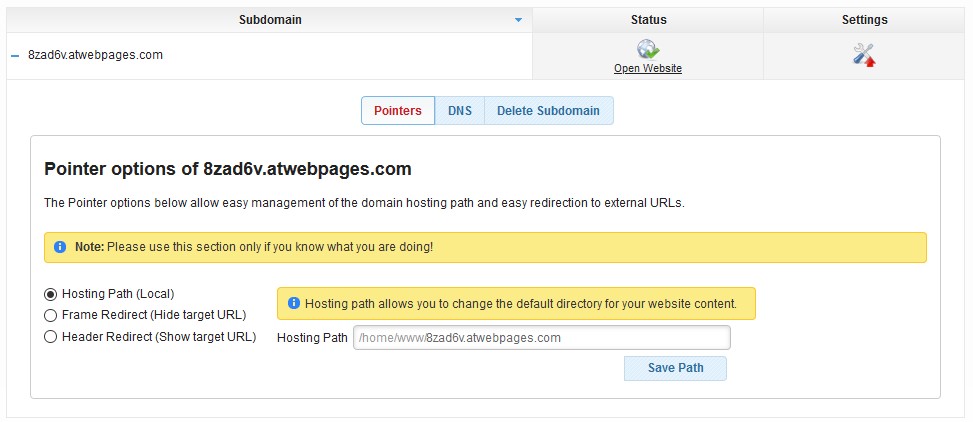
Setting up web host pointers ensures your site directs correctly to your domain. Begin by checking DNS settings. Then, test with a browser to verify everything points correctly.
Tools For Dns Checking
DNS tools help check if your website is set up correctly. They show if your DNS records are correct. Use online services like DNS Checker and MX Toolbox. These tools are easy to use. They help you see if your domain points to the right server. They also check for errors in your DNS settings. This helps ensure your website works smoothly. Always check after making changes to your DNS. This avoids problems later. These tools help you spot issues fast.
Troubleshooting Common Issues
Setting up web pointers can sometimes be tricky. Incorrect DNS settings lead to website downtime. Double-check your DNS records for errors. Look for spelling mistakes in your domain. Make sure your server IP is correct. Use troubleshooting guides online for help. Many guides offer step-by-step solutions. If a problem persists, contact your hosting provider. They can assist you with technical issues. Regular checks help avoid common setup problems. This keeps your website running efficiently.
Credit: www.awardspace.com
Security Measures
DNSSEC helps keep your website safe. It checks the data sent to users. This makes sure it’s not changed or fake. To enable DNSSEC, find the option in your web host settings. Turn it on to secure your site. It’s easy and important. Protect your visitors from bad actors online. Make sure your domain name is safe. Always use strong passwords for extra security.
Keep your website updated regularly. Check for new security patches. Updates fix problems and keep your site safe. Look for new versions of software you use. Install them as soon as possible. This helps to protect against new threats. Monitor your website often. Look for anything that seems wrong. Quick action can prevent big issues. Make a habit of checking for updates weekly.
Frequently Asked Questions
What Are Web Host Pointers?
Web host pointers direct domain names to specific web servers. They ensure visitors access the correct website content. Proper setup is crucial for seamless website accessibility and functionality. These pointers typically involve configuring DNS settings, like A records or CNAME records, to associate domain names with server IP addresses.
Why Is Setting Up Web Host Pointers Important?
Setting up web host pointers is vital for directing traffic to your website. They ensure your domain resolves to the correct server, providing users with the intended content. Without accurate pointers, visitors might face errors or access the wrong site, impacting user experience and website reliability.
How Do I Configure Dns Settings For Pointers?
To configure DNS settings, access your domain registrar’s control panel. Locate the DNS management section. Add or modify records like A or CNAME to point to your web server’s IP address. Save the changes. It may take some time for DNS propagation, so be patient.
What Are A Records And Cname Records?
A records map a domain name to an IPv4 address of a server. They are crucial for directing traffic to your site. CNAME records map a domain to another domain, useful for subdomains. Both records are essential for proper DNS configuration and web host pointer setup.
Conclusion
Setting up web host pointers can seem tricky at first. Follow simple steps to ensure smooth operation. Start with understanding your domain settings. Then, make sure DNS records point correctly. Test changes to confirm everything works. Double-check configurations to avoid errors.
A solid setup supports website performance. Remember, patience is key. Gradually, you will gain confidence. Secure your site and improve visitor experience. Clear setup boosts reliability and speeds up access. Keep learning as the web landscape evolves. Your site deserves the best care.


