
Planning your WordPress site’s web hosting is crucial. Imagine you’ve built a beautiful site and suddenly, it crashes or loads at a snail’s pace.
Frustrating, right? You deserve a site that runs smoothly and efficiently. Choosing the right web hosting can make all the difference. But how do you ensure you make the best choice? You might feel overwhelmed with all the options, but don’t worry.
This guide will simplify the process for you. By the end, you’ll have the confidence to select the perfect web hosting that aligns with your needs. Ready to dive in and unlock the secret to a seamless WordPress experience?
Credit: www.hostinger.com
Choosing The Right Hosting Provider
The right host is important for your site. Think about speed. A fast site keeps users happy. Check the uptime. Uptime means your site is always online. Look at the cost. Is it in your budget? Consider the support. Good support helps with problems. See if they offer backups. Backups save your data.
Security is key. Protect your site from hackers. Look for SSL certificates. They keep data safe. Check for easy WordPress installation. A few clicks should install it. Finally, read user reviews. They show how good the provider is.
| Provider | Feature |
|---|---|
| Bluehost | Easy WordPress setup |
| SiteGround | Strong security features |
| HostGator | Affordable plans |
Types Of Web Hosting
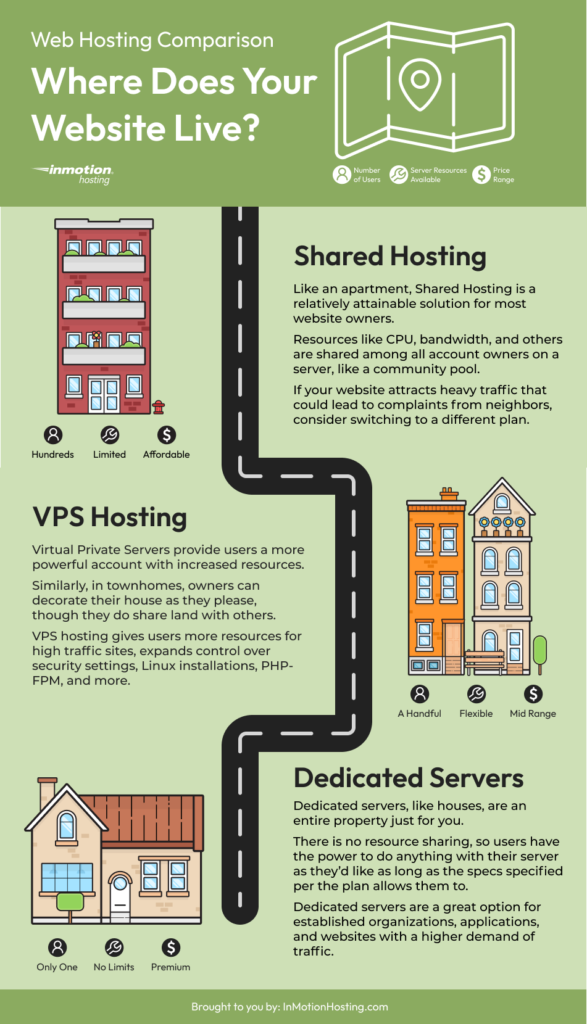
Shared hosting is budget-friendly. Many websites share one server. This means limited resources for each site. It’s a great choice for small websites. Beginners often pick shared hosting. It’s simple to set up. But, if one site gets busy, others slow down. Perfect for personal blogs or small businesses. Easy to manage and usually comes with support.
VPS stands for Virtual Private Server. It offers more control than shared hosting. Websites have their own space on the server. This means better performance and security. Good for growing websites. It allows custom settings. Cost is higher than shared hosting. But you get more resources. Great for medium-sized businesses. Offers flexibility and reliability.
Dedicated hosting means one server for one website. This option is powerful and secure. Ideal for big businesses. Websites get all the server’s resources. No sharing with others. Offers complete control. Expensive, but worth it for large sites. Best for websites with high traffic. Provides maximum performance and customization.
Cloud hosting is modern and scalable. Websites use many servers. This means easy growth. If one server fails, others help. Good for busy websites. Offers flexibility and reliability. Pay only for what you use. Perfect for sites with changing needs. Handles traffic spikes well. Provides excellent uptime and speed.
Budget And Pricing Plans
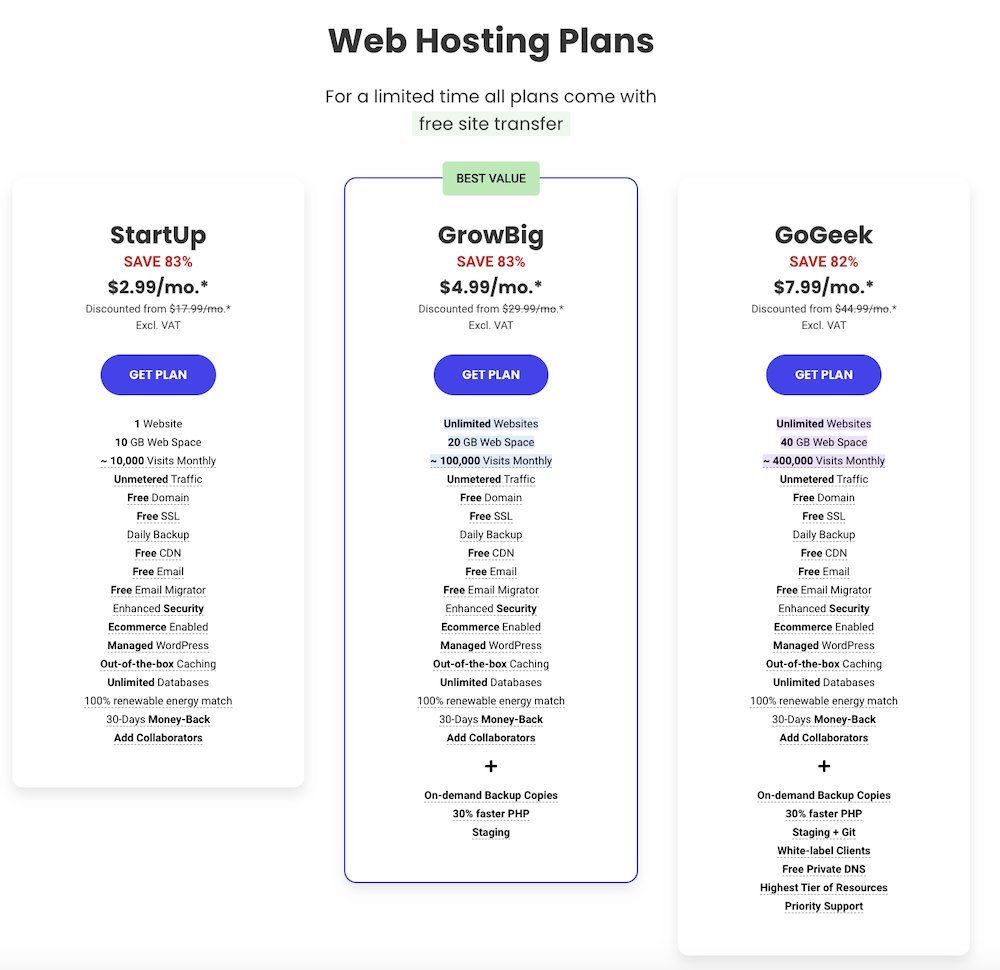
Picking the right hosting plan is important. Cheap plans may not give you everything you need. Think about the features you will get. More storage and speed can be worth extra cost. A good plan should fit your needs and budget.
Some hosts have hidden fees. Always read the fine print. Ask about renewal costs. These can be higher. Watch for add-on charges for extra features. Know what you are paying for.
Assessing Your Site’s Needs
Planning your WordPress site web hosting starts with understanding your site’s needs. Consider traffic, storage, and security requirements. Choose a host that aligns with your goals.
Traffic And Bandwidth Requirements
Think about how many visitors you expect. More visitors need more bandwidth. A small blog may need less. A big store will need more. Choose a host that can handle growth. Check if they offer extra bandwidth. This helps if traffic spikes.
Security And Backup Necessities
Protect your site with good security features. Look for hosts that offer SSL certificates. These keep data safe. Backups are also important. If something goes wrong, a backup helps. Some hosts offer daily backups. This keeps your data safe. Choose a host that values security and backups.
Technical Support And Customer Service
Good support helps when things go wrong. It is like a safety net. Reliable support can save your site from trouble. Quick help means less downtime. Downtime can lose you visitors. Visitors like sites that work well. Good support fixes problems fast. It keeps your site running smoothly.
Check how fast support answers questions. Fast replies mean quick help. Look for friendly support staff. Friendly staff makes you feel cared for. 24/7 support is best. It helps anytime you need it. Read reviews from other users. Reviews tell you if support is good or bad.
Scalability And Future Growth
Planning for your website’s future is very important. Your website should grow as your business grows. Choose a hosting plan that allows for easy expansion. Scalable hosting solutions let you add more resources easily. This ensures your site can handle more visitors.
Flexible hosting solutions are key for a growing business. Some hosting plans offer flexible options to increase bandwidth. Also, they provide more storage space as needed. This way, your website can adapt to changes. Make sure the host offers these features.
Consider the cost of upgrading your hosting plan. Some hosts charge more for extra resources. Budgeting for future growth helps you avoid surprises. Check if the host provides technical support. This ensures you get help when needed.
Performance And Uptime
Speed is crucial for any website. Pages should load fast. Slow sites can annoy visitors. They may leave and not return. Choose hosts with high-speed servers. This ensures quick loading times. Fast sites keep users happy.
Reliability matters too. Websites should be online always. Downtime can hurt your site. It can lose visitors and trust. Reliable hosts promise great uptime. This means your site stays live.
Use monitoring tools to track site speed. They help find problems fast. Fixing issues quickly is important. Tools also check uptime. They alert you if your site goes down. This helps keep your site reliable.
Credit: www.inmotionhosting.com
Control Panel And User Interface
A good control panel should be easy to navigate. Users should find it simple to locate settings. Basic tasks should be quick to perform. The interface must be clean. Avoid complex menus. Kids should understand it. Icons should be clear. Text should be readable.
Look for a panel with backup options. Ensure it supports one-click installations. Check for security settings. Speed settings are important. Ensure it has a file manager. Email settings are necessary. DNS settings should be easy. Customization options are a plus.
Migration Assistance And Setup
Moving your site can be hard. Migration tools help make it easy. Many hosts offer free migration services. Always back up your site first. It’s important to keep your data safe. Check if your host provides 24/7 support. This helps if something goes wrong. Ensure that your site files are properly copied. Test your site after migration. Make sure everything works fine. Look for downtime guarantees. This means your site stays online during the move.
Setting up your site is the next step. Choose a strong password for your account. This keeps your site safe. Install WordPress using one-click installers. They make the job simple. Configure your site’s basic settings. This includes setting up your site title and tagline. Pick a theme that fits your site. Customize it to match your style. Add important plugins for extra features. These tools improve your site’s function. Always save your changes. This ensures everything is updated.
Credit: www.ryrob.com
Frequently Asked Questions
How To Choose Hosting For A WordPress Website?
Choose hosting with reliable uptime and speed. Prioritize security features and daily backups. Ensure compatibility with WordPress. Look for excellent customer support. Consider scalability for future growth.
How Do I Plan A WordPress Website?
Start by defining your website’s purpose and target audience. Choose a suitable WordPress theme. Create a sitemap for structure. Plan essential pages and content. Optimize for SEO and mobile responsiveness.
How Do I Host My WordPress Site?
To host your WordPress site, choose a reliable hosting provider. Install WordPress through their platform. Customize settings and themes, then upload your content. Ensure your site is secure and regularly updated. Select a domain name to make your site accessible online.
Follow these steps to successfully host your WordPress site.
Which Hosting Is Best For WordPress Sites?
SiteGround, Bluehost, and WP Engine are top choices for WordPress hosting. They offer excellent performance, security, and support. Choose based on your budget and specific needs to enhance your WordPress site’s functionality and speed.
Conclusion
Choosing the right hosting for your WordPress site is crucial. It impacts speed, security, and reliability. Start by defining your site needs clearly. Consider your budget and traffic expectations. Look for hosting with excellent customer support. Prioritize security features and backup options.
Don’t rush your decision; research thoroughly. Compare various hosting providers. Read reviews and customer feedback. A well-planned hosting choice sets a strong foundation. This foundation helps your WordPress site grow smoothly. Make informed decisions for long-term success. With careful planning, your site will thrive online.
Your efforts will lead to a successful website journey.


