
Are you ready to showcase your creativity and share your WordPress theme with the world? Packaging a WordPress theme might seem daunting at first, but with the right guidance, it becomes a straightforward process.
Imagine your theme in the hands of users, transforming their websites into stunning masterpieces. That’s the power of a well-packaged theme. You’ll discover the essential steps to package your WordPress theme effectively. You’ll learn how to make it user-friendly, appealing, and ready for distribution.
Get excited, because you’re about to unlock the potential to turn your design into a sought-after tool for countless WordPress users. Stay tuned, and let’s dive into the details!

Credit: www.etsy.com
Preparation
Ensure all necessary files are present. Review your theme’s folder structure. Double-check for missing images, scripts, or stylesheets. Make sure the theme works smoothly.
Verify that all third-party assets comply with licensing rules. Check licenses for fonts, images, and scripts. Make sure you have the rights to use them. Avoid any legal issues.
Keep your documentation current. Add instructions for installing and using the theme. Include any new features or updates. Make it easy for users to understand and follow.
Organizing Files
Start by creating a clear folder layout. Each folder should hold specific files. For example, keep all CSS files in one folder. Place JavaScript files in another. This makes it easy to find files later. Keep image files in a separate folder too. A well-structured directory helps in quick updates.
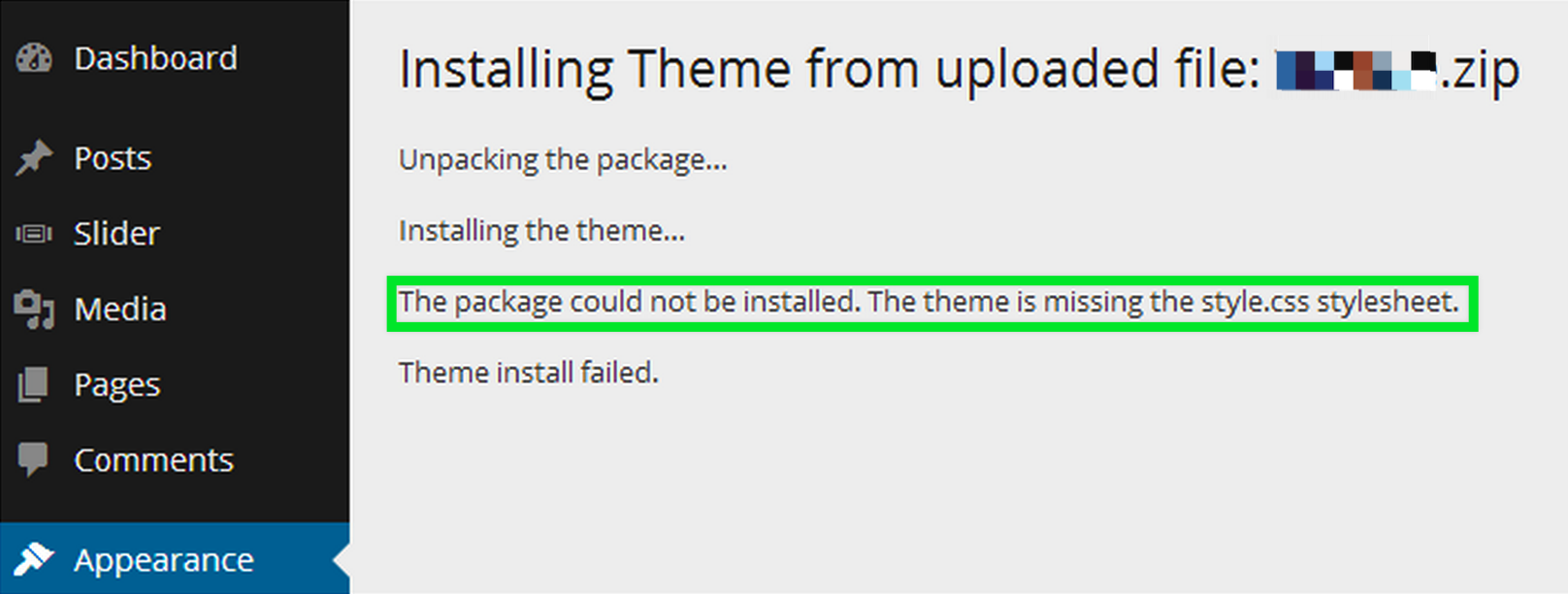
Add all required files for your theme. These include style.css and index.php. Also, add functions.php for extra features. Ensure all files are up to date. Missing files can cause errors. Double-check the list of files before packaging.
Remove files that are not needed. This includes test files or old versions. Unused files make the package heavy. They also confuse users. A clean package is easy to manage. Keep only what is needed for the theme to work.
Creating A Zip Archive
Select a compression tool that works for you. Tools like WinRAR and 7-Zip are good choices. They help pack your WordPress theme neatly.
Keep the directory structure intact. Every file and folder must stay in its place. This ensures the theme works well when unpacked.
Check the archive integrity. Open the zip file and see if all files are there. Missing files can break the theme.
Testing The Package
Start by setting up a new WordPress site. Use it to test the theme. This helps in finding any hidden errors. Make sure everything works well. Follow each step with care. Install the theme just like any other. Pay attention to the details.
Explore all the theme features. Ensure buttons and links work. Images must display properly. Check if text aligns well. Test on different devices. Look for any broken parts. Ensure that menus open correctly. Test all forms for errors.
If you find issues, note them down. Fix them one by one. Double-check after every fix. Updates can solve many problems. Sometimes, older plugins cause conflicts. Disable them and test again. Make sure the theme is error-free before sharing.
Distribution
Pick the right distribution platforms. Use places like WordPress.org and ThemeForest. They are popular for themes. Consider your target audience. Choose platforms they visit often. This helps you reach them better.
Make sure your theme package is complete. Include all files needed. Test the package before uploading. It should be bug-free. Follow the platform’s upload guidelines. This avoids problems later. Keep your package organized.
Decide on the pricing of your theme. Consider your competitors. Set a price that is fair. Think about offering a free version. This attracts more users. Clearly outline the terms of use. Make sure users understand them. This builds trust.

Credit: www.etsy.com
Marketing Strategies
Share your theme on popular platforms like Facebook and Instagram. Create eye-catching posts with screenshots. Use simple language to describe your theme. Engage with your followers by asking questions. Answer their comments quickly. Social media can help you reach many users.
Join WordPress forums and discuss your theme. Share tips and help others. Being active can build trust. Attend WordPress meetups and events. Talk about your theme in group chats. This helps you connect with potential users.
Give a special price for the first buyers. Discounts can attract more users. Announce the offer on your website. Tell people how long the offer lasts. A good deal can make people buy your theme quickly.
Ongoing Maintenance
Regular updates keep your theme fresh. Improve security and fix bugs. Customers trust themes that stay updated. Update the theme often to provide new features. Consistent updates make users happy.
Customer support is essential. Answer questions quickly. Help users with problems. Support builds loyalty and trust. Customers feel valued with good support. Offer help through email or forums.
Feedback monitoring is crucial. Listen to user feedback. Improve the theme based on feedback. Happy users lead to more downloads. Feedback helps make better themes. Always check feedback for improvements.
Credit: help.market.envato.com
Frequently Asked Questions
What Is The Best Way To Package A WordPress Theme?
The best way to package a WordPress theme is to ensure it includes all necessary files. This includes templates, stylesheets, and scripts. Use a consistent naming convention and organize the files logically. Compress the theme folder into a ZIP file for easy distribution and installation.
How Do I Test My WordPress Theme Before Packaging?
Before packaging, test your WordPress theme on a local server. Ensure all functions and design elements work as intended. Validate the code for any errors and check browser compatibility. Use WordPress’s Theme Unit Test data to ensure your theme handles various content types correctly.
Can I Include Plugins In My WordPress Theme Package?
It’s generally advised not to include plugins in your WordPress theme package. Instead, recommend essential plugins in your theme documentation. Alternatively, use TGM Plugin Activation to prompt users to install necessary plugins. This ensures users have the freedom to choose their preferred plugins.
How Do I Ensure My Theme Meets WordPress Standards?
Ensure your theme follows WordPress coding standards by validating your code. Use tools like Theme Check to identify potential issues. Ensure your theme is responsive, secure, and compatible with the latest WordPress version. Adhering to standards enhances your theme’s reliability and user experience.
Conclusion
Creating a WordPress theme package can seem daunting. But it’s manageable. Follow the steps, one by one. Start with organizing your files. Ensure all necessary files are included. Validate your theme for errors. Consider user experience and simplicity. Test your theme thoroughly.
Make adjustments if needed. Keep your theme clean and efficient. Remember, a well-packaged theme enhances usability. It also boosts your credibility as a developer. Practice makes perfect. Keep refining your skills. Soon, packaging WordPress themes will be second nature. Happy coding!


