
Are you tired of paying monthly fees for web hosting? Ever wondered what it takes to own your very own web hosting server?
Imagine having complete control over your website’s performance, security, and uptime. Owning a web hosting server might sound complex, but it’s easier than you think. You’ll not only save money in the long run but also gain unmatched flexibility. Dive into this guide where we break down the process into simple steps.
You’ll discover what equipment you need, how to set it up, and the secrets to managing it efficiently. Ready to unlock the power of web hosting on your terms? Let’s get started!
Choosing The Right Server Type
Dedicated servers are like having your own private playground. No one else can use your space. You have all the power and control. It’s great for big websites with many visitors. But, it can be expensive. You need to know how to manage it well.
VPS hosting is like sharing a house with friends. Each has their own room. You get some privacy and control. It’s cheaper than dedicated servers. Good for medium-sized websites. Easy to upgrade when you grow. But, you still share with others.
Cloud servers are like living in the clouds. You can grow and shrink as needed. Pay for what you use. It’s flexible and good for unpredictable traffic. You don’t worry about hardware. But, it depends on internet speed.
Setting Up The Server
First, choose an operating system for the server. Popular options include Linux and Windows. Linux is often free and secure. Windows is user-friendly. Download the installation file from the official website. Next, boot the server from a USB drive or DVD. Follow the on-screen instructions. Select the language and region. Agree to the terms and conditions. Set up a username and password. Wait for the installation to finish. Restart the server when done.
Open the network settings on the server. Choose static IP or dynamic IP. Static IP is fixed and stable. Dynamic IP changes over time. Enter the IP address, subnet mask, and gateway. Configure the DNS settings. Use a reliable DNS server. Test the connection to ensure it works. Check the internet speed. Confirm the server is online. Now, the server is ready to host websites.
Security Measures
A firewall helps protect your server. It blocks unwanted traffic. Setting up a firewall is crucial. It acts like a guard. Only good data gets through. You must update it often. New threats can appear daily. A strong firewall keeps your server safe.
SSL certificates make your server secure. They encrypt data. This keeps it safe from hackers. SSL is important for trust. Visitors feel safer on your site. Browsers show a lock icon. This tells users your site is secure. Always use SSL for sensitive information.
Software updates keep your server healthy. They fix bugs and holes. Updates are important for safety. Hackers look for weak spots. Always update your software. Use the latest versions. This reduces risks. Regular updates are like a safety shield.
Performance Optimization
Resource allocation is key for smooth server performance. Divide server power wisely. Ensure each user gets enough resources. This prevents overload. Allocate CPU, RAM, and storage based on needs. This keeps the server fast and reliable.
Load balancing helps manage traffic. It spreads the load across many servers. This keeps any one server from getting too busy. Balancing the load stops downtime. It improves user experience and keeps everything running smoothly.
Caching techniques speed up websites. Store data temporarily for quick access. This reduces the need to fetch data repeatedly. It makes sites load faster. Caching saves time and server resources. Users enjoy a quicker, smoother experience.
Backup And Recovery
Backing up your data is very important. Automated backup solutions can help with this. They save copies of your data without you needing to do anything. These solutions work on their own. You can set them to backup daily or weekly. This keeps your data safe. If something goes wrong, you have a backup. Safety is the key here. You won’t lose your important files.
Sometimes, bad things happen. Computers can break. Files can be lost. A disaster recovery plan helps you fix this. It is a plan to get back your lost data. The plan tells you what to do step by step. It helps to get everything back to normal. Make sure your plan is easy to follow. Everyone should know it. This way, no data is lost forever.
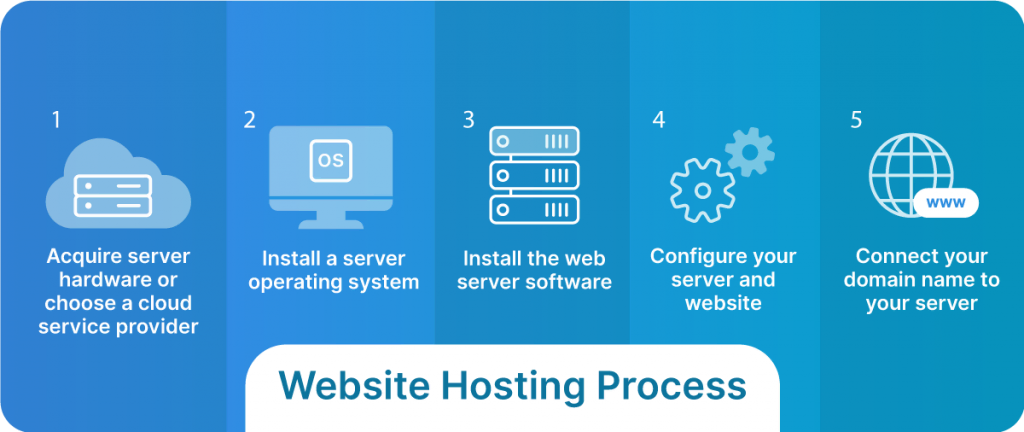
Credit: www.liquidweb.com
Monitoring And Maintenance
Owning a web hosting server requires regular monitoring to ensure smooth performance. Maintenance tasks, like updating software and managing resources, prevent downtime. Regular checks help in identifying potential issues early.
Server Monitoring Tools
Keeping your server healthy is important. Use server monitoring tools to check its status. These tools alert you if something goes wrong. They help track server performance and uptime. It’s like having a watchful eye on your server. Some popular tools are Nagios, Zabbix, and PRTG. Each tool offers unique features. Choose one that fits your needs. Monitoring helps prevent downtime and keeps users happy.
Routine Maintenance Tasks
Regular maintenance is key to a smooth server. First, update your software often. This helps fix bugs and security issues. Second, backup your data regularly. This keeps your data safe from loss. Third, clean up old files and logs. They can slow down your server. Fourth, check for hardware issues. Replace faulty parts quickly. These tasks ensure your server runs well. A happy server leads to happy users.
Legal And Compliance Considerations
Data Protection Regulations are important. Protecting customer data is necessary. Laws are strict. You must follow the rules. Store data safely. Keep it private. Breaches can cause trouble. Heavy fines are possible. Always check for updates. Laws change often.
Terms of Service set rules for users. They explain what is allowed. Users must agree before using the service. Terms protect the company. They limit liability. Clear terms help avoid disputes. Write them in simple language. Users must understand them. Update them regularly.

Credit: diggitymarketing.com
Scaling Your Server
Horizontal scaling means adding more servers. It helps handle more users. Each server shares the load. It can be costly but offers flexibility. Vertical scaling means upgrading the current server. This includes adding more RAM or CPU. It is simpler but has limits. Once upgraded, no more growth is possible. Choose the right type based on needs. Each has pros and cons. Know them well.
Load testing checks server strength. It simulates heavy use. This finds weak points. Helps make improvements. Use software tools for testing. They mimic real user actions. Ensure server can handle peak times. Regular tests keep the server strong. Fix issues before they grow. Testing is crucial for server health.

Credit: www.siteuptime.com
Frequently Asked Questions
Can I Create My Own Web Hosting Server?
Yes, you can create your own web hosting server. You’ll need hardware, software, and technical expertise. Setting up involves configuring a server, installing web hosting software, and ensuring security measures. Consider factors like uptime, maintenance, and bandwidth to ensure reliable hosting.
How Much Does It Cost To Run A Web Server?
Running a web server costs between $10 to $100 monthly, depending on hosting type, server size, and additional features. Shared hosting is cheaper; VPS and dedicated servers are pricier. Additional costs may include domain registration, SSL certificates, and maintenance. Prices vary by provider and specific requirements.
How Much Does A Hosting Server Cost?
Hosting server costs vary from $3 to over $400 monthly. Shared hosting is cheaper, while dedicated servers are pricier. Pricing depends on resources, support, and features offered. Comparing different providers can help find the best deal. Look for discounts and promotions to save money on hosting.
Can I Host My Website By Myself?
Yes, you can host your website yourself. You’ll need a server, technical knowledge, and reliable internet connection. Self-hosting provides control and customization but requires maintenance and security management. Consider costs, time, and expertise before deciding. Most prefer third-party hosting for convenience and support.
Conclusion
Owning a web hosting server is within reach. Start by understanding your needs. Choose reliable hardware and software. Learn server management basics. Keep security a priority. Regular updates are crucial for performance. Backups protect your data. Troubleshooting skills will save time.
Join community forums for support. Patience and practice improve your skills. Hosting your own server brings independence and flexibility. It can be challenging, but rewarding. With effort, you gain control over your online presence. Enjoy the satisfaction of managing your own server.


