
You’ve got a GoDaddy domain, and now you’re looking to move it to a new web host. It’s a smart move that can offer better performance, more features, or simply a better fit for your needs.
But how do you actually make this transfer happen without losing your domain or facing downtime? Don’t worry—you’re in the right place to find out exactly how. Imagine having your website up and running smoothly, with no hiccups in sight.
That’s the ideal scenario, right? This guide will show you step-by-step how to move your GoDaddy domain seamlessly. You’ll learn what information you need, where to find it, and how to ensure your website stays online during the transition. By the end of this article, you’ll not only know how to transfer your domain but also gain the confidence to handle such tasks in the future. Keep reading to discover how simple this process can be with the right guidance.
Preparation Steps
First, ensure your domain is not locked. A locked domain cannot be moved. Go to your GoDaddy account. Check the domain settings. Find the lock status. Unlock the domain if needed. This step is crucial. It allows your domain to be transferred easily.
Make sure your contact info is correct. Incorrect info can cause delays. Check your email address. Confirm your phone number. Update any outdated details. This ensures you receive important notifications. Notifications about your domain transfer.
Credit: www.godaddy.com
Generate Authorization Code
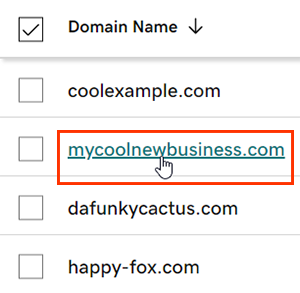
Log in to your GoDaddy account. Find the Domain Manager section. Click on your domain name. Look for the Settings tab. It might be labeled as Domain Settings. Scroll down. See the option for Authorization Code. This code is important.
Find the Transfer section in settings. Click to request a code. GoDaddy will send the code. It comes via email. Check your inbox. The email might be in spam. Use this code for domain transfer. Keep the code safe. You need it for later. Without it, transfer fails.
Select A Web Host
Choosing a web host is important. Look for reliable hosting features. Make sure it suits your needs. Check server uptime and speed. These are crucial for your site. Customer support should be available 24/7. This helps in case of issues. Security features are vital too. Protect your site from threats.
Evaluate Hosting Features
Storage and bandwidth are key. Ensure they meet your requirements. Control panel access is useful. It helps manage your website easily. Backup options are also important. They ensure data safety. Look for email hosting if needed. SSL certificates enhance security. They build trust with visitors.
Check Transfer Compatibility
Ensure the host supports domain transfers. Not all hosts do. Check if they have migration tools. These tools simplify the process. Look for any transfer fees. Some hosts charge for this. Read their terms and conditions. Understand all the details before moving.
Initiate Domain Transfer
Start by logging into your GoDaddy account. Go to the domain settings. Look for the transfer option. Click on it. You will need to submit a transfer request.
Make sure your domain is unlocked. Also, check your contact info. It should be up-to-date. This ensures smooth communication.
You need an authorization code. This is also called an EPP code. Get it from your current registrar. You can find this in the domain settings.
Enter this code when asked. It proves you own the domain. Make sure to keep this code private. Only share it with your new host.
Verify Domain Transfer
Look for a transfer email from GoDaddy. This email is very important. It asks you to confirm the domain transfer. Check your inbox carefully. Sometimes it goes to spam. Click the link in the email. This confirms you want to move your domain. After clicking, wait for the transfer to start.
Check your email regularly. The transfer email has key instructions. Follow them step by step. Don’t rush. Make sure you understand each step. Ask for help if confused. Your domain transfer depends on it.
Keep checking the domain status. Use the web host’s dashboard. It shows the transfer progress. Patience is needed here. Transfers can take time. If problems occur, contact support. They can help solve issues.
Credit: www.godaddy.com
Update Dns Settings
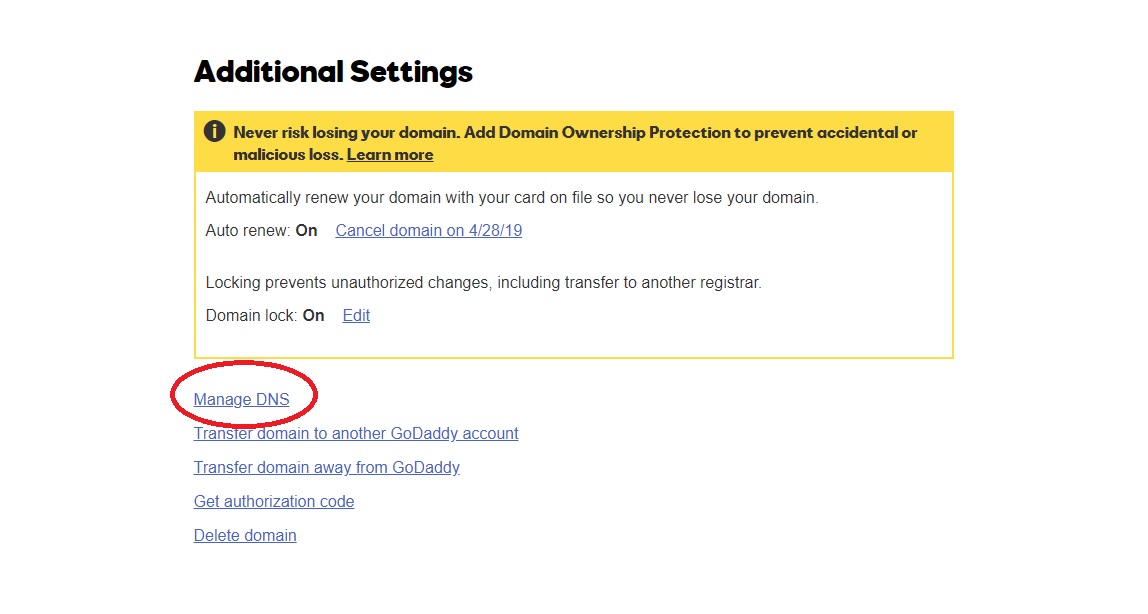
Start by logging into your GoDaddy account. Go to the domain manager section. Click on the domain you want to transfer. Look for the DNS management option. This is where you will make changes. It is important to find the right section. This will ensure smooth transfer of your domain.
In the DNS management area, find the DNS records section. Here, you can add or edit records. You might see terms like A record or CNAME. These are important for your domain. Make sure to enter the correct values. This helps in connecting your domain to the web host. Always double-check the information you enter.
Test Domain Functionality
Check Website Access after moving the domain to a new host. Open a web browser. Type your domain name in the address bar. Press Enter. The website should load. Can you see your website? If yes, the transfer was successful. If not, there might be a problem.
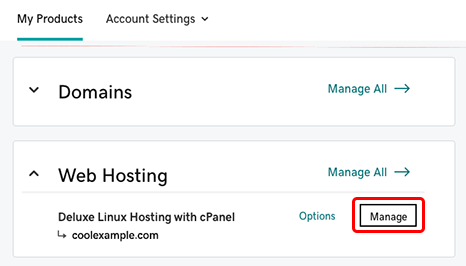
Resolve Potential Issues quickly to prevent downtime. Look for error messages. Common issues include DNS settings not updated. Check your DNS settings at the new host. Ensure they match the information provided by the host. Another issue could be file permissions. Incorrect permissions can block access. Adjust permissions if needed.
Credit: www.godaddy.com
Frequently Asked Questions
Can I Transfer My Godaddy Domain To Another Host?
Yes, you can transfer your GoDaddy domain to another host. Unlock your domain and obtain the authorization code. Initiate the transfer with your new host. Follow their instructions to complete the process. Ensure your domain is eligible for transfer, having been registered for at least 60 days.
How Do I Transfer My Domain To A Host?
Unlock your domain and obtain the authorization code. Initiate the transfer process with your new host. Confirm the transfer via email. Ensure DNS settings are updated. Wait for the transfer to complete.
How Do I Point My Godaddy Domain To Host?
Log in to GoDaddy, access Domain Settings, select Manage DNS. Add A Record with your hosting provider’s IP address. Save changes.
Why Can’t I Transfer My Godaddy Domain?
Your GoDaddy domain can’t transfer if it’s locked, within 60 days of registration, or recently updated. Ensure your email is correct and obtain an authorization code. Check for outstanding charges or disputes. Contact GoDaddy support for specific issues.
Conclusion
Transferring your GoDaddy domain to a web host is straightforward. Follow the steps carefully. Keep your details handy. Verify the domain transfer. Check your email for confirmation. Ensure your web host settings are correct. Test your website after moving. Problems might arise; stay patient.
Seek help if needed. Your domain is now with your web host. Enjoy your updated website! Keep these tips in mind for future transfers.


