
Are you fed up with slow loading times or frequent outages on your current web host? Perhaps you’re looking for better support or more features at a competitive price.
Whatever the reason, migrating to another web host might seem daunting at first. But fear not—this guide is here to make the process smooth and stress-free for you. Imagine the relief of having your website run seamlessly, without the constant hiccups you’ve been dealing with.
Picture the satisfaction of knowing your online presence is secure and supported by a reliable host. You’ll learn the step-by-step process to make the switch easily and efficiently, ensuring you don’t lose valuable data or SEO rankings. Plus, we’ll share insider tips to help you avoid common pitfalls along the way. Ready to transform your website hosting experience? Dive into the article and discover how simple it can be to migrate to a new web host. Your website deserves the best, and so do you.
Credit: www.cloudways.com
Reasons For Switching Hosts
Websites need good hosts to work well. Poor performance can cause slow sites. Slow sites annoy visitors and hurt business. Some hosts have bad customer service. Long wait times for help can frustrate users. High costs are another reason to switch. Cheaper options might offer the same benefits. Security issues can arise with some hosts. Protecting data is very important for site owners. Better security can be found with other providers.
Limited features can restrict site growth. More features help expand and improve websites. Some hosts have downtime issues. Websites must be online all the time. Frequent downtime can cause problems for businesses. Switching hosts can solve many of these issues. Finding a better host improves site performance. Happy visitors mean a successful website.
Choosing The Right Host
Different hosts offer different features. Some have better uptime. Others provide more storage space. It’s important to know what your website needs. A business site might need more bandwidth. A blog might need a simple interface. Make a list of what you need. Then, check each host.
Cost is important. Some hosts are cheap. Others are costly. The cheapest is not always the best. Look at the value for money. Check if there are hidden fees. Some hosts charge for extras. These can add up. Choose a host that fits your budget. But also meets your needs.
Reviews help you know a host’s reputation. Read many reviews. Look for common complaints. If many users mention the same issue, be cautious. Also, check the host’s response to reviews. Do they try to fix problems? A host that listens to users is a good sign.
Preparing For Migration
First, create a backup of your website. Use a reliable tool for this. Save all files and databases. This ensures you don’t lose data. Store the backup in a safe place. This step is crucial for safety.
Make sure your new host supports your website’s technology. Check the server type and software versions. Ensure compatibility with your site’s plugins and themes. This will prevent any issues later.
Gather all credentials needed for migration. This includes FTP details, database access, and domain information. Ensure you have login details for both old and new hosts. This makes the process smooth and easy.
Transferring Your Domain
Unlocking your domain is the first step. Log into your domain account. Find the lock setting. Turn off the lock. This lets you move the domain. Make sure to save changes.
Go to your domain settings. Find the DNS section. Enter new server details. This points your domain to the new host. Double-check the entries for errors. Save the updated settings.
Propagation is the wait time for changes. Usually, it takes 24 to 48 hours. During this time, some users may see the old site. Be patient. The new settings will soon be active for all users.
Moving Website Files
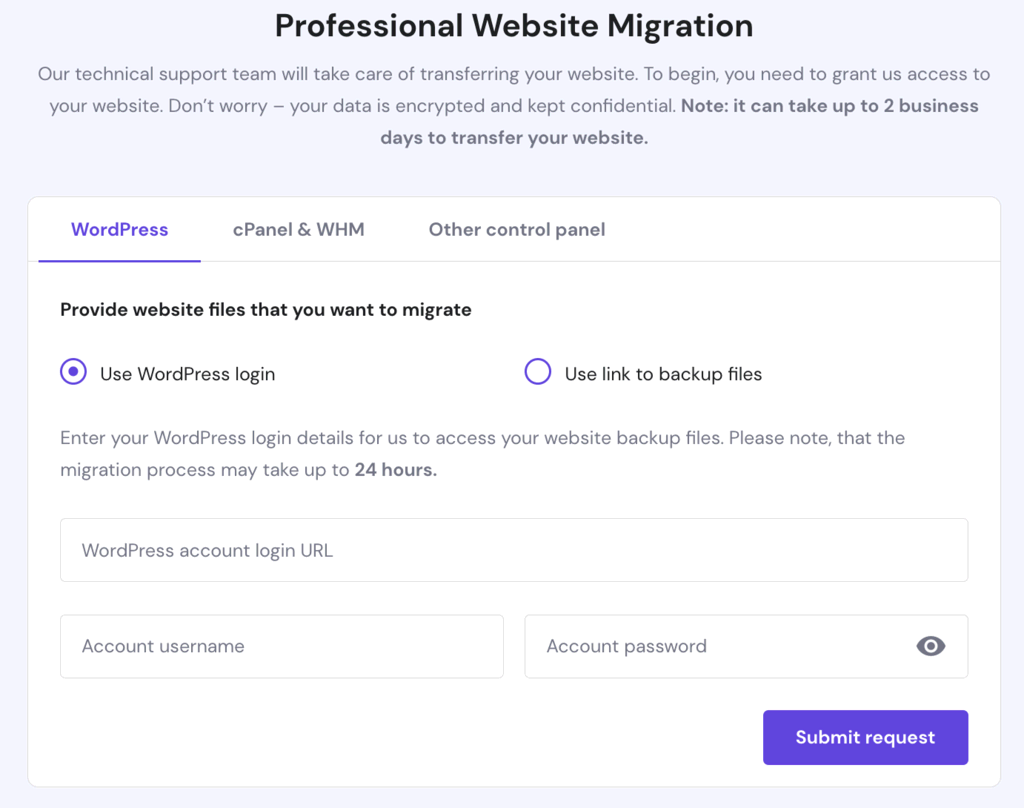
Connect to your old host using FTP or SFTP. These tools let you move files safely. Select all website files. Download them to your computer. Next, connect to your new host with FTP or SFTP. Upload the files. Make sure each file is in the right folder. Check every file. This keeps the site working smoothly.
Access your old host’s database. Use tools like phpMyAdmin. Export the database. Save it on your computer. Connect to the new host’s database. Import the saved database. Ensure all tables are there. Verify data integrity. This step is crucial for your site’s functions. Double-check everything.
Visit your site on the new host. Check all pages. Ensure images and links work. Test forms and scripts. Look for any errors. Fix them quickly. Use a temporary URL if needed. Confirm site looks the same. This ensures users have a good experience. Do not skip testing.
Credit: www.hostinger.com
Updating Email Settings
Create new email accounts with your new host. Use the same names as before. This keeps things simple. Make sure you have all the login details. These will help you access your new emails.
Set up email forwarding from your old host. Forward emails to your new accounts. This way, you won’t miss important messages. Check that the forwarding works properly. This will ensure smooth communication.
Send a test email to your new address. Check if you receive it. If not, review your settings. Make sure everything is correct. It’s important to ensure proper email delivery.
Troubleshooting Common Issues
Switching web hosts can lead to issues like downtime or data loss. Ensure smooth migration by backing up your website. Check compatibility of your files and databases with the new host.
Resolving Dns Errors
DNS errors happen when the server cannot find the website. Check if the domain settings are correct. Update the nameservers with the new host’s details. Clear the DNS cache on your computer. Use online tools to check DNS propagation.
Fixing Broken Links
Broken links are links that do not work. Use a tool to find broken links. Fix them by updating the URL. Redirect the old link to a new page. Make sure all links are working properly. Test your website after updating links.
Addressing Downtime
Downtime means the website is not accessible. Check server status with your host. Ensure your site is properly configured. Restart your server if needed. Monitor your site with uptime tools. Contact your host for help if downtime persists.
Post-migration Tasks
Check your website’s speed. Use tools like Google PageSpeed. Slow loading frustrates users. Monitor server response time. Keep an eye on downtime. Regular checks help keep your site running well.
Install security plugins. Check for malware or viruses. Keep software up to date. Use strong passwords. SSL certificates encrypt data. Protect your site from hackers. Regularly backup your website data.
Tell users about the migration. Send them an email. Update social media platforms. Notify them of changes. Users should know new features. Keep them informed to maintain trust.

Credit: www.hostitsmart.com
Frequently Asked Questions
How Do I Move From One Web Host To Another?
Backup your website files and database. Choose a new host and sign up. Upload files to the new server. Update DNS settings to point to the new host. Verify the site functionality after migration.
How To Transfer From One Host To Another?
To transfer hosts, back up your website files and database. Choose a new host, upload files, and import the database. Update your domain’s DNS settings to point to the new host. Test your website to ensure it’s working correctly.
How Hard Is It To Change Website Hosts?
Changing website hosts can be straightforward. Choose a new host, backup your site, and migrate files. Update DNS settings after migration for seamless transition. Most hosts offer support during the process. Research and plan carefully to ensure minimal downtime.
How Long Does It Take To Migrate A Website To A New Host?
Migrating a website to a new host typically takes 24 to 48 hours. Factors like website size and DNS propagation speed can affect this duration. For a seamless transition, plan carefully and back up all data. Always consult with your new host for specific instructions and support.
Conclusion
Migrating to a new web host can seem daunting. But with careful planning, it becomes manageable. Start by backing up your data. Choose a reliable new host. Follow the migration steps outlined in this guide. Double-check everything to avoid errors.
Seek help if needed. Remember, a smooth transition is possible. Your website’s performance depends on this move. Keep your visitors in mind. Ensure minimal downtime. A successful migration ensures better service. Stay patient and focused. Your efforts will pay off.
Enjoy improved web hosting benefits.


