
Are you feeling overwhelmed about moving your domain name to a new web hosting service? You’re not alone.
Many people find this process daunting, but it doesn’t have to be. By understanding the steps and knowing what to expect, you can make the switch smoothly and efficiently. Imagine having a faster, more reliable website that meets your needs perfectly.
Doesn’t that sound ideal? In this guide, we’re going to break down the entire process of migrating your domain name web hosting service into simple, manageable steps. You’ll discover the secrets to a hassle-free transition and learn how to avoid common pitfalls that can cost you time and money. Ready to take control of your website’s future? Let’s dive in and make your migration successful.
Credit: diggitymarketing.com
Choosing A New Hosting Provider
Start by listing all your website needs. Consider storage, bandwidth, and security. Check if you need specific software or features. Write down your budget too. Think about future growth. Will you need more space later? Ensure the provider supports your technical requirements.
Search for hosting providers online. Read reviews from other users. Look at their uptime guarantees. Check support availability. Is support 24/7? Learn about their server locations. Find out if they offer backups. Pay attention to customer feedback. Trustworthy reviews are important.
Compare different plans. Look at what each plan offers. Check the cost of each plan. Are there hidden fees? Check for discounts. See if they offer a money-back guarantee. Compare the features of each plan. Budget-friendly options are essential. Choose a plan that fits your needs and budget.

Credit: www.websitebuilderexpert.com
Preparing For Migration
Always keep a backup of your website data. This is crucial. Use tools to save all files and databases. Store this backup in a safe place. This ensures nothing is lost during the move. Backups help in case of errors.
Collect all details about your current hosting service. Know your domain name details. Write down your server settings. These include usernames and passwords. Keep this information handy for smooth migration. Verify all data is correct before proceeding.
Plan a maintenance window for migration. Choose a time with low website traffic. Inform users about possible downtime. This helps them prepare for any disruption. A well-planned window reduces stress. It makes the transition smooth and efficient.
Domain Transfer Process
Unlock the domain by visiting your current registrar. This step is important for the transfer. Find the option to unlock the domain. Make sure it is unlocked before moving forward. Without this, the transfer cannot start.
The EPP code is like a password for your domain. Ask your registrar for this code. They might send it via email. Keep it safe and ready for the next step. This code is needed to prove you own the domain.
Go to your new hosting provider. Start a new transfer request. Fill in the details and enter the EPP code. Follow their steps to complete the process. This might take a few days. Keep an eye on your email for updates.
Configuring New Hosting Environment
Use a File Manager or FTP Client to upload files. These tools help move files from your computer to the new hosting. Ensure all files are in the correct folders. Double-check the file paths. It helps keep the website structure intact. Always back up your files before starting.
Log in to the hosting control panel. Look for the database section. Create new databases if needed. Import your data from the old host. Use tools like phpMyAdmin for this task. Ensure all user permissions are set correctly. It keeps data safe and accessible.
Visit the email settings in the control panel. Create new email accounts that match the old ones. Set up forwarding if necessary. Check incoming and outgoing server settings. Ensure emails are sent and received properly. Test each account to confirm they work.
Testing And Verification
Migrating domain name web hosting service requires testing and verification. Ensure all files transfer correctly. Check functionality to avoid downtime and errors.
Checking Website Functionality
Ensure every page loads correctly. Test all links and buttons. Check images display properly. Verify forms work as expected. Make sure content appears as intended. Test navigation menus for smooth operation. Try accessing your site on different devices. Don’t forget mobile phones and tablets. Confirm your website is responsive. Double-check interactive elements like sliders.
Verifying Dns Propagation
DNS changes need time to spread. Check your domain settings. Use online tools to verify DNS. Look for any errors in DNS records. Ensure the new server details are correct. Wait a few hours for changes to take effect. Sometimes it takes up to 48 hours. Test your website from different locations. Verify the domain points to the right server.
Monitoring Performance
Track website speed regularly. Use performance checking tools. Keep an eye on load times. Ensure your site is fast. Fast sites keep visitors happy. Check server response time. Monitor bandwidth usage closely. Look for any slowdowns. Adjust settings for optimal speed. Ensure resources are well-managed. Regular checks help maintain performance.

Credit: www.milesweb.com
Finalizing Migration
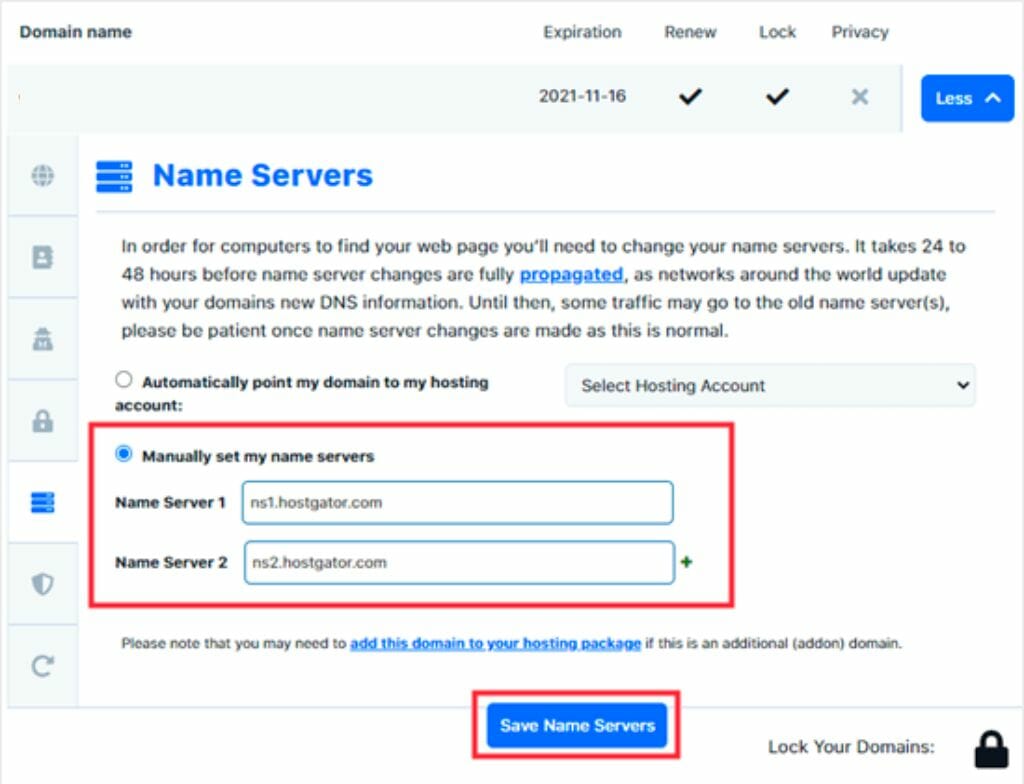
Updating Domain Registration Details is crucial. Ensure your domain points to the new server. Visit your domain registrar’s website. Log in with your credentials. Find your domain settings. Update the nameservers to the new host. Save changes. Check for any confirmation emails. Verify the domain is now linked correctly. Keep a record of any changes made.
Canceling Old Hosting Service is important. Ensure all data is moved. Double-check backups. Contact your old host. Request cancellation of your hosting plan. Follow their process. Confirm cancellation by email. Check for any final charges. Ensure no unwanted renewals.
Communicating Changes to Users is vital. Inform users about the migration. Send an email or notification. Explain any expected downtime. Provide new access details if needed. Keep communication clear and simple. Encourage feedback. Ensure users know how to contact support.
Frequently Asked Questions
Can I Move My Domain From One Hosting Service To Another?
Yes, you can move your domain to another hosting service. Update your DNS settings to point to the new host. Ensure the domain is unlocked and obtain the EPP code from your current registrar. Initiate the transfer with the new hosting provider.
How To Migrate Website Hosting?
To migrate website hosting, first backup all files and databases. Choose a new host and transfer files using FTP. Update DNS settings to point to the new server. Test your site thoroughly to ensure everything works correctly. Finally, cancel the old hosting service after confirming the new setup is complete.
Can I Transfer My Domain From Godaddy To Bluehost?
Yes, you can transfer your domain from GoDaddy to Bluehost. Unlock your domain and obtain the EPP code from GoDaddy. Initiate the transfer process on Bluehost’s platform. Follow the provided instructions to complete the transfer. Ensure your domain meets all eligibility requirements for a smooth transition.
Can I Transfer My Domain From Godaddy To Hostinger?
Yes, you can transfer your domain from GoDaddy to Hostinger. Unlock your domain and get the authorization code. Initiate the transfer in Hostinger’s dashboard. Follow the instructions and verify the transfer via email. Your domain will be transferred within a few days.
Conclusion
Migrating your domain name web hosting is simpler than it seems. Follow the steps carefully. Double-check each detail. Keep a backup of your files. Understand the process thoroughly. This ensures smooth transition. Seek help from support if needed. Test the website after migration.
Ensure everything works correctly. This prevents issues later. Remember, patience is key. Take your time. Secure your data. Safeguard your information. A well-executed migration can improve your site’s performance. Enjoy the benefits of a successful transfer. Your website’s success depends on it.
Happy migrating!


