
Managing multiple domains on a single hosting account can feel overwhelming. You might worry about confusing setups, extra costs, or losing control over your websites.
But what if you could simplify everything and save time and money? This guide will show you exactly how to handle all your domains smoothly and efficiently. By the end, you’ll have clear steps to organize your online presence without hassle.
Ready to take control of your domains like a pro? Let’s dive in.

Credit: www.crazydomains.com.au
Choosing The Right Hosting Plan
Choosing the right hosting plan is key to managing multiple domains on one account. The plan must match your website needs and budget. It should offer enough space, speed, and control. Understanding different hosting types helps make the right choice.
Each hosting plan type has strengths and limits. Knowing these helps pick what fits your domains best. Also, consider future growth to avoid switching plans soon.
Shared Vs Vps Vs Dedicated
Shared hosting means many sites share one server. It is cheap but slower and less secure. Good for small sites with low traffic.
VPS hosting gives more power by dividing one server into parts. Each part works like a small server. Faster and safer than shared. Suitable for medium sites with growing traffic.
Dedicated hosting means one server for one user. Full control and high speed. Best for large sites with heavy traffic and special needs.
Domain Limits And Resources
Check how many domains a plan supports. Some allow only one domain, others offer many. Also, look at storage space and bandwidth. These affect how many visitors your sites can handle.
Plans with low limits might cause slow sites or extra charges. Choose a plan with enough resources to keep all domains running smoothly.
Scalability Considerations
Your hosting should grow with your websites. Start small but pick a plan that can upgrade easily. This saves time and money later.
Some hosts let you add more domains or resources without downtime. This flexibility helps when your sites get more traffic or content.
Registering And Organizing Domains
Registering and organizing domains is the first step in managing multiple websites on one hosting account. It keeps your online presence clear and easy to handle. Good organization saves time and avoids confusion.
Start by choosing the right place to buy your domains. Then, set up the domain names properly. Finally, use tools to keep track of all your domains in one spot.
Selecting Domain Registrars
Choose a domain registrar that is reliable and easy to use. Check for affordable prices and good customer support. Some registrars offer extra features like privacy protection and easy renewal options. Picking a registrar with a simple dashboard helps you manage multiple domains smoothly.
Managing Dns Settings
DNS settings connect your domain to your hosting server. Set the correct DNS records for each domain to ensure they work properly. Keep track of records like A, CNAME, and MX. Proper DNS management prevents downtime and email issues. Use clear labels for each domain’s DNS to avoid mix-ups.
Using Domain Management Tools
Domain management tools help organize and monitor your domains. These tools offer features like bulk editing and renewal reminders. Some hosting accounts include domain management dashboards. Use these to update settings, track expiration dates, and manage renewals. Keeping all domains in one tool saves effort and reduces mistakes.
Setting Up Domains On Hosting
Managing multiple domains on one hosting account starts with proper setup. Each domain needs to be added correctly to work smoothly. Hosting platforms offer several ways to organize your domains. Understanding these options helps you control your websites efficiently.
Adding Domains As Addon Domains
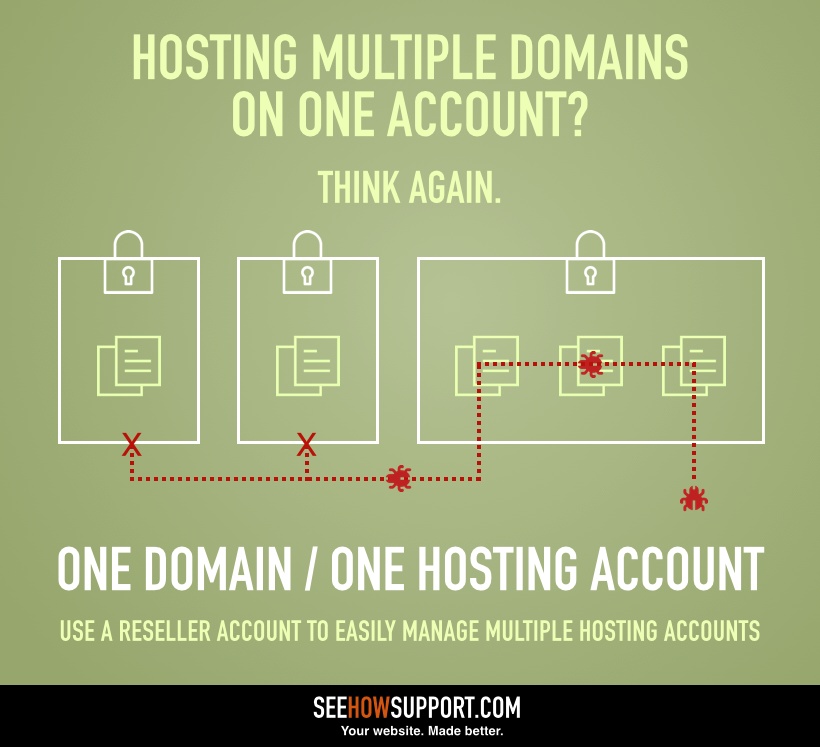
Addon domains let you host separate websites under one account. Each domain works independently with its own files and content. To add an addon domain, access your hosting control panel. Find the “Addon Domains” section and enter your new domain name. Then, assign a folder where the domain’s files will be stored. This keeps your websites separate but managed in one place.
Creating Subdomains
Subdomains are parts of your main domain. They appear before the main domain name, like blog.yoursite.com. Subdomains help organize content without buying new domains. To create a subdomain, go to your hosting panel. Locate the “Subdomains” option and enter the prefix you want. Link it to a folder to hold the subdomain’s content. This method is great for sections like blogs or shops.
Setting Up Domain Aliases
Domain aliases point one domain to another. They show the same website under different domain names. This is useful for branding or protecting your site’s name. To set an alias, open your hosting control panel. Find the “Aliases” or “Parked Domains” area. Add the domain you want to point to your main site. The alias domain will display your main website’s content without separate files.
Credit: seehowsupport.com
Configuring Email For Multiple Domains
Managing email for multiple domains on one hosting account can seem complex. Proper configuration helps keep communication clear and organized. It also ensures smooth delivery and security across all your domains.
Each domain needs its own email setup. This allows you to send and receive messages with the right domain name. You can create email accounts, forward messages, and protect against spam. Let’s explore how to handle these tasks effectively.
Creating Domain-specific Email Accounts
Start by creating email accounts for each domain separately. Use your hosting control panel to add new email addresses. For example, you might create info@yourdomain.com and sales@anotherdomain.com. This helps separate emails by domain and purpose.
Choose simple usernames that match your business or department. Set strong passwords to keep accounts secure. Check your hosting provider’s guide for detailed steps on creating email accounts.
Setting Up Forwarding And Aliases
Email forwarding sends messages from one address to another automatically. It helps you manage emails without logging into multiple accounts. For instance, forward support@yourdomain.com to your main email.
Aliases allow one email address to receive mail for several addresses. This is useful if you want to collect emails from different names in one inbox. Both forwarding and aliases save time and keep your email organized.
Managing Spam And Security
Spam can clutter your inbox and cause security risks. Use your hosting control panel to enable spam filters for each domain. Adjust filter settings to block unwanted emails effectively.
Activate security features like SSL for email encryption. Change passwords regularly and avoid sharing login details. Keep your email safe and reliable by monitoring account activity.
Organizing Website Files And Databases
Managing multiple domains on a single hosting account needs careful organization. Keeping website files and databases tidy helps avoid confusion. It also makes site updates and troubleshooting easier. Proper organization saves time and reduces errors.
Directory Structure Best Practices
Create a separate folder for each domain inside the main directory. Name folders clearly using the domain name or a simple code. Avoid mixing files from different sites in one folder. Use subfolders to store images, scripts, and stylesheets for each site. This setup keeps your files neat and easy to find.
Database Management For Multiple Sites
Assign a unique database to each website to keep data separate. Use clear names for databases to identify the site quickly. Manage database users carefully, granting access only to needed databases. Regularly check for unused databases and remove them to save space. Proper database separation prevents data mix-ups and improves security.
Backup Strategies
Back up each website’s files and databases independently. Store backups in a secure location outside your hosting server. Schedule regular backups to protect against data loss. Test backup files to ensure they work before a real need arises. Reliable backups help recover sites quickly after errors or attacks.
Credit: www.openprovider.com
Optimizing Performance And Security
Managing several domains on one hosting account requires careful attention to performance and security. Fast loading times keep visitors happy. Strong security protects your sites from hackers and malware. Balancing both is key to successful website management.
Ssl Certificate Setup For Multiple Domains
Secure your domains with SSL certificates. SSL encrypts data between users and servers. For multiple domains, use a multi-domain SSL or a wildcard SSL. These certificates cover several domains or subdomains in one package. This saves time and cost. Always enable HTTPS to boost trust and SEO rankings.
Implementing Caching And Cdn
Caching stores website data temporarily to speed up loading. Use server-side caching for faster response. A Content Delivery Network (CDN) distributes your site’s files globally. Visitors get data from the nearest server. This reduces delay and lowers server load. Both caching and CDN improve user experience significantly.
Monitoring And Protecting Against Threats
Regularly monitor your domains for unusual activity. Use security tools to detect malware and attacks early. Set up firewalls to block harmful traffic. Keep software and plugins updated to close security gaps. Back up your sites often to recover quickly from issues. Vigilant monitoring prevents many common threats.
Troubleshooting Common Issues
Managing multiple domains on one hosting account can lead to common problems. Troubleshooting these issues quickly helps keep websites running smoothly. Understanding these problems saves time and stress.
Domain Propagation Delays
Domain propagation means updating DNS across the internet. This process can take hours or days. During propagation, your site may not appear correctly. Patience is key. Avoid making changes too often. Clear your browser cache to see updates. Use online tools to check propagation status.
Dns Conflicts
DNS conflicts happen when domain settings clash. Incorrect DNS records cause websites to break or show errors. Check that each domain has unique records. Avoid duplicate IP addresses or name servers. Use your hosting panel to review DNS settings. Fix wrong entries to restore access fast.
Email Delivery Problems
Email issues occur when domains share hosting. Incorrect MX records can block or delay emails. Verify MX records match your email provider’s instructions. Check SPF, DKIM, and DMARC settings for email security. Test sending and receiving emails regularly. Fix errors to ensure smooth communication.
Tools To Simplify Domain Management
Managing multiple domains on one hosting account can feel confusing. Different tools help make this task easier and faster. These tools organize domains, save time, and reduce errors. They help you focus on growing your websites instead of handling technical details.
Control Panel Features
Most hosting accounts include a control panel. This panel lets you add and manage domains easily. It offers options like domain forwarding and DNS settings. You can create subdomains and manage email accounts too. The interface is simple to use, even for beginners.
Third-party Management Platforms
Third-party tools offer extra help for domain management. These platforms support multiple domains from different hosts. They provide dashboards to see all domains in one place. You can update settings, renew domains, and monitor expiration dates. These tools reduce the need to visit each domain registrar separately.
Automation And Scripting
Automation saves time by handling repetitive tasks automatically. Scripts can update DNS records or renew domains on schedule. This reduces manual work and prevents mistakes. Using simple scripts or automation software helps keep domains organized. It is especially useful for managing many domains at once.
Frequently Asked Questions
How Do I Add Multiple Domains To One Hosting Account?
You can add multiple domains by using the “Addon Domains” feature in your hosting control panel. It allows separate websites under one account efficiently.
Can I Use Different Websites On A Single Hosting Plan?
Yes, a single hosting plan supports multiple websites. Each domain can have its own files and content without conflicts.
What Are The Benefits Of Managing Domains On One Hosting?
Managing multiple domains on one hosting saves cost, simplifies maintenance, and improves resource management. It’s ideal for small businesses.
How To Organize Files For Multiple Domains In Hosting?
Create separate folders for each domain within your hosting’s root directory. This keeps websites organized and avoids file mix-ups.
Conclusion
Managing multiple domains on one hosting account saves time and money. Keep your domains organized and check settings regularly. Use control panel tools to simplify domain management. Monitor website performance and update content often. Stay aware of domain renewal dates to avoid interruptions.
This approach helps you run several sites smoothly and efficiently. Start applying these tips today for better web management.


