
Are you ready to break free from the constraints of pre-designed templates and create a WordPress website that’s uniquely yours? Imagine the thrill of crafting every element of your site, tailored precisely to your vision and needs.
If you’re tired of scrolling through endless themes, trying to find one that fits just right, you’re in the perfect spot. By the end of this article, you’ll discover how to build a WordPress website without relying on a theme, allowing you the freedom to express your creativity and showcase your unique brand identity.
Get ready to dive into a world where your website is a true reflection of your imagination, and let’s unlock the secrets to making it happen!
Why Choose A Theme-free Approach
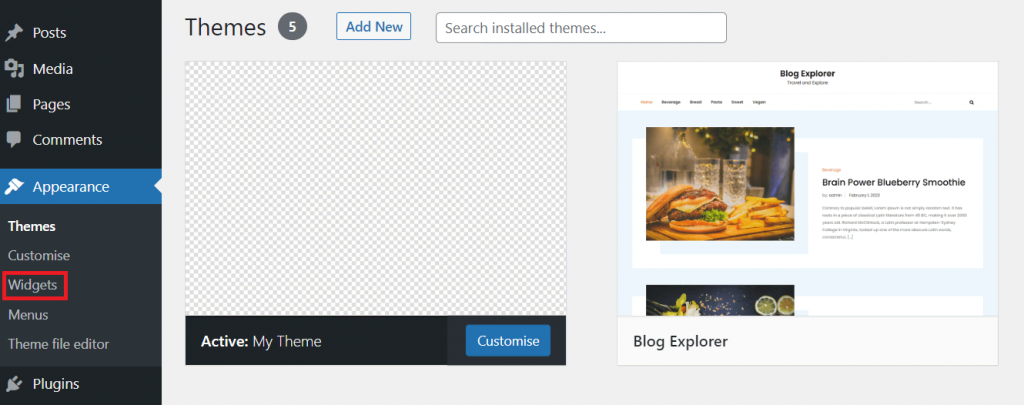
Creating a WordPress website without a theme gives you more control. You can build a site that is truly unique. Many themes come with extra features. These features can slow down your website. A theme-free site is usually faster and simpler. It lets you focus on what you want to show. Themes can also be costly. Making a site without one can save you money. It also helps you learn more about WordPress. You will get to know how it works from inside. This can be a fun and rewarding experience. Your website becomes a true reflection of your ideas. You get to decide every part of it.
Credit: www.hostinger.com
Essential Tools And Technologies
To build a WordPress site without a theme, start with some tools. You need a code editor like VS Code or Sublime Text. These help write and edit code. Install WordPress locally using software like XAMPP or MAMP. These create a server on your computer. Plugins are important too. Use Advanced Custom Fields for creating custom fields. Yoast SEO helps with search engine optimization. Contact Form 7 allows users to send messages. These tools make your website powerful and flexible.
HTML is the backbone of your site. It structures the content. Use CSS to style the website. CSS makes everything look nice. PHP is important for WordPress. It connects your site to the database. Learn the basics of these languages. They are the building blocks of a custom WordPress site. Practice writing simple code. Experiment and see what changes happen. Over time, skills improve and you create better websites.
JavaScript adds dynamic features to your site. It makes websites interactive. Users can click buttons or see animations. Use JavaScript libraries like jQuery to simplify coding. These libraries save time and effort. JavaScript is powerful but can be tricky. Start with simple scripts. Slowly add more complex features. Test everything to ensure it works right. A little JavaScript can greatly enhance user experience.
Setting Up Your WordPress Environment
Start by downloading the latest WordPress files. Visit the official WordPress site. Look for the download button. Once downloaded, unzip the file. You will find many files inside. Upload these files to your server. Use an FTP client like FileZilla. Connect to your server with FTP. Place the files in your desired directory. Usually, it’s the public_html folder.
Begin by creating a new database. Access your hosting control panel. Look for the database section. Choose MySQL databases. Create a new database. Make sure to note the database name. Also, create a database user. Assign this user to your database. Set a strong password. Now, open the wp-config-sample.php file. Enter your database details here. Save this file as wp-config.php.
Crafting A Custom Design
Begin with a blank canvas. Use a design tool like Adobe XD or Figma. Draw your ideas on paper first. Transfer them to digital. Keep it simple. Focus on layout and color schemes. Choose fonts that are easy to read. Think about how users will navigate. Make sure your design is mobile-friendly. Test different design elements. Ask friends for feedback. Improve your mockup until it feels right. Now, you’re ready for the next step.
Start with the HTML structure. Use divs for layout. Use classes and ids for styling. Add CSS to make it look like your mockup. Use Flexbox or Grid for layout. Keep HTML clean and organized. Make sure it’s responsive. Check it on different devices. Fix any bugs you find. Style your buttons and links. Make sure text is readable. Your website should look like your design now. You’re building it from scratch. No theme needed.
Building A Custom WordPress Theme
WordPress template hierarchy is like a map. It tells how themes work. Different files do different jobs. For example, index.php is a fallback file. If no other file fits, WordPress uses it. The header.php file is for the top part of your page. Knowing these files helps you build your site better.
Start with a few important files. style.css is for your site’s style. Make a functions.php file too. It helps add features. The index.php file is needed to show content. You can add more files later.
Add your own styles to make the site look nice. Use the style.css file. Want to add scripts? Use functions.php to load them. This helps your site do more cool things. Always keep your code clean and simple.
Credit: wedevs.com
Integrating WordPress Functionality
Custom Post Types let you create different content. Posts and pages are common. But sometimes, you need more. Imagine a website for movies. You can create a Custom Post Type for movies. This helps organize your content. WordPress makes it easy. Use functions like register_post_type(). This lets you add new types. It’s like magic for your website.
Custom Fields add extra info to your posts. They are like special notes. You can add author names or ratings to your content. This is useful for movies or books. Use plugins or code to set them. They make posts more detailed. Readers get more info. It’s like adding toppings to ice cream.
The WordPress Loop shows your posts. But it can do more. You can customize it. Display posts in different styles. Change how many posts show up. Use functions like query_posts(). This is like a magic wand for your site. Control what your visitors see. Make your site unique and fun.
Testing And Debugging
Building a WordPress site without a theme demands careful attention to testing and debugging. Check each element for functionality. Ensure plugins are working correctly to avoid issues and provide a seamless user experience.
Ensuring Cross-browser Compatibility
Websites should work on all browsers. Check your site on Chrome, Firefox, Safari, and Edge. Each browser may show your site differently. Use tools like BrowserStack to test. Fix any display issues you find. CSS can help fix layout problems. JavaScript might not work on all browsers. Check and adjust your code. Always test on different devices. Computers and phones may show things differently. Make sure your site looks good everywhere.
Debugging Common Issues
Websites can have bugs. Bugs are errors in the code. Check your code for typos and syntax errors. Use a debugger to find mistakes. Debuggers show where problems are. Fix errors one at a time. Look for broken links. Fix any links that don’t work. Slow pages can be a problem. Check your site speed. Compress images to help speed. Use caching to load pages faster. Keep checking for bugs.
Credit: visualmodo.com
Optimizing For Performance
Crafting a WordPress site without a theme involves focusing on custom design and functionality. Start by using page builders or custom coding to create unique layouts. This approach ensures faster loading times and tailored user experiences, enhancing site performance significantly.
Minifying Code
Minify code for faster websites. It removes extra spaces and lines. This makes files smaller. Use tools like Minify or UglifyJS. Smaller files load quicker. This improves speed and user experience.
Caching Strategies
Caching saves data for quick access. It helps websites load fast. Use plugins like W3 Total Cache. They store data in the browser. This reduces server load. Faster load times make users happy.
Optimizing Images
Images can slow websites. Optimize them for speed. Use formats like JPEG or PNG. Compress images to make them smaller. Tools like TinyPNG can help. Smaller images load faster. This keeps visitors engaged.
Ensuring Security
Write clean code. It helps keep hackers away. Avoid using weak passwords for databases. Use strong ones instead. Update your software regularly. Fix any bugs you find. Sanitize all user inputs. Stop harmful data from entering. This is important for website safety.
Always check your code for errors. Use tools that scan for vulnerabilities. Encrypt sensitive data. Make sure no one else can read it. Be careful with user permissions. Limit access to important files.
Perform security audits often. They help find weaknesses. Fix problems before they cause harm. Use reliable security software. It can scan your site for threats. Review your website logs. Look for unusual activities. These could be signs of attacks.
Train your team on security basics. Everyone should know how to stay safe online. Back up your data. Keep copies in safe places. If something goes wrong, you can restore your site quickly.
Maintaining And Updating Your Site
Check your website’s speed often. Fast sites keep users happy. Use tools like Google PageSpeed Insights. Look for changes in loading times. Fix any issues quickly. Slow sites can lose visitors fast. Keep an eye on your server. Make sure it runs smoothly. Errors can scare visitors away. Regular checks help you catch problems early.
Fresh content keeps your site lively. Add new articles or photos often. Update old posts with new information. Check all links to make sure they work. Broken links can frustrate users. Add new features to make your site better. Maybe a contact form or gallery. Keep plugins updated too. This helps with security and functions. Regular updates make your site more engaging.
Frequently Asked Questions
How Can I Build A WordPress Site Without A Theme?
You can build a WordPress site without a theme using custom coding. Use page builders like Elementor or Gutenberg. Start by creating a child theme with minimal files. Customize it using HTML, CSS, and PHP. This approach provides complete control over design and functionality.
Is It Difficult To Create A WordPress Site Without A Theme?
Creating a WordPress site without a theme requires coding skills. It might be challenging for beginners. However, with proper guidance and learning resources, it’s achievable. This method offers flexibility and uniqueness for your website. Consider hiring a developer if coding feels overwhelming.
What Are The Benefits Of Not Using A Theme?
Not using a theme provides complete customization. You have full control over design, performance, and functionality. It ensures a unique website tailored to your needs. This approach eliminates unnecessary code, improving site speed and SEO. It also enhances flexibility for future changes.
Can I Use Plugins Without A Theme?
Yes, you can use plugins without a theme in WordPress. Plugins add specific functionality and features. They integrate seamlessly with custom-coded sites. Ensure the plugins are compatible and necessary for your project. This will enhance the website’s performance and user experience without relying on a theme.
Conclusion
Building a WordPress site without a theme is possible. It offers flexibility and creativity. You can design a unique look for your site. Using plugins and custom codes can enhance functionality. This approach demands patience and learning. But the rewards are worth it.
You gain complete control over your website. This method suits those eager to learn web design basics. With practice, your skills will grow. Your site will reflect your personal style. Start small, and gradually expand your knowledge. Enjoy the process of creating something truly unique.


