
Have you ever wanted to give your WordPress site a unique look but didn’t know where to start? Imagine having the power to design themes that not only reflect your personality but also captivate your audience.
Creating your own WordPress themes can seem daunting at first, but with a little guidance, it can be a rewarding experience. You don’t need to be a coding wizard or a design expert. With the right approach, you can craft themes that are both visually stunning and functional.
This article will guide you step-by-step, revealing secrets to making themes that stand out and keep your visitors engaged. Dive in, and discover how you can transform your WordPress site into a masterpiece.
Credit: www.hostinger.com
Getting Started With WordPress Themes
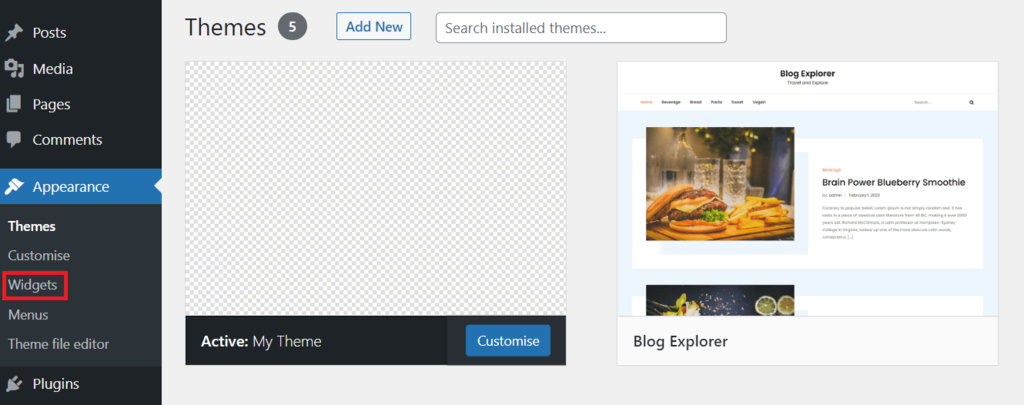
WordPress themes change how your site looks. They control colors and fonts. Themes also affect the layout. A theme is a collection of templates and stylesheets. Each theme has a unique look. Themes can be free or paid. Some themes have more features. Beginners should start with a simple theme. Understanding theme basics helps you create better sites.
First, install a local server like XAMPP. This lets you run WordPress on your computer. Next, download and install WordPress. Create a new folder for your theme. Use a text editor like Visual Studio Code for coding. A good editor makes coding easier. Finally, set up version control with Git. This keeps track of changes.
Designing Your Theme
Choose a layout. Think about the users. Will they read or just look? Some layouts are better for reading. Others are good for photos. Pick one that fits your theme. Simple layouts are often best. They are easy to use. People like them. They don’t confuse users.
Colors make your theme pop. Bright colors can be fun. Soft colors are calm. Choose colors that match your theme. Fonts are important too. Some fonts are easy to read. Others are hard. Pick fonts that suit your style. Keep it simple. Users will thank you.
Wireframes are like blueprints. They show where things go. Mockups are more detailed. They show colors and fonts. Start with wireframes. They help plan the layout. Mockups come next. They bring your theme to life. Both are useful. They guide your design.
Building The Theme Structure
Start with a new folder. This will be your theme folder. Inside, create subfolders named CSS, JS, and images. These folders hold your theme files. Next, create a file named index.php. This file is your main template. Also, add a file named style.css. This file contains your theme’s styles.
The style.css file is very important. It contains your theme’s information. At the top, add your theme name, author, and description. This helps WordPress understand your theme. Then, write your CSS code below this information. Make sure to style your theme well.
The index.php file is your theme’s main file. It controls how your content shows. Use PHP code to add header and footer. Include WordPress functions to show posts. Keep the code simple and clean. This ensures your theme works well.
Credit: www.wpzoom.com
Incorporating WordPress Functions
Template tags are special functions. They help you create a theme. Template tags display information. They show posts and pages. They also show categories. You use them in templates. They make your theme dynamic. Your site becomes interactive. Use them to make your theme unique.
Custom functions add features to your theme. They are stored in the functions.php file. This file is in your theme folder. Functions can change how your site works. You can add new menus. You can add widgets too. They make your theme special. Functions help improve your site.
Hooks and filters are powerful tools. Hooks let you add code at certain points. Filters change data before it shows. They are used to modify themes. They make themes flexible. Use them to customize your site. Hooks and filters let your site do more. They are key to theme development.
Developing Theme Templates
A theme needs a good header and footer. The header is at the top. The footer is at the bottom. Both are important parts of a website. Use HTML and CSS to create them. Make sure they look nice. Add a logo in the header. Include links in the footer. This makes the site easy to use. These parts appear on every page. So, design them well.
Pages and posts are the main parts of a site. Pages are for important information. Posts are for blog entries. Create a template for both. Use PHP to make them work. Add a title area. Include a space for content. Make sure they are easy to read. Add images if needed. This makes each page look good. Templates help in keeping the site neat.
Sidebars are the thin columns on the side. They hold extra information. Widgets are little blocks inside sidebars. Use them for links, ads, or social media. Make a sidebar template. Use WordPress functions to add widgets. This makes your theme flexible. Users can add or remove widgets. It helps the site look organized.
Enhancing Theme With Features
Custom post types make your site special. You can add different content. It is more than just posts or pages. Taxonomies help sort content easily. They make it simple to find information. With these, your theme becomes unique. Visitors can enjoy the content better.
The theme options panel gives users control. They can change settings easily. No need for coding. A simple menu lets them tweak colors and fonts. Users can feel at home. Everyone likes a personal touch.
Responsive design fits all devices. Websites look good on phones and tablets. People use different screens. Your theme must adapt to all sizes. This keeps users happy. Nobody likes to zoom in. Make it easy for them.
Testing And Debugging
Crafting themes for WordPress involves testing and debugging to ensure they function smoothly. Debugging helps identify errors and optimize the theme’s performance. Testing ensures compatibility across various devices and browsers.
Validating Your Theme Code
Ensure your theme code is clean and error-free. Use online tools to check your code. These tools find mistakes in your theme code. Correcting these mistakes improves your theme. Clean code makes your theme fast and reliable.
Using Debugging Tools And Techniques
Debugging tools help find problems in your theme. Use tools like WP_DEBUG in WordPress. This tool shows errors and warnings in your theme. Fix these errors for better performance. Debugging makes your theme user-friendly.
Ensuring Browser Compatibility
Test your theme on different browsers. Popular browsers include Chrome, Firefox, and Safari. Make sure your theme looks good in all of them. This ensures every user has a great experience. Compatibility is key for a successful theme.
Preparing For Theme Release
Crafting themes for WordPress involves understanding design principles and coding skills. Begin by identifying your target audience and the purpose of the theme. Focus on responsiveness and compatibility to ensure your theme works well on all devices.
Optimizing For Performance
Fast themes attract users. Clean code helps speed up your theme. Use caching to store data. Avoid heavy images. Compress them instead. Minimize CSS and JavaScript. This reduces load time. Test theme speed with online tools. Aim for quick responses. Users love fast websites.
Creating Documentation And Support
Users need guides. Write clear documentation. Include setup steps. Explain features simply. Provide contact for help. Support builds trust. Answer questions quickly. Users appreciate prompt replies. Offer FAQs for common issues. Keep guides updated. Ensure easy understanding.
Submitting To WordPress Theme Directory
Ensure theme meets WordPress guidelines. Check for common errors. Validate with tools. Follow WordPress security standards. Add a detailed description. Include screenshots. Show theme features. Submit theme through the WordPress site. Wait for review. Fix issues if notified. Approval gains visibility.
Credit: www.wpzoom.com
Frequently Asked Questions
What Tools Are Needed To Create A WordPress Theme?
To create a WordPress theme, you’ll need a code editor, FTP client, and a local server setup. Tools like Sublime Text or Visual Studio Code are popular choices. Additionally, having access to graphic design software like Adobe Photoshop or GIMP can be beneficial for designing theme elements.
How Do I Start Designing A Theme?
Start by sketching your design layout on paper or using design software. Focus on creating a user-friendly interface. After that, translate your design into HTML, CSS, and JavaScript. Ensure your design is responsive, meaning it adapts well to different screen sizes, from mobile to desktop.
Can I Use Templates For My Theme?
Yes, using templates is a great starting point for beginners. They provide a basic structure you can customize. Templates help in maintaining consistency and saving time. Choose a template that closely matches your design vision and modify it to suit your needs.
How Do I Test My WordPress Theme?
Testing your WordPress theme involves checking for responsiveness, browser compatibility, and functionality. Use tools like BrowserStack for cross-browser testing. Verify that all elements display correctly on different devices. Also, ensure that all links, forms, and interactive elements work as intended.
Conclusion
Creating WordPress themes is a rewarding skill. It combines creativity and technical know-how. Start with basic designs. Gradually, add advanced features. Practice makes perfect. Experiment with different styles. You’ll learn what works best. Always keep user experience in mind. A responsive design is key.
Test your theme on various devices. Ensure it loads quickly. Fast sites rank higher on search engines. Regular updates keep your theme fresh. Stay informed about the latest WordPress trends. This knowledge helps in crafting better themes. Enjoy the journey.
Your WordPress skills will grow with each project. Happy theming!


