
Creating your own website might sound like a daunting task, but it’s easier than you think, especially when you use WordPress themes. Imagine having the power to design a stunning, functional website without needing to learn complicated coding languages.
With WordPress, you can do just that. In this guide, you’ll discover the simple steps to transform your digital vision into a reality using a WordPress theme. Whether you’re launching a personal blog, setting up an online store, or building a portfolio, WordPress has a theme for you.
Ready to unlock the secrets to building an impressive website that stands out? Keep reading, and you’ll see just how straightforward and rewarding the process can be.
Credit: www.hostinger.com
Choosing The Right Domain Name
A good domain name is short and easy to remember. It should reflect your website’s purpose. Avoid using numbers or hyphens. These can confuse visitors. Choose words that are simple.
Try to use a .com extension. People trust this more. Check if your domain name is available. Many tools online can help. A unique name is better. It makes your site special.
Think about your target audience. Use words they understand. This helps in SEO. A good domain name improves search engine ranking. Make sure it represents your brand well.
Selecting A Hosting Provider
Choosing the right hosting provider is important. It affects your website’s speed and uptime. Shared hosting is cheap and good for small sites. VPS hosting offers more power but costs more. Dedicated hosting is for big sites with a lot of traffic. Many people use WordPress hosting for their WordPress sites. It is optimized for WordPress and includes extra features. Look for hosting with 24/7 support. This helps when you need help fast. Also, check for money-back guarantees. You want a host that lets you try it risk-free.
A good hosting provider should have a user-friendly interface. This makes managing your site easy. Some hosts even offer one-click WordPress installs. These save time and are easy to use. Make sure the host has good reviews. A lot of happy users means it’s likely good. Pick a host that fits your needs and budget.
Installing WordPress
First, pick a hosting service. Many options are available. Choose one that fits your needs. Then, create an account. After that, install WordPress on your hosting. Most services offer one-click install. It’s quick and easy. Follow the instructions carefully.
Once installed, log in to your WordPress dashboard. Use the link provided by your host. Enter your username and password. You’re now inside your site. This is where you create and manage content.
Browse the theme library. Pick a theme you like. Themes change your site’s look. Some are free, others cost money. Install the theme and activate it. Your site will look different now. Keep an eye on the design.
Finding The Perfect Theme
Picking a WordPress theme is fun. There are many options available. Each theme has its own style. Some are colorful. Others are simple. Themes can change a website’s look. A good theme makes a website easy to use. Search for a theme that fits your needs. Consider your website’s purpose. Is it for a blog? Or a shop? Read reviews before choosing. Reviews can be helpful. They tell you about problems. Popular themes often get regular updates. Updates keep themes secure. Look for themes that offer good support. Support helps if things go wrong. Try a demo before buying. Demos show how a theme works. Choose wisely for the best website experience.
Customizing Your Theme
Themes come with many options. You can change colors, fonts, and layouts. Most themes have a settings page. Visit this page to find theme options. Experiment with different settings. You will see changes live on your site. Adjust header and footer styles. Explore background and menu choices. Make your site unique.
Custom CSS lets you control your site’s look. You can add your own CSS code. This helps you make more changes. Go to the “Custom CSS” section in WordPress. Type your CSS code there. Change margins, padding, and fonts. Make text bold or change colors. Your site will look special.
Credit: www.elegantthemes.com
Adding Essential Plugins
SEO Plugins help your site show up in search engines. They make sure your content is easy to find. Yoast SEO is a popular choice. It gives tips to improve your content. Another good option is All in One SEO Pack. Both help with keywords and meta tags.
Security Plugins keep your website safe. Wordfence is a strong option. It protects against hackers. Sucuri Security is another trusted plugin. It scans your site for threats. Always keep your security plugins updated. This helps keep your site secure.
Performance Plugins make your site faster. A fast site keeps visitors happy. WP Super Cache is good for speed. It saves your site’s pages. This means faster loading times. Another choice is W3 Total Cache. Both plugins improve site performance.
Creating Engaging Content
Crafting blog posts can be fun. Start by choosing a topic you love. Use clear and simple words. Keep sentences short. This helps readers understand quickly. Break text into small paragraphs. It makes reading easy.
Bold important words. This highlights key points. Add questions to make readers think. Use facts to support your ideas. Keep the tone friendly. It makes the post engaging.
Add pictures or videos to your blog. Media makes the post interesting. Choose clear images. They should relate to the topic. Videos can show ideas better. They keep the audience engaged.
Use captions for images. They explain what the picture shows. Place media between text. This breaks up long paragraphs. It keeps the reader’s attention.
Setting Up Navigation
To create a menu, go to the dashboard. Click on Appearance and then Menus. Add items like pages or posts. Drag items to change their order. Save the menu when done. Menus help users find content easily. They keep your site organized. Choose a menu location like header or footer. You can have more than one menu. Make sure it fits your site’s style.
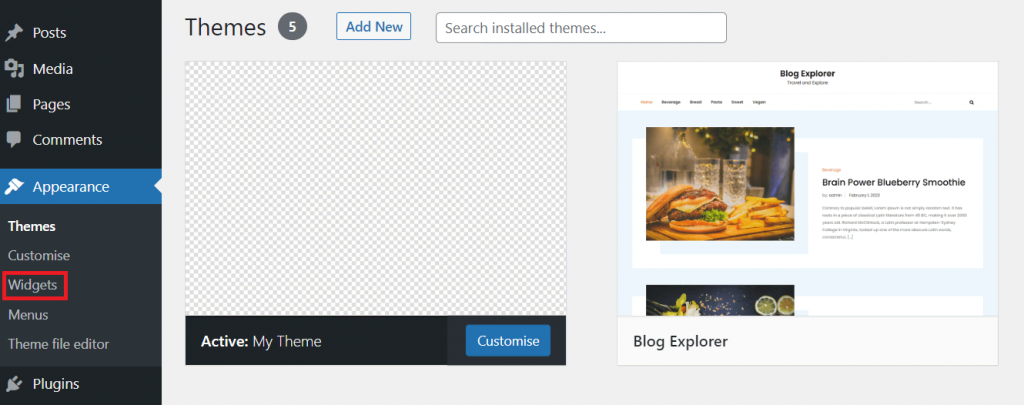
Widgets add features to your site. Go to Appearance and click on Widgets. Drag widgets to the sidebar or footer. Widgets can show recent posts or comments. They can add a search bar. Customize widgets as needed. They make your site interactive. Some themes have special widgets. Use them to enhance user experience. Check how they look on your site.
Optimizing For Mobile
Websites must be mobile-friendly today. Many people use phones to browse. A mobile-friendly site loads fast. It fits well on small screens. Text should be easy to read. Buttons must be easy to click. Using a responsive WordPress theme helps. It adjusts to different screen sizes. Always check your site on a phone. Ensure all parts work well. Test links, images, and forms.
Some plugins can help too. They make mobile optimization easier. Try plugins that improve speed. Plugins can also compress images. This saves space and time. Mobile users expect fast sites. A slow site can lose visitors. A good mobile site keeps users happy. It helps them find what they need.

Credit: themeforest.net
Maintaining Your Website
Creating a website using a WordPress theme is simple and effective. Choose a theme that suits your needs, and customize it to reflect your brand. Regular updates and content additions ensure your site stays fresh and engaging.
Regular Updates
Updating your website is very important. It keeps everything fresh. Themes and plugins need updates often. Updates fix bugs and improve security. Make it a habit to check for updates weekly. This ensures your site runs smoothly. An updated website also makes visitors happy. They like sites that work well. Regular updates help avoid problems and keep your site safe.
Backup Strategies
Backing up your website is crucial. It saves your data if something goes wrong. Use plugins to automate backups. Choose a plugin that suits your needs. Some plugins offer daily backup options. Store backups on different locations. Use cloud storage for safety. This keeps your data secure. Regular backups protect your hard work. They are your safety net for unexpected issues. Restoring from a backup is easier than starting over.
Frequently Asked Questions
How Do I Install A WordPress Theme?
To install a WordPress theme, log into your WordPress dashboard. Navigate to “Appearance” and then “Themes. ” Click “Add New” and search for the theme you want. Once found, click “Install” and then “Activate” to set the theme live on your website.
Can I Customize WordPress Themes Easily?
Yes, WordPress themes are highly customizable. Access the “Customizer” under “Appearance” in your dashboard. Here, you can modify colors, fonts, layouts, and more. Some themes offer additional options through their own settings panel. Always ensure your changes align with your website’s branding and functionality needs.
Are WordPress Themes Mobile-friendly?
Most modern WordPress themes are mobile-friendly. They are designed to be responsive, automatically adjusting to different screen sizes. When choosing a theme, always check if it’s labeled as “responsive. ” Test it on various devices to ensure your site looks great everywhere.
How Do I Update A WordPress Theme?
Updating a WordPress theme is simple. Go to “Dashboard,” then “Updates. ” If a theme update is available, you’ll see it listed. Click “Update” to install the latest version. Always back up your site before updating to prevent data loss or compatibility issues.
Conclusion
Creating a website with a WordPress theme is straightforward. Start by choosing a theme that suits your needs. Customize it to reflect your brand. Use plugins to enhance functionality. Ensure your site is mobile-friendly and fast. Regular updates keep your site secure.
Engage with your audience through interesting content. Remember, simplicity and clarity are key. A user-friendly site attracts more visitors. Practice makes perfect, so don’t rush. Take your time to learn and adjust. Your website can grow with your business. Keep improving it to meet your goals.


