
Are you dreaming of creating your own web hosting server website but feel overwhelmed by where to start? You’re not alone.
Many people aspire to launch their own hosting services but struggle with the technical and logistical challenges involved. Imagine having the power to host websites for clients, manage server resources, and generate income—all from your own web platform. This is more achievable than you might think.
In this guide, we’ll break down the process into simple, manageable steps that you can follow, even if you’re not a tech expert. Whether you want to build a small hosting service for a select group or aim to compete with larger companies, understanding the fundamentals is key. You’ll discover essential tools, software, and strategies that will help you create a reliable and efficient web hosting server website. Stay with us, and you’ll soon be on your way to launching a successful hosting business.
Choosing The Right Hardware
Picking the right server is crucial. CPU power affects speed. A multi-core processor is ideal. RAM helps in running tasks smoothly. More RAM means better performance. Storage capacity is also important. It holds all your data.
HDDs are cheaper. They offer more space. SSDs are faster. They improve loading times. Consider your needs. Backups are vital. Use RAID setups for safety. This keeps your data secure.
A strong internet connection is needed. It helps users access your site. A good bandwidth ensures faster loading. This makes users happy. Use a reliable ISP. They provide stable connections.
Setting Up The Operating System
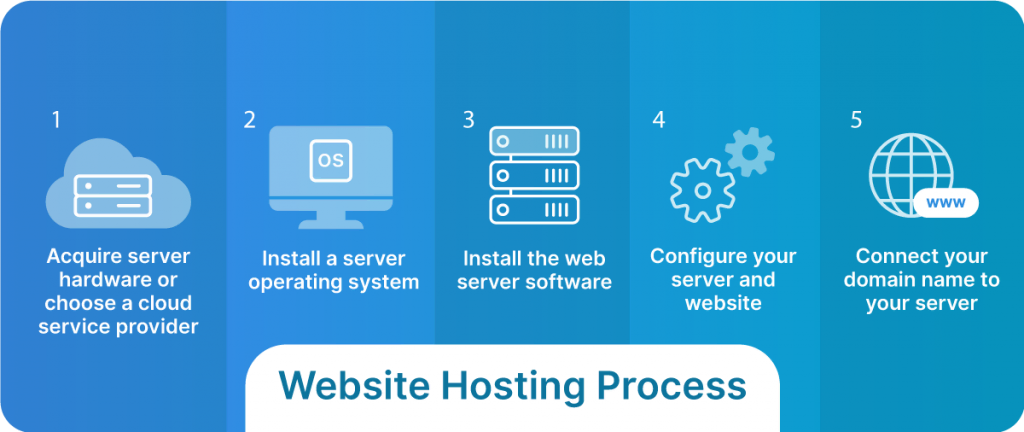
Installing the operating system is the first step in building a web hosting server. Choose a reliable OS like Linux for stability. Follow the installation instructions carefully to ensure proper setup.
Linux Vs Windows
Linux and Windows are two popular choices. Linux is open-source and free. It has strong community support. Windows is user-friendly and familiar to many. Linux offers more customization. Windows provides a polished interface. Both have unique strengths. Choose based on needs.
Installation Process
Installing Linux is simple. Download the ISO file from the Linux website. Create a bootable USB drive. Boot your computer from the USB. Follow the setup instructions. Windows installation is similar. Obtain a legal copy of Windows. Use a USB or DVD to install. Follow the onscreen instructions carefully.
Security Configurations
Securing your server is vital. Start with a strong password. Use a firewall to block unwanted access. Keep your system updated regularly. Install antivirus software. Regularly back up your data. Check for vulnerabilities often. Monitor server activity. This keeps your server safe and secure.
Installing Web Server Software
Apache and Nginx are two popular web server choices. Apache is easy to set up. It is good for dynamic content. Nginx is fast and uses less memory. It is great for static files. Choose according to your needs. Both are free and open-source.
Configuring a web server needs careful steps. Set up domain and IP. Ensure files are in the right place. Check firewall settings. Adjust server settings for better performance. Regularly update the server software. Keep your server secure and efficient.
SSL/TLS keeps your website secure. It encrypts data between server and user. Get a certificate from a trusted provider. Install it on your server. Regularly renew your SSL certificate. This ensures safe browsing for users. A secure site builds trust.
Database Management
Selecting the right database is crucial. MySQL and PostgreSQL are popular. They are open-source and reliable. SQLite is good for smaller needs. It is easy to set up. Each system has pros and cons. Consider your project size and future growth. Check the community support too. A strong community means more help.
Installing a database can be simple. Follow the official guides for accuracy. MySQL and PostgreSQL have detailed steps. Configuration is the next step. Use default settings for beginners. Advanced users can tweak for better performance. Always check for updates. Updated software is more secure. Follow security best practices.
Backups are important. Regular backups prevent data loss. Use automatic tools if possible. Schedule backups at off-peak times. Store them in a safe place. Cloud storage is a great option. Test your backups. Make sure they can be restored. A backup is useless if it doesn’t work. Keep a backup log. This helps track changes over time.
Domain Name Configuration
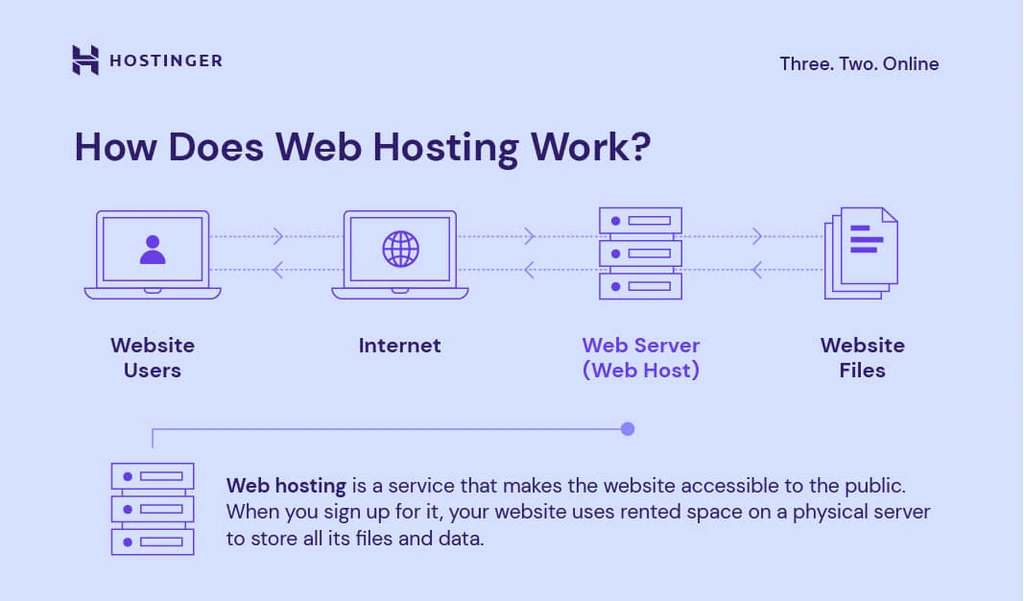
First, choose a unique domain name. Make it easy to remember. Visit a domain registrar like GoDaddy or Namecheap. Check if your domain is available. If not, try another name. Once found, register it. Provide your contact information. Pay the registration fee. Now, the domain belongs to you.
Access your DNS settings through the registrar. Find the DNS management section. Use A records to point your domain to your server’s IP address. Use CNAME records for aliases. Set up MX records for email services. Propagation can take time. Changes might need 24 hours to update.
Subdomains help organize your website. Create subdomains like “blog.yoursite.com”. Go to the DNS settings. Add a new subdomain record. Link it to your server’s IP address. Each subdomain can have unique content. Use subdomains to separate sections of your site.
Credit: www.hostinger.com
Creating Hosting Plans
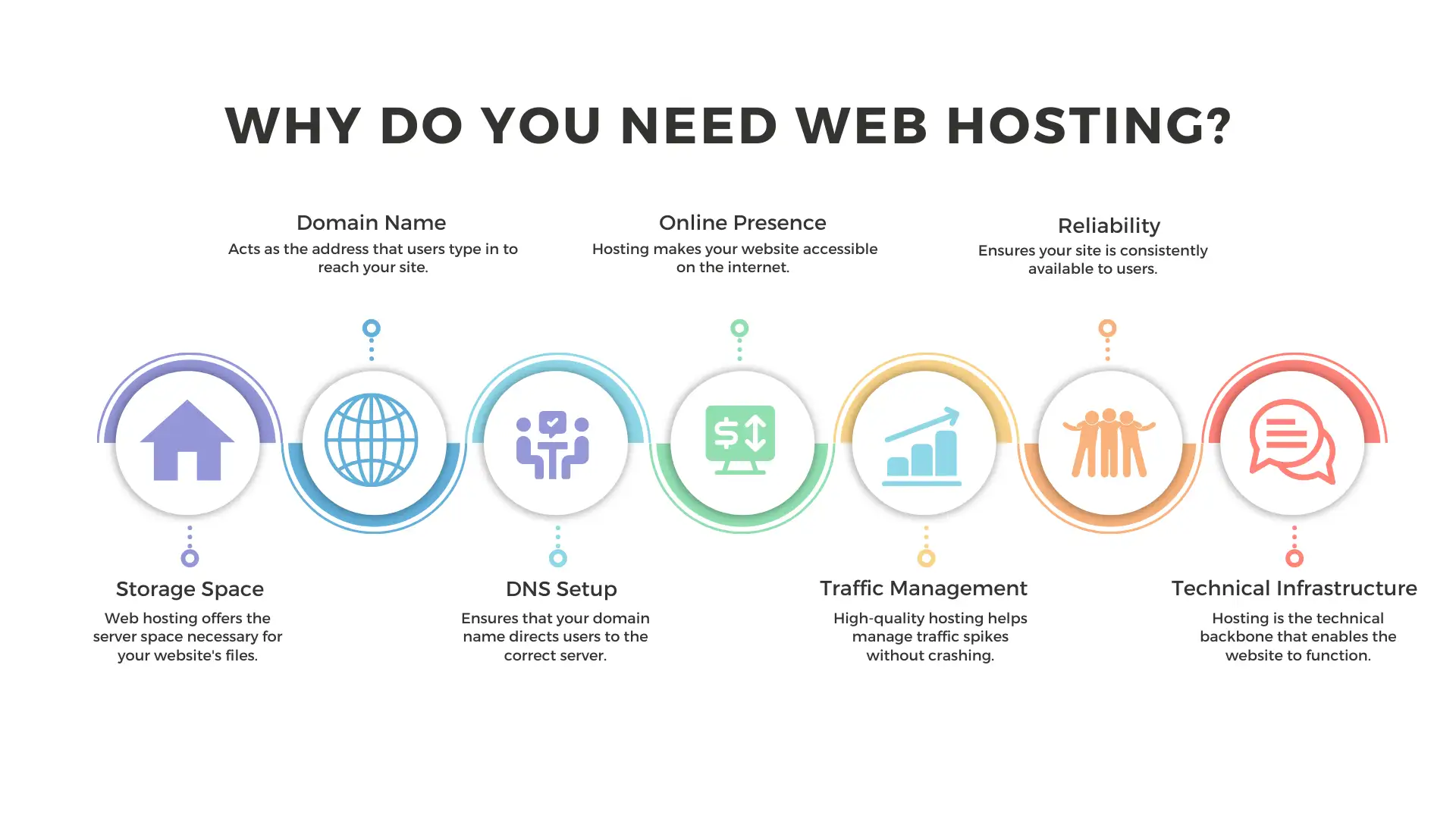
Setting features and limits is crucial. Decide on storage space and bandwidth. Offer enough space for basic needs. Don’t forget email accounts and databases. Some users need more. Others need less. Tailor plans to different users. This keeps them happy. Also, think about security features. SSL certificates are important. They keep data safe.
Pricing affects your business. Start with a basic plan. This should be affordable. Add premium plans for advanced users. Offer discounts for long-term plans. Make sure prices cover your costs. But, they should also be fair. Competitive pricing attracts more users. This helps your business grow.
Managing users is key. Create a simple signup process. Users like easy registration. Provide a dashboard for users. This lets them manage their plans. Support is crucial too. Users need help sometimes. Offer 24/7 support if possible. Happy users stay longer. They also tell others about your service.
Implementing Security Measures
Firewalls guard your server. They block bad traffic. Configure them correctly. Allow only necessary access. This keeps your server safe. Regular checks are vital. Adjust settings if needed. Good firewalls need constant attention.
DDoS attacks flood your server. They overload it with traffic. Protection is crucial. Use tools that detect these attacks. They help manage server load. This ensures your site stays online. Choose reliable protection services. They safeguard your web server.
Updates keep software secure. New patches fix vulnerabilities. Regular updates are essential. Check for updates often. Apply them promptly. Outdated software risks attacks. Secure servers need the latest updates.
Monitoring And Maintenance
Regular monitoring and maintenance ensure your web hosting server website runs smoothly. Check server uptime and troubleshoot issues promptly. Keep software updated to enhance performance and security.
Performance Monitoring Tools
Use tools to watch your server’s health. CPU usage, memory load, and disk space are key metrics. Tools like Nagios or Zabbix help. They show data in simple graphs. Alerts can warn you of problems. Keep an eye on uptime and downtime. Consistent monitoring helps avoid big issues.
Regular Backups
Backups are like safety nets. Always keep copies of your data. Use software that automates backups. Store them in different places. This protects against data loss. Check backups often. Make sure they work. Regular testing is crucial.
Troubleshooting Common Issues
Servers can have problems. Slow speeds or errors are common. Use logs to find errors. Reading logs helps understand issues. Restarting the server can fix some problems. Check for software updates. They often solve glitches. Keep calm and work step-by-step.
Customer Support Systems
Building a web hosting server website requires a solid customer support system. This system helps manage user queries and ensures smooth operations. Fast and reliable support enhances user satisfaction, promoting trust in your services.
Setting Up Support Channels
Offer different support channels. Use email, chat, and phone. Make it easy for users. Quick responses are crucial. Ensure staff are available 24/7. This helps solve problems fast. Train your team well. They should know the product inside out.
Creating Faqs And Guides
Create clear FAQs. Answer common questions. Use simple language. Make guides step-by-step. Include images or videos. This helps users understand better. Update FAQs often. Add new questions as they come. This keeps information fresh and useful.
Handling Customer Queries
Listen to customers carefully. Understand their needs. Respond with simple and clear answers. Be patient and polite. Never rush the customer. If needed, follow up later. Ensure their issue is resolved. Happy customers stay longer.
Credit: www.liquidweb.com
Marketing Your Hosting Service
Identifying your target audience is key. Know who needs hosting. Are they business owners? Bloggers? Gamers? Each group has different needs. Tailor your service to match. Use surveys to learn their preferences. Track trends in web hosting. Adjust your offerings regularly.
Online ads can help you reach users fast. Use Google Ads or Facebook Ads. Choose platforms where your audience spends time. Create engaging ads. Test different formats and messages. Measure ad performance. Adjust strategies based on results.
Partnerships can expand your reach. Collaborate with software companies or web designers. Offer joint promotions. Share resources and knowledge. Host webinars together. Build trust with partners. Strong partnerships lead to more customers.
Credit: wegic.ai
Frequently Asked Questions
How Do I Create My Own Website Hosting Server?
To create a website hosting server, choose reliable hardware, install server software, and configure DNS settings. Secure your server with firewalls and SSL certificates. Regularly update and maintain your server for optimal performance.
Can I Host My Website On My Home Server?
Yes, you can host a website on your home server. Ensure a stable internet connection and security measures. Use a static IP or dynamic DNS service for accessibility. Home hosting may not handle high traffic efficiently.
Can You Do Web Hosting Yourself?
Yes, you can host websites yourself using your own server. Ensure you have technical skills and proper equipment. Consider security, maintenance, and regular updates to manage hosting efficiently. For easier options, explore third-party hosting services.
Do I Need A Server To Host A Website?
Yes, a server is essential to host your website. You can use shared hosting or rent a dedicated server. Alternatively, choose cloud hosting services like AWS or Google Cloud. These options provide necessary resources and support for your website’s performance and availability.
Conclusion
Creating a web hosting server website can seem tough at first. But with the right steps, anyone can do it. You need to plan carefully and choose the best hosting service. Setting up is crucial for smooth performance. Remember to secure your website from threats.
Use simple designs for better user experience. Keep your site updated to ensure efficiency. Testing your site often helps catch errors early. With patience and practice, your site will thrive. Start small, learn as you go, and soon you’ll master web hosting.
Your website will be ready to impress visitors and meet their needs.


