
Have you ever wondered who is behind a website you visit? Knowing who is hosting a domain can give you important clues about the site’s reliability and purpose.
Whether you want to check a competitor, verify a partner, or just satisfy your curiosity, finding out who hosts a domain is easier than you think. You’ll discover simple, step-by-step methods to look up domain hosting information quickly and accurately.
Keep reading to unlock the secrets behind any website you choose.

Credit: www.webhostinghub.com
Why Check Domain Hosts
Checking who hosts a domain helps you learn important details about a website. This knowledge can help you make better decisions about the site. It also helps you avoid risks and solve problems faster. Knowing the domain host gives you control and insight.
Benefits Of Knowing The Host
Knowing the domain host reveals where the website lives. It helps in understanding the site’s speed and reliability. You can judge if the host is good or bad for your needs. It also helps if you want to move your site to a new host.
This information can protect you from scams and fake sites. You can avoid sites that use poor hosting services. It also helps in finding contact info for website support. This is useful if the site has issues or breaks down.
Common Reasons To Investigate
People check domain hosts to verify website trustworthiness. It helps spot fake or harmful websites quickly. Businesses research competitors’ hosts to plan their own websites better. Web developers check hosts before buying domains or building sites.
Domain host checks help solve technical problems. Knowing the host can speed up fixing errors or downtime. It also helps in tracking down website ownership during disputes. This makes the web safer and more transparent for everyone.
Credit: www.greengeeks.com
Tools For Finding Domain Hosts
Finding out who hosts a domain is easier with the right tools. These tools help you see where a website is stored and managed. They provide quick and clear information. You do not need special skills to use them. This section covers three useful options to find domain hosts.
Using Whois Lookup Services
WHOIS lookup services show details about domain owners and hosts. Just enter the domain name, and the tool fetches the data. You can see the hosting provider, registration date, and contact info. Many websites offer free WHOIS lookup tools. They are simple and fast to use.
Online Hosting Checkers
Online hosting checkers identify the server behind a website. These tools scan the domain and reveal the hosting company. They also show server location and IP address. Hosting checkers work well for quick checks. They do not require account creation or downloads.
Browser Extensions
Browser extensions provide hosting info right in your browser. Install an extension to check domains instantly. These tools display host details on the spot. They save time and simplify the process. Extensions often include extra features like SSL info and server type.
Step-by-step Host Lookup
Finding out who hosts a domain is easier than it seems. A clear step-by-step process helps you discover the hosting provider behind any website. This knowledge helps with troubleshooting, security checks, or even buying a domain.
Follow these simple steps to identify the host of a domain quickly and accurately. Each step uses free tools and basic technical details anyone can understand.
Using Whois To Identify Hosts
WHOIS is a public database with domain registration info. Start by entering the domain name into a WHOIS lookup tool online. The results show details like registrar, owner, and sometimes hosting provider.
Look for the “Name Server” or “Hosting Provider” fields. They often reveal the company managing the domain hosting. Some domains use privacy protection, so data might be limited.
Interpreting Dns Records
DNS records point domain names to servers. Use a DNS lookup tool to check the domain’s records. Focus on A, CNAME, and NS records.
A records show the IP address of the server hosting the site. CNAME records link subdomains to other domains. NS records identify the name servers controlling the domain.
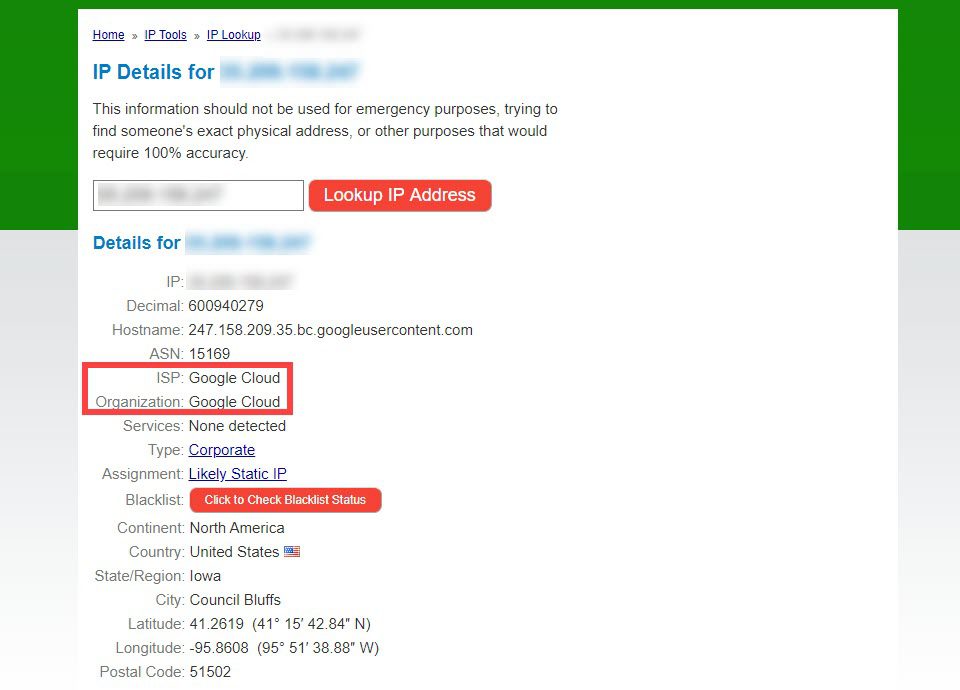
Check the IP address with an IP lookup tool. It reveals which hosting company owns the server.
Verifying Hosting Providers
After gathering info, confirm the hosting provider. Use the IP address or name servers to search hosting databases. These services list companies linked to IP ranges.
Cross-check data from WHOIS and DNS lookups. Consistent details mean accurate identification of the hosting company. This final step ensures you know exactly who hosts the domain.
Credit: www.elegantthemes.com
Troubleshooting Host Identification
Finding out who hosts a domain can sometimes be tricky. The host may use tools that hide their identity. Other times, extra services change the information you see. This section helps you solve common problems when identifying a web host.
Handling Privacy Protection
Many domain owners use privacy protection services. These services hide personal details in the domain records. Instead of the owner’s name, you see the privacy service’s info. This makes it hard to find the real host.
To work around this, check the domain’s IP address. Use tools like Whois lookup or IP tracer. The IP address often points to the hosting company. Sometimes, the website’s contact page or footer shows hosting details.
Dealing With Cdn Services
Content Delivery Networks (CDNs) help websites load faster worldwide. They act as a middleman between users and the host. This can hide the actual hosting provider’s information.
To identify the host, look up the website’s IP address after disabling the CDN. Use tools like DNS checker to find the original server. You may also contact the website owner for hosting info.
When Hosts Use Multiple Providers
Some websites use more than one hosting provider. This spreads their resources and improves performance. It also makes it harder to identify a single host.
Check all IP addresses linked to the domain. Use online tools to see if these IPs belong to different hosts. Look for patterns in DNS records or hosting locations. This helps you understand the hosting setup better.
Additional Tips And Best Practices
Knowing how to find a domain’s host is useful. It helps track site details and manage your online presence. Use these tips to improve your domain research efforts. They ensure you get accurate and up-to-date information.
Cross-checking Multiple Sources
Check different websites for domain host information. Some tools may show outdated or incomplete data. Comparing results from several sources gives a clearer picture. It reduces the chance of errors. Use popular services like WHOIS lookup, hosting checker tools, and DNS lookup.
Regular Domain Host Monitoring
Keep track of your domain’s hosting regularly. Hosts can change without notice. Regular checks help catch changes early. Set reminders to verify hosting details monthly or quarterly. This practice protects your website and prevents surprises.
Frequently Asked Questions
How Can I Find Out Who Hosts A Domain?
Use online tools like WHOIS lookup or hosting checker websites. These tools reveal the hosting provider by analyzing domain registration and DNS details quickly.
Are Whois Lookup Tools Reliable For Hosting Info?
Yes, WHOIS tools provide accurate domain registration and hosting data. However, some domains use privacy services that hide hosting details.
Can I Identify Hosting From Dns Records?
Yes, DNS records often show the IP address linked to hosting servers. Tracing the IP helps determine the hosting provider effectively.
Is It Legal To Look Up Domain Hosting Information?
Yes, looking up publicly available domain hosting info is legal. It helps verify website legitimacy or troubleshoot technical issues responsibly.
Conclusion
Finding out who hosts a domain is easier than you think. Use simple tools online to get the information fast. Knowing the host helps with website research and security checks. Just type the domain name, and the tool shows the host details.
Keep this guide handy for your next domain search. Understanding domain hosting makes managing websites clearer and smarter. Give it a try and see how useful it can be.


