
Ever stumbled upon a website and wondered who’s powering it behind the scenes? Knowing the web host can be crucial, whether you’re a curious tech enthusiast, a budding entrepreneur, or someone looking to switch hosting providers.
You’re about to unlock the secret of identifying the web host of any site with ease. Imagine the power at your fingertips, the ability to uncover what makes your favorite site tick. Dive in, and discover simple, step-by-step methods to satisfy your curiosity and make informed decisions.
Ready to unravel the mystery? Let’s get started!
Identifying Web Hosting Provider
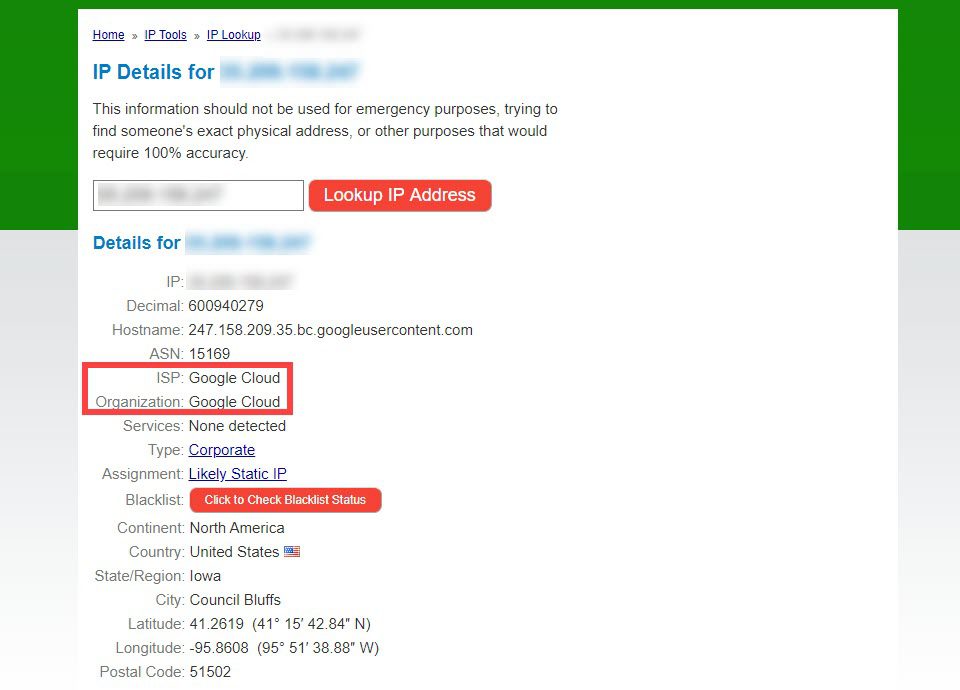
Discovering a website’s hosting provider can be simple. Start by using online tools like WHOIS lookup. These tools show the registrar and hosting information. Another way is checking the website’s source code. Sometimes, the hosting company’s name appears there. Look for clues in IP addresses. Tools like IP lookup reveal the host behind the address.
Some sites use CDNs like Cloudflare. This makes finding the host trickier. Check for hosting provider badges on the site’s footer. These badges often display the host’s name. Asking the website owner directly can provide clear answers. Many owners share their hosting details. Lastly, use browser extensions designed for this task. They can identify hosting providers quickly.
Credit: www.elegantthemes.com
Using Online Tools
Whois lookup services help find web host details. Enter the domain name. The service shows the hosting company. These tools are often free and easy to use. Whois data also reveals the domain’s owner and registration date. Use this info to learn more about the domain.
Hosting checker websites provide quick answers. Type in the domain name. See the host provider instantly. These sites are user-friendly. They offer clear results. Some sites also suggest similar domains. This can help in exploring more options.
Domain tools extensions work as browser add-ons. Install them in your browser. Click the icon to see hosting info. Extensions are handy and save time. They provide instant results without leaving the page. Useful for quick checks on multiple domains.
Analyzing Website Source Code
Meta tags give clues about the website’s host. To find them, right-click on the page. Choose “View Page Source” or “Inspect”. Look for keywords like “generator” or “hosted”. These might show the web host’s name. Not all sites have this info. But some do. It’s a good starting point.
Resource links can help find the host. In the source code, look for links ending in .css, .js, or .jpg. The URLs might have the host’s name. For example, a link might have amazonaws.com. This shows the site uses Amazon Web Services. Not every link gives info. But some are helpful.
Tracing Ip Addresses
Command line tools can help find a web host. Ping is a useful tool. It shows the IP address of a website. Open the command prompt. Type ping and the website name. Press enter. The results show the IP address. Tracert is another tool. It traces the path to the website. Type tracert and the website name. You will see a list. Each line shows a server in the path. These tools are simple and effective.
Online tools can trace IP addresses too. Whois is a popular tool. It shows information about a website. Enter the website name. Press search. The results show the web host. IP Lookup is another tool. It provides details about an IP address. Enter the IP in the search box. Click submit. You will see the hosting company. These tools are easy to use. They are available online for free.
Consulting Dns Records
DNS records are like a web address book. They tell where to find websites. Each entry has important details. The A record shows the website’s IP address. The NS record lists name servers. These help connect to the website. CNAME records can point to another domain. Understanding these helps find the web host. It’s like finding a house address in a map.
DNS lookup tools make the search easy. They show details about a website’s host. Just enter the website name. The tool displays the records. Online tools are often free and simple. Some popular ones are Whois and MXToolbox. These tools help you learn more about the web host. Explore the information provided. It’s like solving a fun puzzle!
Exploring Web Hosting Forums
Discover the process of identifying a website’s hosting provider through web hosting forums. Learn simple tools and techniques to find which web host a site uses. Gain insights from community discussions and expert advice.
Engaging With Hosting Communities
Joining a web hosting forum can be very helpful. Many people share their experiences and insights. Ask questions and get quick answers from real users. You can learn about different hosts. Find out what others think about their current providers. It’s a good way to learn.
Searching Forum Archives
Many forums have archives. You can search these to find old posts. Look for discussions about web hosts. People often share the host they use and why. This information can be very useful. You can see what problems others had. Learn how they solved them. These archives are like a treasure chest of information.
Contacting Website Administrator
Start by finding the website’s contact page. Look for an email address. Send a simple email. Ask for the web hosting details. Be polite. Use clear language. Explain why you need the information. This might help you get a response.
Some websites have a contact form. Use it to ask for hosting details. Be direct. Keep your message short. Write, “I am curious about your web host. Could you share this information?” This approach is simple and clear. Helps in getting the needed information.
Credit: www.godaddy.com

Credit: www.godaddy.com
Frequently Asked Questions
How Do I See What Server A Website Is Using?
Use online tools like “Whois” or “Netcraft” to discover a website’s server details. Alternatively, inspect HTTP headers via browser developer tools. These methods provide server information such as the web server software and hosting provider.
How To Find Out What Platform A Website Is Hosted On?
To find a website’s hosting platform, use online tools like BuiltWith or Netcraft. Check the site’s source code for clues. You can also search WHOIS databases for hosting information. These methods help identify the hosting service quickly and efficiently.
How To Find Out Who Manages A Website?
Check the website’s “Contact” or “About Us” page for management details. Use WHOIS lookup tools for domain information. Explore LinkedIn for company profiles or personnel. Search social media for website-related posts or owner mentions.
How Can I Find My Host?
Check your hosting provider’s welcome email for details. Use online tools like WHOIS to find your host. Access your website’s DNS settings or contact your domain registrar for assistance.
Conclusion
Finding a web host is easier than it seems. You have tools and methods to guide you. Start with domain lookup services. They offer quick insights into hosting details. Use online tools like WHOIS for deeper information. Remember, hosting affects site speed and reliability.
Choose wisely based on what you find. Knowing your host helps in troubleshooting issues. It also aids in future upgrades. Understanding hosting is crucial for website success. Stay informed and make smart decisions. Your site deserves a reliable home.


