
Are you curious about what’s behind your favorite website’s curtain? Maybe you’re planning to launch your own site, or perhaps you’re just fascinated by the digital world.
Whatever the reason, understanding web hosting information is crucial. It can reveal a lot about a website’s reliability, security, and performance. By knowing how to look up web hosting details, you gain insights that can guide your decisions, boost your confidence, and empower your online presence.
Imagine having the power to uncover secrets about any website with just a few clicks. This knowledge is not only intriguing but incredibly useful. Dive into this guide, and you’ll discover straightforward ways to access valuable web hosting information. Your curiosity deserves answers, and this article is designed to satisfy it, leaving you eager to explore further.
Credit: www.elegantthemes.com
Importance Of Web Hosting Information
Finding web hosting details is important. It helps keep your website safe. Web hosting can affect how fast your site loads. Slow sites lose visitors. Security is a big deal. Good hosting prevents hackers. Reliability matters too. Websites need to be up all the time. Hosting affects this. Cost is another factor. Some hosting plans are cheaper. Others have more features. Know what you are paying for. Support is crucial. Good hosts offer help when things go wrong. Understanding hosting helps make smart choices. It is not just about picking a company. It is about knowing what you need. Websites need good hosting to work well. Always check hosting details before buying. It makes a big difference.

Credit: hostingchecker.com
Tools For Web Hosting Lookup
Online services help find web hosting information easily. They offer easy-to-use interfaces. Whois Lookup is a popular choice. It gives details about domain ownership and hosting. Hosting Checker is another tool. It shows where a website is hosted. These tools are free and quick to use. They are useful for beginners and experts alike. No special skills are needed. Just enter the website address, and the tool does the rest.
Browser extensions make it easy to check hosting info. Wappalyzer is a popular choice. It shows server details and technologies used. BuiltWith is another tool. It provides detailed hosting insights. These extensions are easy to install. They work with a click. Very user-friendly.
Command line tools are for tech-savvy users. Ping checks if a site is live. Tracert traces the path to a website server. Nslookup fetches DNS records. These tools need some technical know-how. They are powerful and precise. Great for deeper insights.
Understanding Domain Names And Ip Addresses
Every website has a unique domain name. This name is like a house’s address. It helps people find the website. Domains end with parts like .com or .org. The domain name system, or DNS, turns these names into numbers. These numbers are called IP addresses. Without DNS, finding websites would be hard.
An IP address is a set of numbers. It helps computers talk to each other. Think of it as a phone number for your computer. Every device on the internet has one. This makes sure messages go to the right place. Websites need IP addresses to work. They are like the secret code of the internet.
Steps To Identify Web Hosting Provider
Visit a WHOIS website to start. Enter the website’s URL in the search box. You’ll see details about the domain registration. This may include the web hosting provider. Look for the section labeled “Registrar” or “Hosting Provider“. Some sites may hide this information. It’s due to privacy settings.
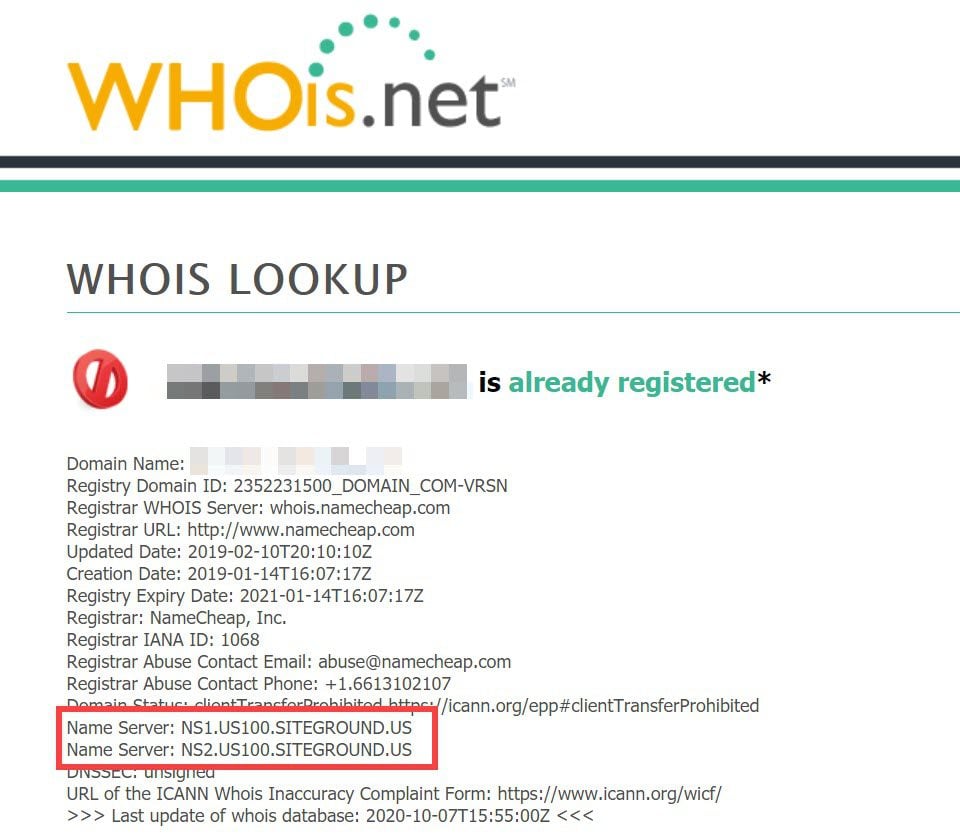
Look at the website’s name servers. They often reveal the hosting company. Use online tools to check them. Enter the site’s URL. The tool will show the name servers. Compare these with known hosting providers. This can help identify the web host.
Find contact details on the website. Look for a “Contact Us” page. Send a polite message to the owner. Ask for details about their web host. Some may not reply. Others might share helpful information. Be respectful and clear with your request.
Analyzing Web Hosting Details
Discovering web hosting details can be simple. Start by using online tools like Whois to find basic information. These tools reveal the hosting provider, IP address, and server location.
Evaluating Hosting Provider
Find the hosting provider of a website. Use tools like WHOIS lookup. This helps identify who hosts the site. Knowing the provider is crucial. It tells you about customer support and reliability. Check reviews online. Reviews show the provider’s reputation. Is the provider trusted? Are users happy? Good support is important. Always choose a provider with good reviews.
Understanding Hosting Plans
Hosting plans vary. Some offer shared hosting. Others provide VPS or dedicated servers. Shared hosting is cheaper. It’s good for small sites. VPS offers more resources. Ideal for medium-sized sites. Dedicated servers are powerful. Best for large sites. Know your site needs. Choose a plan that fits those needs. Consider cost, bandwidth, and storage.
Identifying Server Locations
Server location affects website speed. Websites load faster near their server. Check the server’s location. Tools can help find this. A nearby server improves user experience. It’s vital for global sites. Choose locations wisely. Good server placement boosts site performance. Users enjoy faster browsing.

Credit: www.keytech.au
Privacy And Security Considerations
Protecting your website’s data is vital. Use strong passwords for all accounts. Regularly update these passwords. Enable two-factor authentication for added security. Backup your website data often. Store backups in secure locations. Choose hosting services with encryption protocols. Encryption keeps data safe from hackers. Monitor your website for any suspicious activity. Use security plugins if available. These plugins detect threats early. Train staff on security best practices. Regular security training prevents data leaks.
Secure connections keep information safe. Use SSL certificates for your website. SSL encrypts data between server and browser. Choose web hosts that offer SSL. Check for HTTPS in your website’s URL. HTTPS means a secure connection. Avoid sharing sensitive data on public networks. Public networks can be risky. Test your website’s security regularly. Security tests find vulnerabilities. Fix these issues immediately. Keep software updated. Updates often include security patches. Secure connections build trust with users.
Common Challenges And Solutions
Finding web hosting details can be tricky for many. Identifying hosting providers involves checking domain records and using online tools. Solutions include WHOIS searches and website hosting lookup services to discover hosting information efficiently.
Dealing With Hidden Information
Web hosting data can be hard to find. Many websites hide this info. Private registration is common. This keeps data secret. To find details, use WHOIS tools. They help uncover hidden data. Online services like ICANN can assist. Look for any available contact information. This may include an email or phone number. Reach out for more info if needed.
Overcoming Access Restrictions
Some websites block access. They use security features like firewalls. This keeps data safe. But there are ways to get around this. Use a VPN to change your location. This can help access blocked sites. Another tool is a proxy server. It hides your IP address. Browser extensions can also help. They make browsing easier. Always ensure your actions are legal.
Utilizing Hosting Information
Knowing your web hosting details can help your site run better. Choose the best hosting to boost speed. A fast website keeps users happy. Tools like Google PageSpeed can check your site speed. Slow sites make visitors leave. Choose a host that offers good uptime. Uptime means your site is always online. Look for at least 99% uptime.
A good host also helps with user experience. Visitors like sites that load fast. Hosting affects how quick pages open. Secure hosting keeps data safe. This builds trust with users. Choose hosts that offer SSL certificates. SSL makes sure data is safe. Easy navigation is key. A good host ensures smooth browsing.
Frequently Asked Questions
How To Find Out What Platform A Website Is Hosted On?
Use online tools like BuiltWith or Netcraft to identify the hosting platform. Check the website’s source code for server information. Search for hosting clues in the site’s footer or contact page. Use WHOIS lookup for domain registration details, which may reveal hosting providers.
How Do I Find Details Of A Website?
Use online tools like WHOIS or domain registrars to find website details. Check website footers for contact information. Use web analytics tools for additional insights.
How Do I Know What Server A Website Is Using?
Use online tools like BuiltWith or Netcraft. Enter the website URL to check server details. You can also inspect HTTP headers via browser developer tools or use command-line tools like “curl” to identify server information.
How Do I Find My Hosting Account?
Log into your hosting provider’s website using your registered email and password. Check “My Account” or “Dashboard” section. Contact support for assistance if needed.
Conclusion
Finding web hosting details is simpler than it seems. Start with domain lookup tools. They provide essential data quickly. Check hosting provider websites for more details. Many offer customer support for questions. Explore forums and tech communities. They often share useful insights.
Remember to verify information accuracy. Incorrect data can lead to misunderstandings. Stay curious and keep learning. Technology evolves, and staying informed helps. With these tips, you will find what you need. Your knowledge will grow over time. Keep exploring and discovering new resources.
Happy searching!


