
Ever stumbled across a stunning WordPress site and wondered, “What theme is that?” You’re not alone.
As you browse the web, countless sites capture your attention with their sleek designs and intuitive layouts. You might find yourself yearning to recreate that magic for your own site. Luckily, discovering the theme behind these captivating designs is easier than you think.
You’ll uncover simple techniques to identify the WordPress theme of any website you come across. By the end, you’ll have the skills to replicate your favorite designs and elevate your own website. Ready to unlock the secrets behind those irresistible web aesthetics? Let’s dive in!
Importance Of Identifying WordPress Themes
Knowing your WordPress theme helps in many ways. It allows you to customize your site better. It also helps in troubleshooting issues. Themes give a website its design and layout. Choosing the right theme is crucial for your site’s success. Some themes are fast, others are slow. Fast themes improve user experience. Slow themes can hurt your site’s ranking. Identifying themes can also inspire your own site design. You can look at other sites and see what works. Then, apply those ideas to your own site. Many websites use popular themes. Recognizing them can help you learn their features. This knowledge can guide you in making better decisions. It also helps you understand your competitors. You see what themes they use and why. This understanding can help you improve your own site. Explore themes to find the best fit for your needs.

Credit: www.youtube.com
Common Reasons For Theme Identification
Many people seek theme identification to find ideas. Seeing a beautiful site makes you curious. You want to know what theme they use. It helps spark new ideas. Using the same theme might improve your site. It’s like finding a secret recipe.
Checking a theme’s compatibility is important. Your site must work on all devices. A theme might look good but not work well. Knowing the theme helps avoid problems. It ensures your plugins work smoothly. Compatibility saves time and effort.
Each theme has unique features. Some have special layouts or styles. Knowing these features helps make decisions. Customizations allow you to change colors and fonts. This makes your site unique. Understanding themes brings better choices.
Manual Methods For Theme Detection
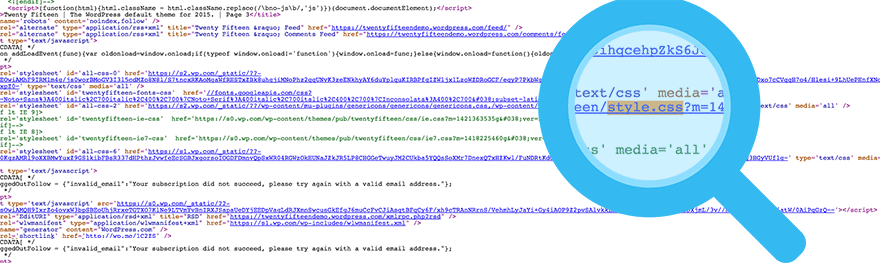
Right-click on the page and select “View Page Source.” Look for the style.css file. This file often contains the theme’s name. Search for Theme Name within the file. You might see other theme details too.
Open the website in your browser. Use the developer tools by pressing F12. Go to the Sources tab. Find the style.css file. Theme information is usually at the top.
Some browser extensions help detect WordPress themes. Install an extension like Wappalyzer. Click on the extension icon. It may show the theme name. These tools are easy for beginners.

Credit: www.wpbeginner.com
Online Tools For Theme Identification
Theme Detection Websites are very helpful. They find the theme used on a site. These sites work fast. Just enter the URL. They show the theme name quickly. Some popular ones include “What WordPress Theme Is That” and “WP Theme Detector”. These tools often reveal the theme’s creator too. They can also show theme popularity. This helps in choosing themes for your site. Easy to use and free! Makes theme research simple.
Plugins for Theme Analysis are another option. They install directly into WordPress. They analyze site themes easily. Popular plugins include “Theme Check” and “WP Theme Detector Plugin”. These plugins check theme codes. They ensure themes follow WordPress rules. This keeps sites safe and functional. Easy to install. Great for understanding theme details.
Limitations And Challenges
Premium and custom themes make it hard to know their names. They often hide their real identity. This is to protect their unique design. Many premium themes use advanced coding techniques. These techniques make it tough to identify them. Custom themes are made for one specific website. They are not available for others to use. This exclusivity adds to the challenge of identification.
Obfuscated source code is another hurdle. Developers sometimes hide code on purpose. This keeps their work secret. It also prevents easy identification. Source code may be scrambled or encrypted. This makes it unreadable. So, finding out the theme becomes really hard.
Best Practices For Theme Research
Use multiple sources for theme details. Check the theme’s official website. Look for reviews and ratings on various sites. Sometimes, forums have useful insights. Always verify the theme’s information. Compare details from different places. This helps in understanding the theme better.
Explore popular theme directories. WordPress.org has a vast list. You can find trusted themes there. Check the theme’s popularity and active installs. Read user reviews. They offer valuable feedback. Always check the last update date. This shows if the theme is still supported. A well-supported theme is crucial.
Alternatives To Theme Identification
Theme frameworks help in building websites easily. They provide a base for creating custom themes. Many developers use frameworks to save time. Popular frameworks include Genesis and Thesis. These frameworks have many features. They make design simple and flexible. Also, they offer good support and updates. Always check if the theme uses a framework. This helps in understanding the theme better.
Hiring a developer can be helpful. Developers know many things about themes. They can find the theme quickly. Experienced developers can identify themes easily. They have tools and skills for this. Developers can also suggest better themes. They can improve your website’s look. Always choose a developer with good reviews. This ensures quality work. Discuss your needs clearly with them.
Credit: winningwp.com
Frequently Asked Questions
How Can I Identify A WordPress Theme?
To identify a WordPress theme, use online tools like WhatTheme or WPThemeDetector. These tools analyze the website’s code and display the theme’s name and details. Alternatively, check the website’s source code by searching for “wp-content/themes” to find the theme folder name.
Are Theme Detection Tools Accurate?
Yes, most theme detection tools are accurate. They analyze the website’s code to identify the theme. However, if the site uses a custom theme or heavily modified version, detection might be challenging. For precise results, verify the theme details manually by inspecting the site’s source code.
Can A WordPress Theme Be Custom-made?
Yes, WordPress themes can be custom-made. Many websites use custom themes to ensure unique design and functionality. Custom themes are usually developed from scratch or heavily modified from existing themes. If the theme detection tool doesn’t identify a theme, it might be a custom-made one.
Why Is Knowing A Site’s Theme Important?
Knowing a site’s theme helps in replicating design and functionality. It provides insights into the tools and features used. This information is valuable for web developers and designers looking to create similar websites or seeking inspiration for their own projects.
Conclusion
Discovering a WordPress theme is easier than you think. Use online tools. They quickly identify themes on any website. You gain insights instantly. This knowledge helps with design choices. It saves time and effort. Now, you can create similar styles.
Exploring themes broadens your options. It enhances your site’s appearance. Stay curious and keep learning. This skill boosts your web projects. Keep these tips handy for future reference. Your journey with WordPress themes starts now. Embrace it and enjoy the creativity.


