
Have you ever stumbled upon a sleek, fast-loading website and wondered what web hosting service powers it? Knowing the web hosting provider of a website can unlock valuable insights, especially if you’re planning to launch your own site or improve an existing one.
Whether you’re curious about a competitor’s hosting solution or simply want to understand the backbone of a favorite website, discovering this information can give you a strategic edge. In this guide, we’ll walk you through simple, effective ways to uncover the hosting provider behind any website.
Stay with us to uncover these secrets, and you’ll soon be able to apply this knowledge to enhance your own digital presence.

Credit: www.hostinger.com
Identifying Web Hosting Providers
Online tools help find web hosting providers easily. These tools are free to use. Simply enter the website URL. You get details like hosting name, IP address, and server location. WhoIsHostingThis and HostAdvice are popular choices. They provide quick results. You don’t need technical skills to use them. These tools make it simple to learn who hosts a site.
Domain registration details show the web hosting provider. Use a Whois lookup tool. Enter the domain name. Get information about the registrar and hosting company. Some sites hide their details. But many show clear hosting info. Domain registration data is public. Anyone can access it. This method is simple and effective.
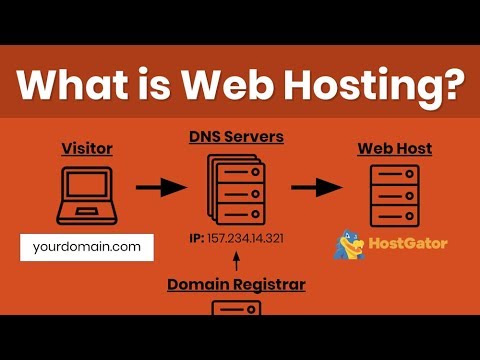
DNS records offer clues about web hosting providers. Use DNS lookup tools. They reveal server names and IP addresses. DNSstuff and MXToolbox are useful sites. DNS records are like an address book. They show where a site is hosted. This method requires basic understanding. But it’s a reliable way to find hosting info.
Manual Methods For Web Hosting Detection
Discover web hosting details manually by inspecting website elements. Check the site’s IP address using online tools. Review DNS records for hosting clues, revealing valuable insights about server location and hosting provider.
Analyzing Website Source Code
Open your browser and visit the website. Right-click on the page and select “View Page Source” or press Ctrl+U. A new tab will show the source code. Look for meta tags or comments. Sometimes, hosting details are there. Check for lines mentioning hosting providers like “Cloudflare” or “AWS”. These clues can help find the hosting company.
Inspecting Whois Data
WHOIS is a tool that shows information about domain names. It can reveal who owns the site and its hosting. Visit a WHOIS lookup website. Enter the domain name in the search box. Click search and wait. The result shows details like registrar and hosting provider. This is a simple way to find hosting information.
Web Hosting Features And Clues
Server location helps in finding website’s host. Different locations show different hosting services. Nearby servers can make websites faster. Users can check server location with online tools. These tools give important server details. Knowing server location helps in understanding hosting quality.
IP addresses are unique numbers. They help find web host. Tracking IP can reveal hosting company. Many sites offer IP tracking. They show IP and host name. Webmasters use these tools often. IP tracking is simple and fast. It provides useful hosting clues.
Common Challenges In Web Hosting Identification
Some websites use hidden hosting providers. This makes it hard to know who hosts them. These providers hide the real server details. They use different names. This can confuse people trying to find the host.
Websites often use proxy servers. These servers act as middlemen. They hide the true host. This adds a layer of secrecy. Finding the hosting provider becomes tricky. People think the proxy is the host. But it is not.
Using Browser Extensions
Discovering a website’s hosting provider is simple with browser extensions. These tools reveal hosting details quickly. Install an extension, visit the site, and find hosting information effortlessly.
Popular Extensions For Hosting Info
Extensions help find hosting details quickly. Some popular ones are Wappalyzer and BuiltWith. These tools show hosting info like server type and location. They are easy to use and provide fast results. Many people use them to learn about websites.
Installation And Use
Installing extensions is simple. Go to the browser store. Search for the extension name. Click install and wait. Once installed, use the extension to check hosting info. Click on the extension icon. It shows details like hosting provider and server location. Easy to use and helpful.

Credit: www.hostinger.com
Advanced Techniques
Discover how to identify a website’s hosting provider using advanced techniques. Tools like WHOIS and online lookup services can help. Understanding hosting details can offer insights into site performance and security.
Utilizing Command-line Tools
Command-line tools help find web hosting. One popular tool is WHOIS. It shows domain registration details. You can see the host’s name easily. Another tool is nslookup. It finds the server’s IP address. This helps identify the host. Use traceroute to follow data paths. It shows the route data takes to the server. This reveals the hosting location. These tools are easy to use. They provide clear information quickly. A basic understanding of commands is helpful. With practice, these tools become simple.
Network Tracing Methods
Network tracing helps find a site’s host. Start with ping command. It checks if a server is reachable. It shows the server’s IP address. Another method is traceroute. This traces data paths to the server. It shows each stop along the way. Use online tracing tools for more help. They offer user-friendly interfaces. These methods give clues about the host. With practice, tracing becomes easier.
Credit: www.youtube.com
Frequently Asked Questions
How To Find Out What Platform A Website Is Hosted On?
Use online tools like BuiltWith or Wappalyzer to identify the hosting platform of a website. Check the website’s source code for hosting information. Examine domain registration details on WHOIS databases for insights.
How Do I Know The Web Server Of A Website?
Use online tools like “Whois” or “WhatWeb” to identify the web server of a website. Alternatively, inspect the HTTP headers using browser developer tools. These methods reveal server details quickly.
How Do I Find Out What Service Is Hosting My Website?
Check your domain registrar account for hosting details. Use online tools like WHOIS to identify your hosting provider. Access your website’s control panel or contact your web developer for information. Search for hosting clues in your website’s DNS records.
What Is Your Website Host?
Our website is hosted on Bluehost. They provide reliable and fast hosting services. Bluehost ensures excellent uptime and customer support.
Conclusion
Discovering a website’s hosting is simpler than you think. Use online tools to find the host quickly. Check the website’s source code for clues. Look for the hosting provider’s name or IP address. These steps help uncover the hosting service.
Understanding this can improve your own web strategies. It aids in benchmarking your hosting decisions. Knowing the host offers insights into website performance. This knowledge can guide your hosting choices. Stay informed and make smarter decisions for your website.


