
Are you looking to take your WordPress site to the next level by adding stunning design features without diving into complex coding? Integrating WP Bakery into your WordPress theme might just be the solution you need.
Imagine having a powerful tool that allows you to create beautiful, custom layouts effortlessly. WP Bakery is renowned for its user-friendly drag-and-drop interface, enabling you to transform your website’s appearance swiftly and efficiently. In this guide, we’ll walk you through the seamless integration process, ensuring you can start crafting visually appealing pages that captivate your audience and elevate your online presence.
Stick around to discover how easily you can enhance your website’s design and functionality with WP Bakery.

Credit: wpbakery.com
Wp Bakery Overview
WP Bakery is a plugin for WordPress. It helps make pages. You can use it with drag-and-drop. This makes page building easy. Many people like it. It is popular for creating sites. You can build pages fast with it. No need for coding skills.
WP Bakery has many features. It has ready-made templates. These templates save time. You can also customize pages easily. There are many elements to add. You can add images, texts, and buttons. It works well with many themes.
Installation Process
Visit the WP Bakery website. Locate the download section. Click on the download button. Save the file to your computer. The file will be in a .zip format. Keep it safe on your desktop. You will need it soon.
Open your WordPress dashboard. Go to Plugins on the sidebar. Click Add New. Choose the upload option. Select the WP Bakery .zip file. Click upload and install. Wait for the installation to finish. Once done, find the plugin under installed plugins. Click Activate to start using WP Bakery.
Theme Compatibility
First, check if your theme supports WP Bakery. Look for any theme documentation. Some themes may need specific versions. Ensure that your WordPress version is up-to-date. This helps with smooth integration.
Check if there are any plugin conflicts. Sometimes, other plugins may interfere. Disable other plugins if needed. Ensure your website does not break.
Go to your WordPress dashboard. Navigate to the theme settings area. You might need to adjust some settings. Look for options related to page builders. Enable WP Bakery if required.
Check for any custom CSS settings. Some themes allow custom styles. Make sure these do not clash with WP Bakery. Always preview changes before making them live.
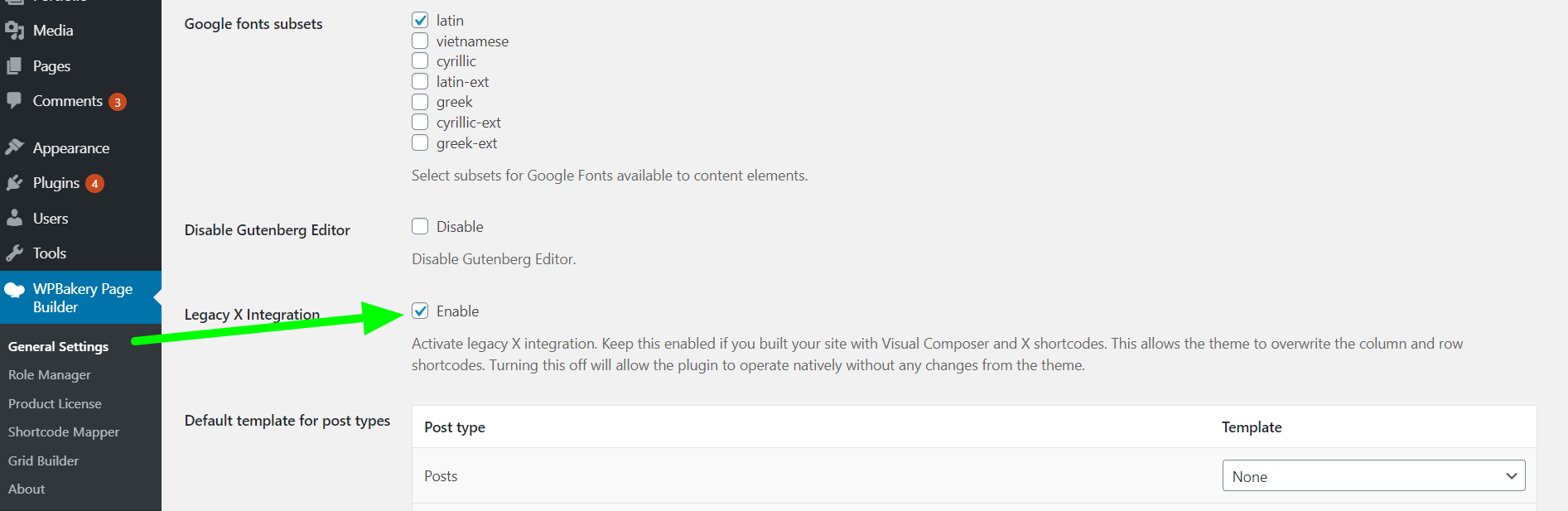
Credit: theme.co
Customizing With Wp Bakery
Wp Bakery offers many pre-built templates. These templates make creating pages easy. Choose a template that fits your style. Adjust colors and fonts to match your theme. Templates save time. They help keep your design consistent. Templates are easy to use.
Building layouts from scratch is fun. Drag and drop elements to create your design. Add text blocks, images, and buttons. Wp Bakery makes this simple. It’s like playing with building blocks. Make your website unique. Use different sections for different content. Keep experimenting.
Integrating Shortcodes
WP Bakery offers many built-in shortcodes for easy use. These shortcodes help to add features. No coding skills needed. You can find them in the WP Bakery menu. Use them to add buttons, galleries, or sliders. Just select and insert. It’s that simple. This makes your site look unique. Built-in shortcodes are reliable and safe. They work well with most themes.
Sometimes, you need something special. Create custom shortcodes for this. Custom shortcodes allow more creativity. Add special designs or features. To do this, go to your theme’s functions.php file. Write your shortcode code there. Make sure to save changes. Test the new shortcode on a page. Check how it works. Custom shortcodes make your site stand out. They show your creativity.
Performance Optimization
Integrating WP Bakery into a WordPress theme enhances website performance by streamlining design processes. This drag-and-drop tool simplifies layout customization, reducing the need for complex coding. As a result, users experience faster page load times and improved site efficiency.
Improving Load Times
Fast websites keep visitors happy. Slow pages make people leave. Optimize images to load faster. Use smaller images. Reduce image quality if needed. Use caching to save resources. Cached pages load quicker. Set up browser caching. Use plugins for caching.
Minimizing Resource Usage
Efficient use of resources is crucial. Limit plugins to those truly needed. Too many plugins slow down sites. Choose lightweight themes. They use fewer resources. Optimize scripts by reducing their size. Minimize CSS and JavaScript files. This helps save server power. Use lazy loading for images. Images load only when needed. This saves bandwidth.
Troubleshooting Common Issues
Integrating WP Bakery with a WordPress theme can sometimes cause issues. These can include plugin conflicts or layout problems. Check compatibility, update plugins, and ensure proper shortcodes to solve these issues easily.
Resolving Conflicts
Plugins can sometimes cause conflicts. Deactivate other plugins one by one. Check if the issue resolves. Some themes may not support WP Bakery. Ensure theme compatibility. Update WP Bakery to the latest version. This might fix the conflict. Always back up your site before making changes. Use a staging site for testing. This keeps your live site safe.
Fixing Display Errors
Pages may not look right. Check the website’s CSS settings. Incorrect settings can cause display issues. Clear your browser cache. Sometimes old data causes problems. Refresh the page to see changes. Ensure WP Bakery is activated correctly. Reinstall if necessary. This might solve display errors. Use the WP Bakery support forum for help. Other users may have solutions.
Credit: themeforest.net
Frequently Asked Questions
How Do I Install Wp Bakery In WordPress?
To install WP Bakery, navigate to your WordPress dashboard. Click on “Plugins” and then “Add New. ” Upload the WP Bakery plugin file, install it, and activate it. Ensure your theme supports WP Bakery for seamless integration and enhanced page-building capabilities.
Can Wp Bakery Be Used With Any Theme?
Yes, WP Bakery can be used with most WordPress themes. However, optimal performance is achieved when the theme is built with WP Bakery compatibility in mind. Always check the theme documentation for compatibility details before integrating WP Bakery.
Is Wp Bakery A Free Plugin?
WP Bakery is not a free plugin. It requires a one-time purchase for a regular license. This provides access to updates and premium support. Consider it an investment for enhanced design flexibility and advanced content management capabilities in your WordPress site.
What Are The Benefits Of Using Wp Bakery?
WP Bakery offers a user-friendly drag-and-drop interface. It enables non-developers to create professional layouts easily. Its extensive library of elements and templates enhances design possibilities. The plugin’s robust support and frequent updates ensure reliability and improved functionality over time.
Conclusion
Integrating WP Bakery enhances your WordPress theme’s design flexibility. The process is straightforward, even for beginners. Custom layouts and designs become easier. You gain creative control without coding skills. This tool offers a user-friendly interface. It simplifies building stunning pages.
With WP Bakery, your site stands out. Experiment with various design elements. Boost your site’s appeal and functionality. Enjoy crafting beautiful, responsive pages effortlessly. Your WordPress theme can now showcase unique content. Start exploring WP Bakery today. Make your website visually captivating and engaging.


