
Are you ready to transform your website with a fresh, engaging look? Installing the U Design WordPress theme might just be the perfect solution for you.
You don’t need to be a tech wizard to give your site a stunning makeover. With its user-friendly interface and versatile features, the U Design theme empowers you to create a visually appealing and functional website effortlessly. Imagine capturing the attention of your visitors, making them stay longer, and encouraging them to explore your content.
This article will guide you step-by-step on how to install the U Design WordPress theme, ensuring your site stands out in the crowded online space. Stick with us, and you’ll discover just how simple it can be to elevate your website’s design to the next level.
Prerequisites
Before installing the U Design WordPress theme, ensure WordPress is installed on your hosting. Check for PHP 7. 0 or higher and MySQL 5. 6 or greater. A modern browser and stable internet connection also help.
WordPress Installation
You need a WordPress website to use the U Design theme. Make sure WordPress is installed on your hosting server. You can do this with a one-click install from most hosting providers. If you need help, check your host’s support page.
U Design Theme Purchase
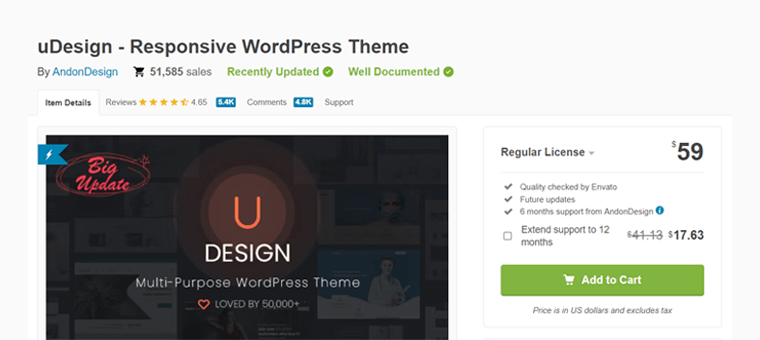
The U Design theme must be purchased from a theme marketplace. Go to ThemeForest or another trusted site. Search for the U Design theme. Add it to your cart and complete the purchase. You will receive a download link for the theme files. Save these files on your computer.

Credit: www.webfulcreations.com
Downloading The Theme
First, open your email. Look for the purchase receipt from the theme seller. It usually contains a link. Click on the link. It will take you to the download page. Make sure you have stable internet. Slow internet can cause download issues. Ensure your device has enough space. Downloads need storage space.
After downloading, find the theme file on your device. The file is usually in a ZIP format. Check your Downloads folder first. If not there, check other folders. Sometimes, downloaded files go to random folders. You can search the file name. Use the device search bar for this. Once found, keep it in an easy-to-access location. This will help in the next steps.
Uploading The Theme
First, log into your WordPress Dashboard. Use your username and password. The dashboard is where you manage your site. Look for the menu on the left.
Find the Appearance option in the menu. Click on it. Choose Themes from the list. You’ll see current themes. To add a new theme, click Add New. This opens the upload area.
Activating The Theme
Start by going to your WordPress dashboard. Look for the Appearance tab. Click on it and choose Themes. You will see a list of themes. Find the U Design theme you installed. Click on the Activate button. This will make your theme live.
After activation, check your site. Make sure everything looks good. Sometimes, you may need to adjust settings. This ensures the theme looks perfect.
The theme comes with a setup wizard. This helps you configure the theme easily. Follow the steps in the wizard. It might ask for some details. Fill them in carefully. The wizard will guide you through the setup. This makes your site ready in no time.
Installing Required Plugins
Automatic installation makes it easy. Click on Install Plugins under the theme options. This will list all the required plugins. Click Install next to each plugin. Wait for the installation to finish. It takes only a few seconds. Then, click Activate to use them. Your plugins are now ready to go.
Download the plugin files first. Go to your WordPress Dashboard. Click on Plugins, then Add New. Select Upload Plugin and choose your downloaded files. Click Install Now. Wait for the process to complete. Don’t forget to click Activate after installation.
Credit: www.sitesaga.com
Importing Demo Content
Demo content makes a website look complete. It helps understand the theme’s layout. Users can see how their site will look. Design inspiration is easy with demo content. It gives ideas for pages and posts. This saves time. Users don’t need to create everything from scratch.
Go to your WordPress dashboard. Click on “Appearance“. Then, choose “Themes“. Now, select “U Design” theme. Click on “Import Demo Data“. Wait for it to finish. Do not close the page. You will see a success message. Your demo content is ready.
Customizing The Theme
Explore the process of installing the U Design WordPress theme. Begin by downloading the theme package from a trusted source. Navigate to your WordPress dashboard, select ‘Appearance,’ then ‘Themes,’ and click ‘Add New. ‘
Using The Theme Customizer
The Theme Customizer is easy to use. It helps you change the theme’s look. First, go to your WordPress dashboard. Find the “Appearance” option. Click on “Customize.” The tool will open. You see many options. You can change colors, fonts, and more. Pick a color you like. Select a font that looks good. Save changes to see them live.
Adjusting Layout And Design
Layout and design are important. They make your site look nice. Start by choosing a layout. You can pick one from the list. Adjust the size of your header and footer. Move sections around. Make sure it is easy to read. Check how it looks on mobile. This helps visitors find things easily. Always preview changes before you save.
Troubleshooting Common Issues
Installing the U Design WordPress theme can sometimes present challenges. Common issues include plugin conflicts and incomplete uploads. Ensure a smooth installation by checking server requirements and disabling conflicting plugins.
Theme Not Uploading
Sometimes, the U Design theme won’t upload. This can be due to a file size limit. Check your server settings. Make sure they allow larger file uploads. If not, contact your hosting provider. They can increase the limit for you. Another reason could be a slow internet connection. Try uploading the theme again. Be patient if it’s slow.
Plugin Conflicts
Plugins might cause conflicts with the theme. Disable all plugins first. Then, activate the theme. If it works, turn on the plugins one by one. This helps you find the problematic plugin. Once found, look for an update. Check the plugin’s website. Updates can solve conflicts. If there’s no update, consider using an alternative plugin.
Credit: themeforest.net
Frequently Asked Questions
How To Install U Design Theme In WordPress?
To install U Design, log into your WordPress dashboard. Navigate to ‘Appearance’ > ‘Themes’ > ‘Add New’. Click ‘Upload Theme’, choose the U Design ZIP file from your computer, and click ‘Install Now’. Once installed, activate the theme. Ensure your WordPress is updated for compatibility.
What Are U Design Theme Requirements?
U Design requires WordPress 5. 0 or higher and PHP 7. 0 or later. Ensure your server meets these specifications. Adequate hosting is necessary for optimal performance. Check for any additional plugin requirements. Always back up your site before installing a new theme to avoid data loss.
Can I Customize The U Design Theme?
Yes, U Design is highly customizable. Use the WordPress Customizer to modify layouts, colors, and fonts. Utilize the theme’s built-in options for additional settings. No coding skills are needed. Explore the theme’s documentation for detailed customization guidance. Regular updates ensure new customization features.
Does U Design Support Plugins?
U Design supports a wide range of plugins. Popular plugins like WooCommerce, WPBakery, and Slider Revolution are compatible. Always check the theme’s documentation for compatibility information. Keep plugins updated to avoid conflicts. Using too many plugins can affect site performance, so choose wisely.
Conclusion
Installing the U Design WordPress theme is straightforward and rewarding. First, download the theme files. Then, upload them to your WordPress dashboard. Activate the theme to see the changes instantly. Customize your site’s look using the built-in options. No coding skills needed.
Troubleshooting tips can help if issues arise. Enjoy your new, visually appealing website. Keep it updated for best performance. Remember, practice makes perfect. Explore different settings. Experiment with styles. Create a unique website that fits your needs. Your journey to a stunning site begins here.
Happy designing!


