
Are you ready to give your WordPress site a stunning makeover? Installing a premium WordPress theme can transform your website from ordinary to extraordinary, offering you the sleek design and advanced features you’ve always dreamed of.
But how do you get started without feeling overwhelmed? Don’t worry, you’re not alone, and this guide is here to help. Imagine effortlessly showcasing your content in a way that captivates your visitors and keeps them coming back for more.
This article will walk you through every step, ensuring you install your premium theme like a pro. Let’s dive in and discover how easy it can be to elevate your site to new heights!
Choosing The Right Theme
Start by thinking about what your website needs. Is it a blog, shop, or portfolio? Each has different needs. Blogs might need clean layouts. Shops need product showcase options. Portfolios require image galleries. Knowing your needs helps in choosing the right theme. Some themes offer more features than others. Pick one that fits your goals.
Choose themes from trusted providers. They offer quality and support. Some popular ones are ThemeForest, Elegant Themes, and StudioPress. These sites have many options. Check user reviews to see what others say. Look for frequent updates. This keeps your theme secure. Always download from the provider’s site. This ensures you get a genuine product.
Credit: thimpress.com
Purchasing A Premium Theme
Many premium themes have different licensing options. Some licenses allow use on one site. Others let you use them on multiple sites. Choose the right license for your needs. Always read the terms carefully. Some licenses come with extra support. This can be helpful if you need assistance.
Payment methods can vary by theme provider. Most accept credit cards and PayPal. Some accept other methods like bank transfers. Always check the available payment options. Make sure your payment method is secure. Look for trusted payment gateways. Keep your payment details safe. This will protect you from fraud.
Downloading The Theme Files
Find the download link for your premium theme. Look on the website where you bought it. Often, the link is in your account or email. Make sure you download the correct file. It should end with .zip.
Save the theme file to your computer. Choose a safe place, like a special folder. This way, you won’t lose it. Check the file for viruses before using it. Use an antivirus tool for safety.
Uploading The Theme To WordPress
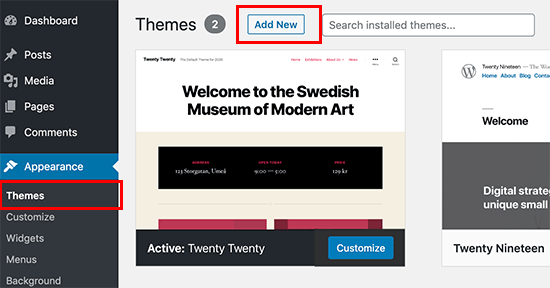
First, log in to the WordPress Dashboard. Use your username and password. This is the main area to manage your site. Locate the sidebar on the left. Look for the Appearance menu. Click on it. Now, select Themes.
At the top, click on Add New. Then, find the Upload Theme button. You should see this option at the top. Click it. Choose the theme file from your computer. It should be in a .zip format. Finally, click Install Now.
Wait for the installation to finish. Then, activate your theme. This will make your site look new and fresh. Easy and simple steps to follow.
Activating The New Theme
Find your theme under the “Appearance” tab. Click on “Themes” to see options. Hover over the theme you want. Look for the “Preview” button. Click it to view the design. Check the colors and layout. Make sure it fits your needs. If it looks good, proceed to activate it.
Go back to the “Themes” section. Find the theme you like. Hover over it again. This time, click “Activate”. Your site will now use this theme. Visit your website to see changes. Everything should look new and fresh. If there are any issues, consider tweaking settings. Themes often offer custom options. Explore these to adjust your site further.

Credit: www.shoutmeloud.com
Customizing Theme Settings
Discover the ease of installing premium WordPress themes to enhance your website’s appearance. Follow straightforward steps to access theme settings and make personalized adjustments that suit your style. Transform your site with unique designs and functionalities tailored to your needs.
Navigating The Customizer
The Customizer helps you change your theme easily. Find it in the WordPress dashboard. Click on “Appearance” and then “Customize”. You will see many options. Each option helps change a part of your site. Try them out! Make your site look just the way you want.
Adjusting Appearance And Layout
Changing the appearance and layout is fun. Start by selecting colors and fonts. These make your site unique. Next, look at the layout options. You can move things around. Maybe put the sidebar on the left? Or remove it? Each change makes your site special. Keep experimenting until it feels right.
Installing Required Plugins
Some themes need special plugins to work. These plugins help add extra features. Theme documentation often lists these plugins. Always check the theme’s website. You might find a recommended plugins list there. This ensures you don’t miss any important ones.
Plugins must work well with your theme. Check if they are compatible. This prevents site problems later. Always use plugins that are updated. Updated plugins fix bugs and add new features. Look at user reviews too. These can tell you if a plugin is good or bad.

Credit: visualmodo.com
Troubleshooting Common Issues
Installing premium WordPress themes can sometimes lead to common issues. Errors may occur during the upload process. Ensure your theme file is in the correct format and is compatible with your WordPress version. Double-check these aspects to ensure a smooth installation.
Resolving Installation Errors
Premium WordPress themes can sometimes cause errors during installation. These errors often occur due to compatibility issues. Check if your WordPress version matches the theme requirements. Ensure your server settings meet the theme specifications. Low memory limits can cause problems too. Increase the PHP memory limit if necessary. Make sure the theme file is not corrupted. Try downloading the theme again if issues persist.
Seeking Support And Assistance
Help is available if installation problems arise. Most premium themes offer dedicated support. Reach out to the theme developers for assistance. Use their support forums or contact forms. They often provide detailed troubleshooting guides. Community forums can also be helpful. Other users might have faced similar issues. Remember, patience is key when solving technical problems. Detailed documentation is often provided by developers. Reading these resources can be very helpful.
Maintaining Theme Updates
New updates make themes work better. They fix bugs and add features. Regularly checking for updates keeps your site safe. Look for updates in your WordPress dashboard. Updates can be found under the Themes section. It’s important to check these updates often. Missing an update can cause problems later.
Before updating, back up your site. This keeps your data safe. Use a plugin to make this easy. After backing up, apply the update. Click the Update Now button in the dashboard. Check your site after the update. Make sure everything works correctly. If something breaks, restore your backup. This will fix any issues quickly.
Frequently Asked Questions
How To Choose A Premium WordPress Theme?
Choosing a premium WordPress theme involves considering design, features, and compatibility. Ensure it aligns with your site’s purpose and has good reviews. Check for responsive design and regular updates. Make sure it supports the plugins you need and is optimized for SEO.
Where To Find Premium WordPress Themes?
You can find premium WordPress themes on theme marketplaces like ThemeForest, Elegant Themes, and StudioPress. These platforms offer a wide range of themes for different niches. They provide customer reviews, ratings, and support, ensuring quality and reliability. Always verify the developer’s reputation before purchasing.
How To Install A Premium WordPress Theme?
To install, download the theme file, then log into your WordPress dashboard. Navigate to Appearance > Themes > Add New. Click “Upload Theme” and select your downloaded file. Click “Install Now” and then “Activate” to apply the theme. Ensure you follow any additional setup instructions provided by the theme developer.
Do Premium Themes Need Updates?
Yes, premium themes need regular updates to ensure compatibility and security. Updates often include new features, bug fixes, and improvements. Keeping your theme updated helps protect your site from vulnerabilities. Always check the theme developer’s website or your WordPress dashboard for update notifications.
Conclusion
Installing premium WordPress themes is simple and rewarding. Follow the steps carefully. Choose a theme that fits your brand and needs. Download it from a trusted source. Upload it to your WordPress dashboard. Activate the theme once uploaded. Customize it to match your style.
Make sure your site looks great on all devices. This enhances user experience. Quality themes boost your site’s appeal. They help attract more visitors. Keep your theme updated for security and features. With practice, theme installation becomes second nature. Enjoy your enhanced website look and functionality.


