
Are you looking to give your WordPress website a fresh new look without the hassle of coding? Installing new themes in WordPress is the perfect solution.
Imagine being able to completely transform your site’s appearance in just a few clicks. Whether you’re going for a sleek, professional vibe or a vibrant, creative flair, the right theme can make all the difference. But with countless options available, where do you start?
Don’t worry; you’re not alone. In this guide, I’ll walk you through the simple steps to install and activate new themes in WordPress, ensuring your website stands out and captivates your audience. Get ready to unlock endless possibilities and see your website in a whole new light!
Credit: www.greengeeks.com
Choosing The Right Theme
Selecting the best theme is crucial for enhancing your WordPress site’s appearance. Explore the theme directory and click “Install” to begin. Customize it to suit your needs and create an engaging user experience.
Factors To Consider
Picking a theme is important for your website. Ensure it matches your site’s purpose. Check if it is mobile-friendly. Most users visit sites on phones. A fast-loading theme is crucial. Slow sites lose visitors. Make sure the theme is easy to customize. You might want to change colors or fonts. Look for good reviews. Others’ experiences can help you decide. A theme with support is helpful. You might need help sometimes. Ensure the theme is compatible with popular plugins. This ensures your site runs smoothly.
Popular Sources For Themes
Find themes on trusted websites. WordPress.org has many free themes. They are safe and well-tested. ThemeForest offers premium themes. They have more features. Elegant Themes is another option. They provide beautiful designs. StudioPress is known for its fast themes. They are good for blogs. TemplateMonster has many styles. You can find both free and paid options. Always check ratings and reviews before downloading.
Preparing Your Website
Backing up is very important. It saves your work. Use a plugin like UpdraftPlus. This plugin is easy to use. Install it from the plugin store. Then, go to the settings page. Click the backup button. Wait for it to finish. Now, your site is safe. If things go wrong, you can restore it. Always keep your backups updated. Never skip this step. It can save you from big problems.
Check if your theme works with your WordPress version. Visit the theme’s page. Read user reviews. Look for any problems. Check the theme details. See if it supports your plugins. Plugin support is key. Try to use themes that are popular. Popular themes are usually well-supported. Make sure the theme is updated often. An updated theme is safer. It usually works better.
Installing Themes From WordPress Repository
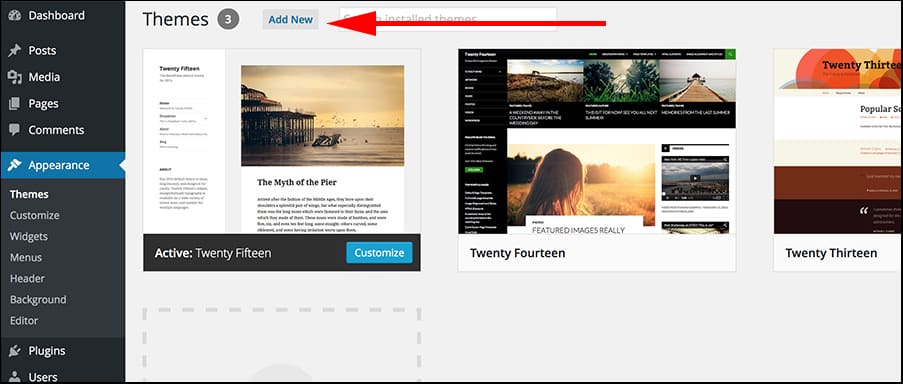
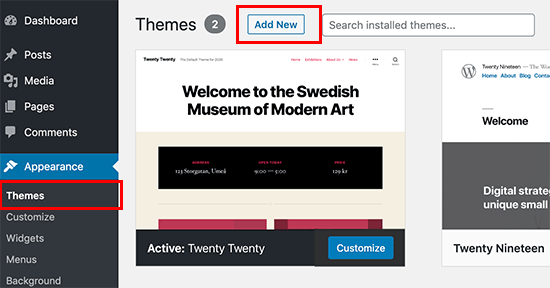
First, go to your WordPress dashboard. Look for the Appearance section on the left. Click on Themes. This opens the theme page. Here, click on Add New. The screen will show the WordPress Theme Directory. You can see many themes here. Use the search bar to find a theme. Filters help narrow the choices. Themes are sorted by features, popularity, and more.
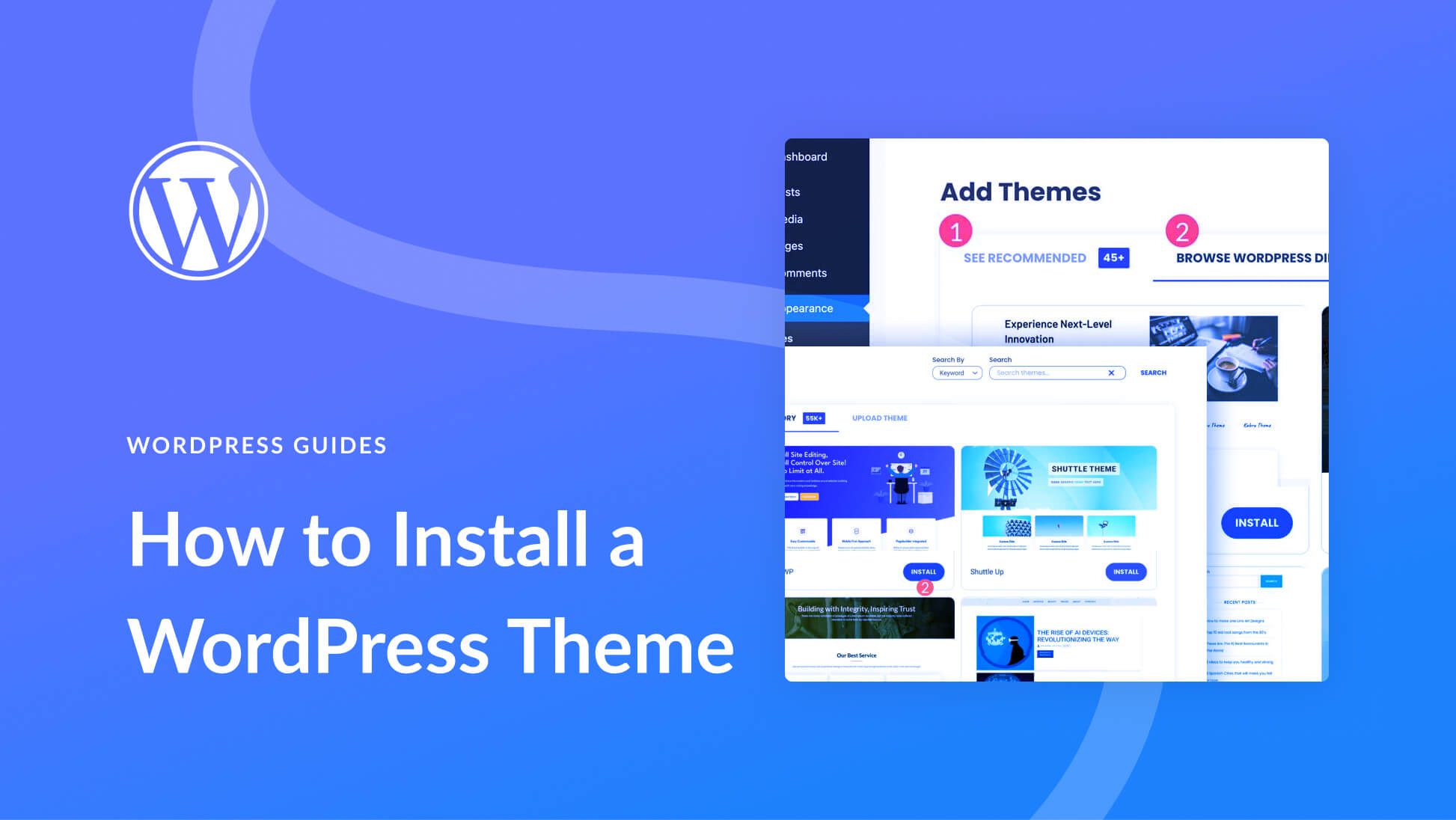
After choosing a theme, click Install. WordPress will download the theme for you. This takes a few seconds. Once installed, click Activate. The new theme becomes live on your site. Refresh your site to see the changes. Themes can change your site’s look. Try different ones for the best fit.
Credit: thimpress.com
Uploading Themes Manually
Find a theme you like. Click the download button. Save the zip file on your computer. Remember where you saved it. You need it later.
Open your WordPress dashboard. Go to Appearance and click on Themes. Click Add New at the top. Then click Upload Theme. Choose the zip file from your computer. Click Install Now. Wait for it to finish.
Use an FTP client like FileZilla. Connect to your website server. Find the wp-content/themes folder. Upload the extracted theme folder here. Make sure all files are uploaded. Once done, activate it via your WordPress dashboard.
Customizing Your Theme
The WordPress Customizer is easy to use. Find it in your dashboard. Click on Appearance, then Customize. You can change colors and fonts here. See changes in real-time. Feel free to explore different settings. Make your site look unique.
Widgets add extra features to your site. Go to Appearance then Widgets. You can add a calendar or search bar. Menus help users find content. Go to Appearance, then Menus. Create and arrange your menu items. Make navigation simple for users.
Credit: www.elegantthemes.com
Troubleshooting Common Issues
Installing new themes in WordPress can sometimes be tricky. Common issues include theme compatibility and installation errors. Ensuring the theme is compatible with your version of WordPress helps. Always check for updates and follow the installation instructions carefully.
Theme Conflicts
Sometimes, new themes may not work well. Conflicts can happen with existing plugins. This can cause websites to break. Try disabling all plugins first. Then activate them one by one. This helps find the conflicting plugin. Updating plugins and themes can also help. Make sure everything is up to date. If conflicts persist, consider switching to another theme.
Restoring Default Settings
After trying a new theme, settings might change. Restoring default settings can fix problems. Go to the theme settings page. Look for a button to reset to default. This will bring back the original look. Be careful, as it may erase changes you made. Backup your website first. This ensures you can restore your custom settings if needed.
Maintaining And Updating Themes
Discover how to install new themes in WordPress effortlessly. Navigate to your dashboard, select “Appearance,” then “Themes. ” Click “Add New” to explore options. Choose a theme, hit “Install,” and activate it. Enjoy a refreshed website look in minutes.
Regular Updates
Themes need updates to stay fresh. Updates fix bugs and add new features. Always use the latest theme version. It keeps your site safe and fast. Check for updates often. Some themes update automatically. Others need manual updates. Visit the theme page to update it. Keep your theme updated for best performance.
Monitoring Performance
Monitor your theme’s performance. Slow themes can frustrate visitors. Use tools to check loading speed. Speed is important for user experience. A slow site can lose visitors. Test your theme after updates. Make sure everything works well. Check for broken links or images. A fast theme keeps your site popular.
Frequently Asked Questions
How Do I Find New WordPress Themes?
You can find new WordPress themes by navigating to your WordPress dashboard. Go to “Appearance” and click on “Themes. ” From there, click “Add New” to browse available themes. You can search for themes based on features, popularity, and more to suit your needs.
Can I Install Themes From Third-party Websites?
Yes, you can install themes from third-party websites. Download the theme as a. zip file. Go to your WordPress dashboard, click “Appearance,” then “Themes,” and “Add New. ” Select “Upload Theme,” choose your. zip file, and click “Install Now. ” Ensure the theme is from a reputable source.
Is It Safe To Change WordPress Themes?
Changing WordPress themes is generally safe, but backup your website first. Changing themes might affect your site’s design and functionality. Ensure the new theme is compatible with your plugins and WordPress version. Testing your new theme on a staging site is a good practice.
Do New Themes Affect My Site’s Seo?
New themes can affect your site’s SEO. A well-coded, lightweight theme can improve loading speed, which is crucial for SEO. Ensure the theme is mobile-friendly and supports schema markup. Test your site’s SEO performance after installing a new theme to make necessary adjustments.
Conclusion
Installing new themes in WordPress is easy and fun. Themes give your site a fresh look. Choose a theme that fits your style. Follow simple steps to install it. Explore theme options and settings. Customize to match your vision. Themes enhance user experience.
They make your site appealing. Keep your theme updated for best performance. A well-chosen theme can attract visitors. It reflects your brand identity. Enjoy creating a unique WordPress site. Experiment with different themes. Find one that speaks to you. Your site is now ready to shine.
Happy designing!


