
Are you ready to give your WordPress blog a fresh and unique look? Installing a custom theme can be the perfect way to make your website stand out and truly reflect your personality or brand.
But, if you’re feeling a bit overwhelmed by the technical aspects, don’t worry—you’re not alone. Many bloggers like you have faced the same challenge and successfully transformed their sites with stunning themes. Imagine the satisfaction of seeing your blog come to life with a design that you love.
In this guide, we’ll walk you through the simple steps to install a custom theme for your WordPress blog. Get ready to capture your audience’s attention and keep them coming back for more. Keep reading to discover how easy it can be to elevate your blog’s appearance with just a few clicks!
Choosing The Right Theme
Think about what your blog needs. Is it a photo blog? Or a news site? Each blog has its own needs. Make a list. This helps to find the right theme. Focus on style and function. Your blog needs to look good and work well.
Browse the internet for themes. Many sites have free themes. Some are paid. Choose what fits your budget. Reviews are helpful. They show what others think. Ratings can guide your choice. Look for themes with good reviews.
Check what features the theme offers. Does it have a responsive design? This is important. Your blog should look good on phones and computers. Customization options matter too. Can you change colors and fonts? Make sure the theme has what you need.
Credit: www.teachucomp.com
Preparing Your WordPress Site
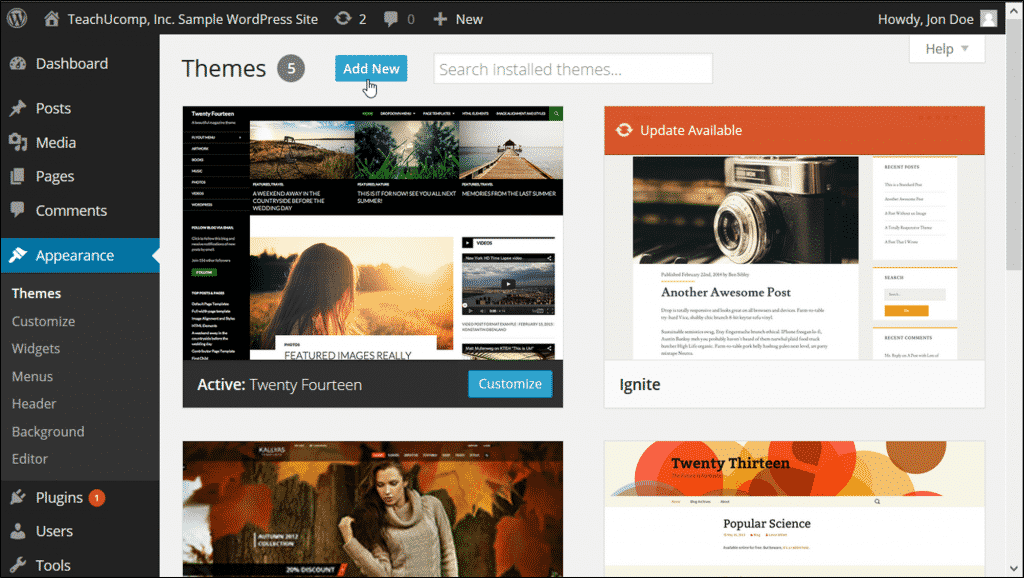
Installing a custom theme on WordPress can enhance your blog’s appearance. Start by accessing the WordPress dashboard. Navigate to “Appearance” and select “Themes” to upload your chosen theme file. Follow on-screen instructions to activate and customize.
Backing Up Your Site
Always keep a backup of your site. It saves your work. Use plugins like UpdraftPlus or BackWPup for this. A backup helps if things go wrong. You can restore your site easily. Back up your files and database. Store these backups safely. Maybe on a cloud or a drive. Regular backups are a good habit. They keep your site safe.
Updating WordPress Version
Keep your WordPress updated. New versions have security fixes. They also offer new features. Go to the dashboard. Click on Updates. Check for any new updates there. Update your plugins too. Old plugins can cause issues. Themes need updates as well. Updating keeps your site secure and fast. It’s an easy but important step.
Installing A Custom Theme
Start by finding a theme you like. Download the theme files to your computer. Go to your WordPress dashboard. Click on Appearance, then Themes. Click Add New at the top. Choose the Upload Theme button. Find the theme file on your computer. Click Install Now. Wait for the upload to finish.
After uploading, click the Activate button. Your new theme will be live. Check your blog to see the changes. Customize the theme as needed. Use the Customize option under Appearance. Save changes after editing. Enjoy your new blog look!
Customizing Theme Settings
The WordPress Customizer helps change your blog’s look easily. It lets you adjust colors, fonts, and more. It is simple to use. Click on “Customize” in the dashboard. You will see many options. Each option changes a part of your theme.
Choose colors that match your style. You can change the header image too. Make sure your blog looks unique. Play with layouts until you find the best one. The customizer lets you preview changes before saving. This way, you can see how your blog looks before going live.
Layouts make your blog easy to read. Choose a simple design. A good layout helps visitors find information. Adjusting layout is fun. You can move sections around. Try different styles and see what fits.
Keep the design clean. Avoid too many colors. Simple is best. Make sure text is easy to read. The right design makes your blog look nice. Test layouts and designs often. Changes can make your blog better.
Enhancing Functionality
Transform your WordPress blog by installing a custom theme. Access your dashboard, navigate to ‘Appearance,’ and select ‘Themes. ‘ Upload your chosen theme file. Activate the theme to enhance your blog’s functionality and appearance instantly.
Installing Essential Plugins
Plugins can add more features to your blog. Start with essential plugins for security and speed. Install a security plugin to protect your site from threats. A backup plugin helps save your work. A SEO plugin can help your blog rank better. Each plugin has settings you can adjust. Always keep plugins updated for best performance.
Integrating Widgets
Widgets add small features to your blog. Use a sidebar widget for quick links. A footer widget can show contact info. Some widgets show recent posts or popular posts. Drag and drop widgets in your dashboard. Customize their appearance to match your theme. Widgets can make your site more user-friendly.
Credit: www.hostdime.com
Testing The Theme
Make sure the theme works with your WordPress version. Compatibility is key. Older themes might not fit. Updates can fix bugs. Bugs cause problems. Check the theme description. It often lists compatible versions. This saves headaches later.
Responsive design adjusts to different screens. Use a phone to test it. Use a tablet too. Big screens and small screens both matter. See if images resize correctly. Text should be easy to read. Buttons need to be clickable. If it fails, pick another theme. A good theme works everywhere.
Maintaining Your Theme
Installing a custom theme in WordPress enhances your blog’s look. First, download your theme file. Then, navigate to the WordPress dashboard, click on “Appearance,” and select “Themes. ” Upload your downloaded theme and activate it. Enjoy your new blog design!
Regular Updates
Updating themes is very important. Updates fix bugs. They also improve security. Check for updates often. WordPress usually notifies you. Always backup your site before updating. This ensures safety in case of errors.
Monitoring For Issues
Sometimes themes have problems. Slow loading can be a sign. Broken links are another issue. Regularly check your blog for these problems. Use tools to monitor performance. They help identify issues quickly. Address problems as soon as they appear.
Credit: blog.templatetoaster.com
Frequently Asked Questions
How To Choose A WordPress Theme?
Selecting a theme depends on your blog’s niche and aesthetic preference. Look for responsive, SEO-friendly themes with customizable features. Ensure compatibility with your plugins and check reviews for reliability. Opt for themes that offer updates and support to keep your blog secure and up-to-date.
Can I Install A Theme Manually?
Yes, you can install themes manually via WordPress or FTP. In WordPress, navigate to ‘Appearance’ then ‘Themes’ and click ‘Add New’. Upload your theme file and activate it. For FTP, use a client to upload the theme folder to wp-content/themes.
Activate it through WordPress admin.
What Are Theme Installation Best Practices?
Ensure backups before installing a new theme. Test themes on a staging site to avoid disrupting your live blog. Verify compatibility with your plugins and check for mobile responsiveness. Regularly update themes and plugins to maintain security. Review documentation for specific installation steps.
How Do I Customize My WordPress Theme?
Customize your theme using the WordPress Customizer. Navigate to ‘Appearance’ and select ‘Customize’ to edit colors, fonts, and layouts. Use widgets and plugins to add functionality. Advanced users can modify theme files using a child theme to prevent losing changes during updates.
Conclusion
You’ve learned how to install a custom theme on WordPress. It’s not hard. Just follow the steps carefully. Start with choosing the right theme. Then, download and upload it. Activate your theme next. Check your blog’s appearance. Make sure everything looks good.
Customize your settings if needed. Small changes can make big differences. Your blog now has a fresh look. Enjoy your new design. Keep exploring WordPress features. There’s always more to learn. Happy blogging!


