
Are you looking to boost your website’s engagement and showcase your online presence in style? Adding a footer social counter to your Newspaper WordPress theme could be the game-changer you need.
Imagine this: visitors landing on your site and instantly seeing your social reach, enticing them to join your community and follow your updates. It’s like a secret handshake that says, “Hey, we’re active, and we’ve got something worth sharing!” In this guide, you’ll discover the simple steps to seamlessly integrate a social counter in your footer.
Get ready to enhance your site’s credibility and keep your audience engaged. Dive in, and let’s transform your website into a social magnet today!
Choosing The Right Plugin
Social counter plugins help show your followers. These plugins work with WordPress themes. Some plugins are more popular than others. Social Snap is one such plugin. It is easy to use and looks good.
Monarch is another popular choice. It offers many options and is user-friendly. AddToAny is simple and works with many platforms. It is fast and reliable.
The Newspaper theme supports many plugins. Social Snap works well with this theme. It integrates smoothly and looks neat. Monarch also fits perfectly with Newspaper. It offers great features.
AddToAny is another good option. It is compatible and easy to set up. The choice depends on your needs. Pick the one that suits you best.
Installing The Plugin
First, login to your WordPress site. Use your admin username and password. The dashboard is your starting point. It shows your website’s controls. You can find plugins in the menu. Click on the “Plugins” option. This is on the left side of the screen. Next, choose “Add New” to find new plugins. It will open a new page with many options.
Search for “Footer Social Counter” plugin. Use the search bar at the top right. Type the plugin name and press enter. The plugin will appear on the list. Click “Install Now” to start the installation. Wait for the process to complete. Once installed, click “Activate” to turn it on. Now the plugin is active on your site.
Configuring Social Counter Settings
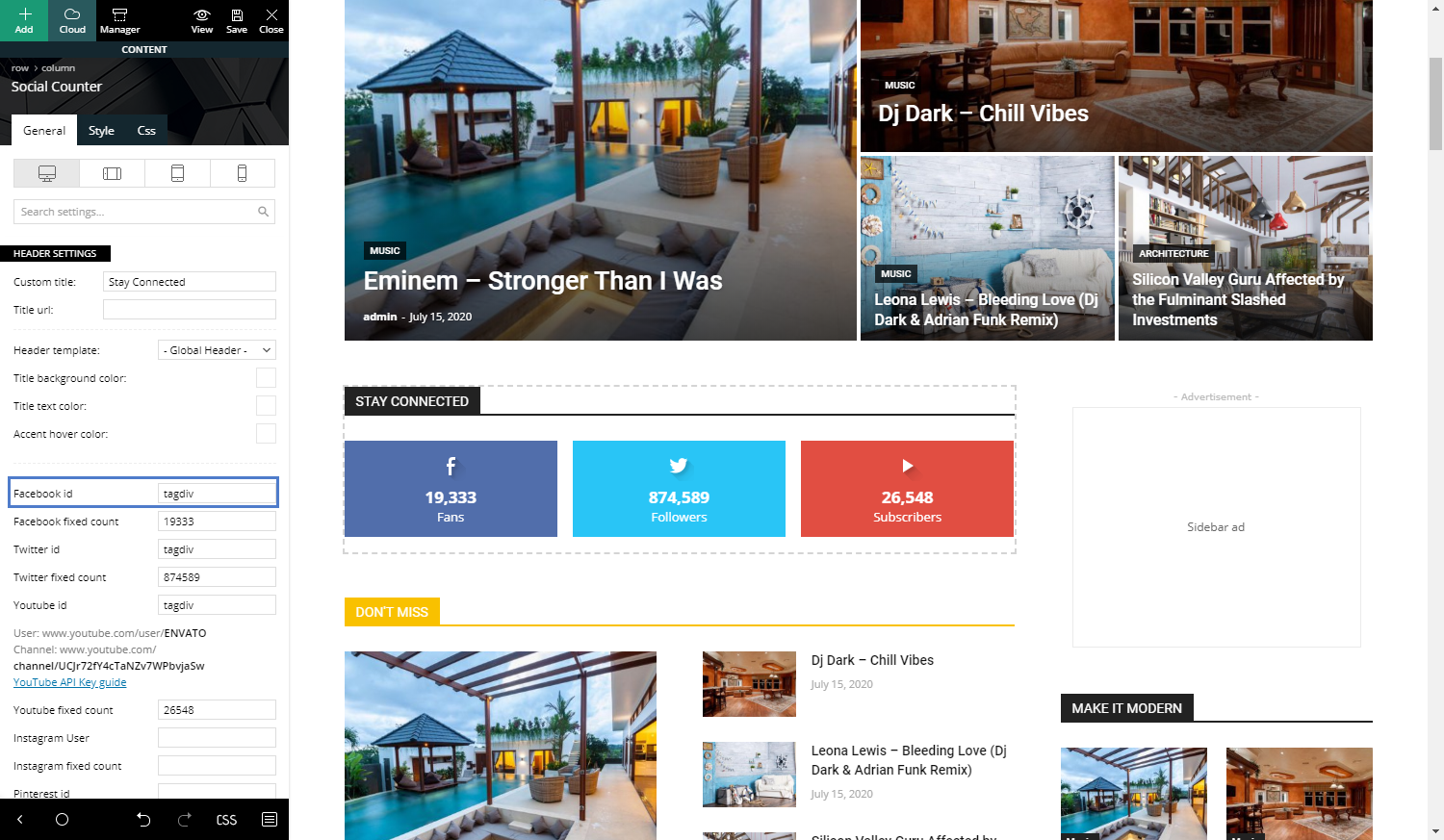
Connect social media accounts to your WordPress theme. This helps display follower counts. Go to the theme settings. Look for the social counter section. Enter your social media details. Include Facebook, Twitter, and Instagram. These are popular choices. Use correct API keys. Without them, it won’t work. Save changes once done.
Customize how the counter looks on your site. Choose colors that match your theme. Pick a font style you like. Make sure it is easy to read. Decide where the counter will show. You can place it in the footer. This is common. Users can see it easily there. Adjust sizes for mobile and desktop views. Test settings before going live.
Credit: forum.tagdiv.com
Adding Social Counter To Footer
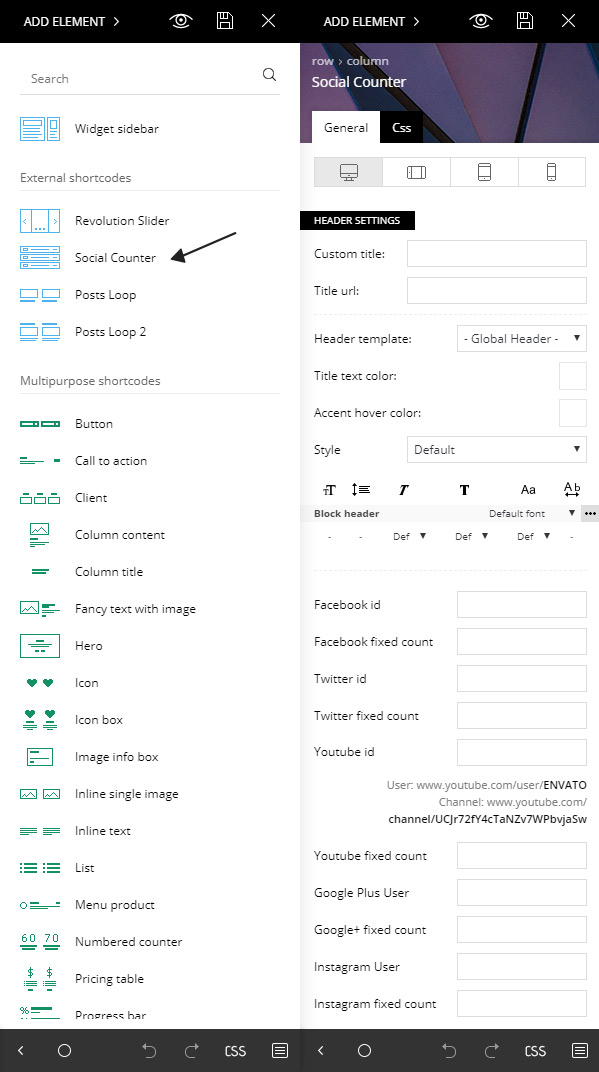
Social counters show how popular your site is. These can be added to the footer for extra visibility. Use widgets to place social counters in your site’s footer. It’s simple and quick. Open your WordPress dashboard and go to Appearance. Click on Widgets. Choose the social counter widget you want. Drag it to the footer area. Check the site to see the social counter at the bottom. Easy steps make your site look great.
Widgets are helpful tools. They make adding features easy. Select the right widget from the WordPress dashboard. Drag it to the footer spot. Adjust settings to fit your design. Save changes after setting up. Widgets enhance your site’s appearance. They are simple to use.
Design is important. Customizing the footer makes your site unique. Adjust colors, fonts, and layout in the theme settings. Choose styles that match your site. Make sure the social counter fits the design. A well-designed footer attracts visitors. Personalize it to make your site stand out. Keep it clear and simple.
Testing And Troubleshooting
Explore how to insert a footer social counter in the Newspaper WordPress theme. Begin by accessing the theme options, then navigate to the footer settings to customize social media counters. Adjust settings to display accurate follower numbers, ensuring an engaging user experience and enhancing site interaction.
Ensuring Proper Display
Check the theme settings for social counters. Make sure they are on. Review the plugin compatibility. Some plugins may cause display issues. Use the browser developer tools to inspect elements. Look for errors in console logs. Verify that the social counter code is correct. Double-check the API keys and connection settings.
Common Issues And Fixes
Social counters may not appear. This often happens due to theme conflicts. Try switching themes temporarily. Another issue is incorrect API keys. Ensure keys are correct and active. Counters may display wrong numbers. This can be due to cache problems. Clear the cache and check again. Sometimes, network issues affect data fetching. Verify that your internet is stable.
Credit: tagdiv.com
Enhancing Footer With Additional Features
Adding widgets can make your footer more useful. Try including a search bar. It helps visitors find what they need. You can also add a newsletter sign-up. This keeps your audience updated. A recent posts widget is another option. It shows your latest content.
Keep colors consistent with the rest of the site. This makes everything match. Use the same font style in the footer. It should look neat and tidy. Avoid clutter. Too many items can be confusing. Keep it simple and clean. A little space between elements helps. It makes reading easy.

Credit: themeforest.net
Frequently Asked Questions
How To Add Social Counter In Newspaper Theme?
To add a social counter, navigate to the Newspaper theme’s dashboard. Use the built-in widgets or plugins designed for social media integration. Customize the settings to display your preferred social platforms and styles. Ensure you save your changes and preview your site to confirm the counter appears correctly.
Can I Customize The Footer Social Counter Appearance?
Yes, you can customize the footer social counter’s appearance. Access the theme’s customization options in the WordPress dashboard. You can change colors, sizes, and styles to match your site’s design. Experiment with different settings to achieve a cohesive look that enhances user experience.
What Plugins Support Social Counters In Newspaper Theme?
Several plugins support social counters in the Newspaper theme. Popular options include Social Snap, Social Pug, and Monarch. These plugins offer customizable settings and integration options. Choose one that fits your needs, install it through the WordPress dashboard, and follow instructions to configure it properly.
Why Is My Social Counter Not Displaying?
If your social counter isn’t displaying, check your plugin or widget settings. Ensure they’re correctly configured and active. Verify that your theme and WordPress are updated. Sometimes, conflicts with other plugins can cause issues, so consider disabling them one by one to identify the problem.
Conclusion
Adding a footer social counter is simple with the Newspaper theme. It enhances your site’s appearance and boosts user engagement. Just follow the steps outlined for seamless integration. Adjust settings to match your design style. Test the counter to ensure it functions correctly.
Keep your website updated for the best performance. This feature enriches visitor interaction and builds a strong online presence. Stay consistent with your social media updates. Your audience will appreciate the effort. Enjoy the benefits of a connected and dynamic site.
Your journey to a better website starts here.


