
If you want your WordPress website to stand out and attract more visitors, improving your SEO is the key. But where do you start?
You might feel overwhelmed by all the technical terms and strategies out there. Don’t worry—this guide breaks it down into simple, clear steps you can follow right now. By using the right tools, choosing the best keywords, and optimizing your content, you’ll see real results that bring more traffic and boost your site’s visibility.
Ready to unlock the full potential of your WordPress site? Keep reading to discover how to increase your SEO easily and effectively.
Seo Plugins For WordPress
SEO plugins are essential tools for improving your WordPress site’s search engine ranking. They simplify the process of optimizing your pages and posts. These plugins guide you to set meta titles, descriptions, and keywords easily. They also help fix technical SEO issues without coding knowledge. Using an SEO plugin saves time and boosts your website’s visibility on search engines.
Choosing Yoast Seo Or Rankmath
Yoast SEO and RankMath are the top choices for WordPress SEO plugins. Both offer features like keyword optimization, readability checks, and XML sitemap creation. Yoast SEO is user-friendly and popular with beginners. RankMath provides more advanced options and integrations. Your choice depends on your needs and experience level. Test each plugin to see which fits your workflow best.
Configuring Plugin Settings
Proper configuration is key to getting SEO benefits from your plugin. Start by entering your website’s basic info in the plugin settings. Set up your preferred title and meta description templates. Enable XML sitemaps and connect to Google Search Console. Use the built-in content analysis tools for each post. Regularly update the plugin to use the latest SEO features and fixes.

Credit: directorist.com
Keyword Research Strategies
Keyword research is a vital step to improve your WordPress SEO. It helps you find the right words to use in your content. These words are what people type into search engines. Using good keywords can bring more visitors to your website. This section explains simple strategies for keyword research.
Using Google Keyword Planner
Google Keyword Planner is a free tool that shows popular search terms. It helps you discover keywords related to your topic. You can see how many people search for each keyword. The tool also suggests similar keywords you might not know. Choose keywords with good search volume but low competition. This makes it easier to rank higher in search results.
Incorporating Keywords Naturally
After finding keywords, add them to your content in a natural way. Use keywords in titles, headings, and the main text. Avoid stuffing keywords; it can hurt your SEO and readability. Write for people first, not just for search engines. Use variations of your keywords to keep the text smooth. This approach helps your content rank well and stay engaging.
Content Creation And Structure
Creating and structuring content on WordPress plays a key role in improving SEO. Well-written content attracts visitors and keeps them engaged. Clear organization helps search engines understand your site better. Both content quality and structure impact your site’s ranking.
Producing High-quality Content
Focus on writing content that answers your audience’s questions. Use simple language and short sentences for easy reading. Add useful information and unique insights to stand out. Regularly update your posts to keep them relevant. Avoid keyword stuffing; use keywords naturally within the text. Include images or videos to support your message and make content engaging.
Organizing With Categories And Tags
Use categories to group related posts together. This helps users find similar topics quickly. Tags offer more detailed labeling of content themes. Both categories and tags improve site navigation and user experience. Search engines use this structure to index your pages efficiently. Keep your categories and tags clear and relevant to avoid confusion.
Optimizing Titles And Meta Descriptions
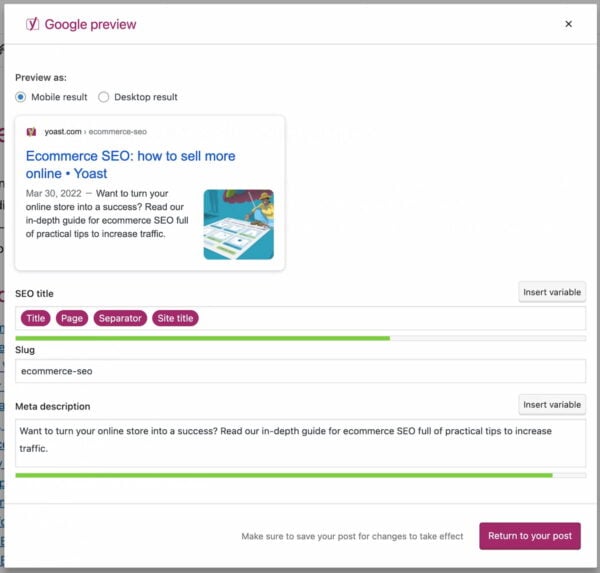
Optimizing titles and meta descriptions plays a key role in improving SEO for WordPress sites. These elements appear in search results and help search engines understand your page content. Well-crafted titles and meta descriptions can attract more visitors and boost your ranking.
Crafting Compelling Titles
Create titles that clearly describe your page content. Use main keywords near the beginning. Keep titles under 60 characters to avoid being cut off. Write unique titles for each page to prevent duplication. Use active voice and simple words to engage readers quickly.
Improving Click-through Rates
Meta descriptions act like a mini-ad for your page. Write descriptions between 150 and 160 characters. Include keywords but keep the text natural and easy to read. Use clear calls to action or highlight benefits. This encourages users to click your link instead of others.
Internal Linking Techniques
Internal linking is a powerful SEO strategy for WordPress sites. It connects your pages and posts, helping search engines crawl your site better. It also guides visitors to related content, increasing engagement and time spent on your site. Effective internal linking improves your site’s structure and boosts your SEO rankings.
Using Descriptive Anchor Text
Anchor text is the clickable text in a link. Using descriptive anchor text helps both users and search engines understand the linked page’s topic. Avoid generic phrases like “click here” or “read more.” Instead, use clear, specific words that describe the destination content.
For example, instead of linking with “learn more,” use “WordPress SEO tips.” This approach improves keyword relevance and helps search engines rank your pages better.
Building Topical Authority
Internal links can show search engines that your site covers a topic in depth. Linking related posts and pages creates a network of content around a main subject. This signals authority and relevance.
To build topical authority, group your content by themes. Link from general articles to more detailed ones. This way, visitors and search engines see your site as a valuable resource on the topic.
Credit: webnus.net
Image Optimization
Images play a crucial role in your WordPress site’s SEO. Optimizing images improves page load speed and user experience. Search engines favor sites that load quickly and provide relevant content. Proper image optimization helps your site rank higher in search results. Focus on compressing images and adding descriptive alt text to boost SEO effectively.
Compressing And Resizing Images
Large images slow down your website. Compress images to reduce file size without losing quality. Use tools like TinyPNG or plugins such as Smush for automatic compression. Resize images to fit your page layout. Avoid uploading images larger than needed. Faster loading pages keep visitors engaged and improve search rankings.
Adding Descriptive Alt Text
Alt text describes an image for search engines and users with disabilities. Write clear and concise alt text that explains the image content. Include relevant keywords naturally but avoid keyword stuffing. Alt text helps search engines understand your content better. It also improves accessibility, making your site user-friendly for everyone.
Technical Seo Settings
Technical SEO settings form the backbone of your WordPress site’s search engine performance. These settings help search engines crawl, index, and rank your content properly. Without proper technical SEO, your site might not appear in search results even if your content is great.
Adjusting these settings ensures your website is accessible and easy to understand for search engines. This step improves your chances of ranking higher and attracting more visitors.
Checking Search Engine Visibility
WordPress has a built-in option to control search engine visibility. You must check this setting to allow search engines to index your site. Go to Settings > Reading in your WordPress dashboard.
Look for the option labeled “Search Engine Visibility.” Make sure the box that says “Discourage search engines from indexing this site” is unchecked. If this box is checked, search engines will not crawl your website.
Unchecking this option makes your site visible to search engines. This simple step can boost your SEO by allowing search engines to find and rank your pages.
Creating Xml Sitemaps
XML sitemaps help search engines understand your site structure. They list all important pages and posts. This makes it easier for search engines to crawl and index your content.
You can create XML sitemaps using SEO plugins like Yoast SEO or Rank Math. These plugins generate sitemaps automatically and update them when you add new content.
Submit your sitemap to Google Search Console to improve indexing speed. Regularly check that your sitemap includes all relevant pages and posts. A clean sitemap improves your site’s SEO performance.
Improving Site Speed
Improving site speed is crucial for better SEO on WordPress. Fast-loading websites keep visitors engaged and reduce bounce rates. Search engines also rank quicker sites higher. Even a few seconds delay can hurt your rankings and user experience.
Using Caching Plugins
Caching plugins save a copy of your pages and serve them quickly to visitors. This reduces server load and speeds up page delivery. Popular plugins like W3 Total Cache or WP Super Cache are easy to set up. They improve loading times without needing complex coding skills.
Optimizing Load Times
Optimize images by compressing them before uploading. Large images slow down your site significantly. Use tools like TinyPNG or ShortPixel to reduce file size without losing quality. Limit the number of plugins and scripts running on your site. Remove unnecessary ones to avoid extra loading time. Choose a reliable hosting provider with fast servers and good uptime.
Seo-friendly Url Structures
Creating SEO-friendly URL structures is a key step to improve your WordPress site’s search rankings. Clear and concise URLs help both users and search engines understand the content of your pages. Proper URL formatting makes your site look professional and trustworthy.
Search engines prefer URLs that are simple and contain relevant keywords. Avoid using long strings of numbers or random characters. A neat URL structure also improves user experience by making links easy to remember and share.
Setting Permalinks To Post Name
WordPress offers different permalink settings under Settings > Permalinks. Choosing “Post name” creates URLs based on your post titles. For example, yoursite.com/sample-post.
This format is clean and descriptive. It includes important keywords from your post title, which search engines notice. Setting permalinks to post name is simple and effective for SEO.
Custom Url Formats
You can customize your URLs to better fit your content or niche. Use categories or keywords in the URL to organize your posts logically. For example, yoursite.com/category/post-name.
Custom URLs help visitors understand what the page is about before clicking. Keep URLs short and avoid stop words like “and” or “the.” This makes URLs easier to read and improves SEO.
Submitting Site To Search Engines
Submitting your WordPress site to search engines is a crucial step in SEO. It helps search engines discover and rank your pages. Without submission, your site might stay invisible in search results. This process ensures faster indexing and better visibility. It also gives you tools to monitor your site’s performance and fix issues.
Registering With Google Search Console
Google Search Console is a free tool for site owners. Register your WordPress site here to connect with Google. Start by signing in with your Google account. Add your website URL and verify ownership. Verification can be done by uploading an HTML file, adding a meta tag, or using your domain provider.
Once registered, submit your sitemap to help Google crawl your pages. A sitemap lists all important pages on your site. You can create one using SEO plugins like Yoast or Rank Math. Submitting a sitemap speeds up indexing and improves site structure understanding.
Monitoring Indexing Status
After submission, monitor how Google indexes your site. Use Google Search Console to check indexing status regularly. Look for errors, warnings, or pages excluded from the index. Fix issues such as crawl errors or blocked pages promptly.
Monitoring indexing helps ensure your content appears in search results. It also reveals which keywords bring visitors to your site. Use this data to improve your SEO strategy and content quality. Regular checks keep your site healthy and visible to users.
Credit: yoast.com
Frequently Asked Questions
How To Improve Your Seo On WordPress?
Use SEO plugins like Yoast or RankMath, research keywords, create quality content, optimize titles and meta descriptions, link internally, compress images, and ensure search engines can index your site. Improve page speed with caching and image optimization for better WordPress SEO performance.
What Are The 3 C’s Of Seo?
The 3 C’s of SEO are Content, Code, and Credibility. Content attracts users, Code ensures site functionality, and Credibility builds trust and authority.
How Do I Add Seo To A WordPress Site?
Add SEO to WordPress by installing plugins like Yoast or RankMath. Perform keyword research and create quality content. Optimize titles, meta descriptions, images, and internal links. Improve page speed with caching and image compression. Ensure search engine visibility is enabled in Settings > Reading.
What Is A 3 Month Seo Strategy?
A 3 month SEO strategy plans targeted actions to improve website rankings quickly. It includes keyword research, on-page SEO, content creation, technical fixes, and link building. The goal is to boost organic traffic and search visibility within a short timeframe.
Conclusion
Boosting SEO on WordPress takes steady effort and clear steps. Use SEO plugins like Yoast or RankMath to simplify tasks. Research keywords carefully and add them naturally to your content. Focus on creating useful, well-organized content that answers user questions.
Optimize your titles and meta descriptions to attract clicks. Speed up your site by compressing images and enabling caching. Keep your site visible to search engines by checking settings regularly. Small changes add up to better rankings and more visitors.
Stay patient and keep improving your site bit by bit.


