
Are you tired of your WordPress site looking bland and ordinary? Imagine transforming it into a visually stunning masterpiece in just a few clicks.
If you’ve ever felt overwhelmed by the idea of customizing your site, importing theme settings could be your game-changer. It’s simpler than you think, and it can save you hours of frustration. In this guide, you’ll discover how to effortlessly import theme settings in WordPress, turning your website vision into reality.
Stay with us to unlock the secrets of a beautifully designed site that captures attention and keeps your visitors coming back for more.
Prerequisites For Importing
Always save your current settings. This protects your work. Use a plugin or manual method. Plugins are easier. Manual methods require more steps. Settings can be stored on your computer. This avoids any loss. Data safety is important. Backup ensures you can restore settings later.
Not all themes work together. Some themes may cause errors. Check if your theme is compatible
Credit: www.greengeeks.com
Choosing The Right Theme
Themes can change the look of your website. Some themes offer many customization options. Others are simple and easy to use. Always check if the theme is responsive. This means it looks good on phones and computers. Also, see if it has support for popular plugins. This can help you add new features later.
Always get themes from trusted places. The WordPress Theme Directory is a good start. Some websites might offer free themes. Be careful. They might have hidden malware. A reliable source ensures your website is safe. Check reviews and ratings before downloading. This helps in choosing a good theme. Read what other users say. It can tell you if the theme is good or bad.
Installing The New Theme
First, go to your WordPress dashboard. Find the “Appearance” section and click on “Themes”. You will see options to add new themes. Click on the “Add New” button. Use the search bar to find your theme. Click “Install”, then “Activate”. Your new theme is ready.
Open your FTP client and connect to your server. Go to the wp-content/themes folder. Upload the theme files to this folder. Make sure all files are uploaded. After uploading, go to your WordPress dashboard. Find the theme in the “Themes” section. Click “Activate” to use it.
Importing Theme Settings
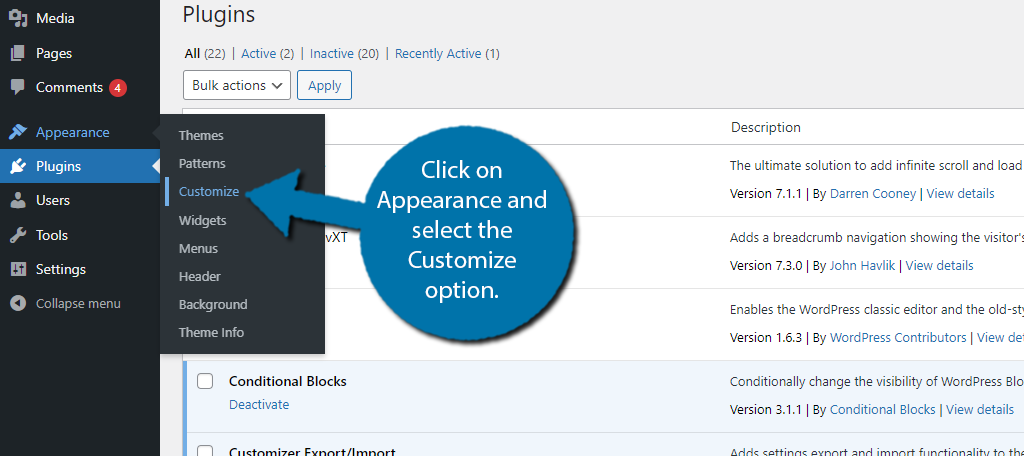
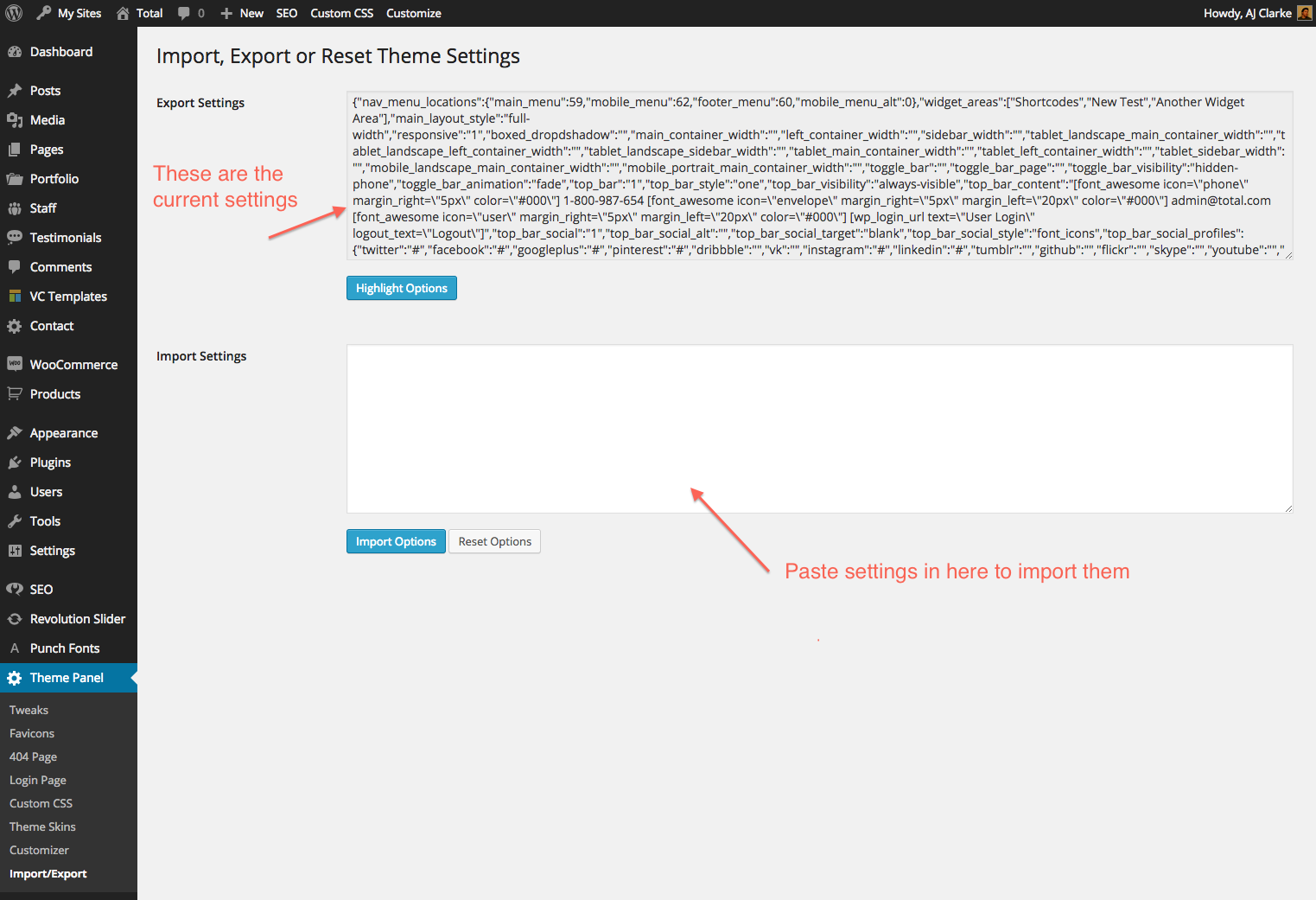
Find the import option in your WordPress dashboard. Look under the Appearance menu. Click on Customize. Some themes have an Import/Export tab. This tab helps you import settings quickly. Check if your theme has this tab.
Theme importer plugins can help you. They make importing settings easy. Some plugins are free. Others may cost money. Install the plugin from the plugin store. Activate it after installation. Follow the steps in the plugin. Some popular plugins are One Click Demo Import and WP Importer. They guide you through importing.
Troubleshooting Common Issues
Import errors can happen. Always ensure your theme file is not corrupted. Check file size and format. Make sure it is a .xml file. Plugins may cause trouble. Disable them temporarily. Retry the import. If the error persists, contact support for help.
Themes may not work with all WordPress versions. Check the theme’s compatibility with your WordPress version. Update WordPress if needed. Some themes need specific plugins. Install these plugins before importing. Older themes might not work with new WordPress. Consider using a different theme if issues arise.
Customizing After Import
Theme options let you change the look of your site. Colors and fonts can be customized. Make sure your site looks good. Layout changes are also possible. You can set a different homepage. Background images and patterns can be added. This makes your site unique. Always save changes after adjusting settings.
Widgets add features to your site. Add a calendar or a search bar. Widgets can be moved around. Menus help visitors find pages. Create menus for easy navigation. Add links to important pages. You can change the menu order. This helps visitors find what they need. Save changes to keep your setup.
Verifying Theme Functionality
Testing site performance is very important. Load the website in a browser. Check if pages load fast. If the site is slow, it can annoy visitors. A slow site can also affect search engine rankings. Use tools like Google PageSpeed Insights. These tools help in checking speed.
Checking responsiveness is crucial too. Open the site on different devices. Use a phone and a tablet. Check if the site looks good on all screens. A good theme must adjust to any screen size. Visitors use many devices. So, the site must be mobile-friendly.
Credit: totalwptheme.com
Credit: www.wpbeginner.com
Frequently Asked Questions
How Do I Import Theme Settings In WordPress?
To import theme settings, navigate to the WordPress dashboard. Go to ‘Appearance’ > ‘Import Demo Data’. Follow the prompts to upload the theme settings file. Ensure compatibility with your theme version. Once uploaded, settings will be applied automatically.
Can Theme Settings Affect My Website Layout?
Yes, theme settings significantly impact your website layout. They dictate color schemes, fonts, and widget placements. Importing new settings can change the overall appearance. Always backup your site before importing to prevent unwanted changes.
What Are Common Issues With Importing Settings?
Common issues include file incompatibility and server timeout errors. Ensure the settings file matches your theme version. Increase server resources if experiencing timeout. Always backup your site to safeguard existing configurations.
Is It Safe To Import Theme Settings?
Importing theme settings is generally safe if done correctly. Ensure the settings file is from a reliable source. Always backup your site before importing to prevent data loss. Verify compatibility with your current theme version.
Conclusion
Importing theme settings in WordPress enhances your site’s appearance. Following steps simplifies the process. With patience, you can customize your site efficiently. Always back up your data before changes. Explore various themes to find the perfect fit. Each theme offers unique features.
Experiment with settings to personalize your site. Small adjustments can make a big impact. WordPress themes offer flexibility and creativity. Enjoy the journey of designing your website. Remember, practice makes perfect. Gradually, you’ll become more confident. Keep learning and improving your skills.
Your WordPress site reflects your brand’s personality. Make it visually appealing and functional. Happy customizing!


