
Are you eager to launch your very own website but unsure where to begin? Hosting a website might seem daunting, but it’s simpler than you think.
Imagine the satisfaction of seeing your ideas come to life online, accessible to people around the globe. By hosting your site, you can share your passion, products, or services and connect with a wider audience. This guide will walk you through the essential steps to host your website successfully.
You’ll discover that with the right approach, you can confidently manage your online presence. Ready to unlock the secrets of web hosting and make your digital dreams a reality? Let’s dive in!
Choosing A Domain Name
Start by thinking of words related to your site. Write down ideas that come to your mind. Combine words to form unique names. Keep it short and easy to spell. Avoid numbers and hyphens. They can confuse people. Make it memorable. Ask friends for their thoughts. They can help with fresh ideas.
Use a domain checker tool online. Enter your ideas in the search box. Ensure the name is available. If taken, try a different extension. .com is popular, but .net or .org might work. Check social media too. You might want the same name there. Be flexible with your choices.
Choose a reliable domain registrar. Popular ones include GoDaddy and Namecheap. Compare prices and services. Look for discounts or packages. Register the domain quickly. Someone else might take it. Secure your domain for at least one year. Longer is better. Remember to renew it before it expires.
Selecting A Hosting Provider
There are different types of hosting services. Shared hosting is the most common. It is cheap and easy to use. VPS hosting is more powerful. It gives more control. Dedicated hosting is the best. It gives a whole server to you. Choose based on your needs.
Pricing plans vary. Shared hosting is the cheapest. VPS is mid-range. Dedicated is the most expensive. Check what you can pay. Look for discounts. Some companies offer deals for new users. Compare prices to find the best deal.
Features are important. Check for storage space and bandwidth. Look for easy-to-use control panels. Some plans offer free SSL certificates. 24/7 support is also good. Make sure the provider has what you need.
Setting Up Your Hosting Account
Start by visiting the hosting provider’s website. Look for the sign-up button. Click it to begin. Fill in your personal details. Use a valid email address. Choose a strong password. Double-check your information for accuracy. Click submit to create your account.
After creating your account, log in. Find the settings tab in your dashboard. Click on it to access options. You can change your password here. Update your contact information. Set your time zone correctly. Choose your preferred language. Save all changes after updating.

Credit: www.crazyegg.com
Uploading Website Files
FTP clients help transfer files. They connect your computer to the server. Popular choices include FileZilla and Cyberduck. First, download and install the FTP client. Enter the server details. These include host address, username, and password. Once connected, you can see server folders. Drag and drop files from your computer to the server. Make sure the right files go to the right folders. This way, your website will work correctly.
Many hosts offer a dashboard for uploads. Log into your hosting account. Look for a section named File Manager or Website Files. Click it to open. Use the upload button to add files. Select the files from your computer. Wait for the upload to finish. Ensure files are in the correct directory. This helps your website display properly.
Managing Dns Settings
Changing DNS settings is key in hosting a website. It directs domain names to the correct server. This makes sure people find your site easily.
Understanding Dns Basics
DNS stands for Domain Name System. It is like the internet’s address book. DNS helps computers find websites. Every website has a unique IP address. DNS translates domain names to IP addresses. This process makes it easy to find sites. Without DNS, you would need to remember numbers, not names.
Configuring Dns Records
DNS records store important information. They tell servers where to find your site. A records point domain names to IP addresses. CNAME records create aliases for domains. MX records handle email delivery. To change DNS records, access your domain registrar’s settings. Be careful when editing. Errors can cause website downtime. Always double-check changes.
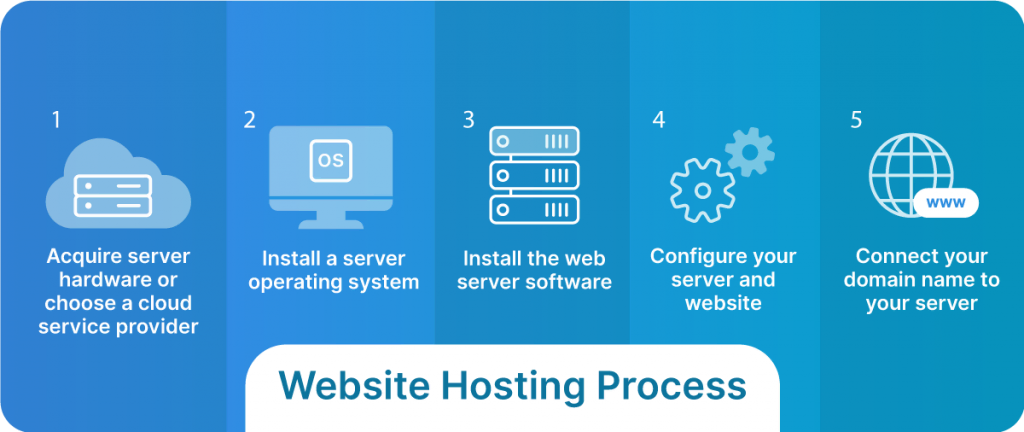
Credit: www.liquidweb.com
Implementing Security Measures
SSL certificates keep data safe. They encrypt information between the server and user. Users trust sites with SSL. A padlock icon shows in the browser. Many hosting providers offer free SSL. It’s important to install it early. This helps in building trust.
Firewalls act as a shield. They block harmful traffic. This keeps websites safe from attacks. A firewall checks all incoming data. It allows only safe data to pass. Many web hosts provide this service. It’s easy to set up. Protection improves with regular updates. Always keep the firewall active.
Monitoring Website Performance
Tracking website traffic helps understand how users find your site. Use tools like Google Analytics to get detailed reports. Check the number of visits and their sources. Keep an eye on bounce rates. A high bounce rate means people leave quickly. This can be a sign of poor content or slow load times. Regularly review these metrics to improve your site.
Load times affect user experience. Slow sites can frustrate visitors. Use tools like GTmetrix or Pingdom to measure load speeds. Check how fast pages and images load. Optimize images to make them smaller. Reduce large files that slow down your site. Aim for load times under three seconds. Faster sites keep visitors happy and engaged.
Troubleshooting Common Issues
Hosting a website involves solving common issues like server errors and slow loading times. Regularly updating your software and checking configurations can help. Use reliable hosting services to minimize downtime and enhance user experience.
Resolving Connectivity Problems
Websites might not load due to connectivity problems. Check your internet connection first. Make sure the router is working well. Restart it if needed. Next, verify the DNS settings. Incorrect DNS can block access. Use a public DNS like Google’s. Clear the browser cache too. Cached data can cause loading issues. Finally, ensure the server is online. Contact the host if it’s down.
Fixing Configuration Errors
Configuration errors can break a website. First, review the configuration files. Look for any wrong entries. Correct them promptly. Check if all paths are set correctly. Wrong paths lead to errors. Confirm the permissions are set right. Incorrect permissions can restrict access. Ensure all plugins are up-to-date. Outdated plugins can cause problems. Test changes in a staging environment. It helps avoid live site issues.
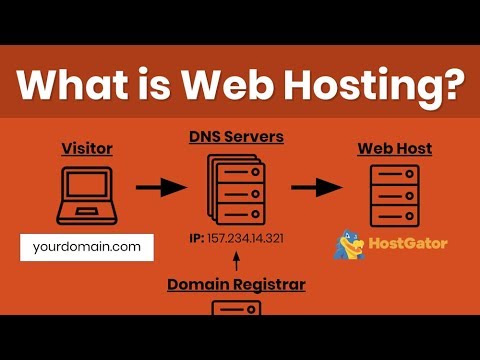
Credit: www.youtube.com
Frequently Asked Questions
How Do I Host My Own Website?
To host your own website, choose a domain name and a reliable hosting provider. Set up your server, install necessary software, and upload your website files. Ensure regular backups and security measures.
Can I Host My Website For Free?
Yes, hosting your website for free is possible. Platforms like WordPress. com, Wix, and GitHub Pages offer free hosting options. These services typically have limitations such as storage and bandwidth restrictions. For more control and customization, upgrading to paid plans is recommended.
How Much Does It Cost To Host A Website?
Website hosting costs range from $3 to $300 monthly. Shared hosting is the cheapest, starting at $3. VPS and dedicated hosting are more expensive, reaching up to $300. Prices vary based on provider, storage, bandwidth, and additional features. Consider your website needs and budget when choosing a plan.
Is Google Web Hosting Free?
Google does not offer free web hosting. Google Cloud provides paid hosting services with a free tier option. The free tier allows limited usage and resources. For full hosting services, users must pay based on their specific needs and usage.
Conclusion
Hosting a website seems daunting. But, it becomes manageable with practice. Start by choosing a reliable hosting provider. Next, set up your domain and server. Don’t forget to configure settings for security and performance. Regular updates keep your site running smoothly.
Monitor website traffic to improve user experience. Troubleshooting skills also help solve issues fast. Hosting your own site offers control and flexibility. With patience and learning, you can host successfully. Remember, each step builds your skills. Keep exploring and adapting.
Your website awaits your creativity and effort.


