
Unlocking the potential of your web service starts with a critical step: hosting it on a server. You might be wondering why this is so essential.
Imagine you’ve developed a brilliant web application or service. It’s sleek, efficient, and ready to change the game. But without proper hosting, it remains in the shadows, unseen and unused. You’ll discover the straightforward steps to host your web service on a server, turning your creation into a live, accessible, and thriving tool on the internet.
As you read on, visualize your web service finally reaching its audience, operating smoothly, and fulfilling its purpose. You’ll not only learn the technical how-tos but also gain insights into making the right choices that align with your goals and enhance your service’s performance. Ready to take your web service from local to global? Let’s dive in and make it happen.

Credit: www.hostinger.com
Choosing The Right Server
Dedicated hosting gives you a whole server. It’s all yours. This means more power and control. But it costs more. Shared hosting is cheaper. Many websites use one server. This can slow things down. But it’s easy to manage. Choose based on needs and budget.
Cloud solutions are popular. They store data on the internet. Access it from anywhere. It’s flexible and scalable. On-premise solutions store data locally. You need your own hardware. It’s more secure but less flexible. Pick what’s best for your business.

Credit: www.hostinger.com
Preparing The Environment
Start by installing the web server software. Choose popular options like Apache or Nginx. These are widely used and have strong support. Make sure the software is compatible with your system. Follow the installation guide provided by the software. This will help in setting it up correctly.
Security is very important. Enable firewalls to protect the server. Use strong passwords for all accounts. Regularly update the software to fix security issues. Check for security patches often. Also, consider SSL certificates to secure data. This keeps information safe from hackers. Monitor server activity for any unusual behavior. Keep backups of important data.
Deploying Web Service
First, gather all the files for the web service. These files might include HTML, CSS, JavaScript, and images. Use an FTP client to upload them to the server. Tools like FileZilla can help. Connect to the server using the server’s IP address, username, and password. Drag and drop files into the server’s folder. Check to ensure all files are uploaded correctly. Each file should be in the right folder. This keeps the website organized and working.
Most web services need a database. Create a database on the server. Use tools like phpMyAdmin for this task. Connect your web service to the database. You will need the database name, username, and password. Add these details to your web service code. This helps the web service get data from the database. Check the connection to make sure it works. If there are errors, fix them. This keeps the web service running smoothly.
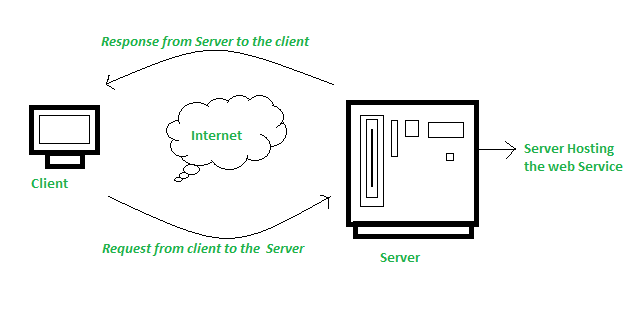
Credit: www.geeksforgeeks.org
Configuring Domain And Dns
First, choose a unique domain name. It should be easy to remember. Visit a domain registrar like GoDaddy. Check if your name is available. If yes, proceed to buy it. This name is your web address. People will use it to find your site.
After registering, set up your DNS records. Log into your registrar’s dashboard. Find the DNS settings. Add an A record for your domain. Use your server’s IP address here. This connects your domain to your server. Also, add MX records for emails. Save all changes to apply them.
Testing And Validation
Setting up a web service on a server involves testing and validation to ensure functionality. Verify server compatibility and check for any errors. Conduct thorough tests to confirm that the service runs smoothly and meets user expectations.
Running Performance Tests
Check if your web service can handle many users. Test the speed of your server. Slow servers make users unhappy. Use tools to measure the load on the server. These tools show how well the service runs. Look for any errors during testing. Fix these errors quickly. Your goal is a fast and smooth service.
Ensuring Security Compliance
Keep the server safe from hackers. Use strong passwords for protection. Regularly update the server software. Updates fix security holes. Check the server settings often. Make sure they follow security rules. These rules help keep data safe. Teach your team about security. Everyone should know the best practices.
Monitoring And Maintenance
Ensuring web service reliability involves consistent monitoring and maintenance. This process identifies potential issues early, ensuring smooth server operations. Regular updates and checks help keep the service running efficiently, minimizing downtime and enhancing user experience.
Setting Up Alerts And Logs
Alerts help you know problems fast. Set them for server errors and high usage. Logs are records of what happens on your server. Check them to see what went wrong. Use tools that make this easy. Some tools can send alerts to your phone or email. This way, you can act quickly. Keeping an eye on these things keeps your server healthy.
Regular Software Updates
Software updates are important. They fix bugs and security holes. Old software can make your server weak. Hackers look for weak spots. Updating keeps your server safe. Make a schedule for updates. Stick to it. Some updates happen automatically. Check settings to be sure. Regular updates keep things running smoothly.
Scaling And Optimization
Web servers can get busy. Many people visit websites. This is where load balancing helps. Load balancing spreads visitors across several servers. It makes websites fast and stable. There are different ways to balance loads. Round-robin is one way. It sends each visitor to a different server. Another way is least connections. It sends visitors to the least busy server. This helps keep servers from crashing. Web services run better with load balancing.
Servers have limits. They can’t handle too much work. Optimizing resources is important. It saves power and time. Start by checking server usage. Find out which parts use the most power. Then, make changes. Use caching to store data. It helps speed up services. Compress files to save space. Smaller files load faster. Make sure servers work well. This helps services run smoothly.
Frequently Asked Questions
How Can I Host A Website On My Server?
To host a website on your server, install a web server software like Apache or Nginx. Configure DNS settings to point your domain to your server’s IP address. Upload your website files to the server and ensure security measures are in place.
Regularly update and monitor your server.
How Do I Host A Webservice?
To host a web service, choose a reliable hosting provider. Install necessary software like Apache or Nginx. Deploy your application files. Configure your server settings. Ensure security measures are in place. Test your web service for functionality. Regularly update and maintain your server and application for optimal performance.
How To Host A Web Server On Windows Server?
Install IIS via Server Manager on Windows Server. Configure your website and set up DNS. Ensure firewall allows traffic.
How To Host A Service In Iis?
Open IIS Manager. Right-click on “Sites” and select “Add Website. ” Enter site name, physical path, and binding details. Click “OK” to host your service. Ensure your application pool is correctly configured. Test your service to confirm successful hosting.
Conclusion
Hosting a web service on a server is quite simple. Start with choosing the right server. Install necessary software tools. Configure settings properly for smooth operation. Test your setup to ensure functionality. Regular monitoring is crucial for security and performance.
Troubleshoot issues promptly to maintain service quality. Backup data regularly to prevent loss. Follow these steps, and your web service will run efficiently. Remember, practice makes perfect. Experiment and learn. Soon, hosting will become second nature to you. Enjoy the process and happy hosting!


