
Are you ready to unlock the secrets of hosting your very own web server? Imagine the freedom of having total control over your online presence, where you decide what goes live and when.
Whether you’re a business owner looking to expand your digital footprint or a tech enthusiast eager to master new skills, hosting a web server is a game-changer. By the end of this article, you’ll have the confidence and know-how to set up a web server that suits your needs perfectly.
We’ll guide you through the process step-by-step, ensuring you have all the tools and knowledge at your fingertips. Get ready to dive into the world of web hosting and discover how empowering it can be.
Credit: www.youtube.com
Choosing The Right Server
A dedicated server means the server is all yours. You get more control and resources. It’s like having your own house. But it can be costly. A shared server means you share space with others. It’s like living in an apartment. It’s cheaper but less private. Choose based on your needs and budget.
Cloud solutions offer flexibility. You only pay for what you use. It’s like renting a car instead of buying one. You can scale up or down easily. This means you can add more space or reduce it. It’s good for growing businesses. Consider how fast you might grow.

Credit: www.hostinger.com
Setting Up Your Server
A good server needs some key parts. Start with a strong CPU. It helps your server run fast. Get at least 4GB of RAM. More RAM makes your server better. You also need a reliable hard drive. SSDs are a good choice. They are fast and safe. Lastly, a stable internet connection is a must. This keeps your server online all the time.
First, choose an operating system. Linux is a popular choice. It’s free and secure. Next, install a web server software. Apache and Nginx are common. They help serve your web pages. Remember to keep your software updated. Updates fix bugs and improve security. Finally, set up a firewall. This keeps your server safe from attacks.
Configuring The Server
Keep the web server safe. Install a firewall to protect it. The firewall blocks bad traffic. Use strong passwords for your accounts. Change them often. Always update your server software. This fixes bugs and security holes. Turn off unused services. They might be risky. Only allow trusted people to access the server. Set up SSL certificates. They keep data safe when sent online.
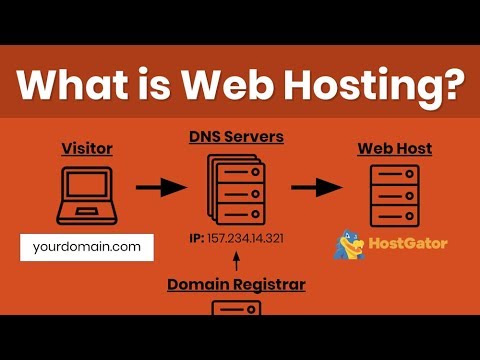
Set up the IP address carefully. Choose a static IP for the server. This helps it stay the same. Configure the DNS settings. They help people find your site. Use port forwarding on your router. This directs traffic to your server. Check the network speed. A fast network makes sites load quickly. Monitor the network traffic. It helps spot problems early.
Managing Web Hosting
Setting up a web server involves selecting a reliable hosting provider and configuring the server settings. Ensuring proper security measures, like firewalls, is vital for protecting your data. Regular monitoring and updates help maintain efficient server performance.
Control Panel Options
Control panels help manage your web hosting. Popular options include cPanel and Plesk. These tools let you manage files and databases. Use them to set up email accounts too. cPanel is user-friendly. It is good for beginners. Plesk supports both Windows and Linux. This makes it versatile. Always choose a panel that suits your needs.
Domain Management
Domains are like the name of your website. Managing them is crucial. Use your control panel for this. You can add or remove domains easily. It lets you set up subdomains too. Renew your domains on time. This ensures your site stays live. Use strong passwords for security. Always keep your domain information updated.
Monitoring And Maintenance
Ensure your web server runs smoothly with regular monitoring and maintenance. Check server performance and security settings frequently. Update software to prevent vulnerabilities and optimize server efficiency.
Performance Monitoring Tools
Web servers need constant care. Performance monitoring tools help track server health. They show how fast your server runs. These tools alert you to problems. They help keep websites fast. Slow sites lose visitors. Choose tools that fit your needs. Some tools are free. Others cost money. Check reviews before picking one. Popular tools are Nagios, Zabbix, and New Relic.
Regular Updates
Regular updates are crucial for web servers. They fix bugs and improve security. Updates make servers run better. They prevent hackers from attacking. Set a schedule for updates. Choose monthly or weekly. Always backup before updating. Backups save data from loss. Use reliable backup tools. Test updates first. This ensures they work well. Never skip important updates. Your server stays safe and fast.

Credit: www.hostinger.com
Troubleshooting Common Issues
Setting up a web server often faces common issues like configuration errors or port conflicts. Fixing these can involve checking server settings, ensuring necessary ports are open, and verifying software compatibility. Regular updates and proper firewall settings also help maintain smooth server operation.
Error Logs
Error logs are like a web server’s diary. They tell you what went wrong. Check the logs for any red flags. They help you find the source of a problem. Look for lines that repeat. They might show a pattern. This pattern can guide you to a solution.
If you see error codes, note them. These codes explain specific issues. Search online for the code meaning. This can lead to useful fixes.
Connectivity Problems
Sometimes web servers cannot connect. Check if the network cables are plugged in. Also, see if the internet is working. Restart the router if needed. Make sure your firewall settings are correct. They can block connections accidentally. Verify the server’s IP address. It must be correct for connections to work.
Keep track of these checks. It will help solve issues faster next time.
Frequently Asked Questions
How Do I Host My Own Website Server?
To host your own website server, choose hardware, install server software, configure settings, and ensure security. Obtain a static IP address, register a domain name, and set up DNS records. Regularly update software and backup data for smooth operation. Ensure reliable internet connection for optimal performance.
How Much Does It Cost To Host A Website Server?
Website hosting costs vary from $3 to $500 monthly, depending on server type and features. Shared hosting is cheaper, while dedicated servers cost more. Consider bandwidth, storage, and support when choosing. Compare providers for best value and performance.
Can I Host My Website By Myself?
Yes, you can host your website yourself. You need a server, domain, and technical expertise. Ensure reliable internet connection and security measures to protect your site. Consider costs and maintenance time. Hosting services offer convenience and support if self-hosting seems complex.
Choose based on your skills and resources.
Is Google Web Hosting Free?
Google does not offer free web hosting. Google Cloud provides hosting services, but they charge based on usage. Users can explore the Google Cloud Free Tier, which offers limited resources for free. This tier is suitable for small projects and learning purposes.
Always check Google Cloud’s pricing for detailed information.
Conclusion
Setting up a web server can seem challenging. Yet, with practice, it becomes manageable. Start with basic steps. Choose reliable hosting. Install server software carefully. Configure settings to suit your needs. Regularly update and maintain the server. This keeps it secure and efficient.
Remember, patience is key. Troubleshooting issues is part of the learning process. Seek help when needed. Online forums can be valuable resources. Hosting your own web server offers control and flexibility. It opens doors to new possibilities. Embark on this journey with confidence.
Enjoy the learning experience. Happy hosting!


