
Imagine a world where your web application runs smoothly, scales effortlessly, and remains secure—all thanks to the power of the cloud. You’re probably wondering how you can achieve this.
The answer lies in Google Cloud Platform (GCP). Whether you’re a developer looking to deploy your first app or a seasoned tech enthusiast eager to optimize your hosting strategies, understanding how to leverage GCP could be the game-changer you’ve been searching for.
In this guide, you’ll discover the step-by-step process to host your web application on Google Cloud Platform. You’ll learn not just the technical steps, but also the smart decisions that ensure performance, scalability, and security. By the end of this article, you’ll feel confident in your ability to use GCP to its fullest potential, unlocking opportunities that could propel your application to new heights. Get ready to transform the way you think about web hosting as you dive into the world of Google Cloud Platform.
Setting Up Google Cloud Account
First, visit the Google Cloud Platform website. Click on the Get Started button. Follow the steps to create an account. You will need a Google account. Provide your basic details. Set up a payment method. Google offers a free trial with credits. Use these credits to explore services.
After account creation, go to the Google Cloud Console. You will see a dashboard. Find the Activate Services button. Click it to start. Choose the services needed for your app. Activate them one by one. Review the services list. Make sure everything is ready. Now, you can start using Google Cloud.
Credit: medium.com
Choosing The Right Hosting Solution
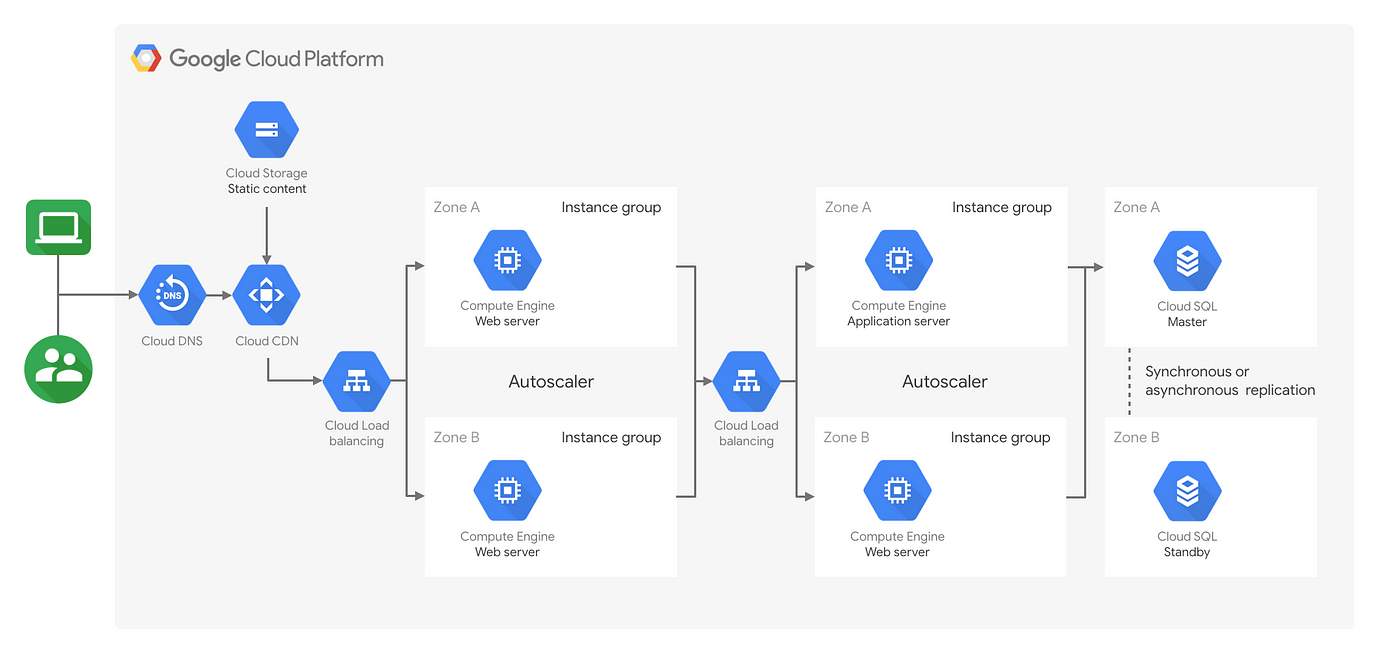
Compute Engine offers virtual machines for your app. You get full control over the server. It can be a bit complex for beginners. App Engine is a platform-as-a-service. It lets you focus on code, not the server. Automatic scaling makes it easy to handle traffic spikes. Both have their own benefits. Choosing depends on your needs.
Kubernetes Engine is perfect for containerized apps. It helps in managing containers. You can run many containers at once. Scaling is automatic. You only pay for what you use. It supports different programming languages. Ideal for apps that need frequent updates. Simple for developers to deploy new features.
Configuring Your Web Application
Make sure your web app is ready for the cloud. Check your code for errors and bugs. Fix them before moving forward. Create a deployment package. This is a file with all your app’s parts. Use formats like .zip or .tar. These formats are easy to upload. Organize files in a way that makes sense. This helps your app run smoothly on the cloud.
Environment variables are important for your app. They store settings and configurations. Use them to keep sensitive information safe. Examples are passwords and API keys. Set these variables in your app’s settings. Double-check for correct values. This ensures your app works correctly. Store them in a secure way. Never put them in the code directly.
Deploying On Google Compute Engine
Deploying your web application on Google Compute Engine offers scalable and reliable hosting solutions. Utilize virtual machines to run your apps efficiently, ensuring optimal performance. Google Cloud Platform simplifies management with its intuitive interface, making it accessible even for beginners.
Creating A Virtual Machine Instance
To start, sign into the Google Cloud Console. Find the Compute Engine section. Click on “Create Instance.” Choose the right machine type for your needs. Select a region close to your users. This helps with speed. Name your instance something easy to remember. Pick an operating system you are comfortable with. Then, click “Create” to set it up.
Installing Necessary Software
Once the virtual machine is ready, connect using SSH. This is a secure way to access your machine. On the terminal, update the software first. Use commands like sudo apt update and sudo apt upgrade. Install a web server like Apache or Nginx. Use commands like sudo apt install apache2. Check if the server is running. Type systemctl status apache2 to see the status. Your web server should now be ready.
Deploying On Google App Engine
Before using Google App Engine, the application must be structured well. It requires a specific directory layout. First, create a new folder for the app. Inside, add a file named app.yaml. This file tells App Engine how to run the app. Make sure to include all important configuration details. Place the main code in a folder named src. This helps in organizing the app better.
Deploying is easy with the Google Cloud SDK. First, install the SDK on your computer. Open the command line and navigate to the app folder. Use the command gcloud app deploy to start deployment. The SDK will upload all files to the cloud. Make sure the internet connection is stable during this process. After deployment, the app will be live online. You can access it using a web browser.
Using Google Kubernetes Engine
First, open the Google Cloud Console. Click on the Kubernetes Engine button. Next, choose Clusters and then click Create Cluster. You will see options to configure your cluster. Choose the settings that fit your needs. Click Create to start the cluster. Wait for a few minutes. Your cluster is now ready.
First, create a Docker container. Ensure it works perfectly on your machine. Push this container to Google Container Registry. Use the command `gcloud builds submit`. Now, your container is in the cloud. Next, deploy it to your cluster. Use the command `kubectl create deployment`. Finally, expose your deployment to the internet. Use `kubectl expose deployment` command. Your app is now live.
Managing Cloud Resources
Monitoring is key for cloud success. Google Cloud offers tools to track your app. Use Stackdriver for detailed insights. It helps you see performance issues quickly. Scaling is important for handling more users. Automatic scaling adjusts resources based on demand. This ensures your app runs smoothly without interruption. Configuring alerts can notify you of issues. This proactive approach minimizes downtime. Always monitor and scale to keep your app efficient.
Saving money is crucial for cloud users. Choose the right instance size for your needs. Avoid over-provisioning resources. Use cost management tools to track spending. Google Cloud provides recommendations for savings. Optimize performance by selecting appropriate regions. This reduces latency and improves user experience. Regularly review your setup to ensure efficiency. Use caching to speed up data access. Cost and performance optimization keeps your app competitive.
Configuring Networking And Security
Deploying a web application on Google Cloud Platform involves configuring networking and security settings. This ensures efficient data flow and protection against threats. Proper setup guarantees that your application remains accessible and secure for users.
Setting Up Firewalls
Firewalls are like guards for your web app. They block unwanted visitors. Only allow the traffic you trust. Create firewall rules in Google Cloud. Decide which IPs can access your app. This keeps your app safe. Set up rules for different networks. Test your firewall settings. Make sure they work well.
Implementing Ssl/tls
SSL/TLS keeps data safe and private. It encrypts the data between users and your app. Use Google Cloud’s SSL certificates. They are easy to set up. First, get a certificate from a trusted authority. Then, install it on your server. This makes sure that user data is secure. Users will trust your site more.
Troubleshooting Common Issues
Deployment errors can be tricky. Always check your error logs first. These logs give clues about what’s wrong. Ensure all your environment variables are set correctly. Sometimes, a misconfigured variable causes errors. Double-check your file paths too. Incorrect paths lead to missing files. If the problem persists, verify your configuration files. An error there can stop deployment. Always keep your software versions updated. Old software might not work well with new code.
Connectivity issues can interrupt your app. First, ensure your network settings are correct. Wrong settings block connections. Check your firewall rules too. Firewalls might block important traffic. Make sure your server ports are open. Closed ports stop data from flowing. If you’re still facing issues, test your internet connection. A weak connection can cause problems. Also, consider checking your DNS settings. Wrong DNS can lead to slow or failed connections.

Credit: cloud.google.com
Credit: cloud.google.com
Frequently Asked Questions
Can I Host An App On Google Cloud?
Yes, you can host an app on Google Cloud. Use Google App Engine or Google Kubernetes Engine for scalable hosting solutions. Enjoy reliable infrastructure, global reach, and integrated security features. Easily deploy, manage, and scale your app with Google Cloud’s powerful tools and services.
Can I Host My Website On Google Cloud?
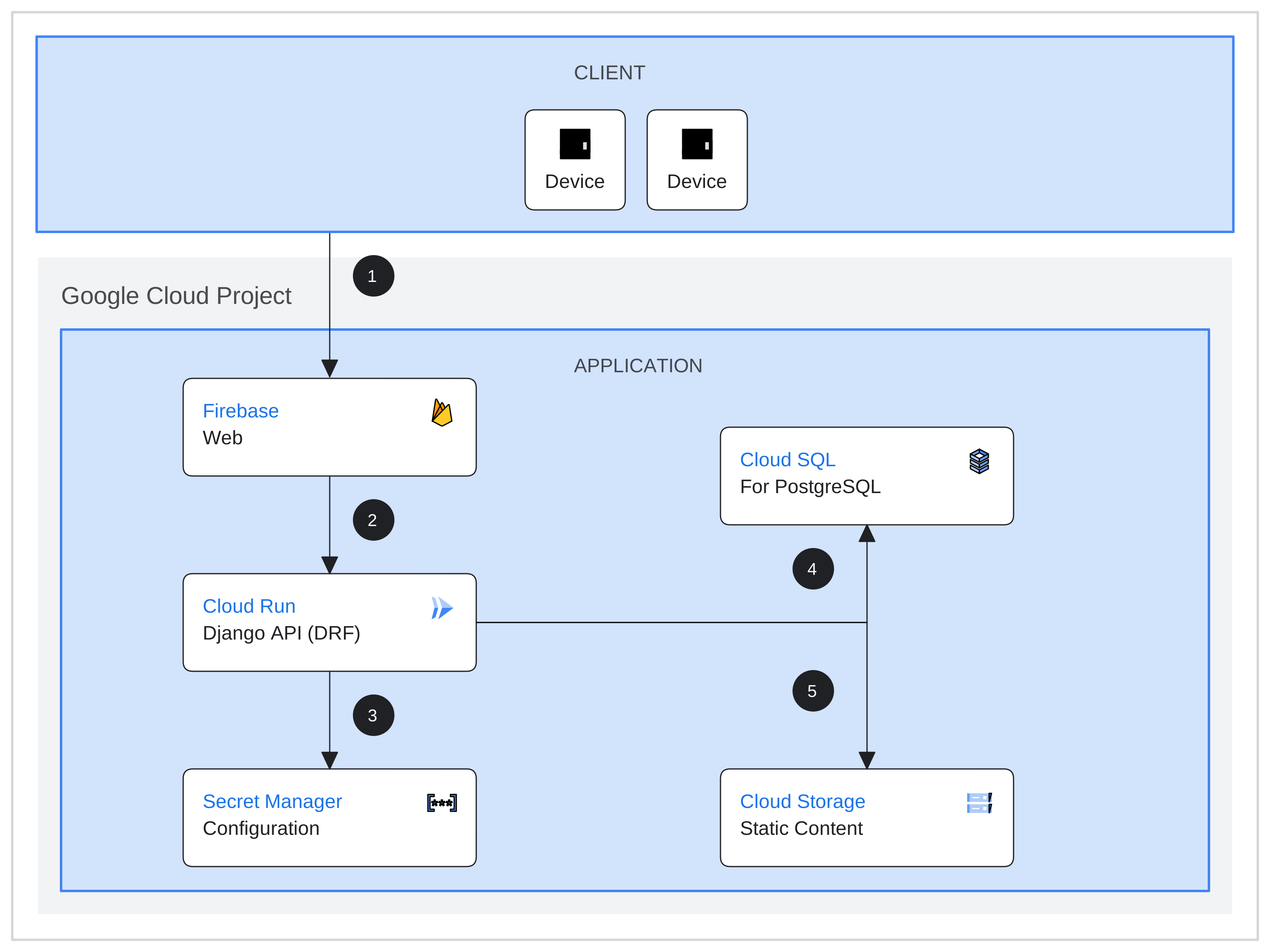
Yes, you can host your website on Google Cloud. Utilize Google Cloud’s scalable infrastructure and services for optimal performance. Choose from options like Compute Engine, Cloud Run, or App Engine. Benefit from high availability, security, and global reach. Easily manage resources through Google Cloud’s intuitive dashboard.
Does Google Support Web Hosting?
Google does not directly offer web hosting services. Instead, it provides cloud-based solutions through Google Cloud Platform. Users can host websites using Google Cloud’s infrastructure, which includes various tools and services for building and maintaining sites. Google’s cloud solutions are scalable and reliable for web hosting needs.
Can I Use Google Drive To Host My Website?
Google Drive cannot host websites for public access. It’s a cloud storage service meant for file sharing. For website hosting, consider platforms like GitHub Pages, Netlify, or AWS. These offer more suitable features for web hosting and management.
Conclusion
Hosting web applications on Google Cloud Platform is straightforward. It’s cost-effective and scalable. Follow the steps outlined to ensure a smooth setup. Google Cloud offers flexibility for various project needs. Its tools help manage and deploy applications efficiently. Start small, then expand as your project grows.
This platform supports your application’s growth. With practice, hosting becomes easier. Explore its features and enhance your skills. Your web application can thrive with Google Cloud. Happy hosting!


