
Are you eager to see your web application come alive on the internet, accessible to users around the globe? Hosting your web application on a server is the crucial step that transforms your code from a local project to a worldwide digital presence.
Imagine the excitement of watching your application run seamlessly, reaching your target audience, and achieving its purpose. You might feel overwhelmed by the technicalities, but rest assured, this process is more straightforward than it seems. By understanding the basics, you can navigate this task with confidence.
Dive into this guide to unlock the secrets of hosting your web application successfully, ensuring it performs optimally and securely. Let’s get started on making your web application shine on the server!
Choosing The Right Server
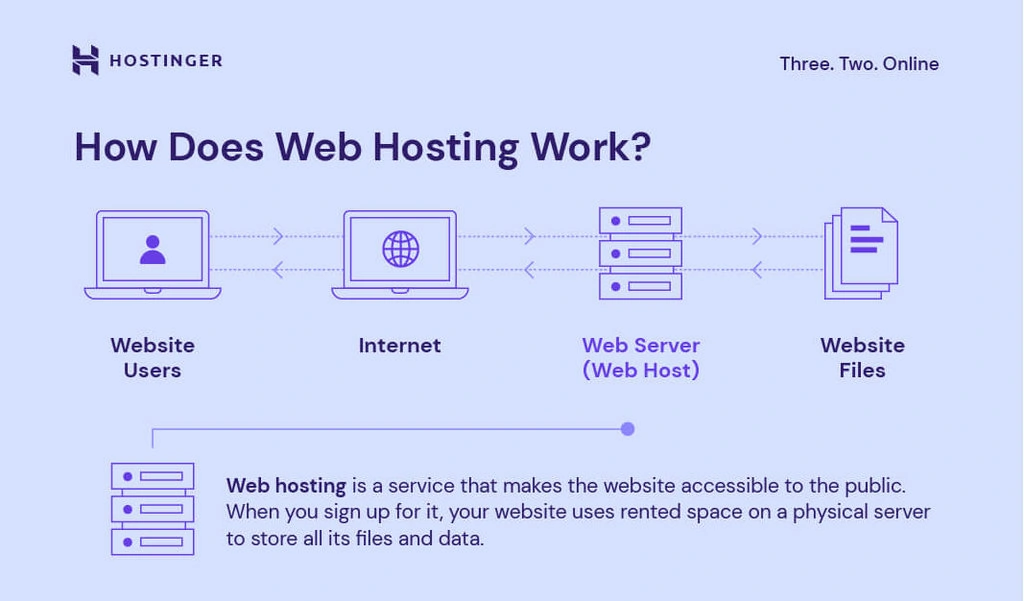
Servers come in different types. Shared servers are cheap but have limited resources. Virtual Private Servers offer more control and security. Dedicated servers give full control. Each type has its own pros and cons. It’s important to know your needs. Choose a type that fits your application.
Cloud hosting is flexible. It can grow with your needs. You pay only for what you use. Dedicated hosting means you own the server. No sharing. It is stable and secure. Both have their benefits. Think about your budget and needs. Choose what suits you best.
Specifications matter a lot. CPU power, RAM, and storage are key. More power means faster performance. More RAM helps handle more users. Storage space is needed for your data. Know what your web app needs. Choose specs that match those needs.
Credit: www.hostinger.com
Preparing Your Web Application
Ensure your code is clean and efficient. Remove any unnecessary code. This helps make the app run faster. Use tools like linters to check your code. They find mistakes and suggest fixes. This makes your app better and more reliable. Simple code is easier to manage. It also uses less server power.
Set up your database properly. Choose a reliable database system. Examples are MySQL or MongoDB. Make sure the database is secure. Keep your data organized. This helps the app find information quickly. Regularly back up your data. This prevents data loss. Use indexes to speed up searches. Well-configured databases improve app performance.
Protect your web app from attacks. Use strong passwords and keep them safe. Install a firewall to block threats. Regularly update your software. This fixes security holes. Encrypt sensitive data. This keeps it safe from hackers. Limit user access to important areas. Security is key to a safe web app.
Setting Up The Server Environment
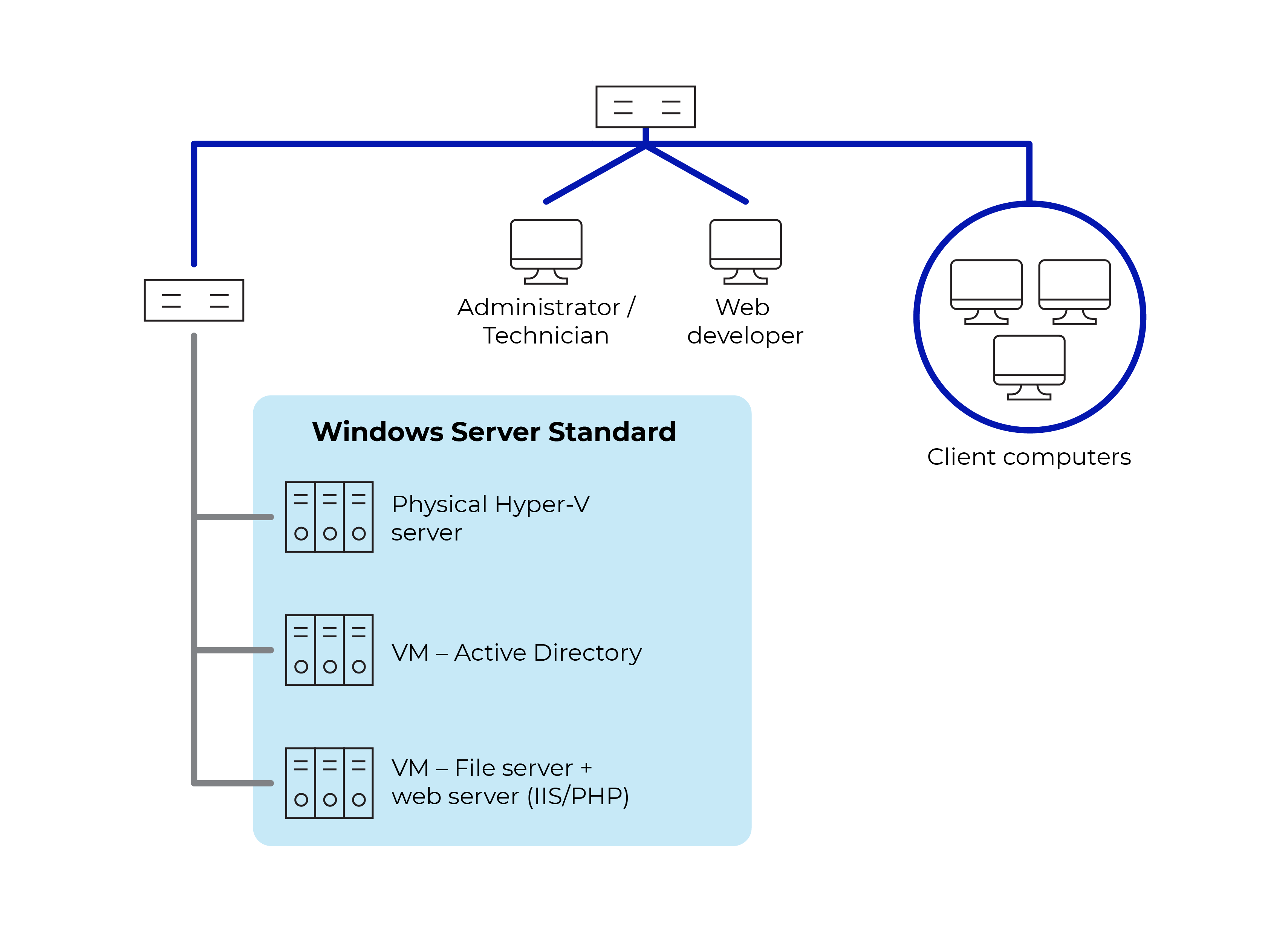
Choosing the right operating system is important. Linux and Windows are popular choices. Linux is often free and secure. Windows is user-friendly. Pick the one that suits your app needs. Check software compatibility too.
Install the necessary software for your app. This includes a web server like Apache or Nginx. Also, you may need database software like MySQL. Follow simple guides online for installation. Make sure everything is up-to-date.
Set up a firewall to protect your server. This helps block unwanted access. Adjust the settings to allow only safe connections. Use strong passwords for all accounts. Keep your server software updated to stay secure.
Deploying The Web Application
First, copy your files from your computer to the server. Use tools like FileZilla or WinSCP. These tools help move files fast. Make sure all files are in the right folder. Check twice to avoid errors. Your files need to be complete and without mistakes.
Set up the web server to host your application. Common servers are Apache and Nginx. Open the server settings file. Add your application details. Save changes carefully. Restart the server to apply settings. Always check if the server runs properly.
Register a domain name to access your app easily. Use services like GoDaddy or Namecheap. Link your domain to the server’s IP address. This process is called DNS configuration. Wait a bit for changes to work. Then, type your domain in a browser to see your app.
Testing And Troubleshooting
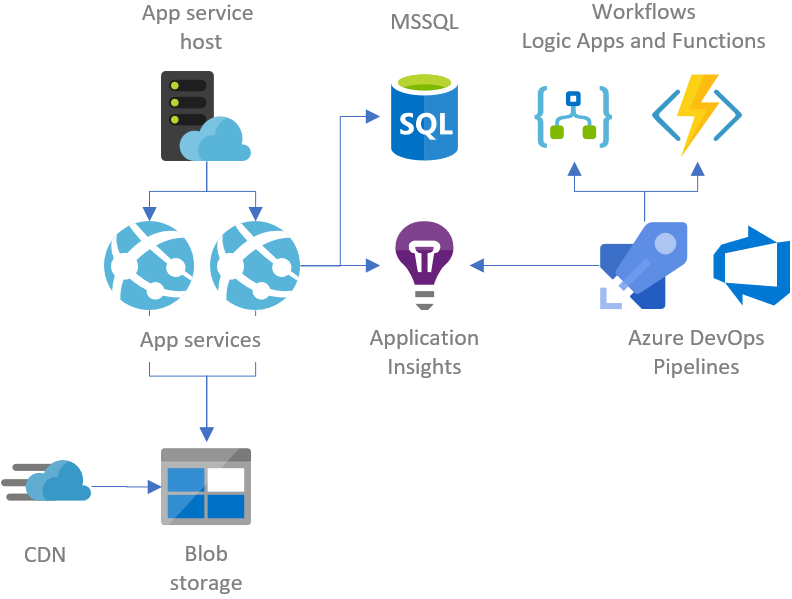
Functional Testing checks if the app works as planned. Test all features. Click buttons. Fill forms. Make sure everything responds. Fix any bugs found. Use test tools. They help catch issues fast. Testing keeps the app stable.
Performance Monitoring tracks app speed. Slow apps annoy users. Check load times. Monitor server health. Watch for delays. Use tools to measure speed. Improve slow parts. Fast apps make users happy. Keep performance checks regular.
Error Handling manages app mistakes. Apps can break. Show clear error messages. Help users understand problems. Log errors for fixing. Fix bugs quickly. Good error handling builds trust. Users feel safe using your app.
Credit: gunnarpeipman.com
Maintaining Your Application
Keep your application safe with regular updates. Updates fix bugs and add new features. They also improve security. Set a schedule for updates. This keeps your app running smoothly. Don’t wait too long between updates.
Backups are important for data safety. Save copies of your data often. Use cloud or external storage. This helps if your server fails. Check backups regularly to ensure they work.
Monitoring helps you see how your app works. Use tools for this. They show app speed and errors. Analytics offer insights into user behavior. These tools help you improve the app. Fix problems quickly with this data.
Credit: openclassrooms.com
Frequently Asked Questions
How To Host A Web Application On A Server?
Choose a server, install necessary software, upload your web application files, configure server settings, and ensure security.
Can I Host My Website On My Server?
Yes, you can host your website on your server. Ensure it meets technical requirements like storage, bandwidth, and security. Configure server settings and install necessary software. Proper maintenance and regular updates are essential for smooth operation. Consider your technical expertise and potential costs before proceeding.
What Is The Best Hosting For A Web Application?
The best hosting for a web application depends on your needs. Consider AWS, Google Cloud, or Microsoft Azure for scalability. Choose Bluehost or SiteGround for affordability and support. Evaluate security, speed, and budget when selecting. Always ensure the hosting provider aligns with your application’s specific requirements.
How To Run An Application On A Server?
To run an application on a server, install necessary software and dependencies. Upload application files using FTP or SSH. Configure server settings and environment variables. Start the application using a command or script. Monitor the application for performance and errors.
Ensure the server is secure and regularly updated.
Conclusion
Hosting a web application on a server can seem daunting. But, with clear steps, it becomes manageable. First, choose the right server for your app. Then, ensure your server environment matches your application needs. Don’t forget security; it’s crucial. Regular updates keep your server running smoothly.
Monitor performance to catch issues early. With these tips, hosting becomes simpler. Your web application reaches users effectively. Remember, practice makes perfect. Each time, you get better at hosting. Your application is ready for the world. Enjoy the process and see your app thrive online.


