
Have you ever wondered how your favorite web applications are hosted on Linux servers? Maybe you’re looking to dive into the world of web hosting yourself but aren’t sure where to start.
Hosting a web application on a Linux server might sound technical and challenging, but it’s much simpler than you think. Imagine having full control over your application environment, optimizing performance, and ensuring security—all within your reach. Whether you’re a budding developer, a curious tech enthusiast, or a business owner wanting to take control of your web presence, this guide is tailored just for you.
Get ready to unlock the secrets of Linux server hosting and transform your web application dreams into reality. Keep reading to discover the step-by-step process that will empower you to host your web application confidently and efficiently.
Server Setup
Picking the right Linux distribution is very important. Some popular choices are Ubuntu and CentOS. Ubuntu is user-friendly. CentOS is known for stability. Both are good for hosting. Think about your needs. Do you want something easy? Choose Ubuntu. Need something stable? CentOS might be better.
Software is needed to run web applications. Apache or Nginx can serve your site. They help your app show on the internet. MySQL or PostgreSQL is used for databases. They store your app data. Install these tools using Linux commands. Use the terminal to type commands. Follow simple guides to install them.
Security Measures
A firewall keeps your server safe. It stops bad traffic. UFW (Uncomplicated Firewall) is easy to use. First, install UFW on your Linux server. Then, enable it by typing sudo ufw enable in the terminal. Allow only important ports. For web apps, open ports 80 and 443. Use sudo ufw allow 80 and sudo ufw allow 443. Block other ports. This keeps bad guys out. Check rules with sudo ufw status. Make sure your settings are right. Adjust if needed. A strong firewall is your first line of defense.
SSH is a secure way to connect. It uses a special key. First, create a new SSH key on your computer. Use ssh-keygen command. Save the key safely. Next, add your key to the server. Use ssh-copy-id command. This lets you log in without a password. Change the SSH port to something else. Not the default 22. This keeps hackers guessing. Edit the SSH config file. Find the line Port 22. Replace 22 with another number. Restart SSH service. Strong SSH access keeps your server safe.
Web Server Configuration
Choose between Apache or Nginx for your server. Both are good. Apache is easy to set up. Nginx is fast and uses less memory. Use the terminal to install. Type sudo apt-get install apache2 for Apache. Type sudo apt-get install nginx for Nginx. Wait for the installation to finish.
Virtual hosts help serve many websites on one server. Create a directory for your website. Use sudo mkdir /var/www/yourwebsite. Next, set permissions using sudo chown -R $USER:$USER /var/www/yourwebsite. Create a config file in /etc/apache2/sites-available/ for Apache. Use /etc/nginx/sites-available/ for Nginx. Name it as your website. Edit it to point to your directory. Enable the config with sudo a2ensite yourwebsite.conf for Apache. For Nginx, use sudo ln -s /etc/nginx/sites-available/yourwebsite /etc/nginx/sites-enabled/.

Credit: linuxhandbook.com
Database Setup
Setting up a database is key to hosting a web application on a Linux server. It involves installing database software, configuring settings, and ensuring connectivity. This process supports data storage and retrieval, crucial for web app functionality.
Installing Database Software
Choose a database like MySQL or PostgreSQL for your application. Use the terminal to install it. Type the install command for your chosen database. For MySQL, type: sudo apt-get install mysql-server. Watch the installation process carefully. The process finishes with a success message. Ensure the database service is running. Check its status using the command: sudo systemctl status mysql.
Creating Database And User
Open the database command line. Type: mysql -u root -p to log in. Create a new database with a simple command. Type: CREATE DATABASE my_database;. Next, create a new user. Use the command: CREATE USER 'my_user'@'localhost' IDENTIFIED BY 'password';. Grant all permissions to this user. Type: GRANT ALL PRIVILEGES ON my_database. TO 'my_user'@'localhost';. Finally, exit the database command line by typing: exit;.
Deploying The Application
First, compress your application files. Use tools like zip or tar. Next, connect to your Linux server. You can use SSH for this. Transfer your files using SCP or FTP. Ensure files are in the correct directory. Double-check all permissions. Make sure files are readable and executable.
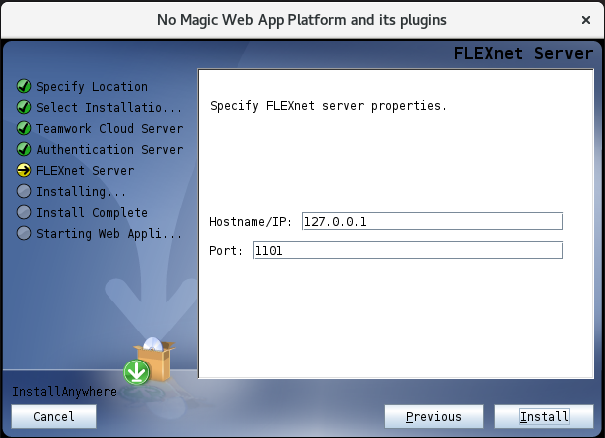
Environment variables are crucial. They hold important settings. Use them for things like database connections. Edit your bash profile or environment file. Add variable names and values. Example: export DB_NAME=mydatabase. Save and reload the session. Test to ensure they work. They must be accurate. Mistakes can cause errors.
Credit: docs.nomagic.com
Ssl Certificate
An SSL certificate keeps websites safe. It protects users’ data. First, choose a trusted Certificate Authority (CA). This is important. They provide the certificate. Next, create a Certificate Signing Request (CSR). This file holds your details. Then, submit this CSR to the CA. They verify your information. Finally, receive your SSL certificate. Install it on your server. It’s easy and vital for security.
Secure your site with HTTPS. First, enable the SSL module on your server. Then, edit your server’s configuration file. Point to the SSL certificate’s location. Also, set the SSL key file path. Test your configuration. Make sure there are no errors. Once done, restart your server. Your site now uses HTTPS. This keeps user data safe.
Monitoring And Maintenance
Managing a web application on a Linux server requires regular monitoring to ensure optimal performance. Routine maintenance tasks, like updating software and checking logs, help prevent potential issues and keep the server running smoothly. Implementing these practices enhances security and reliability of your web application.
Setting Up Monitoring Tools
Linux servers need monitoring tools to keep them running smoothly. These tools watch over the server. They check the server’s health and performance. They alert users if something goes wrong. Popular tools include Nagios and Zabbix. These tools are easy to use. They provide helpful charts and graphs. Alerts can be set up by email or SMS. Monitoring tools are essential. They prevent downtime and ensure the server runs well.
Regular Backups
Backups protect server data. They are important to avoid data loss. Set up a backup schedule. Choose daily or weekly backups. Use tools like rsync or Bacula. These tools copy data to another place. Store backups safely. Use external drives or cloud storage. Keep many copies of the backup. This way, if one is lost, others remain safe. Regular backups give peace of mind. They help recover lost data quickly.

Credit: vixion.co.in
Troubleshooting
Setting up a web application on a Linux server can be tricky. Common issues include permission errors, incorrect configurations, and missing dependencies. To resolve these, check file permissions, verify configuration files, and ensure all necessary software packages are installed. This method helps maintain a smooth and functional deployment process.
Common Issues And Solutions
Log files help find problems. They show errors and warnings. Check the Apache or Nginx log files. Look for specific error messages. These messages often tell what’s wrong. Missing files or permission issues are common.
Permissions can cause problems. Ensure files have correct permissions. Use the chmod command. Set files readable by the server. Sometimes, wrong settings in configuration files occur. Verify configuration files for syntax errors. This includes .htaccess or nginx.conf files.
Network issues might arise. Check if the server can connect to the internet. Use the ping command. It tests connectivity. Ensure firewall rules allow traffic. Server might block requests.
Frequently Asked Questions
How To Host A Web App On A Linux Server?
To host a web app on a Linux server, first install necessary software like Apache or Nginx. Configure server settings and ensure security measures. Upload web app files using SCP or FTP. Set permissions and test the app. Regularly update and monitor server performance for optimal functionality.
Can You Host A Website On Linux?
Yes, Linux can host a website. It’s popular for its stability, security, and flexibility. You can use web servers like Apache or Nginx. Linux supports various programming languages and databases, making it ideal for developers. Many hosting providers offer Linux-based plans for efficient website management.
How To Deploy An Application On A Linux Server?
To deploy an application on a Linux server, first install necessary packages. Transfer application files using SCP or FTP. Configure server settings, such as environment variables. Execute the application using terminal commands. Monitor performance and troubleshoot any issues promptly. Ensure security best practices are followed throughout the process.
How Do I Host A Web Application On A Server?
Choose a reliable hosting provider and upload your web application files via FTP or SSH. Configure the server environment, including software dependencies and database connections. Set up domain and DNS settings to point to your server. Test your application to ensure it’s running smoothly and securely.
Conclusion
Hosting a web application on a Linux server is straightforward. Follow the steps carefully. Ensure your server is secure. Regular updates are crucial. Test your application thoroughly. Fix errors promptly. Monitor server performance regularly. Use tools to help manage traffic.
Keep backups of your data. This prevents data loss. Learn from your hosting experience. Improve your skills over time. Hosting can seem daunting, but practice helps. Start with small projects. Gradually take on more complex applications. Enjoy the process of learning and growing.
Success comes with persistence and dedication. Happy hosting!


