
Imagine having a brilliant web app idea but being held back by hosting costs. You’re not alone—many developers face this hurdle.
What if there was a way to bring your app to life without spending a dime on hosting? Yes, it’s possible! You can showcase your web app to the world without breaking the bank, using free hosting solutions. This article will guide you through the steps to host your web app for free, maximizing your resources while minimizing costs.
By the end, you’ll be equipped with the knowledge to launch your project confidently and creatively. Keep reading to unlock the secrets of free web app hosting and turn your ideas into reality without financial constraints.
Choosing Free Hosting Platforms
Many platforms offer free hosting for web apps. GitHub Pages is great for static sites. Netlify provides easy deployment with free SSL. Heroku supports dynamic apps. Google Cloud’s free tier is another option. These platforms give beginners a chance to learn and experiment.
Free hosting has good and bad sides. Pros: Saves money. Easy to start. Good for small projects. Cons: Limited resources. Ads may show up. Not always reliable. Some features might be missing.
Choose wisely. Consider your needs. Think about what matters most for your web app.
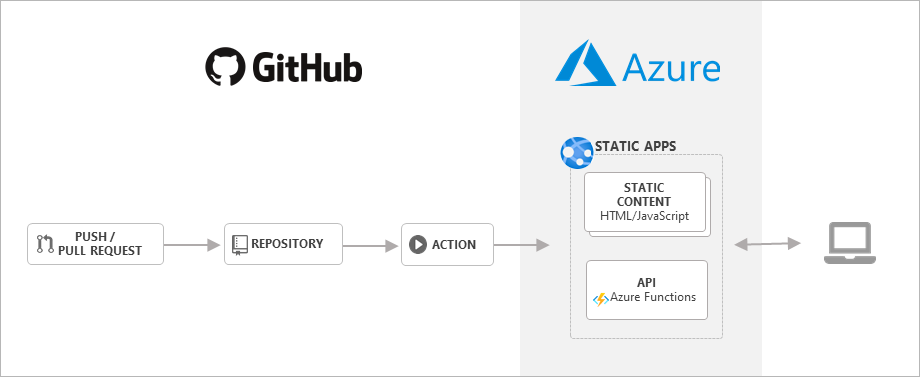
Credit: medium.com
Setting Up A Github Repository
Start by logging into your GitHub account. Click on the “New” button in the repository section. Choose a clear name for your repository. Set the visibility to public if you want others to see it. Add a README file to explain your project. Click on “Create repository” to finish. Now, you have a new home for your code.
First, ensure Git is installed on your computer. Open the terminal or command prompt. Navigate to your project folder. Use git init to start tracking your files. Add your files with git add .. Make a commit with git commit -m "Initial commit". Connect your local repo to GitHub using the command provided in your new repo page. Finally, push your code with git push origin main. Now, your code is on GitHub!
Deploying On Github Pages
First, create a GitHub repository for your project. Make sure it is public. Then, upload your web app files to this repository. Go to the repository’s settings. Find the section for GitHub Pages. Select the branch you want to use. Usually, it’s the main branch. Save your changes. Now, your web app is live on GitHub Pages.
Check your web app’s URL from the GitHub Pages settings. Make sure all links and resources in your app use relative paths. This helps your app work properly. If your app uses JavaScript, ensure it loads correctly. Sometimes, you need to adjust paths or settings. Test your app to see if it works fine. If there are issues, tweak the configurations. This ensures a smooth experience for visitors.
Using Netlify For Deployment
First, sign in to Netlify. Use your GitHub account. Click on “New site from Git.” This connects your GitHub with Netlify. Choose the repository for your web app. Netlify will fetch the code from GitHub. This makes deployment easy and fast.
Once linked, adjust the settings. Select the correct branch. This is usually “main” or “master.” Configure build commands if needed. Most apps use “npm run build.” Specify the “publish directory.” This is often “dist” or “build.” Click “Deploy site.” Netlify will start the deployment process. Watch the progress on the dashboard. Errors will appear here too. Fix any issues right away. Your app will soon be live.
Leveraging Vercel For Hosting
Vercel offers a simple way to host web apps for free. Connect your Git repository to Vercel. It pulls code directly. This makes deployment easy and quick. You don’t need to manage servers. Vercel handles the technical details. This lets you focus on coding.
Connecting With Git Repositories
Link your GitHub or GitLab account with Vercel. It automatically updates with code changes. This keeps your app fresh and up-to-date. Every push to the main branch triggers a new deployment. This is convenient and saves time.
Customizing Deployment Options
Vercel allows custom deployment settings. Choose regions where your app runs. Set environment variables for your app. Adjust build and runtime settings easily. This helps in optimizing app performance. Make the best use of Vercel’s features.
Optimizing Performance
Discover methods to host your web app for free while ensuring optimal performance. Explore platforms offering no-cost hosting with easy setup. Boost your app’s efficiency without breaking the bank.
Reducing Load Times
Web apps need to be fast. A slow app can make users unhappy. Use smaller images to speed up load times. Compress files to save space. This helps the app run quicker. Minimize the number of requests to the server. Fewer requests mean faster loads. Keep code clean and simple. It makes everything run smoother.
Implementing Caching Strategies
Caching is like taking a shortcut. It helps load things faster. Save data that doesn’t change often. This reduces the need to ask the server again. Use browser caching to save files on the user’s device. This makes things load quicker next time. Server-side caching stores data on the server. It speeds up response times too. Implement these strategies for a faster app.
Ensuring Security
Free web app hosting requires strong security measures. Choose platforms offering HTTPS, regular updates, and reliable encryption. A trusted host ensures your data stays protected without extra cost.
Ssl Certificates For Free
SSL certificates protect your web app. They encrypt data. This keeps user information safe. You can get them for free. Websites like Let’s Encrypt offer free SSL certificates. They are easy to install. SSL makes your site trustworthy. Users feel secure. A secure site boosts user confidence. It’s important for online safety. Many hosting services support SSL. Always check before choosing one. SSL is crucial for web security. Protect your app today.
Securing Web App Data
Data safety is key for web apps. Encrypt data to protect it. Use strong passwords for all accounts. Update software regularly. This fixes security flaws. Backup data often. Cloud services can help. Always have a backup plan. Limit access to sensitive info. Only trusted people should have access. Use security plugins if possible. They offer extra protection. Keep user data safe and secure. Trust is built on security.

Credit: www.freecodecamp.org
Troubleshooting Common Issues
Facing trouble hosting a web app for free? Explore solutions for common challenges like server errors and deployment issues. Simplify your hosting journey with these easy-to-follow tips for beginners.
Fixing Deployment Errors
Deployment errors can break your web app. Check configuration settings first. Ensure all files are in correct places. Review server logs to find error messages. These logs help identify problems quickly. Permissions issues often block deployments. Verify user rights and access levels. Test your app locally before uploading. This saves time and avoids mistakes. Network problems may also cause errors. Check internet connection and firewall settings.
Handling Downtime
Downtime affects user experience. It can also hurt your app’s reputation. Monitor server performance regularly. Use tools to track uptime and response times. These tools alert you of any issues. Have a backup plan for emergencies. This ensures quick recovery. Keep your software updated to prevent vulnerabilities. Regular maintenance helps avoid downtime. Communicate with users during outages. Provide updates and estimate recovery times. This builds trust and keeps users informed.

Credit: www.javatutoronline.com
Frequently Asked Questions
How To Create A Web App For Free?
Use platforms like Glitch, GitHub Pages, or Repl. it to create a free web app. Utilize HTML, CSS, and JavaScript. Leverage free templates and online resources to speed up development. Collaborate with communities for support and troubleshooting. Deploy your app and share it with the world.
How To Host Your Own Web Application?
Choose a reliable hosting provider. Register a domain name. Set up a server environment. Deploy your web application. Ensure security and regular updates.
Is Google Web Hosting Free?
Google does not offer free web hosting services. Google Cloud provides paid hosting solutions with various pricing plans. Users can explore Google Sites for basic website creation, but it’s not suitable for professional hosting needs. For cost-effective solutions, consider alternatives like WordPress or free hosting platforms.
Is There Any Free Web Hosting?
Yes, free web hosting is available. Services like InfinityFree, 000webhost, and FreeHosting offer no-cost hosting plans. These usually come with limitations like storage and bandwidth caps. Users can upgrade to paid plans for more features and resources. Always read the terms to understand what’s included.
Conclusion
Hosting a web app for free is possible and rewarding. You save money and gain valuable experience. Many platforms offer easy setup and reliable service. Choose one that fits your needs and explore its features. Keep your app simple for better performance.
Always prioritize security to protect user data. Regular updates ensure smooth operation. Engage with online communities for support and tips. Practice makes perfect, so keep experimenting. Hosting your app for free is a great way to start. Embrace the journey and watch your skills grow.


